

Convert List to Table and Vice-Versa
In the real world, sometimes we face a scenario where we are required to convert a list into a table or vice versa. In this article first we will learn how to convert a list intoa table, and after that we will convert the table into a list.
Convert List into Table
Firstly, we create a user-defined function that converts the list to a table. We define two parameters in this function; the first parameter accepts the list and second parameter defines the delimiter and on the basis of this delimiter we separate the list.
Let us create a function
- CREATEFUNCTION UDF_ConvertListItem2Table
- (
- @ListItemVARCHAR(MAX),
- @Delimiter CHAR
- )
- RETURNS
- @Tab TABLE
- (
- Id intIDENTITY(1, 1),
- Item VARCHAR(MAX)
- )
- AS
- BEGIN
- DECLARE @Item VARCHAR(MAX);
- DECLARE @Index INT;
- SET @ListItem = LTRIM(RTRIM(@ListItem)) + @Delimiter
- SET @Index = CHARINDEX(@Delimiter, @ListItem)
- WHILE @Index > 0
- BEGIN
- SET @Item = LTRIM(RTRIM(LEFT(@ListItem, @Index - 1)))
- IF @Item != ''
- BEGIN
- INSERTINTO @Tab(Item)
- VALUES(CAST(@Item ASVARCHAR(MAX)))
- END
- SET @ListItem = RIGHT(@ListItem, LEN(@ListItem) - @Index)
- SET @Index = CHARINDEX(@Delimiter, @ListItem, 1)
- END
Let us take some examples.
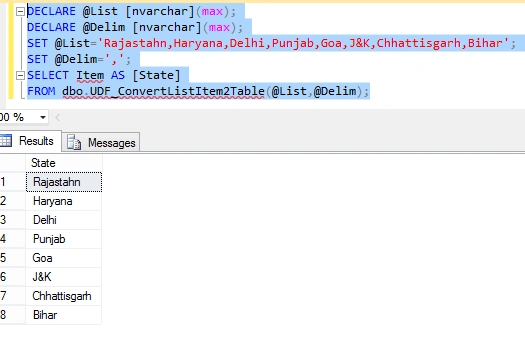
Example 1
- DECLARE @List [nvarchar](max);
- DECLARE @Delim [nvarchar](max);
- SET @List='Rajastahn,Haryana,Delhi,Punjab,Goa,J&K,Chhattisgarh,Bihar';
- SET @Delim=',';
- SELECT Item AS [State]
- FROM dbo.UDF_ConvertListItem2Table(@List,@Delim);
Example 2
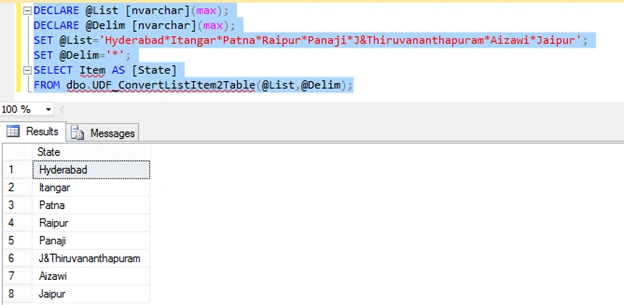
- DECLARE @List [nvarchar](max);
- DECLARE @Delim [nvarchar](max);
- SET @List='Hyderabad*Itangar*Patna*Raipur*Panaji*J&Thiruvananthapuram*Aizawi*Jaipur';
- SET @Delim='*';
- SELECT Item AS [State]
- FROM dbo.UDF_ConvertListItem2Table(@List,@Delim);
Example 3
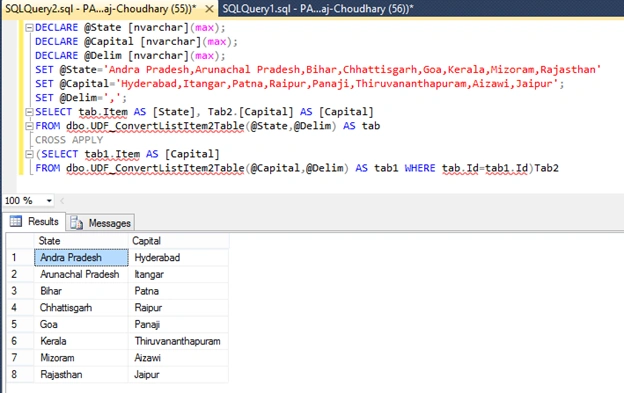
- DECLARE @State[nvarchar](max);
- DECLARE @Capital[nvarchar](max);
- DECLARE @Delim[nvarchar](max);
- SET @State = 'AndraPradesh,ArunachalPradesh,Bihar,Chhattisgarh,Goa,Kerala,Mizoram,Rajasthan'
- SET @Capital = 'Hyderabad,Itangar,Patna,Raipur,Panaji,Thiruvananthapuram,Aizawi,Jaipur';
- SET @Delim = ',';
- SELECTtab.ItemAS[State], Tab2.[Capital] AS[Capital]
- FROM dbo.UDF_ConvertListItem2Table(@State, @Delim) AS tab
- CROSSAPPLY
- (SELECT tab1.Item AS[Capital] FROM dbo.UDF_ConvertListItem2Table(@Capital, @Delim) AS tab1 WHEREtab.Id = tab1.Id) Tab2
Convert Table Into List
To convert a table into a list we have multiple choices, like using the COALESCE, SELECT or like CURSOR. We will discuss all these methods today. We can use any method to convert a table into a list, but we should prefer the COALESCE method.
Method 1: (Using COALESCE)
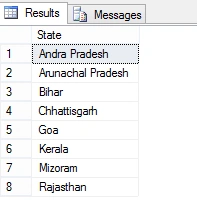
Firstly, we create a table that contains the names of states.
- CREATE TABLE# Temp
- (
- [State][nvarchar](max)
- );
- INSERT INTO# Temp
- SELECT 'Andra Pradesh'
- UNIONALL
- SELECT 'Arunachal Pradesh'
- UNIONALL
- SELECT 'Bihar'
- UNIONALL
- SELECT 'Chhattisgarh'
- UNIONALL
- SELECT 'Goa'
- UNIONALL
- SELECT 'Kerala'
- UNIONALL
- SELECT 'Mizoram'
- UNIONALL
- SELECT 'Rajasthan'
- SELECT * FROM# Temp AS[#TE]
Now we create a list using COALESCE for above table, all elements will be separated by commas.
- DECLARE @List [nvarchar](max);
- SELECT @List=COALESCE(@List+',','')+[State]
- FROM #Temp;
- SELECT @List AS [ListOfSates];

Method 2: (Using SELECT)
- DECLARE @List [nvarchar](max);
- SET @List='';
- SELECT @List=@List+[State]+','
- FROM #Temp;
- SELECTSUBSTRING(@List,1,LEN(@List)-1)AS [ListOfSates];
Method 3: (Using Cursor)
- DECLARE @State[nvarchar](max);
- DECLARE @StateText[nvarchar](max);
- SET @StateText = '';
- DECLARESelect_CursorCURSOR
- LOCALFORWARD_ONLYFOR
- SELECT * FROM# Temp AS# TE
- OPENSelect_Cursor
- FETCHNEXTFROMSelect_CursorINTO @State
- WHILE @ @FETCH_STATUS = 0
- BEGIN
- SET @StateText = @StateText + @State + ',';
- FETCHNEXTFROMSelect_CursorINTO @State;
- END
- CLOSESelect_Cursor
- DEALLOCATESelect_Cursor
- SELECTSUBSTRING(@StateText, 1, LEN(@StateText) - 1) AS[State];
We can convert a table into a list using a cursor but it is not an appropriate way because a cursor requires more resources compared to another method and it makes the process slow. So never select a cursor for the conversion of a table into a list.
Thanks for reading the article.
Debasis SahaPosted Jan 18, 2016, 4:08 AM
Nice One..
Ankit BansalPosted Jan 18, 2016, 12:31 AM
Really helpful..
Yashwant VishwakarmaPosted Jan 17, 2016, 11:47 PM
Nice article Pankaj, Thanks for sharing !!
Santhakumar MunuswamyPosted Jan 17, 2016, 2:09 PM
Thanks for nice share
Arul RPosted Jan 17, 2016, 3:09 AM
Nice share
Gowtham KPosted Jan 16, 2016, 11:13 PM
Good One
Humayun Kabir MamunPosted Jan 16, 2016, 10:36 PM
Nice...
Ehsan SajjadPosted Jan 16, 2016, 4:11 PM
nice post
Aasim AbdullahPosted Jan 16, 2016, 3:18 PM
You forgot to mention best option to convert column values to a list is using FOR XML Path