

We will be using the following third-party DLLs to get our work done:
- PdfBox: This third-party Nuget package will be used to read a PDF file.
- DocX: This package will be used to write a Word document.
Step 1
The first step will be to get the PdfBox package using the Nuget Package Manager. The path for it is somwhere.
Right-click on the solution and select the “Manage NuGet Packages” option.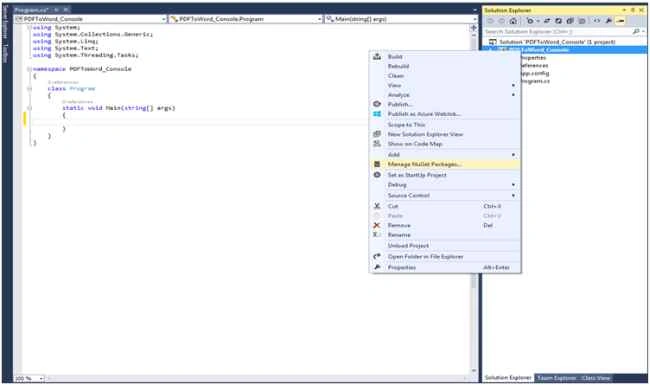
Now, select the “Online” option from the left side menu and search for “PdfBox” on the right side panel. Ater searching, click on the “Install” button alongside the “PdfBox” as in the following: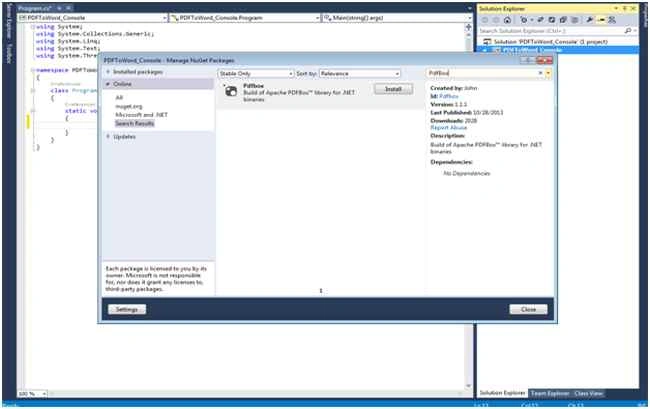
Once it is installed, you will see some DLLs have been added to the project as in the following: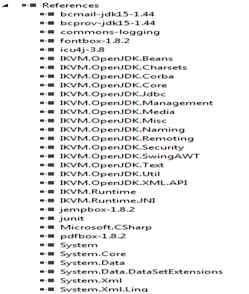
Step 2
Now, import the following DLLs into your .cs file:
- using org.apache.pdfbox.pdmodel;
- using org.apache.pdfbox.util;
Step 3
The third step will be to install the DocX NuGet Package from the NuGet Package Manager:
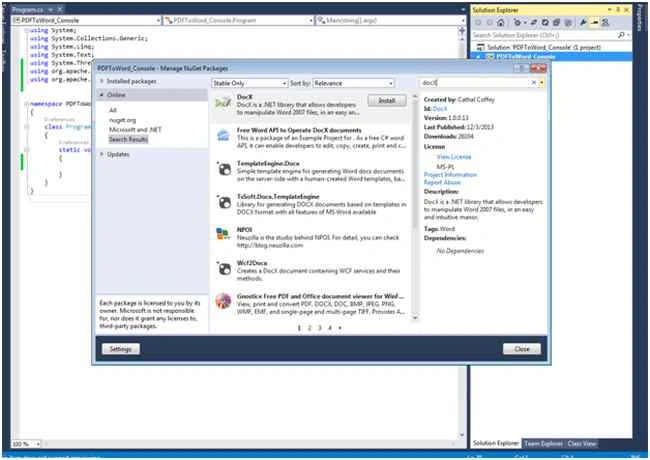
Doing this will import some more DLLs into your solution.
Step 4
Let's read a PDF file and try to get the text from it.
We would use the package PDFBox to do so and the code for it will be as in the following:

Step 5
The next part of the code will be to read this string and write it to a Word document.
You would need to import the following two namespaces in the .cs file:
- using Novacode;
- using System.Diagnostics;
The System.Diagnostic is to ensure that we are automatically able to open the new Word document. This is done by the code: “Process.Start("WINWORD.EXE", fn);”.
The code for it will be:
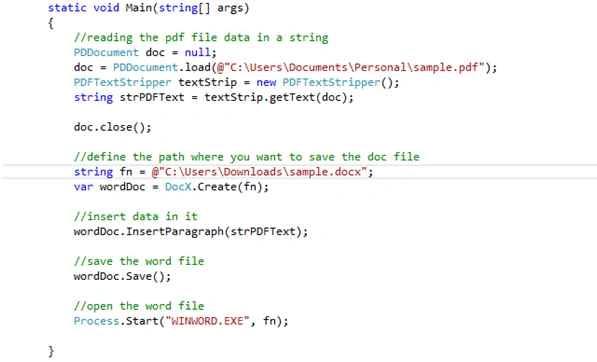
In this way the PDF document would not be available as a Word document file.
I hope this helped.
Thanks,
Vipul
Jayhind MartPosted Jun 23, 2021, 12:59 PM
They all are license version
Sachintha NayanajithPosted Aug 2, 2019, 1:53 AM
What is the DocX version that should be used
Mayur PadhiyarPosted Aug 24, 2018, 5:47 AM
Which DocX version you used sir and there are penty of Docx available in nuget which one should we use? On I found xceed but it is not giving any option like Novacode!!! Please reply as soon as possible.
saim sunnyPosted Feb 11, 2017, 3:21 AM
Hexa decimal invalid character error
Former memberPosted Aug 10, 2016, 2:38 AM
My Pdf has chart images than i tried above code but it only generate Text in Word not generate image.can please help me out to generate word document with images as well
Anji YPosted Apr 18, 2016, 9:49 AM
hi, i faced an error like Access to the path 'd:\sample.docx' is denied.
Zubair SaifPosted Apr 9, 2016, 3:37 AM
An unhandled exception of type 'java.io.FileNotFoundException' occurred in IKVM.OpenJDK.Core.dll Additional information: The given path's format is not supported. How to resolve this issue
Asfend YarPosted Feb 26, 2016, 12:13 PM
good
Sr KarthigaPosted Feb 26, 2016, 9:33 AM
good one
Sr KarthigaPosted Feb 26, 2016, 9:33 AM
nice explanation
Akash MalhotraPosted Sep 3, 2015, 3:14 PM
Nice article
Manas MohapatraPosted Aug 3, 2015, 6:24 AM
Very informative..
pooja guptaPosted Jul 19, 2015, 12:39 PM
good one
Naveen ChauhanPosted Jul 18, 2015, 4:16 AM
very useful article....
Sibeesh VenuPosted Jul 14, 2015, 1:00 PM
Nice Share. Thank you :)
Vipul MalhotraPosted Jul 14, 2015, 7:02 AM
Yes it does, I am working on the way to get images as well
Ramesh KhairnarPosted Jul 14, 2015, 5:10 AM
Nice article. but it skip the images.
Van LaiPosted Jul 14, 2015, 4:32 AM
Interesting tools. Thanks for sharing.
Debasis SahaPosted Jul 14, 2015, 12:51 AM
Good..
Pankaj Kumar ChoudharyPosted Jul 14, 2015, 12:15 AM
Nice Article ...........
Jaipal ReddyPosted Jul 14, 2015, 12:07 AM
Nice one
Nilesh JadavPosted Jul 14, 2015, 12:01 AM
Nice one sir
Gopi ChandPosted Jul 13, 2015, 9:17 PM
Good
Santhakumar MunuswamyPosted Jul 13, 2015, 2:59 PM
Nice article! Thanks for sharing
Neeraj KumarPosted Jul 13, 2015, 2:56 PM
Nice