

Introduction
In this article, we will learn how to build a Covid-19 live tracker application using Angular and Bootstrap.
Prerequisites
- Node
- Npm
- Angular CLI
- TypeScript
- Visual Studio Code
Note
Before going through this session, please visit my previous article related to Angular applications as mentioned below.
Step 1
In this step I added code in app.module.ts file to make request to API and fetch dynamic data to the template.
Code Ref
For this iIneed to import httpclientmodule.
- import {HttpClientModule} from '@angular/common/http';
- imports: [
- HttpClientModule
- ]
Then I need to make a new service specifically designed for making http request by using the mentioned API url. For this go to command prompt and then type as mentioned below:
F:\Covid19\angular-app\covid19-status>ng generate service services/corona.
Then it will create services folder with two files
- corona.service.ts
- corona.service.spec.ts
Step 3
In this step I added code in corona.service.ts file. I need to import httpclient.
- import {HttpClient} from '@angular/common/http';
- constructor(private http:HttpClient) {}
Then import Observable type from rxjs.
- import {Observable} from 'rxjs';
Code Ref
- getCountries():Observable<any>{
- const url = "https://xxxx.com/countries"
- return this.http.get<any>(url)
- } //This method is for populate country list in dropdown. Mention your api url in
- //place of xxxx.com
- getCoronaRealData(country):Observable<any>{
- const url = "https://xxxx.com/country/"+ country
- return this.http.get<any>(url)
- } //this method is for show country wise covid-19 details. Mention your api url
- // in place of xxxx.com
- getTotal():Observable<any>{
- const url = "https://xxxx.com/world/total"
- return this.http.get<any>(url)
- } //this method is for worldwide covid-19 status. Mention your api url
- // in place of xxxx.com
In this step I need to import the service in app.component.ts file:
- import {CoronaService} from './services/corona.service'
- constructor(private corona:CoronaService){}
- ngOnInit(){
- this.corona.getCountries().subscribe((data)=>{
- console.log(data)
- this.countries = data
- })
Code Ref
- export class AppComponent { //list of arrays to access dynamic data from API and these array names should match with API end points with value names
- countries:any
- country:any
- Confirmed:Number
- Recovered:Number
- Deaths:Number
- Date:Date
- Active:Number
- Country:String
- TotalConfirmed:Number
- TotalDeaths:Number
- TotalRecovered:Number
- constructor(private corona:CoronaService){}
- ngOnInit(){
- this.corona.getCountries().subscribe((data)=>{
- console.log(data)
- this.countries = data
- }) //for populating country names in dropdown
- this.getworldtotal() //for worldwide status
- }
- getCoronaData(){
- this.corona.getCoronaRealData(this.country).subscribe((data)=>{
- console.log(data) //for country wise covid-19 status and access dynamic
- //endpoint from api
- var index = data.length - 1
- this.Confirmed = data[index].Confirmed
- this.Recovered = data[index].Recovered
- this.Deaths = data[index].Deaths
- this.Date = data[index].Date
- this.Active = data[index].Active
- this.Country = data[index].Country
- })
- }
- getCountry(country:any){
- this.country = country
- } //this is for when select country changed it triggers
- getworldtotal(){
- this.corona.getTotal().subscribe((data)=>{
- console.log(data) //this is for worldwide status
- this.TotalConfirmed = data.TotalConfirmed
- this.TotalDeaths = data.TotalDeaths
- this.TotalRecovered = data.TotalRecovered
- })
- }
Here I need to add code in app.component.html file.
Code Ref
- <div>
- <div style="background-color:orangered; font-size: large; height:30px; font-family: 'Franklin Gothic Medium', 'Arial Narrow', Arial, sans-serif;">
- <h4 style="color:white; text-align:center">Coronavirus (COVID-19) Live Status With Country</h4>
- </div>
- <br>
- <label class="label warning">Total Confirmed Worldwide :</label><label class="labeldt">{{TotalConfirmed}}</label>
- <label class="label danger">Total Deaths Worldwide :</label><label class="labeldt">{{TotalDeaths}}</label>
- <label class="label success">Total Recovered Worldwide :</label><label class="labeldt">{{TotalRecovered}}</label>
- <br>
- <br>
- <br>
- <br>
- <label class="label info">Country Name:</label>
- <select (change)="getCountry($event.target.value)">
- <option *ngFor="let country of countries" value={{country.Slug}}>
- {{country.Country}}
- </option>
- </select>
- <button (click)="getCoronaData()" class="button button4">Seach Corona Data</button>
- <h1 style="text-align: center; color:blue;font-family: 'Franklin Gothic Medium', 'Arial Narrow', Arial, sans-serif;">Country Wise Till Date : {{Date|date:'medium'}}</h1>
- <table align="center" border="1" cellpadding="4" cellspacing="4">
- <tr>
- <th style="background-color: Yellow;color: blue">Country</th>
- <th style="background-color: Yellow;color: blue">Total Confirmed</th>
- <th style="background-color: Yellow;color: blue">Total Recovered</th>
- <th style="background-color: Yellow;color: blue">Total Deaths</th>
- <th style="background-color: Yellow;color: blue">Total Active</th>
- </tr>
- <tr>
- <td>{{Country}}</td>
- <td>{{Confirmed}}</td>
- <td>{{Recovered}}</td>
- <td>{{Deaths}}</td>
- <td>{{Active}}</td>
- </tr>
- </table>
- </div>
Here in dropdown I mention the function getCountry on change event of dropdown and in option tag put a loop using Countries array and load country names.
- <select (change)="getCountry($event.target.value)">
- <option *ngFor="let country of countries" value={{country.Slug}}>
- {{country.Country}}
- </option>
- </select>
- <button (click)="getCoronaData()" class="button button4">Seach Corona Data</button>
- <td>{{Country}}</td>
- <td>{{Confirmed}}</td>
- <td>{{Recovered}}</td>
- <td>{{Deaths}}</td>
- <td>{{Active}}</td>
I need to add css in style.css.
- table {
- font-family: arial, sans-serif;
- border-collapse: collapse;
- width: 100%;
- }
- td, th {
- border: 1px solid #dddddd;
- text-align: left;
- padding: 8px;
- }
- tr:nth-child(even) {
- background-color: #dddddd;
- font-family: 'Franklin Gothic Medium', 'Arial Narrow', Arial, sans-serif;
- color: red;
- }
- .label {
- font-size: large;
- color: white;
- padding: 8px;
- font-family: 'Franklin Gothic Medium', 'Arial Narrow', Arial, sans-serif;
- }
- .info {background-color: #2196F3;} /* Blue */
- .danger {background-color: #f44336;} /* Red */
- .success {background-color: #4CAF50;} /* Green */
- .warning {background-color: #ff9800;} /* Orange */
- .button {
- background-color: #4CAF50;
- border: none;
- color: white;
- padding: 15px 32px;
- text-align: center;
- text-decoration: none;
- display: inline-block;
- font-size: 16px;
- margin: 4px 2px;
- cursor: pointer;
- }
- .button4 {
- border-radius: 9px;
- }
- input[type=date], select {
- width: 60%;
- padding: 12px 20px;
- margin: 8px 0;
- display: inline-block;
- border: 1px solid #ccc;
- border-radius: 4px;
- box-sizing: border-box;
- font-family: 'Franklin Gothic Medium', 'Arial Narrow', Arial, sans-serif;
- color: blue;
- font-size: large;
- }
- input[type=text], select {
- width: 60%;
- padding: 12px 20px;
- margin: 8px 0;
- display: inline-block;
- border: 1px solid #ccc;
- border-radius: 4px;
- box-sizing: border-box;
- font-family: 'Franklin Gothic Medium', 'Arial Narrow', Arial, sans-serif;
- color: blue;
- font-size: large;
- }
- .labeldt {
- font-size: large;
- color: red;
- padding: 8px;
- font-family: 'Franklin Gothic Medium', 'Arial Narrow', Arial, sans-serif;
- font-size: large;
- }
OUTPUT
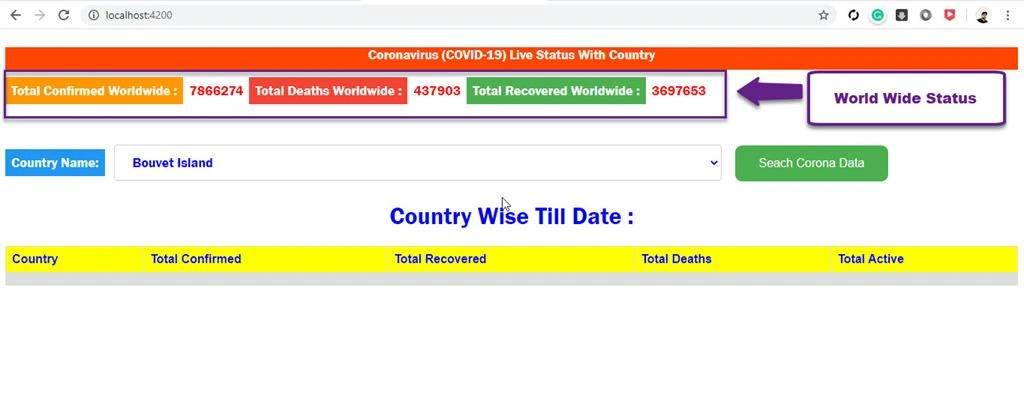
The landing page of Covid-19 live status using Angular is shown as mentioned below,
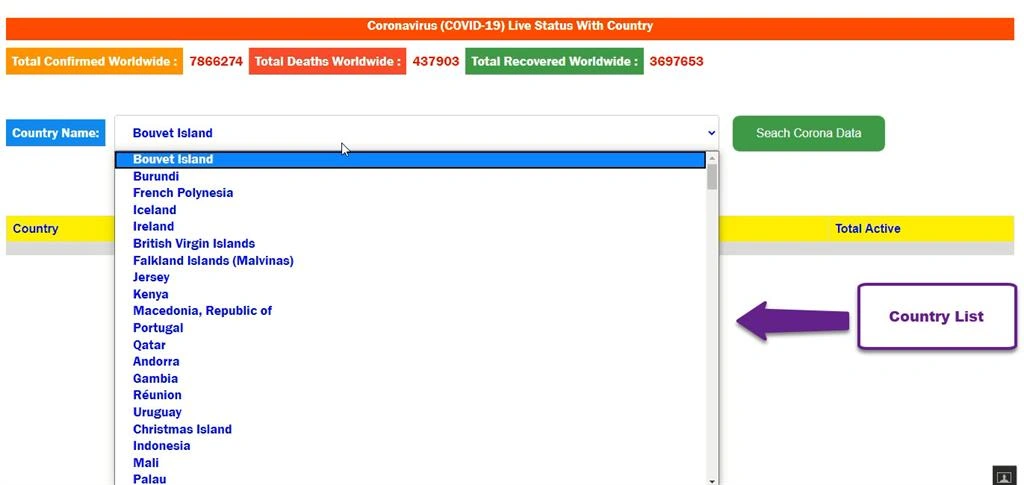
The list of country names are populating in dropdown list.
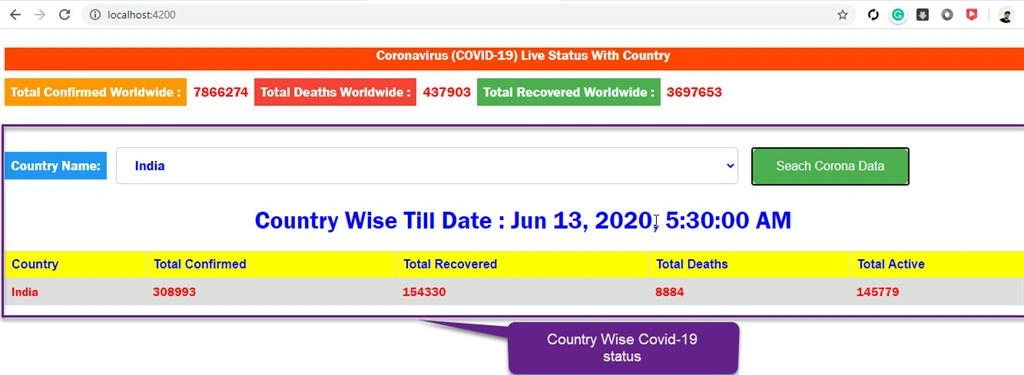
The country wise Covid-19 status details as mentioned below.
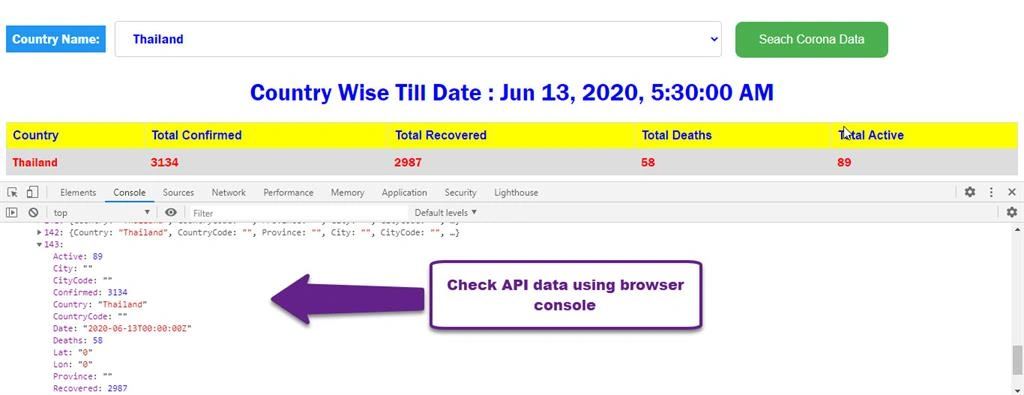
Check API data using browser console.
Summary
In this article, we have learned how to:
- Set up Angular application using VS code
- Create service in Angular to access API data
- Configure API url and access its value with end points
- Add CSS for better look to component
Debendra DashPosted Jul 15, 2020, 5:10 AM
Great work satya..