

Count(All) and Count(Distinct) are two aggregate functions in SQL Server.
Count function is a part of the SQL Server's aggregate functions. In aggregates, we consider various types of functions like count, max, avg, min, and sum. In this article, you consider the Count function which is used to count the number of rows in a database table.
Let's have a look at a practical example of how to get the difference between the Count(All) and Count(Distinct) in SQL Server. The example is developed in SQL Server 2012 using the SQL Server Management Studio.
Count() Function in SQL Server
The COUNT() function is used to count the number of rows when you use a where condition with the Count function in a select statement. It will return the number of rows from the table satisfying the where condition. NULL values will not be counted by the Count function.
Example
- SELECT [EmpID]
- ,[EmpName]
- ,[EmpSalary]
- FROM [master].[dbo].[Employee]
- Go
- select Count(empname) as CountResult from [Employee]
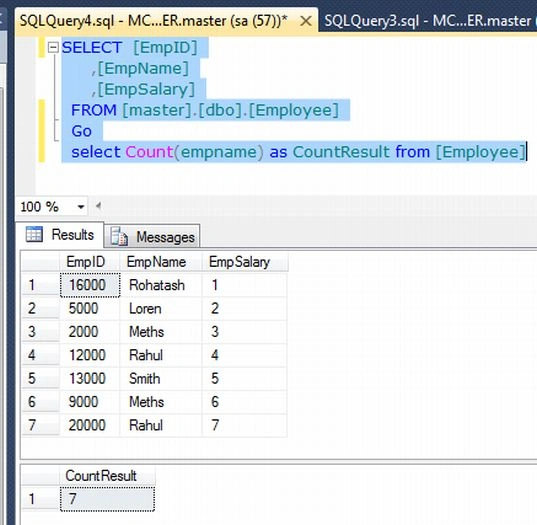
Count(All ColumnName) Function
The COUNT(All ColumnName) function is similar to Count(ColumnName). It also produces the same result as Count(ColumnName).
Example
- SELECT [EmpID]
- ,[EmpName]
- ,[EmpSalary]
- FROM [master].[dbo].[Employee]
- Go
- select Count(All empname) as CountResult from [Employee]
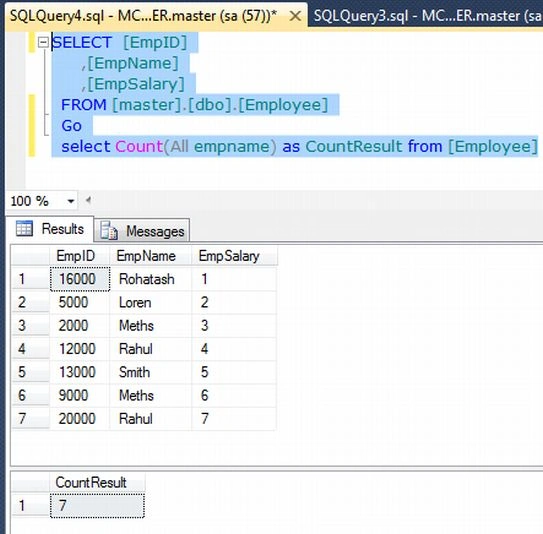
Count(Distinct ColumnName) Function
When the DISTINCT keyword is used, all duplicate values are eliminated before the function count is applied, or if you want to count the number of unique rows in the table. This form of Count does not count rows with null values for the column.
Example
- SELECT [EmpID]
- ,[EmpName]
- ,[EmpSalary]
- FROM [master].[dbo].[Employee]
- Go
- select Count(Distinct empname) as CountResult from [Employee]
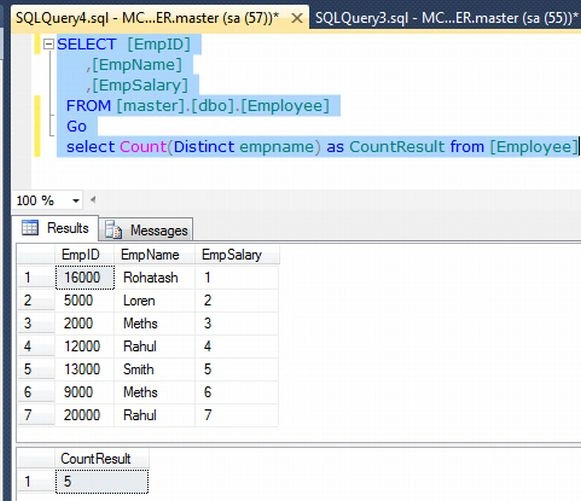
Jitendra WaghalePosted Aug 4, 2018, 10:36 AM
Very helpful post!!
Pradeep ShetPosted Sep 30, 2014, 3:08 PM
good 1
Saineshwar BageriPosted Sep 30, 2014, 4:57 AM
nice one sir
Gohil JayendrasinhPosted Feb 18, 2013, 12:51 AM
If you have millions of rows in a table, COUNT() may throw an error message so you can use COUNT_BIG function instead to avoid this data type error. For return values greater than 2^31-1, COUNT produces an error. Use COUNT_BIG instead. http://msdn.microsoft.com/en-us/library/ms175997.aspx