

Introduction
To know what a MongoDB is, how to install it, and how to install the C# MongoDB driver, please see the article "Mongo database in .Net with C#.
Now, we are creating the sample application.
Step 1. Create a console application named "MongodbConsole" Application.
Now write the following code under the namespace area.
using MongoDB.Driver;
using MongoDB.Bson;
class Program
{
    static void Main(string[] args)
    {
        // Connection string and database name
        string connectionString = "mongodb://localhost:27017";
        string dbName = "mydatabase";
        // Create a MongoDB client
        MongoClient client = new MongoClient(connectionString);
        // Get a reference to the database
        IMongoDatabase database = client.GetDatabase(dbName);
        // Access a collection
        IMongoCollection<BsonDocument> collection = database.GetCollection<BsonDocument>("mycollection");
        // Insert a document
        BsonDocument document = new BsonDocument
        {
            { "name", "John" },
            { "age", 30 }
        };
        collection.InsertOne(document);
        // Query the collection
        var result = collection.Find(new BsonDocument("name", "John")).ToList();
        foreach (var doc in result)
        {
            Console.WriteLine(doc.ToJson());
        }
    }
}
MongoDB.Driver is the C# driver for using the MongoDB database in a C# .Net application.
Step 2. Now go to the "bin" folder under the "mongodb-win32-i386-1.8.1" folder. After that, click the "mongod" exe, just like in Figure 1. It is the server for the MongoDB. You must open the MongoDB database server while you are creating an application using MongoDB. We can open the MongoDB database server by using the Windows service also.

Figure.1
Now we have to first connect to the database. So under the void main, we will write the code.
var mongo = new Mongo();
mongo.Connect();
var db = mongo.getDB("testmongo");
Here we are creating the object variable of the "Mongo" database. Then we are going to open the connection of the database by writing "mongo. Connect();". It is the same as "con. open()" for ADO.Net programming.
var mongo = new Mongo();
mongo.Connect();
// Create or access a database named "testmongo" under the "c:\Data\db" folder.
var db = mongo.getDB("testmongo");
Now write the following code.
var categorylist = db.GetCollection("studcategories");
var category = new Document();
category["Name"] = "shirsendu nandi";
category["Id"] = "20";
category["Address"] = "bangalore";
categorylist.Insert(category);
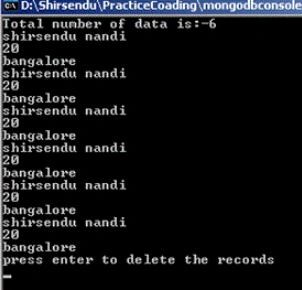
Console.WriteLine("Total number of data is: " + categorylist.Count());

ShipuPosted Jun 18, 2018, 1:40 AM
But, I need more help on mongodb ?
ShipuPosted Jun 18, 2018, 1:37 AM
Nice share...helped me a lot. Thanks :)
Dinesh BeniwalPosted Apr 14, 2011, 12:03 AM
Nice one......
Mayur GujrathiPosted Apr 13, 2011, 8:18 AM
Very useful information nandi