Introduction
In my last
article, we saw how to create a multi-node cluster in windows local machine using a replica set. In this article, we will see how to create a free MongoDB Atlas cluster. MongoDB Atlas is a fully-managed cloud database. Atlas handles all the complexity of deploying, managing, and healing your deployments on the cloud service provider of your choice (Azure, AWS, and GCP).
Currently, MongoDB Atlas provides 512 MB free space. We will see all the steps to create a free MongoDB cluster in this tutorial.
Open this link to create a new cluster.
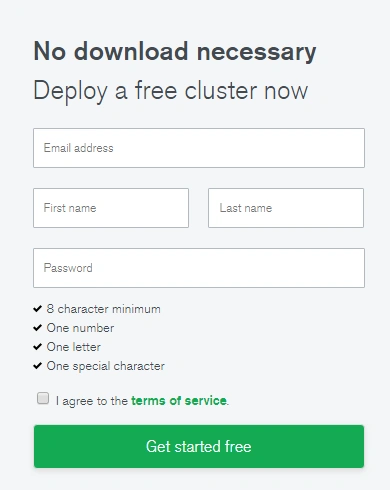
Give your email address and full name and give a strong password and then click “Get started free” button.
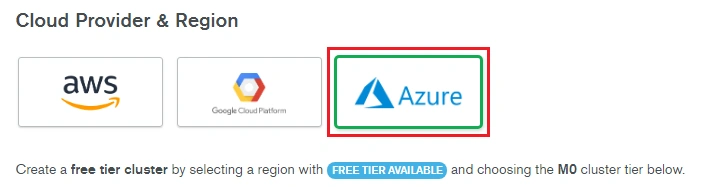
We can choose the appropriate cloud provider from the below list. I am choosing Azure as a cloud provider. Each provider has its own regions.
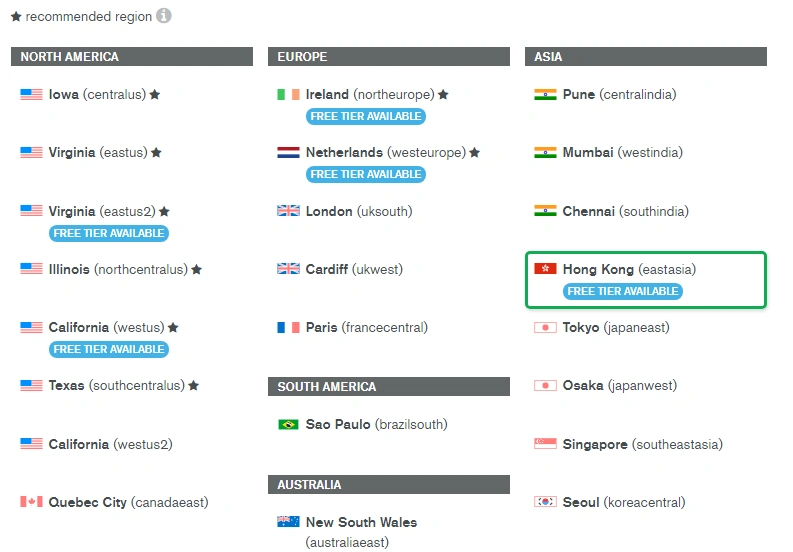
Please note that free tier is available in limited regions only.
I have chosen “Hong Kong” as my region. We can choose the appropriate price tier now.
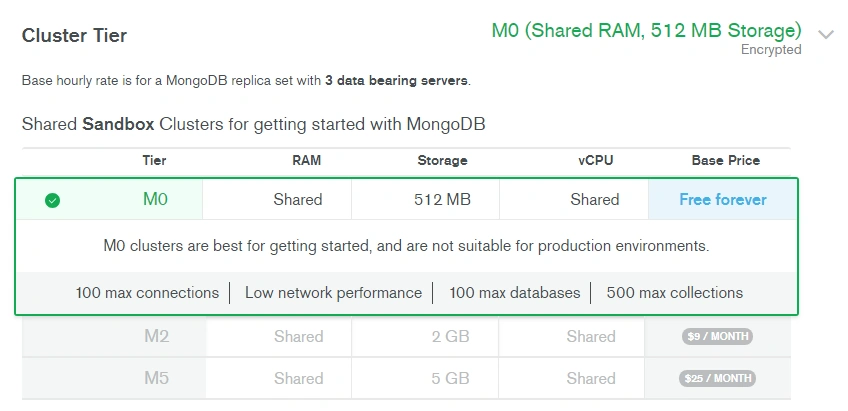
We have chosen the free tier with 512 MB storage plan. We can give a cluster name as well.
We can click “Create Cluster” button to create the free cluster now.
Please note, it will take from 7 to 10 minutes to complete the entire cluster provisioning.
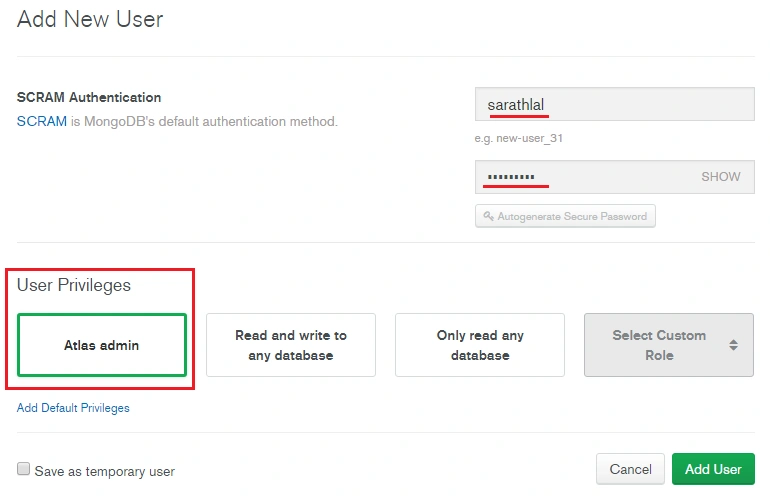
We can create a new database user now. Click “Security” tab and click “ADD NEW USER” button.
I have selected “Atlas admin” role for our user so that all the admin privileges will be given to the user.
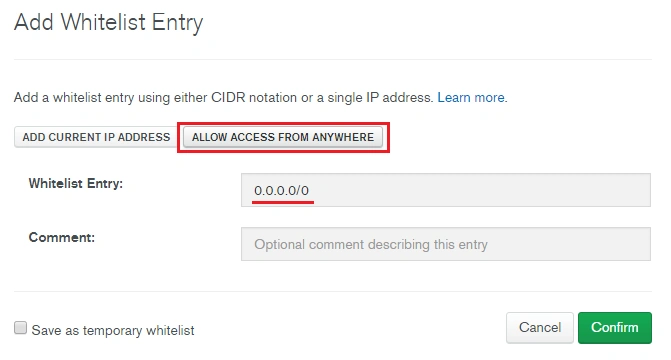
We can add IP address to the IP Whitelists. Please choose “IP Whitelist” tab and click “ADD IP ADDRESS” button.
For testing purposes, I have allowed the access from anywhere option. Please note, production databases do not allow all IP addresses for security reasons.
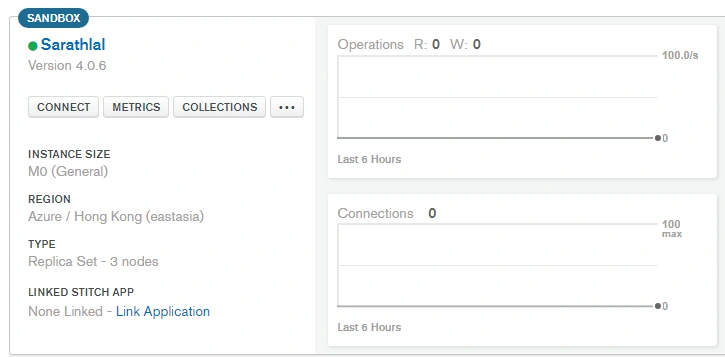
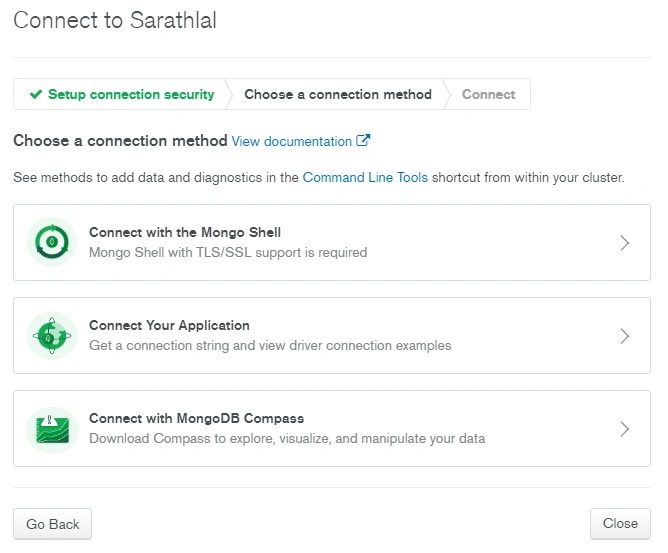
Our MongoDB Atlas cluster is ready to use now. We can click the “Connect” button to get the connection string details.
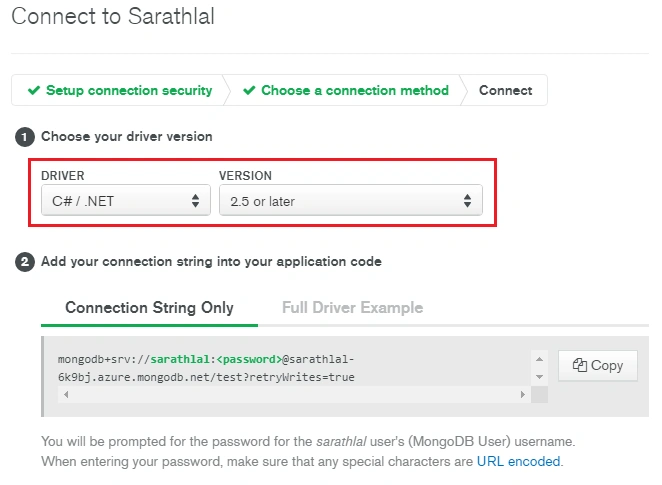
There are various options available to connect with MongoDB cluster. We can choose the “Connect Your Application” option as we are going to connect with our MVC 5 application.
We can select C#/NET driver and version 2.5 or later.
Please copy the connection string and save to a safe place. We will use this connection string later with our MVC 5 application.
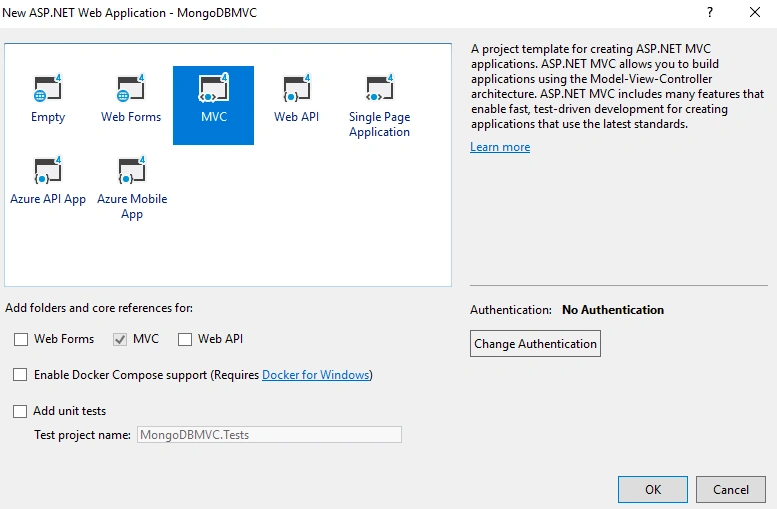
We can create the MVC application now. Please choose the MVC template from Visual Studio.
We can install the “MongoDB.Driver” NuGet package to our project.
We are creating a sample Employee data management application. So, we can create an “Employee” class inside the “Models” folder. Please copy the below code and paste in Employee class.
- using MongoDB.Bson;
- using MongoDB.Bson.Serialization.Attributes;
-
- namespace MongoDBMVC.Models
- {
- public class Employee
- {
- [BsonId]
- [BsonRepresentation(BsonType.ObjectId)]
- public string Id { get; set; }
- public string Name { get; set; }
- public string Address { get; set; }
- public string Gender { get; set; }
- public string Company { get; set; }
- public string Designation { get; set; }
- }
- }
We can create a “MongoDbContext” context class and give the MongoDB connection details inside this class.
- using MongoDB.Driver;
-
- namespace MongoDBMVC.Models
- {
- public class MongoDbContext
- {
- private readonly IMongoDatabase _mongoDb;
- public MongoDbContext()
- {
- var client = new MongoClient("mongodb+srv://sarathlal:<password>@sarathlal-6k9bj.azure.mongodb.net?retryWrites=true");
- _mongoDb = client.GetDatabase("SarathDB");
- }
- public IMongoCollection<Employee> Employee
- {
- get
- {
- return _mongoDb.GetCollection<Employee>("Employee");
- }
- }
- }
- }
We have given MongoDB database name and collection name (Employee) inside above class. MongoDB driver will automatically create a database and collection in the first run.
We can create a “IEmployeeRepository” interface and add some members inside it.
- using System.Collections.Generic;
- using System.Threading.Tasks;
-
- namespace MongoDBMVC.Models
- {
- public interface IEmployeeRepository
- {
- Task Add(Employee employee);
- Task Update(Employee employee);
- Task Delete(string id);
- Task<Employee> GetEmployee(string id);
- Task<IEnumerable<Employee>> GetEmployees();
- }
- }
We can implement “IEmployeeRepository” interface inside a new class “EmployeeRepository”
- using MongoDB.Driver;
- using System.Collections.Generic;
- using System.Threading.Tasks;
-
- namespace MongoDBMVC.Models
- {
- public class EmployeeRepository : IEmployeeRepository
- {
- MongoDbContext db = new MongoDbContext();
- public async Task Add(Employee employee)
- {
- try
- {
- await db.Employee.InsertOneAsync(employee);
- }
- catch
- {
- throw;
- }
- }
- public async Task<Employee> GetEmployee(string id)
- {
- try
- {
- FilterDefinition<Employee> filter = Builders<Employee>.Filter.Eq("Id", id);
- return await db.Employee.Find(filter).FirstOrDefaultAsync();
- }
- catch
- {
- throw;
- }
- }
- public async Task<IEnumerable<Employee>> GetEmployees()
- {
- try
- {
- return await db.Employee.Find(_ => true).ToListAsync();
- }
- catch
- {
- throw;
- }
- }
- public async Task Update(Employee employee)
- {
- try
- {
- await db.Employee.ReplaceOneAsync(filter: g => g.Id == employee.Id, replacement: employee);
- }
- catch
- {
- throw;
- }
- }
- public async Task Delete(string id)
- {
- try
- {
- FilterDefinition<Employee> data = Builders<Employee>.Filter.Eq("Id", id);
- await db.Employee.DeleteOneAsync(data);
- }
- catch
- {
- throw;
- }
- }
- }
- }
We have added all the CRUD operations inside the above class.
We can create a new Employee Controller now. We will use the default scaffolding option provided by the MVC template, so that we can automatically create all the views for CRUD operations easily.
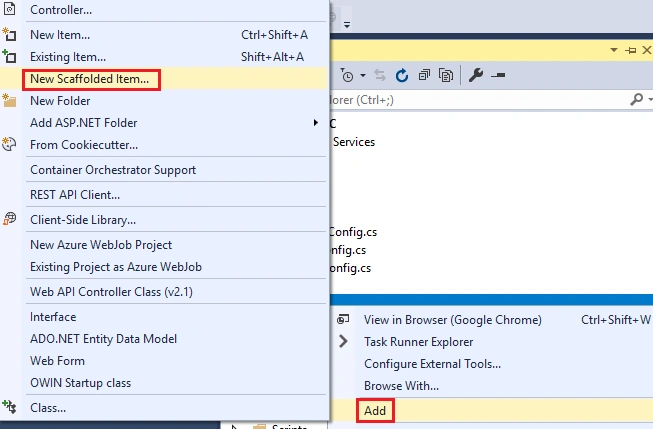
We can right click “Controller” folder and click “Add” and choose “New Scaffolded Item” to create a new controller class.
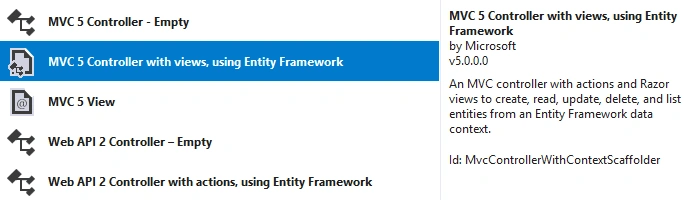
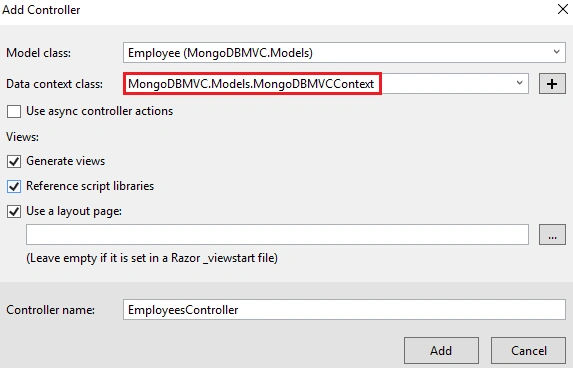
Please note, we are opting for Entity framework. We choose this option only to create default views for CRUD operations. We will not use the Entity Framework model in this project as we are connecting with MongoDB.
We can choose the “Employee” class as a model and create a new data context class. Please note, we will delete this data context class later. We only choose this option to create default views for CRUD operations as explained earlier.
After a few moments, our new controller and corresponding views for CRUD operations will be created successfully.
We can replace the “EmployeesController” class with the below code.
- using MongoDBMVC.Models;
- using System.Collections.Generic;
- using System.Net;
- using System.Threading.Tasks;
- using System.Web.Mvc;
-
- namespace MongoDBMVC.Controllers
- {
- public class EmployeesController : Controller
- {
- private readonly IEmployeeRepository _dataAccessProvider = new EmployeeRepository();
- public async Task<ActionResult> Index()
- {
- IEnumerable<Employee> employees = await _dataAccessProvider.GetEmployees();
- return View(employees);
- }
-
- public async Task<ActionResult> Details(string id)
- {
- if (id == null)
- {
- return new HttpStatusCodeResult(HttpStatusCode.BadRequest);
- }
- Employee employee = await _dataAccessProvider.GetEmployee(id);
- if (employee == null)
- {
- return HttpNotFound();
- }
- return View(employee);
- }
-
- public ActionResult Create()
- {
- return View();
- }
-
- [HttpPost]
- [ValidateAntiForgeryToken]
- public async Task<ActionResult> Create([Bind(Include = "Name,Address,Gender,Company,Designation")] Employee employee)
- {
- if (ModelState.IsValid)
- {
- await _dataAccessProvider.Add(employee);
- return RedirectToAction("Index");
- }
-
- return View(employee);
- }
-
- public async Task<ActionResult> Edit(string id)
- {
- if (id == null)
- {
- return new HttpStatusCodeResult(HttpStatusCode.BadRequest);
- }
- Employee employee = await _dataAccessProvider.GetEmployee(id);
- if (employee == null)
- {
- return HttpNotFound();
- }
- return View(employee);
- }
-
- [HttpPost]
- [ValidateAntiForgeryToken]
- public async Task<ActionResult> Edit([Bind(Include = "Id,Name,Address,Gender,Company,Designation")] Employee employee)
- {
- if (ModelState.IsValid)
- {
- await _dataAccessProvider.Update(employee);
- return RedirectToAction("Index");
- }
- return View(employee);
- }
-
- public async Task<ActionResult> Delete(string id)
- {
- if (id == null)
- {
- return new HttpStatusCodeResult(HttpStatusCode.BadRequest);
- }
-
- Employee employee = await _dataAccessProvider.GetEmployee(id);
- if (employee == null)
- {
- return HttpNotFound();
- }
- return View(employee);
- }
-
- [HttpPost, ActionName("Delete")]
- [ValidateAntiForgeryToken]
- public async Task<ActionResult> DeleteConfirmed(string id)
- {
- await _dataAccessProvider.Delete(id);
- return RedirectToAction("Index");
- }
-
- protected override void Dispose(bool disposing)
- {
- base.Dispose(disposing);
- }
- }
- }
We can modify the “Create.cshtml” code with the below code. (We have removed the Id column from this view)
- @model MongoDBMVC.Models.Employee
-
- @{
- ViewBag.Title = "Create";
- }
-
- <h2>Create</h2>
-
-
- @using (Html.BeginForm())
- {
- @Html.AntiForgeryToken()
-
- <div class="form-horizontal">
- <h4>Employee</h4>
- <hr />
-
- <div class="form-group">
- @Html.LabelFor(model => model.Name, htmlAttributes: new { @class = "control-label col-md-2" })
- <div class="col-md-10">
- @Html.EditorFor(model => model.Name, new { htmlAttributes = new { @class = "form-control" } })
- @Html.ValidationMessageFor(model => model.Name, "", new { @class = "text-danger" })
- </div>
- </div>
-
- <div class="form-group">
- @Html.LabelFor(model => model.Address, htmlAttributes: new { @class = "control-label col-md-2" })
- <div class="col-md-10">
- @Html.EditorFor(model => model.Address, new { htmlAttributes = new { @class = "form-control" } })
- @Html.ValidationMessageFor(model => model.Address, "", new { @class = "text-danger" })
- </div>
- </div>
-
- <div class="form-group">
- @Html.LabelFor(model => model.Gender, htmlAttributes: new { @class = "control-label col-md-2" })
- <div class="col-md-10">
- @Html.EditorFor(model => model.Gender, new { htmlAttributes = new { @class = "form-control" } })
- @Html.ValidationMessageFor(model => model.Gender, "", new { @class = "text-danger" })
- </div>
- </div>
-
- <div class="form-group">
- @Html.LabelFor(model => model.Company, htmlAttributes: new { @class = "control-label col-md-2" })
- <div class="col-md-10">
- @Html.EditorFor(model => model.Company, new { htmlAttributes = new { @class = "form-control" } })
- @Html.ValidationMessageFor(model => model.Company, "", new { @class = "text-danger" })
- </div>
- </div>
-
- <div class="form-group">
- @Html.LabelFor(model => model.Designation, htmlAttributes: new { @class = "control-label col-md-2" })
- <div class="col-md-10">
- @Html.EditorFor(model => model.Designation, new { htmlAttributes = new { @class = "form-control" } })
- @Html.ValidationMessageFor(model => model.Designation, "", new { @class = "text-danger" })
- </div>
- </div>
-
- <div class="form-group">
- <div class="col-md-offset-2 col-md-10">
- <input type="submit" value="Create" class="btn btn-default" />
- </div>
- </div>
- </div>
- }
-
- <div>
- @Html.ActionLink("Back to List", "Index")
- </div>
-
- @section Scripts {
- @Scripts.Render("~/bundles/jqueryval")
- }
We must modify the “_Layout.cshtml” view inside the shared folder with below code.
- <!DOCTYPE html>
- <html>
- <head>
- <meta charset="utf-8" />
- <meta name="viewport" content="width=device-width, initial-scale=1.0">
- <title>@ViewBag.Title - My ASP.NET Application</title>
- @Styles.Render("~/Content/css")
- @Scripts.Render("~/bundles/modernizr")
- </head>
- <body>
- <div class="navbar navbar-inverse navbar-fixed-top">
- <div class="container">
- <div class="navbar-header">
- <button type="button" class="navbar-toggle" data-toggle="collapse" data-target=".navbar-collapse">
- <span class="icon-bar"></span>
- <span class="icon-bar"></span>
- <span class="icon-bar"></span>
- </button>
- @Html.ActionLink("MongoDB Atlas With MVC", "Index", "Home", new { area = "" }, new { @class = "navbar-brand" })
- </div>
- <div class="navbar-collapse collapse">
- <ul class="nav navbar-nav">
- <li>@Html.ActionLink("Home", "Index", "Home")</li>
- <li>@Html.ActionLink("Employee Details", "Index", "Employees")</li>
- <li>@Html.ActionLink("About", "About", "Home")</li>
- <li>@Html.ActionLink("Contact", "Contact", "Home")</li>
- </ul>
- </div>
- </div>
- </div>
- <div class="container body-content">
- @RenderBody()
- <hr />
- <footer>
- <p>© @DateTime.Now.Year - My ASP.NET Application</p>
- </footer>
- </div>
-
- @Scripts.Render("~/bundles/jquery")
- @Scripts.Render("~/bundles/bootstrap")
- @RenderSection("scripts", required: false)
- </body>
- </html>
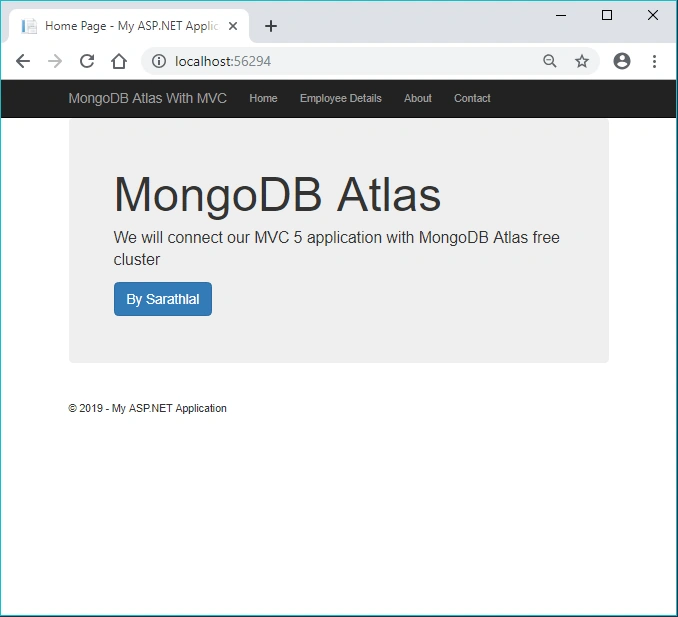
We have completed all the coding part. We can run the application now.
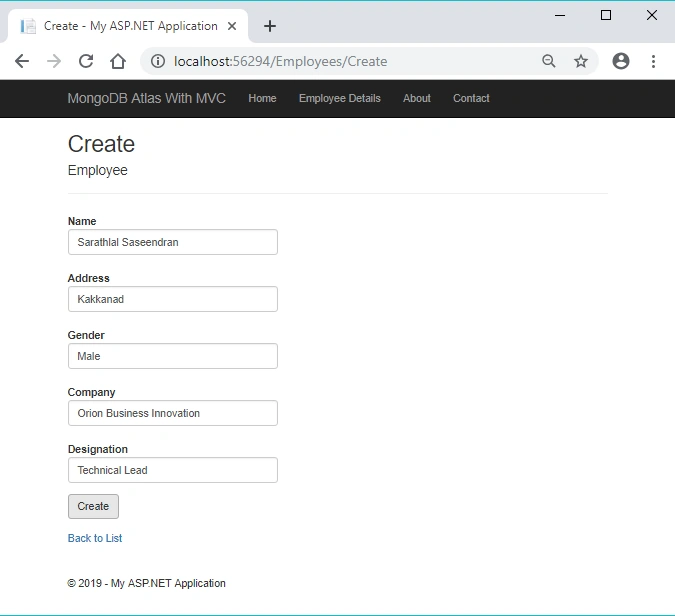
You can click the “Employee Details” tab to open the employee menu. You can click the “Create New” button to add new employee details.
In this article, we have seen how to create a MongoDB Atlas free cluster and connect with an MVC 5 application. We have created a sample Employee application in MVC and added all CRUD operations in it.





Selva ganapathyPosted Jul 12, 2021, 9:51 AM
Great article. thanks sarathlal...
Samir BhogaytaPosted Dec 5, 2019, 12:56 AM
Hello sir, Same error I found in your code public async Task<IEnumerable<Employee>> GetEmployees() { try { return await db.Employee.Find(_ => true).ToListAsync(); } catch { throw; } }
Samir BhogaytaPosted Nov 28, 2019, 12:55 AM
Hello sir, I also followed all the steps as per your article. But I am getting this error with my own table. Server Error in '/' Application.The method or operation is not implemented. Can you please guide that the table is created automatically into mongodb cluster or it's require to create it using Atlas admin.
Samir BhogaytaPosted Nov 28, 2019, 12:36 AM
Hello sir, I am getting this error while creating new employee using Create view. System.Data.Entity.Validation.DbEntityValidationException: 'Validation failed for one or more entities. See 'EntityValidationErrors' property for more details.'
Jaakko MansikkaPosted Apr 27, 2019, 5:24 AM
In the EmployeesController.cs I get an CS0266 that keeps me from building the view, haven't been able to proceed. Cannot implicitly convert type 'MongoMVC.Models.EmployeeRepository' to 'MongoMVC.Models.IEmployeeRepository'. An explicit conversion exists (are you missing a cast?)"
Touhidul FahimPosted Mar 9, 2019, 9:46 PM
Such as wonderful tutorial.. its so easy to understand :)