

In this post, we will see how to create a sample C# Corner User Flair in ASP.NET MVC application using HtmlAgilityPack. We will also add a provision to save this flair as an image using a third-party JavaScript library, html2canvas.
Introduction
C# Corner itself provides the user flair. This is my humble attempt to scrape the data from C# Corner user profile page using HtmlAgilityPack in ASP.NET MVC application. We collected the user data like Name, Rank, Reputation, Reads from the corresponding span ids. We also got all the image URLs from the site (profile page) and only took the image used for the author's image. We will create a sample user flair using this data. Will also provide an option to save this flair as an image.
Dependencies for this project -
- Visual Studio 2015 or higher (we are using .NET framework 4.5)
- Install HtmlAgilityPack using NuGet
- Valid CDN link for html2canvas library
Create an MVC application in Visual Studio
We can choose the ASP.NET 4.5.2 Templates and MVC template. Click the OK button to create the project.
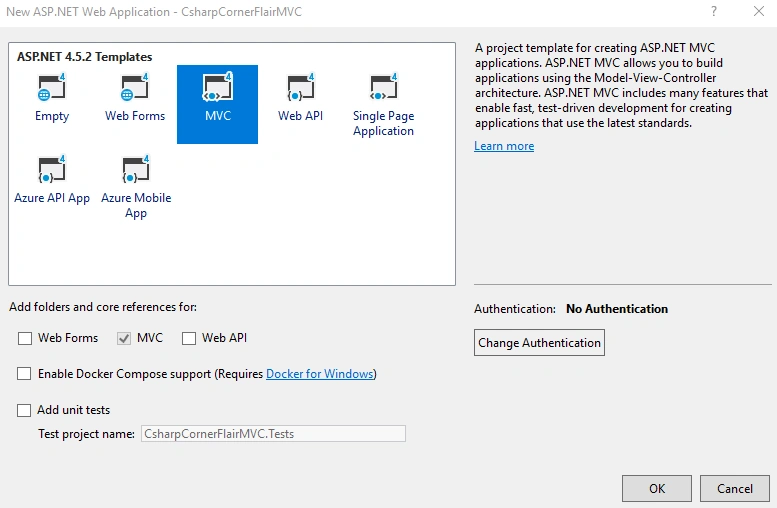
In the MVC project, we have Controllers, Models, and Views folders. We need to create a “UserInfo” class inside the Models folder.
- namespace CsharpCornerFlairMVC.Models
- {
- public class UserInfo
- {
- public string UserId { get; set; }
- public string UserName { get; set; }
- public string UserRank { get; set; }
- public string UserReputation { get; set; }
- public string UserRead { get; set; }
- public string ImageURL { get; set; }
- public bool InvalidUser { get; set; }
- public bool PageInit { get; set; }
- }
- }
Please note that we have additionally added “InvalidUser” and “PageInit” properties along with other user information properties in this class. These are used for controlling the visibility of some page contents in Razor Views. We will discuss about these details later in this post.
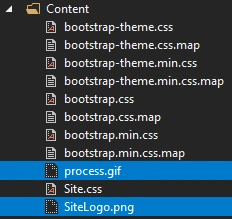
Now, modify the “_Layout.cshtml” Razor View file inside the Views -> Shared folder.
- <!DOCTYPE html>
- <html>
- <head>
- <meta charset="utf-8" />
- <meta name="viewport" content="width=device-width, initial-scale=1.0">
- <title>C# Corner Sample Flair</title>
- <link href="https://csharpcorner-mindcrackerinc.netdna-ssl.com/Images/McnIcon.ico" rel="shortcut icon" type="image/x-icon" />
- @Styles.Render("~/Content/css")
- @Scripts.Render("~/bundles/modernizr")
- </head>
- <body>
- <div class="navbar navbar-inverse navbar-fixed-top">
- <div class="container">
- <div class="navbar-header">
- <button type="button" class="navbar-toggle" data-toggle="collapse" data-target=".navbar-collapse">
- <span class="icon-bar"></span>
- <span class="icon-bar"></span>
- <span class="icon-bar"></span>
- </button>
- @Html.ActionLink("C# Corner Sample Flair", "Index", "Home", new { area = "" }, new { @class = "navbar-brand" })
- </div>
- <div class="navbar-collapse collapse">
- <ul class="nav navbar-nav">
- <li>@Html.ActionLink("Home", "Index", "Home")</li>
- <li>@Html.ActionLink("About", "About", "Home")</li>
- </ul>
- </div>
- </div>
- </div>
- <div class="container body-content">
- @RenderBody()
- <hr />
- <footer>
- <p>
- © 2019 - C# Corner Sample Flair
- <a href="https://codewithsarath.com" target="_blank">By Sarath Lal</a>
- </p>
- </footer>
- </div>
- @Scripts.Render("~/bundles/jquery")
- @Scripts.Render("~/bundles/bootstrap")
- @RenderSection("scripts", required: false)
- </body>
- </html>
This is a master layout page which will be rendered with all the other Views. We can modify the important Razor View file “Index.cshtml”.
- @{
- ViewBag.Title = "Home Page";
- }
- @model CsharpCornerFlairMVC.Models.UserInfo
- @using (Html.BeginForm("Index", "Home", FormMethod.Post))
- {
- <div style="padding-top:30px;">
- @Html.Label("C# Corner User Id")
- </div>
- <div>
- @Html.TextBoxFor(m => m.UserId)
- <i onclick="resetValues()" style="color:forestgreen; cursor:pointer;" class="glyphicon glyphicon-repeat" title="Reset Values"></i>
- </div>
- <div style="padding-top:20px;">
- <input class="btn-lg btn-info" type="submit" id="btnSubmit" value="Process Flair" onclick="processFlair()" name="Submit" />
- </div>
- <div id="process" style="display:none">
- <img src="~/Content/process.gif" alt="Process" />
- </div>
- @Html.HiddenFor(model => model.UserId)
- }
- @if (Model != null && !Model.InvalidUser && !Model.PageInit)
- {
- <div id="flair" style="padding-top:30px; width:550px; column-count: 4;">
- <div style="float: left;">
- <img src="~/Content/SiteLogo.png" style="width:30px; height:22px;" alt="C# Corner" />
- </div>
- <div style="padding-left: 30px; width:250px;">
- @Model.UserName
- </div>
- <div style="padding-left: 30px; width:250px; cursor:pointer">
- <i class="greendot"></i> <text title="Current Rank">@Model.UserRank</text> <i class="orangedot"></i> <text title="Total Reputation">@Model.UserReputation</text> <i class="bluedot"></i> <text title="Total Reads">@Model.UserRead</text>
- </div>
- <div style="float: right;">
- <img src="@Model.ImageURL" alt="NA"
- style="border-radius: 50%; width:50px; height:50px;">
- </div>
- </div>
- <div id="saveflair">
- <div style="padding-top:20px;">
- <input class="btn-success btn-sm" type="button" onclick="saveAsImage()" value="Save as Image!" />
- </div>
- <div style="padding:10px">
- <img id="txtScreenshot" src="">
- </div>
- </div>
- }
- else
- {
- if (Model != null && Model.InvalidUser && !Model.PageInit)
- {
- <div id="invaliduser" style="padding-top:30px;">
- <i>Invalid User Id</i>
- </div>
- }
- }
- @section scripts {
- <script src="//cdnjs.cloudflare.com/ajax/libs/html2canvas/0.4.1/html2canvas.min.js"></script>
- <script>
- function resetValues() {
- document.getElementById("UserId").value = '';
- var invalidUser = @Html.Raw(Json.Encode(Model.InvalidUser));
- if (invalidUser) {
- document.getElementById("invaliduser").style.display = 'none';
- }
- else {
- document.getElementById("saveflair").style.display = 'none';
- document.getElementById("flair").style.display = 'none';
- }
- }
- function processFlair() {
- document.getElementById("process").style.display = 'block';
- var invalidUser = @Html.Raw(Json.Encode(Model.InvalidUser));
- if (invalidUser) {
- document.getElementById("invaliduser").style.display = 'none';
- }
- else {
- document.getElementById("saveflair").style.display = 'none';
- document.getElementById("flair").style.display = 'none';
- }
- }
- function saveAsImage() {
- html2canvas(document.getElementById("flair"),
- {
- useCORS: true,
- onrendered: function (canvas) {
- var screenshot = canvas.toDataURL("image/png");
- document.getElementById("txtScreenshot").setAttribute("src", screenshot);
- }
- });
- }
- </script>
- }
I have put all the client-side logic inside this Razor file. As I mentioned earlier, I have used the “InvalidUser” and “PageInit” properties to hide/show some div tags.
- if (Model != null && Model.InvalidUser && !Model.PageInit)
- {
- <div id="invaliduser" style="padding-top:30px;">
- <i>Invalid User Id</i>
- </div>
- }
Please note, I have also used @Html.Raw to get the server Model values in the client-side code.
- function resetValues() {
- document.getElementById("UserId").value = '';
- var invalidUser = @Html.Raw(Json.Encode(Model.InvalidUser));
- if (invalidUser) {
- document.getElementById("invaliduser").style.display = 'none';
- }
- else {
- document.getElementById("saveflair").style.display = 'none';
- document.getElementById("flair").style.display = 'none';
- }
- }
I have used a very simple logic to save the HTML to image. (Here, we are saving it as a PNG file).
- function saveAsImage() {
- html2canvas(document.getElementById("flair"),
- {
- useCORS: true,
- onrendered: function (canvas) {
- var screenshot = canvas.toDataURL("image/png");
- document.getElementById("txtScreenshot").setAttribute("src", screenshot);
- }
- });
- }
I have used three CSS classes to show the green, orange, and blue dots on flair. We can add these CSS classes in the Site.css file inside Content folder.
- .greendot {
- height: 10px;
- width: 10px;
- background-color: green;
- border-radius: 50%;
- display: inline-block;
- }
- .orangedot {
- height: 10px;
- width: 10px;
- background-color: orange;
- border-radius: 50%;
- display: inline-block;
- }
- .bluedot {
- height: 10px;
- width: 10px;
- background-color: blue;
- border-radius: 50%;
- display: inline-block;
- }
Let us add logic to scrape the user data from the user profile page. We will add these codes in our HomeController class file.

- using CsharpCornerFlairMVC.Models;
- using HtmlAgilityPack;
- using System;
- using System.Collections.Generic;
- using System.IO;
- using System.Net;
- using System.Text;
- using System.Web.Mvc;
- namespace CsharpCornerFlairMVC.Controllers
- {
- public class HomeController : Controller
- {
- public ActionResult Index()
- {
- UserInfo userInfo = new UserInfo();
- userInfo.PageInit = true;
- return View(userInfo);
- }
- [HttpPost]
- public ActionResult Index(UserInfo userInfo)
- {
- if (userInfo != null && !string.IsNullOrEmpty(userInfo.UserId))
- {
- userInfo.PageInit = false;
- if (String.IsNullOrEmpty(userInfo.UserId))
- {
- return View(userInfo);
- }
- string urlAddress = "https://www.c-sharpcorner.com/members/" + userInfo.UserId;
- try
- {
- HttpWebRequest request = (HttpWebRequest)WebRequest.Create(urlAddress);
- HttpWebResponse response = (HttpWebResponse)request.GetResponse();
- string strData = "";
- if (response.StatusCode == HttpStatusCode.OK)
- {
- Stream receiveStream = response.GetResponseStream();
- StreamReader readStream = null;
- if (response.CharacterSet == null)
- {
- readStream = new StreamReader(receiveStream);
- }
- else
- {
- readStream = new StreamReader(receiveStream, Encoding.GetEncoding(response.CharacterSet));
- }
- strData = readStream.ReadToEnd();
- response.Close();
- readStream.Close();
- }
- string htmlToParse = strData;
- HtmlDocument htmlDocument = new HtmlDocument();
- htmlDocument.LoadHtml(htmlToParse);
- var nodeName = htmlDocument.DocumentNode.SelectSingleNode("//title");
- if (nodeName != null)
- {
- userInfo.UserName = nodeName.InnerText.Trim();
- }
- else
- {
- userInfo.UserName = "Invalid";
- }
- var nodeRank = htmlDocument.DocumentNode.SelectSingleNode("//span[@id='ctl00_ContentMain_AuthorProfile1_LabelRank']");
- if (nodeRank != null)
- {
- userInfo.UserRank = nodeRank.InnerText;
- }
- else
- {
- var nodeUserType = htmlDocument.DocumentNode.SelectSingleNode("//span[@id='spanUserType']");
- if (nodeUserType != null)
- {
- userInfo.UserRank = nodeUserType.InnerText.ToLower();
- }
- else
- {
- userInfo.UserRank = "NA";
- }
- }
- var nodeReputation = htmlDocument.DocumentNode.SelectSingleNode("//span[@id='ctl00_ContentMain_AuthorProfile1_AuthorPoints']");
- if (nodeReputation != null)
- {
- userInfo.UserReputation = nodeReputation.InnerText;
- }
- else
- {
- userInfo.UserReputation = "NA";
- }
- var nodeRead = htmlDocument.DocumentNode.SelectSingleNode("//span[@id='ctl00_ContentMain_AuthorProfile1_TotalReadCount']");
- if (nodeRead != null)
- {
- userInfo.UserRead = nodeRead.InnerText;
- }
- else
- {
- userInfo.UserRead = "NA";
- }
- List<string> imgURLs = new List<string>();
- foreach (HtmlNode node in htmlDocument.DocumentNode.SelectNodes("//img"))
- {
- var imgURL = node.Attributes["src"].Value;
- if (imgURL.Contains("AuthorImage"))
- {
- imgURLs.Add(imgURL);
- }
- }
- if (imgURLs.Count == 1)
- {
- userInfo.ImageURL = imgURLs[0];
- }
- else
- {
- userInfo.ImageURL = "https://csharpcorner-mindcrackerinc.netdna-ssl.com/UploadFile/AuthorImage/DefaultAuthorImage.jpg";
- }
- }
- catch (Exception)
- {
- userInfo.InvalidUser = true;
- return View(userInfo);
- }
- userInfo.InvalidUser = false;
- return View(userInfo);
- }
- else
- {
- userInfo.InvalidUser = true;
- return View(userInfo);
- }
- }
- public ActionResult About()
- {
- return View();
- }
- }
- }
We are getting the C# Corner user id from Razor View and passing this value to “Index” method in the Controller. After that, we passed the user id along with “https://www.c-sharpcorner.com/members/" URL (For e.g.: “https://www.c-sharpcorner.com/members/sarath-lal7") and got the page content and stored into a string variable.
- string urlAddress = "https://www.c-sharpcorner.com/members/" + userInfo.UserId;
- try
- {
- HttpWebRequest request = (HttpWebRequest)WebRequest.Create(urlAddress);
- HttpWebResponse response = (HttpWebResponse)request.GetResponse();
- string strData = "";
- if (response.StatusCode == HttpStatusCode.OK)
- {
- Stream receiveStream = response.GetResponseStream();
- StreamReader readStream = null;
- if (response.CharacterSet == null)
- {
- readStream = new StreamReader(receiveStream);
- }
- else
- {
- readStream = new StreamReader(receiveStream, Encoding.GetEncoding(response.CharacterSet));
- }
- strData = readStream.ReadToEnd();
- response.Close();
- readStream.Close();
- }
We can get the user's name using the below code.
- var nodeName = htmlDocument.DocumentNode.SelectSingleNode("//title");
- if (nodeName != null)
- {
- userInfo.UserName = nodeName.InnerText.Trim();
- }
- else
- {
- userInfo.UserName = "Invalid";
- }
Please note that currently the username is the user profile page title.
- var nodeRank = htmlDocument.DocumentNode.SelectSingleNode("//span[@id='ctl00_ContentMain_AuthorProfile1_LabelRank']");
- if (nodeRank != null)
- {
- userInfo.UserRank = nodeRank.InnerText;
- }
- else
- {
- var nodeUserType = htmlDocument.DocumentNode.SelectSingleNode("//span[@id='spanUserType']");
- if (nodeUserType != null)
- {
- userInfo.UserRank = nodeUserType.InnerText.ToLower();
- }
- else
- {
- userInfo.UserRank = "NA";
- }
- }
User's rank is stored inside the span id “ctl00_ContentMain_AuthorProfile1_LabelRank”.
- var nodeReputation = htmlDocument.DocumentNode.SelectSingleNode("//span[@id='ctl00_ContentMain_AuthorProfile1_AuthorPoints']");
- if (nodeReputation != null)
- {
- userInfo.UserReputation = nodeReputation.InnerText;
- }
- else
- {
- userInfo.UserReputation = "NA";
- }
Reputation is stored inside the span id “ctl00_ContentMain_AuthorProfile1_AuthorPoints”.
- var nodeRead = htmlDocument.DocumentNode.SelectSingleNode("//span[@id='ctl00_ContentMain_AuthorProfile1_TotalReadCount']");
- if (nodeRead != null)
- {
- userInfo.UserRead = nodeRead.InnerText;
- }
- else
- {
- userInfo.UserRead = "NA";
- }
User Reads are stored inside the span id “ctl00_ContentMain_AuthorProfile1_TotalReadCount”.
- List<string> imgURLs = new List<string>();
- foreach (HtmlNode node in htmlDocument.DocumentNode.SelectNodes("//img"))
- {
- var imgURL = node.Attributes["src"].Value;
- if (imgURL.Contains("AuthorImage"))
- {
- imgURLs.Add(imgURL);
- }
- }
- if (imgURLs.Count == 1)
- {
- userInfo.ImageURL = imgURLs[0];
- }
- else
- {
- userInfo.ImageURL = "https://csharpcorner-mindcrackerinc.netdna-ssl.com/UploadFile/AuthorImage/DefaultAuthorImage.jpg";
- }
We are collecting all the image URLs from site and finding the image URL containing “AuthorImage”.
We can modify the “About.cshtml” file with the below code.
About.cshtml
- @{
- ViewBag.Title = "About";
- }
- <h2>@ViewBag.Title.</h2>
- <p>We will create a sample C# Corner Flair in ASP.NET MVC application using <b>HtmlAgilityPack.</b><br />
- We will also add a provision to save this flair as image using third party JavaScript library <b>html2canvas.</b></p>
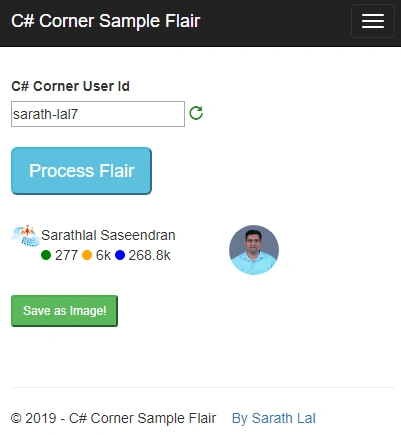
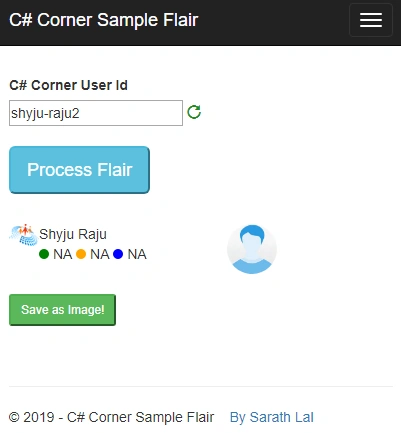

Well, we have completed all the coding part. Now, we can run the application and check the functionalities. If you do not know your user id, please click your user profile and get the value after “members”. Here, my user id is “sarath-lal7”.

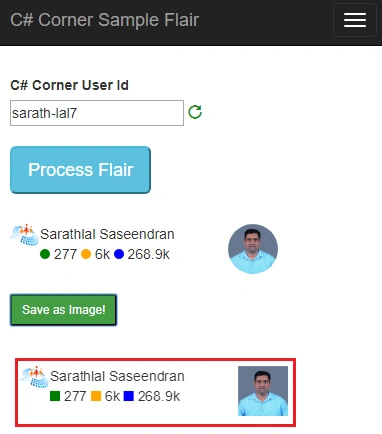
Just right-click the image file and save to your local folder easily.
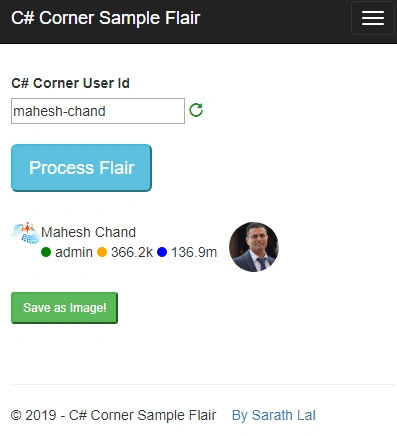
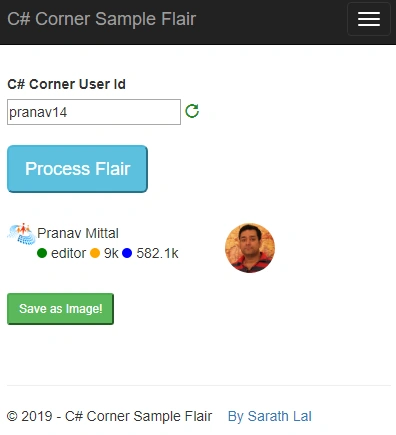
You will not get the user rank usually for editors too. Here also, I take the user type and show it instead of user rank.
Challenges for this application in future
I have made this application based on the current span ids used on the C# Corner website. If the C# Corner team change these values in the future, that may affect the application. We will have to change our code accordingly.
Conclusion
In this post, we have seen how to scrape data from C# Corner profile page for a user and get details like name, user rank, user reputation and user image. We have created a user flair using this data. For that, we used HtmlAgilityPack. We have also provided an option to save the user flair as an image. For that, we used a third-party JavaScript library html2canvas for this.
Rushi MehtaPosted Dec 4, 2019, 2:18 AM
Great Article Share.. It is very useful
Vrushali GhodkePosted Dec 2, 2019, 9:14 AM
Great...thanks for sharing.
Chu DuPosted Dec 2, 2019, 5:05 AM
Thank You so much!.
Arun Kumar SinghPosted Dec 2, 2019, 3:25 AM
We need more article like this
Sundaram SubramanianPosted Dec 2, 2019, 2:31 AM
Hi, Can you please give me an another example, so that I can relate it much.
Sourav Kumar DasPosted Dec 2, 2019, 1:23 AM
Nice article Sir based on MVC Sir.
Prakash ChasiyaPosted Dec 1, 2019, 11:15 PM
Very Nice. Thanks for sharing sir!!
Sourabh SomaniPosted Dec 27, 2018, 11:26 PM
Awesome, I love your approach reading HTML and generating flair. Well this process is quite slow because you are requesting for the web page and you get the infromation from that page which is completly and if We change something in the page it will not work.
Mahesh ChandPosted Dec 27, 2018, 10:54 PM
Nicely done! I think we should open source these kind of projects. What do you guys think of adding an open source section on the site.
Hiten PandyaPosted Dec 27, 2018, 10:31 PM
Superb Article. Thank you so much sir for sharing this.
Abhishek MishraPosted Dec 27, 2018, 9:43 PM
I simply loved and enjoyed reading this. Good one.
Ahsan SiddiquePosted Dec 27, 2018, 8:40 PM
Good Sarathlal...I like it.