

Hello everyone!! In this article I am going to make a simple application based on ASP.NET Web Forms which includes a few server controls such as Calendar control.
To get started,
Follow these steps
Step 1 -
Open your latest version of Visual Studio. Select File, New, then Project to see the following screen.Under the section of Visual C#, click on ASP.NET Empty Web Application. Name it EventApp.
Open your latest version of Visual Studio. Select File, New, then Project to see the following screen.Under the section of Visual C#, click on ASP.NET Empty Web Application. Name it EventApp.
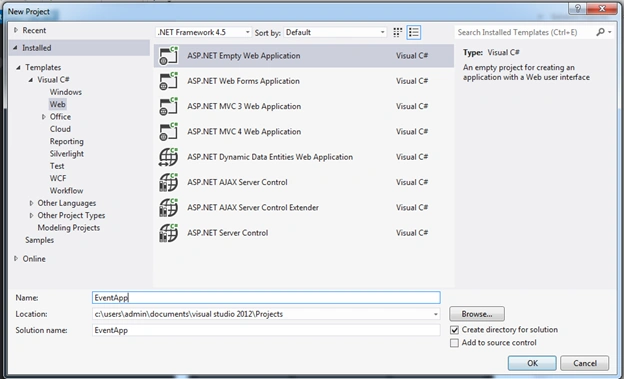
Step 2 -
Click on OK Button to load the project .On the left hand side of the Solution Explorer right click on your project name and add a new Web Form. Name it Event.aspx as follows.
Click on Add button to load the main project.
Step 3 - Add the following code to the Event.aspx page,
- <%@ Page Language="C#" AutoEventWireup="true" CodeBehind="Event.aspx.cs" Inherits="EventApp.Event" %>
- <!DOCTYPE html>
- <html xmlns="http://www.w3.org/1999/xhtml">
- <head runat="server">
- <title></title>
- </head>
- <body>
- <form id="form1" runat="server">
- <div>
- <h1 style="text-align: center;">
- Enter details and set a day to initiate an event.
- </h1> </div>
- <div style="text-align: center;">
- <table style="text-align: left; margin:auto; border-color: #000000;
- border-width: 2px; background-color: #fff99e;" cellspacing="0" cellpadding="8" rules="none" width="540">
- <tr>
- <td valign="top">Your Name:</td>
- <td valign="top">
- <asp:TextBox ID="nameBox" Runat="server" Width="160px" />
- <asp:RequiredFieldValidator ID="validateName"
Runat="server" ErrorMessage="You must enter a name."
ControlToValidate="nameBox" Display="None" /> </td> - <td valign="middle" rowspan="4">
- <asp:Calendar ID="calendar" Runat="server" BackColor="White" /> </td>
- </tr>
- <tr>
- <td valign="top"> Event Name:</td>
- <td valign="top">
- <asp:TextBox ID="eventBox" Runat="server" Width="160px" />
- <asp:RequiredFieldValidator ID="validateEvent" Runat="server"
ErrorMessage="You must enter an event name." ControlToValidate="eventBox" Display="None" /> </td> - </tr>
- <tr>
- <td valign="top"> Meeting Room:</td>
- <td valign="top">
- <asp:DropDownList ID="roomList" Runat="server" Width="160px">
- <asp:ListItem Value="1">The Happy Room</asp:ListItem>
- <asp:ListItem Value="2">The Angry Room</asp:ListItem>
- <asp:ListItem Value="3">The Depressing Room</asp:ListItem>
- <asp:ListItem Value="4">The Funked Out Room</asp:ListItem>
- </asp:DropDownList>
- <asp:RequiredFieldValidator ID="validateRoom" Runat="server"
ErrorMessage="You must select a room." ControlToValidate="roomList" Display="None" /> </td> - </tr>
- <tr>
- <td valign="top"> Attendees:</td>
- <td valign="top">
- <asp:ListBox ID="attendeeList" Runat="server" Width="160px" SelectionMode="Multiple" Rows="6">
- <asp:ListItem Value="1">Bill Gates</asp:ListItem>
- <asp:ListItem Value="2">Steve Jobs</asp:ListItem>
- <asp:ListItem Value="3">Mark Zuckerberg</asp:ListItem>
- <asp:ListItem Value="4">William Hewlett</asp:ListItem>
- <asp:ListItem Value="5">Bob Packard</asp:ListItem>
- <asp:ListItem Value="6">Larry Page</asp:ListItem>
- </asp:ListBox>
- <asp:RequiredFieldValidator ID="validateAttendees" Runat="server"
ErrorMessage="You must have at least one attendee." ControlToValidate="attendeeList" Display="None" /> </td> - </tr>
- <tr>
- <td align="center" colspan="3">
- <asp:Button ID="submitButton" Runat="server" Width="100%"
Text="Submit meeting room request" onclick="submitButton_Click" /> </td> - </tr>
- <tr>
- <td align="center" colspan="3">
- <asp:ValidationSummary ID="validationSummary" Runat="server"
HeaderText="Before submitting your request:" /> </td> - </tr>
- </table>
- </div>
- <table>
- <tr>
- <td height="50"></td>
- </tr>
- </table>
- <table style="text-align: left; margin:auto; border-color: #000000;
- border-width: 2px; background-color:lightgoldenrodyellow;" cellspacing="0" cellpadding="8" rules="none" width="540">
- <tr>
- <td>
- <p style="text-align:center;"> Results:
- <asp:Label Runat="server" ID="resultLabel" Text="None." /> </p>
- </td>
- </tr>
- </table>
- </form>
- </body>
- </html>
- using System;
- using System.Collections.Generic;
- using System.Linq;
- using System.Web;
- using System.Web.UI;
- using System.Web.UI.WebControls;
- public partial class _Default: System.Web.UI.Page
- {
- protected void Page_Load(object sender, EventArgs e)
- {
- if (!this.IsPostBack)
- {
- calendar.SelectedDate = DateTime.Now;
- }
- }
- protected void submitButton_Click(object sender, EventArgs e)
- {
- if (this.IsValid)
- {
- resultLabel.Text = roomList.SelectedItem.Text + " has been booked on " +
calendar.SelectedDate.ToLongDateString() + " by " + nameBox.Text + " for " + eventBox.Text + " event. "; - foreach(ListItem attendee in attendeeList.Items)
- {
- if (attendee.Selected)
- {
- resultLabel.Text += attendee.Text + ", ";
- }
- }
- resultLabel.Text += " and " + nameBox.Text + " will be attending.";
- }
- }
- }
Step 5 - Save the project and build it to see the following output,
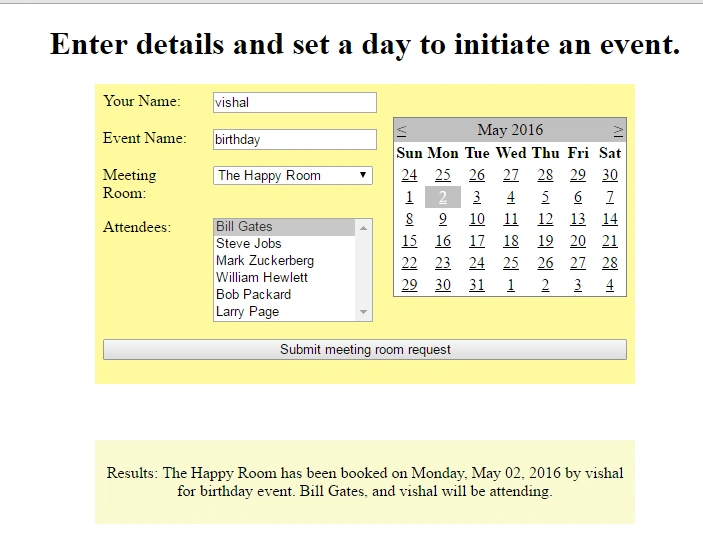
Nilesh ShahPosted Jan 20, 2017, 5:02 PM
By the title I thought it will be an app as it says "create App", anyways nice article though
SubashPosted Nov 7, 2016, 7:51 PM
Nice one sir if the Attendees load form backend it will more useful
Sr KarthigaPosted May 6, 2016, 3:45 AM
good one
Kuppurasu NagarajPosted May 5, 2016, 1:07 PM
Nice Sharing..