

Introduction
This is a simple application for beginners that shows how to format a web form using HTML 5 and CSS tools. We know that HTML 5 is the advanced version of HTML. Basically, HTML 5 can be used to develop 3D applications. This article is intended to help with the use of HTML5 tools to format web form applications. CSS is the acronym for Cascading Style Sheet that is used for design. CSS defines how HTML elements are to be displayed. The <section> tag defines sections in a document. Such as chapters, headers, footers, or any other sections of the document. I hope this article helps to develop a format of a web form using HTML 5 and CSS tools.
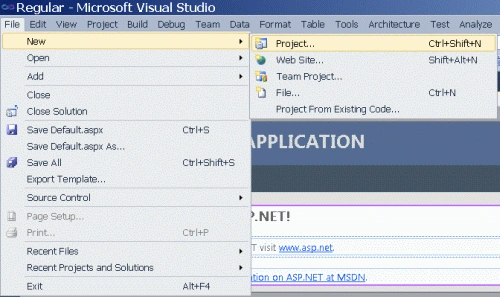
Step 1: Open Visual Studio.
- Go to file -> New->Projects.
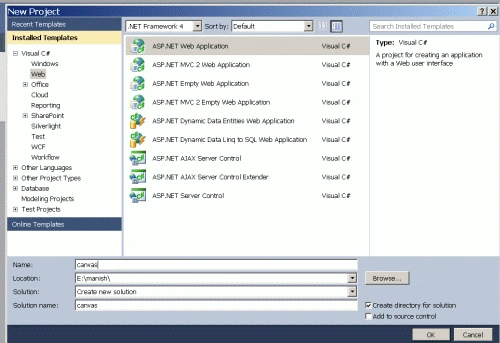
- Create an ASP. NET Web Application.
- Name of "Page.aspx".
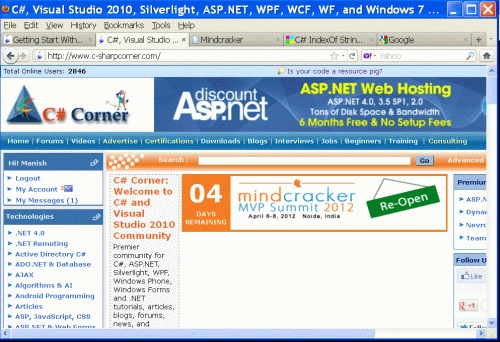
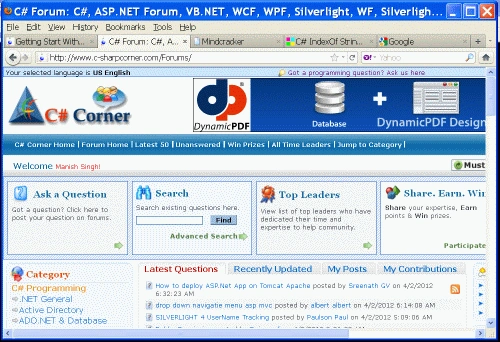
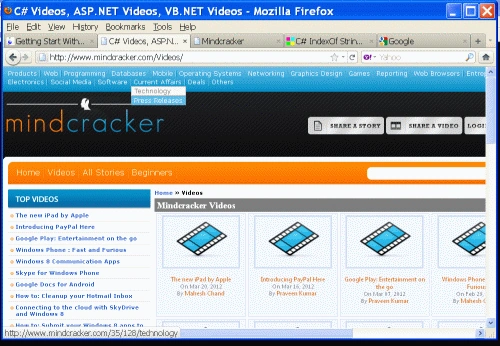
When the user clicks a header menu such as Home or Forums, a new window is opened.
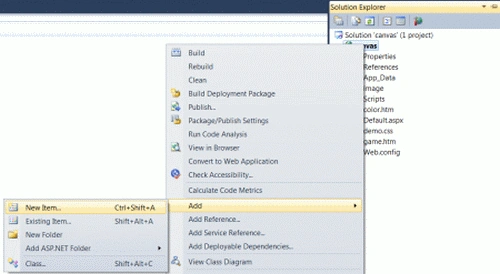
- Right-click on the Solution Explorer.
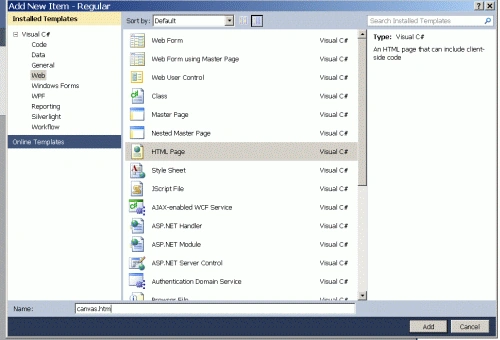
- Add->add new item->HTML form.
- The Name of the HTML form is "Form.html".
Code
- <style>
- body { margin: 0 auto; width:655px;background-color:Gray; }
- sec { display: block; }
- sec#art { width: 440px; float: left; padding: 10px; background-color:Silver; }
- art > header { text-decoration: underline; margin-bottom: 10px; background-color:Aqua;}
- Asi { float: left; width: 100px; padding: 10px; }
- footer { overflow: hidden; clear: both; text-align: center; padding: 20px; }
- N li { float: left; width: 100px; text-align:center; padding: 10px; color:Lime; }
- N ul { list-style: none; overflow: hidden; padding: 0; margin: 0; background-color: #424242; }
- a { color:Fuchsia; }
- N li a { color:Red; }
- </style>
Step 4: In this section, we set a title of menu and set a link of a menu.
Code
- <N>
- <ul style="background-color: Purple">
- <li><a href="http://www.c-sharpcorner.com/" style="background-color: #66FFFF">
- <h2>
- Home</h2>
- </a></li>
- <li><a href="http://www.c-sharpcorner.com/Forums/">
- <h2>
- Fourms</h2>
- </a></li>
- <li><a href="http://www.c-sharpcorner.com/Media/ContactUs.aspx">
- <h2>
- Adverties</h2>
- </a></li>
- <li><a href="http://www.c-sharpcorner.com/Downloads/">
- <h2>
- Downlodes</h2>
- </a></li>
- </ul>
- </N>
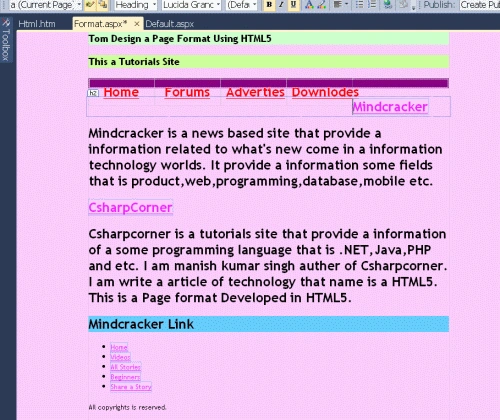
Code
- <sec id="arts">
- <art>
- <header>
- <h2>
- <a href="http://www.mindcracker.com/">Mindcracker</a></h2>
- </header>
- <h2>
- Mindcracker is a news based site<sec>
- that provide a information related to what's new come in a information
- technology worlds.
- It provide a information some fields that is
- product,web,programming,database,mobile etc.
- </sec>
- </h2>
- </art>
- <art>
- <header>
- <h2>
- <a href="http://www.c-sharpcorner.com/">CsharpCorner</a></h2>
- </header>
- <sec>
- <h2>
- Csharpcorner is a tutorials site that provide a information of a some programming
- language that is .NET,Java,PHP and etc. I am manish kumar singh auther of Csharpcorner.
- I am write a art of technology that name is a HTML5. This is a Page format Developed
- in HTML5.
- </sec>
- </h2>
- </art>
- </sec>
Step 6: In this section, we set a link of a side menu title.
Code
- <Asi>
- <h2 style="background-color: #66CCFF">
- Top links</h2>
- <ul>
- <li><a ref="external" href="http://www.mindcracker.com/">Home</a></li>
- <li><a ref="external" href="http://www.mindcracker.com/Videos/">Videos</a></li>
- <li><a ref="external" href="http://www.mindcracker.com/Story/">All Stories</a></li>
- <li><a ref="external" href="http://www.mindcracker.com/Beginners/">Beginners</a></li>
- <li><a ref="external" href="http://www.mindcracker.com/UserRegistration/LoginCheck.aspx?ReturnURL=/story/createstory.aspx">
- Share a Story</a></li>
- </ul>
- </Asi>
Step 7: Press "Ctrl+F5" to run the application in a browser.
Output
This is a format of a web form.

When the user clicks a header menu such as Home or Forums, a new window is opened.
Here are some useful resources:
Join the conversation! Your thoughts help the community grow.