

In my previous article, we saw how to create a RDLC Report in ASP.Net using Visual Studio Report Designer. If you missed that, visit the following link:
You have seen that in the previous example, we haven't provided even a single line of code. In this article, we will create a RDLC Report using a DataSet and use a few lines of code to fill the DataSet with data and use that DataSet as a ReportDataSource. For demonstration, I have created a database (named Sample) and created a table tbl_Employee in it. The following is the table design for creating tbl_Employee.

Add some records to tbl_Employee. I have attached the script of the database along with the source code for download.
Let's Begin
1. Create a new website.
2. Right-click on Website then select Add New Item then select DataSet.

3. You will see Empty DataSet. Right-click on the DataSet then go to Add then select DataTable.
2. Right-click on Website then select Add New Item then select DataSet.
3. You will see Empty DataSet. Right-click on the DataSet then go to Add then select DataTable.

4. Right-click on DataTable and add the column's name. The column name must match the name of the column added in the the tbl_Employee.

Set the DataType of each column the same as declared in tbl_Employee. Save the DataSet (in other words dsEmployee).

5. Right-click on Website then select Add new item then select Report Wizard then click on Add.

6. Now the Report Wizard opens. Select the DataSource as Dataset (in other words dsEmployee).

7. Drag and drop the required fields from the Available fields into the Values section.

Click on "Next" because we didn't want to display a subtotal in our report.

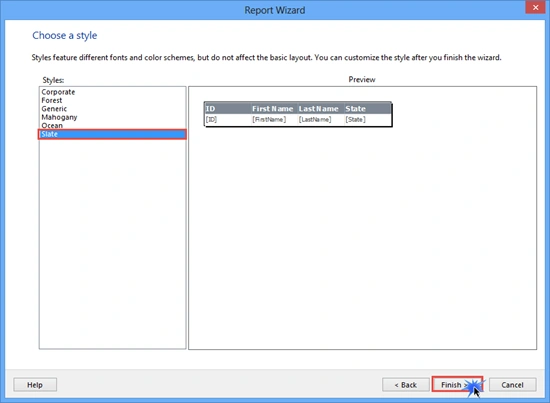
8. Choose a style for your report then click on "Finish". I have selected Slate as the style for my report.


Venky SPosted Jun 23, 2022, 2:04 AM
HI Anoop if we have 2 datasets from a store proc. How do I say instead of this dsemp.Tables[0]. The store proc gives two result sets as the output and both are used in the report
Darshan BalarPosted Oct 12, 2020, 5:23 AM
This code is perfectly work on local pc But when i publish so unable to fill data in rdlc report please help
mahesh wabalePosted Aug 30, 2019, 10:51 PM
Hi Anoop, Very Good article, I have uses same stems which u have wrote. only you need to add two line after this code below are the lines this.reportViewer1.LocalReport.Refresh(); this.reportViewer1.RefreshReport();
Fahim BhuiyanPosted Jan 9, 2018, 2:07 AM
Anoop Create RDLC Report Using DataSet in ASP.Net is a effective article you done!
Mrinmoy RoyPosted Feb 19, 2016, 7:31 AM
thanks
Anoop Kumar SharmaPosted Dec 8, 2015, 10:40 AM
Thanks Manoj Kalla..!!
Manoj KallaPosted Dec 8, 2015, 8:19 AM
Short and Sweet, Great
Murali krishnaPosted Nov 6, 2015, 6:57 AM
hi how to print directly
Vincent OnyinyePosted Aug 26, 2015, 2:08 PM
Nice work, but does it work only on internet explorer browser?
madhuri GamanePosted Jul 23, 2015, 3:35 AM
working... but how to print directly ??
Anoop Kumar SharmaPosted Dec 27, 2014, 4:49 AM
Thanks Jitendra Kumar
Jitendra KumarPosted Dec 27, 2014, 4:19 AM
Nice one..