

We can use JSOM for creating custom SharePoint groups and assign permissions to groups in SharePoint 2013. I’ll explain the basics of this using CEWP and jQuery. This script can be used in SharePoint Online, SharePoint App and Farm solutions with ease.
Prerequisites: User/App must have full control on site.
Solution:
- Create a web part page in your SharePoint 2013 or Office 365 SharePoint Site.
- Add Content Editor web part on the page.
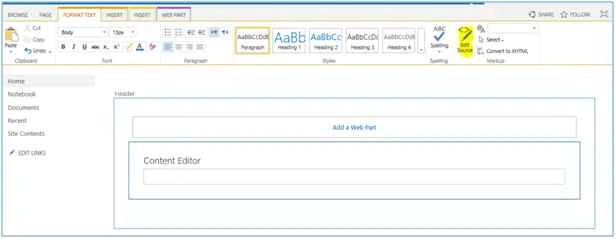
- Edit ‘HTML Source’ of content editor web part and copy the following html and hit OK.
- <script src="https://ajax.googleapis.com/ajax/libs/jquery/1.11.1/jquery.min.js"></script>
- <script src="/_layouts/15/sp.js" type="text/javascript"></script>
- <script src="/_layouts/15/SP.RequestExecutor.js" type="text/javascript"></script>
- <script src="/_layouts/15/SP.search.js" type="text/javascript"></script>
- <script type="text/javascript">
- $(function() {
- $('#btnCreateCustomGroup').click(btnCreateCustomGroup_Click);
- });
- function btnCreateCustomGroup_Click() {
- var grpName = "DSAuditors"
- var grpDesc = "Auditors custom group with edit access";
- var grpRole = "Edit";
- var appweburl = _spPageContextInfo.siteAbsoluteUrl;
- var clientContext = new SP.ClientContext(appweburl);
- CreateCustomGroup(clientContext, grpName, grpDesc, grpRole, true, false, true,
- function success() {
- alert("Successfully created group: " + grpName);
- },
- function fail(src, info) {
- alert("Failed to create group: " + grpName + ". " + info.get_message());
- });
- }
- function CreateCustomGroup(context, name, desc, roleName, canMembersEdit, visibleToMembersOnly, addCurrentUser, success, fail) {
- var web = context.get_web();
- //Get all groups in site
- var groupCollection = web.get_siteGroups();
- // Create Group information for Group
- var newGRP = new SP.GroupCreationInformation();
- newGRP.set_title(name);
- newGRP.set_description(desc);
- var currentUser = web.get_currentUser();
- context.load(currentUser);
- context.load(web, 'Title', 'HasUniqueRoleAssignments');
- context.executeQueryAsync(function() {
- if (!web.get_hasUniqueRoleAssignments()) {
- web.breakRoleInheritance(true, false);
- }
- //add group to site gorup collection
- var newCreateGroup = groupCollection.add(newGRP);
- //Role Definition
- var rolDef = web.get_roleDefinitions().getByName(roleName);
- var rolDefColl = SP.RoleDefinitionBindingCollection.newObject(context);
- rolDefColl.add(rolDef);
- // Get the RoleAssignmentCollection for the target web.
- var roleAssignments = web.get_roleAssignments();
- // assign the group to the new RoleDefinitionBindingCollection.
- roleAssignments.add(newCreateGroup, rolDefColl);
- //Set group properties
- newCreateGroup.set_allowMembersEditMembership(canMembersEdit);
- newCreateGroup.set_onlyAllowMembersViewMembership(visibleToMembersOnly);
- //add currect user to group
- if (addCurrentUser) {
- newCreateGroup.get_users().addUser(currentUser);
- }
- newCreateGroup.update();
- context.load(newCreateGroup);
- //Execute Query
- context.executeQueryAsync(success, fail);
- }, fail);
- }
- </script>
- <div>
- <h1>Create SharePoint Group </h1>
- <br/>
- <input id="btnCreateCustomGroup" type="button" value="Create SPGroup" />
- </div>
- Web part page will be displayed like the following screenshot:
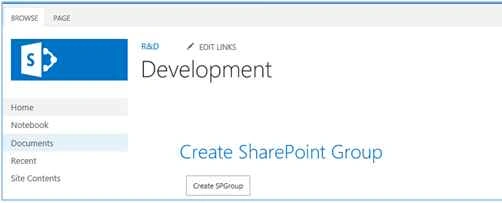
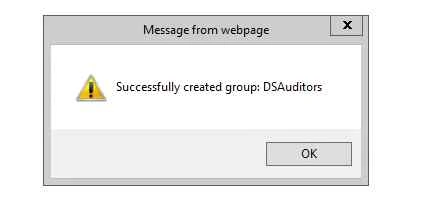
- Click on ‘Create SPGroup’ button to create a SharePoint group ‘DSAuditors’ with ‘Edit’ permission. It would display success/fail message.
JS explained
JS starts with required script references (jQuery, sp.js etc.). In document ready, button click event is associated to the button. Function btnCreateCustomGroup_Click get the client context and calls function createCustomGroups; which accepts various group properties as parameter.
Robbie MarianoPosted Sep 25, 2017, 8:42 PM
Wow thanks nice share
Saineshwar BageriPosted Sep 25, 2015, 8:35 AM
Nice one
Harshad PansuriyaPosted Sep 23, 2015, 8:26 AM
Nice One
Sibeesh VenuPosted Sep 23, 2015, 3:05 AM
Nice Share
Ankit BansalPosted Sep 23, 2015, 1:51 AM
thanks for sharing..
Sujeet SumanPosted Sep 23, 2015, 1:08 AM
Nice Article................
Jacob RobinsonPosted Sep 23, 2015, 12:22 AM
Good One..
Karthikeyan KPosted Sep 22, 2015, 11:16 PM
Nice One..
Santhakumar MunuswamyPosted Sep 22, 2015, 3:01 PM
Thanks for nice share
Rajeesh MenothPosted Sep 22, 2015, 2:06 PM
Nice One..
Pankaj Kumar ChoudharyPosted Sep 22, 2015, 1:35 PM
Nice Explain Sir......
Gopi ChandPosted Sep 22, 2015, 1:27 PM
Its nice one :)