

Creation process
1. Create a tag handler: Tag handler is a class to contain logic for the tag. Whenever a JSP uses the tag then an instance of this class is created. This class may contain some variables to represent attributes of the tag. This class contains different methods to execute the logic on start or end of the tag. The class can be created using the following steps.
- Create a class by inheriting javax.servlet.jsp.tagext.tagsupport class
- Provide variables to represent attributes of the tag.
- Provide setter methods for each of the variables to modify value of the variables.
- Override methods of tag support class to implement logic for the tag.
For the starting tag the method is public int doStartTag()
For the ending tag the method is public int doEndTag()
Both these methods return a constant to specify the nature of the tag.
- Create an object of javax.servlet.jsp.JspWriter using the getout method of the pagecontext object. Use write of JspWriter to print the required lines of HTML tags into the starting tag or ending tag.
- Keep this class in a package and the package folder must be available inside classes folder.
- Use Jsp-api.jar in classpath to compile the file
//tag handler
package mytags;
import javax.servlet.jsp.*;
import javax.servlet.jsp.tagext.*;
import java.sql.*;
public class table extends TagSupport
{
public String tname;
//to modify the variable--setter method
public void setTname(String un)
{
tname=un;
}
public int doStartTag() throws JspException
{
try{
JspWriter out=pageContext.getOut();
Class.forName("sun.jdbc.odbc.JdbcOdbcDriver");
Connection con=DriverManager.getConnection("jdbc:odbc:mydsn","system","pintu");
Statement stmt=con.createStatement();
ResultSet rs=stmt.executeQuery("select * from "+tname );
out.write("<table height='70%' width='70%' border='1'>");
while(rs.next())
{
String no=rs.getString(1);
String str1=rs.getString(2);
String str2=rs.getString(3);
out.write("<tr><td>"+no+"</td><td>"+str1+"</td><td>"+str2+"</td></tr>");
}
out.write("</table>");
}
catch(Exception ex){ System.out.println(ex);}
return SKIP_BODY;
}
}
Storing the above program
Create a folder named mytags inside the classes folder of the context (E:\tag\WEB-INF\classes\mytags) and store the above program as table.java.Copy jsp-api.jar file from (E:\Program Files\Apache Software Foundation\Tomcat 6.0\lib) and paste it inside mytags folder.
Compiling the above program
javac -cp jsp-api.jar table.java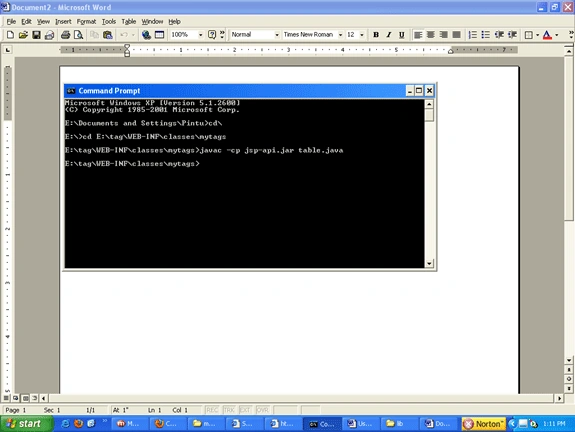
Creation of .tld files
Create a mt.tld file inside WEB-INF folder of the context (E:\tag\WEB-INF)
mt.tld file
<?xml version="1.0" encoding="ISO-8859-1" ?>
<!DOCTYPE taglib
PUBLIC "-//Sun Microsystems, Inc.//DTD JSP Tag Library 1.2//EN"
"http://java.sun.com/j2ee/dtds/web-jsptaglibrary_1_2.dtd">
<!-- a tag library descriptor -->
<taglib>
<tlib-version>2.0</tlib-version>
<jsp-version>2.0</jsp-version>
<short-name>hello</short-name>
<uri>http://javapoint.net/mytags</uri>
<tag>
<name>table</name>
<tag-class>mytags.table</tag-class>
<attribute>
<name>tname</name>
<required>true</required>
<rtexprvalue>true</rtexprvalue>
</attribute>
</tag>
</taglib>
How to use this tld file in JSP
Create a JSP page as display.jsp as below:
<%@ taglib uri="/WEB-INF/mt.tld" prefix="p1" %>
<html>
<body bgcolor="cyan">
<form>
<h2>Table Name<input type="text" name="t1"></h2>
<input type="submit" value="submit">
</form>
<%
String s1=request.getParameter("t1");
if(s1 !=null)
{
%>
<p1:table tname="<%= s1 %>" />
<%
}
%>
</body>
</html>
Running the file
http://localhost:8082/javatag/display.jsp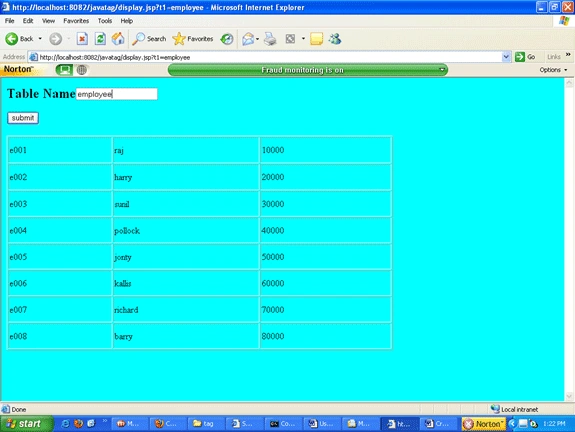
Angelina ErinPosted Aug 1, 2011, 12:44 AM
Useful Article