

What is WCF
WCF is Windows Communication Foundation and we can say it the elder brother of Web Service.
We will create two projects:
- Web Application.
- WCF Service Library.
Note: Within one solution we can create n number of projects and this is the advantage of Solution.
- Create Web Application.
File, New, Project, then ASP.NET Empty Web Application.
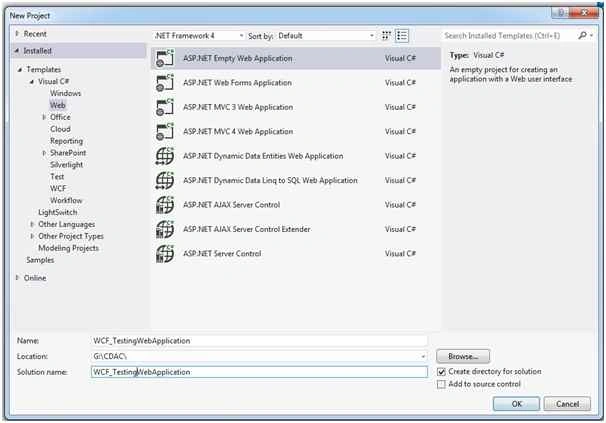
Give the name WCF_TestingWebApplication.
- Create another project of WCF Service Library under same solution.

Give name MyWCFServiceLibrary
- After creating Wcf ServiceLibrary project, You can see default two service base file created:
- IService.cs
- Service1.cs
Delete these two default created service files.
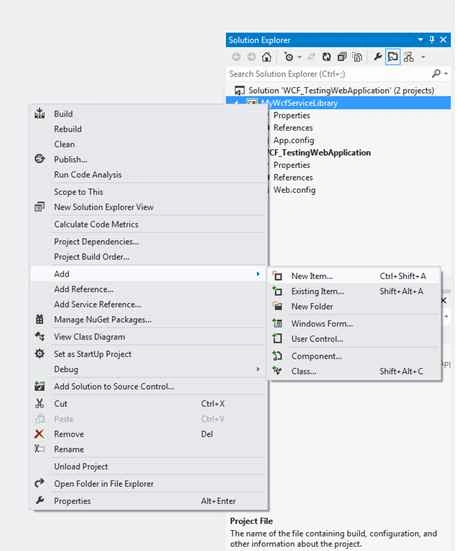
- Now, add new service item. You can add new service by the following,
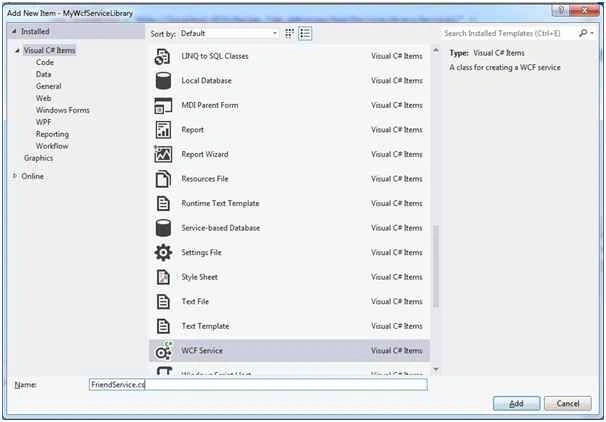
- Select WCF Service item and give name FriendService,
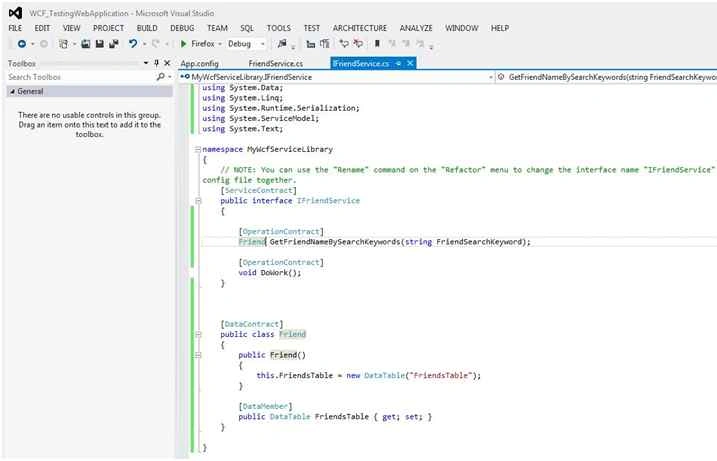
- After creating FriendService you can see two files get created,
- IFriendService.cs: Interface to declare your Service contracts and Data Contracts.
- FriendService.cs: Is a normal class inherited by IFriendService where you can define all the methods and other processes.
- You can see both files having one DoWork() kind of thing. You can comment out or remove or let it be. This is by default.
- Namespace required,
Namespace Functionalities Using System.Data To get ado.net data handling classes. Using System.Data.SqlClient To connect to Microsoft Sql server. Using Systen.Configuration To fetch configuration settings and connectionstrings from app.config. Firstly, give reference of system.configuration.dll. - Now we will define our function name GetFriendNameBySearchKeywords(). Firstly, we have given signature of this function in IFriendService.cs then Implemented in FriendService.cs.
Double click on IFriendService.cs file.
Write the following codes just above DoWork().
In gray color code we define method GetFreindNameBySearchKeywords as per Friend class declaration.- [ServiceContract]
- public interface IFriendService
- {
- [OperationContract]
- Friend GetFriendNameBySearchKeywords();
- [OperationContract]
- void DoWork();
- }
In orange color code we defined implementation of Friend class.- [DataContract]
- public class Friend
- {
- public Friend()
- {
- this.FriendsTable = new DataTable("FriendsTable");
- }
- [DataMember]
- public DataTable FriendsTable
- {
- get;
- set;
- }
- }
- By default WCF service library application give you APP.CONFIG file.
Insert Connection String inside CONFIGURATION tag.
- <connectionStrings>
- <add name="MemberCDACConnectionString" connectionString="Data Source=SAIBABA-PC\SAIBABA;Initial Catalog=MemberCDAC;Integrated Security=True" providerName="System.Data.SqlClient"/>
- </connectionStrings>
- Table structure of tblFriends,
The sample records of tblFriends,- CREATE TABLE [dbo].[tblFriends](
- [FriendID] [int] IDENTITY(1,1)NOT NULL,
- [FriendName] [varchar](50)NULL,
- [FriendImage] [varchar](500)NULL,
- [Place] [varchar](500)NULL,
- [Mobile] [varchar](20)NULL
- )ON [PRIMARY]
- GO
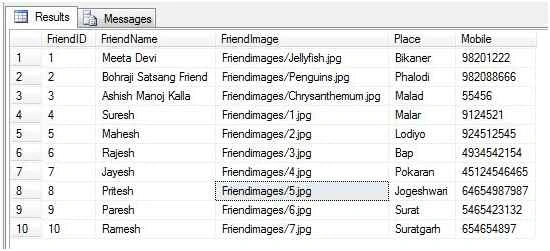
- Now, we implement GetFriendNameBySearchKeywords() method in FriendService.cs.
FriendService.cs, this file inheriting interface file IFreindService.
Here we are implementing our method GetFreindNameBySearchKeywords.
- public class FriendService: IFriendService
- {
- //To fetch connection string from APP.CONFIG file.
- string ConStr = ConfigurationManager.ConnectionStrings["MemberCDACConnectionString"].ConnectionString;
- public Friend GetFriendNameBySearchKeywords(string FriendSearchKeyword)
- {
- //Set connection which feteched from app.config.
- SqlConnection con = new SqlConnection(ConStr);
- //SELECT query to fetch data from ProductsTable
- SqlDataAdapter da = new SqlDataAdapter("Select FriendName From tblFriends Where ProductName Like '%" + FriendSearchKeyword + "%'", ConStr);
- //DataSet is virutual database or data container.
- Friend _friends = new Friend();
- //Fill data inside ds(DataSet) with TableNamed ProductsTable
- da.Fill(_friends.FriendsTable);
- return _friends;
- }
- public void DoWork()
- {}
- }
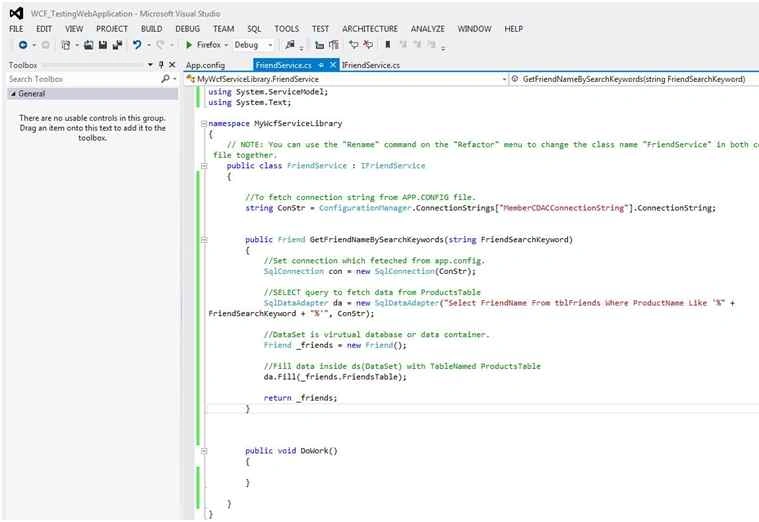
We had completed WCF work, check and build your WCF Service Library project.
If you have any error solve or cannot you can comment I will answer as early as possible.
Implementing WCF Service in WCF_TestingWebApplication
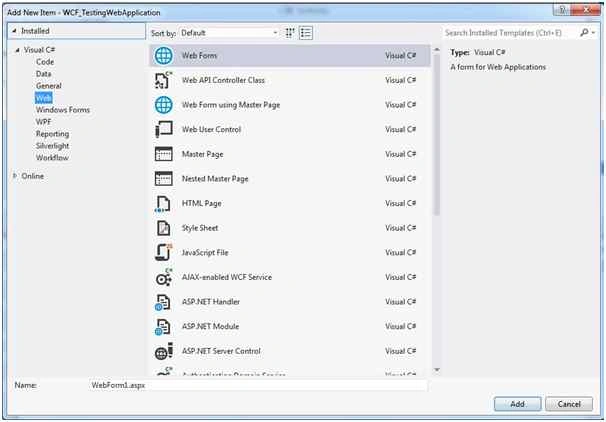
Switch to WCF_TestingWebApplication and add new WebForm1.aspx
- For adding new WebForm1.aspx.
Right click on project Add - New Item, then write the name WebForm1,
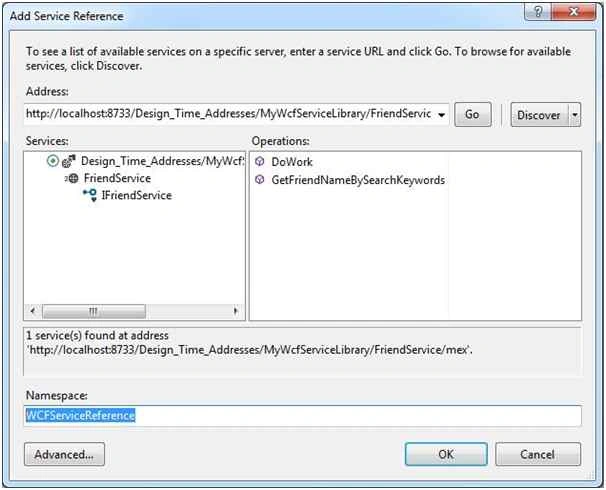
- Right click on WCF project and select Add Service Reference,
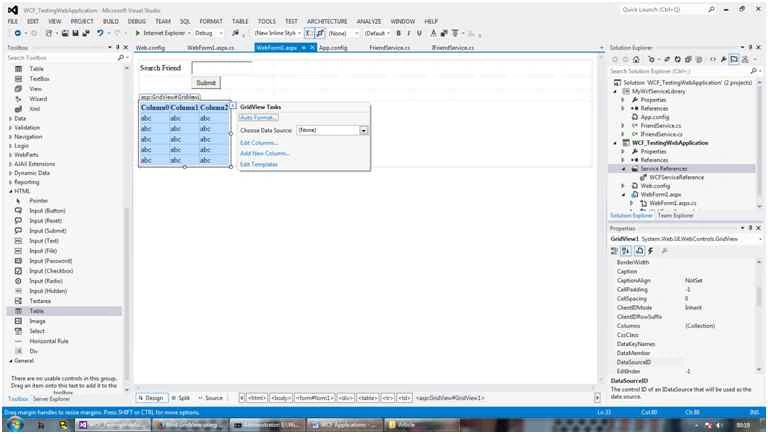
- Now switch back to WebForm1.ASPX page, drag and drop HTML TABLE from TOOL BOX.
Note: HTML toolbox of controls located at bottom of toolbox.
Add the following controls as per charts.
CONTROL TYPE CONTROL ID DESCRIPTION TextBox txtFriendSearchKeyword To enter member name. Button btnSubmit Button to submit data. GridView gvMember Gridview to display data.
Set following settings from properties:
AutoGenerateSelectButton="True" Width="100%"Drag and Drop above mentioned controls from TOOLBOX after HTML table. - Click on GridView Smart Tag, click AutoFormat and select BrownSugar.
- WebForm1.aspx file code
- <%@ Page Language="C#" AutoEventWireup="true" CodeBehind="WebForm1.aspx.cs" Inherits="WCF_TestingWebApplication.WebForm1" %>
- <!DOCTYPE html>
- <html xmlns="http://www.w3.org/1999/xhtml">
- <head runat="server">
- <title></title>
- <style type="text/css">
- .auto-style1 {
- text-align: center;
- }
- .auto-style2 {
- width: 170px;
- }
- .auto-style3 {
- width: 104px;
- }
- </style>
- </head>
- <body>
- <form id="form1" runat="server">
- <div>
- <table style="width:100%;">
- <tr>
- <td class="auto-style3">Search Friend</td>
- <td class="auto-style2">
- <asp:TextBox ID="txtFriendSearchKeyword" runat="server" Height="22px"></asp:TextBox>
- </td>
- <td> </td>
- </tr>
- <tr>
- <td class="auto-style1" colspan="2">
- <asp:Button ID="btnFriend" runat="server" Text="Submit" OnClick="btnFriend_Click" />
- </td>
- <td> </td>
- </tr>
- <tr>
- <td class="auto-style3"> </td>
- <td class="auto-style2"> </td>
- <td> </td>
- </tr>
- <tr>
- <td colspan="3">
- <asp:GridView ID="GridView1" runat="server" BackColor="#DEBA84" BorderColor="#DEBA84" BorderStyle="None" BorderWidth="1px" CellPadding="3" CellSpacing="2" Width="100%">
- <FooterStyle BackColor="#F7DFB5" ForeColor="#8C4510" />
- <HeaderStyle BackColor="#A55129" Font-Bold="True" ForeColor="White" />
- <PagerStyle ForeColor="#8C4510" HorizontalAlign="Center" />
- <RowStyle BackColor="#FFF7E7" ForeColor="#8C4510" />
- <SelectedRowStyle BackColor="#738A9C" Font-Bold="True" ForeColor="White" />
- <SortedAscendingCellStyle BackColor="#FFF1D4" />
- <SortedAscendingHeaderStyle BackColor="#B95C30" />
- <SortedDescendingCellStyle BackColor="#F1E5CE" />
- <SortedDescendingHeaderStyle BackColor="#93451F" /> </asp:GridView>
- </td>
- </tr>
- </table>
- </div>
- </form>
- </body>
- </html>
- WebForm1.aspx.cs file code:
- using System;
- using System.Collections.Generic;
- using System.Linq;
- using System.Web;
- using System.Web.UI;
- using System.Web.UI.WebControls;
- using WCF_TestingWebApplication.WCFServiceReference;
- namespace WCF_TestingWebApplication
- {
- public partial class WebForm1: System.Web.UI.Page
- {
- FriendServiceClient _friendclient = new FriendServiceClient();
- protected void Page_Load(object sender, EventArgs e)
- {
- if (!IsPostBack)
- {
- GridView1.DataSource = _friendclient.GetFriendNameBySearchKeywords("NULL")
- .FriendsTable;
- GridView1.DataBind();
- }
- }
- protected void btnFriend_Click(object sender, EventArgs e)
- {
- GridView1.DataSource = _friendclient.GetFriendNameBySearchKeywords(txtFriendSearchKeyword.Text)
- .FriendsTable;
- GridView1.DataBind();
- }
- }
- }
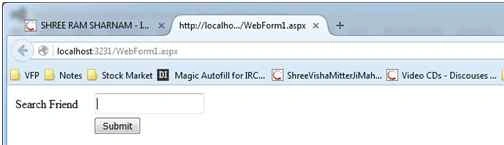
- When you press F5 your WebForm1 view will be like the following,
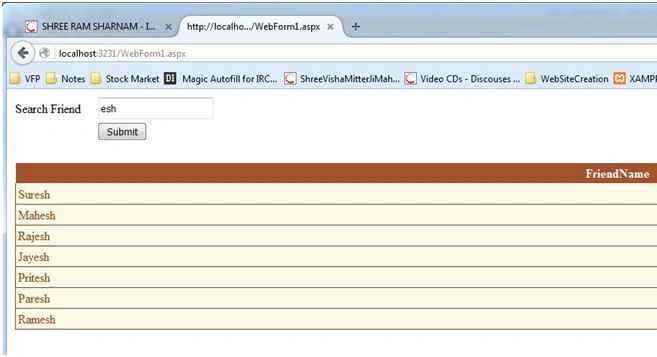
- Now, we can search friend(s).
Thank you, our task completed.
Rithik MarshallPosted Feb 25, 2016, 5:46 PM
I thought just because i Dint build the WCFservicelibrary i'm not getting the reference. so when i build WCFservicelibrary i'm getting the following error.......... 'MyWCFServiceLibrary.FriendService' does not implement interface member 'MyWCFServiceLibrary.IFriendService.GetFriendNameBySearchKeywords()'
Rithik MarshallPosted Feb 25, 2016, 5:42 PM
Kindly help me out
Rithik MarshallPosted Feb 25, 2016, 5:41 PM
While building the WCF Webservice I'm struck at this step ..........2.Right click on WCF project and select Add Service Reference,"I'm not able to add service reference" it show no path to add from. I tried using the same path even in the screenshot. even that dint work(obviously!but just gave it a shot)
Santhakumar MunuswamyPosted Dec 22, 2015, 9:07 AM
Thanks for nice article. keep it up
Maruthi PalllamalliPosted Dec 21, 2015, 11:38 AM
What is the advantage of wcf for this task ?
Maruthi PalllamalliPosted Dec 21, 2015, 11:37 AM
you are the life time learner...Keep it up......
Ankur MistryPosted Dec 21, 2015, 2:22 AM
Helpful Article.
Rakesh KalluriPosted Dec 21, 2015, 1:38 AM
Nice Share
Raja TPosted Dec 21, 2015, 1:30 AM
Nice Sir, Thanks for sharing