
In this article, we will learn how to create a first application for Windows Phone 8. In the previous tutorial, we saw How to install Windows Phone 8 SDK.
Let's begin.
Create a new Windows Phone App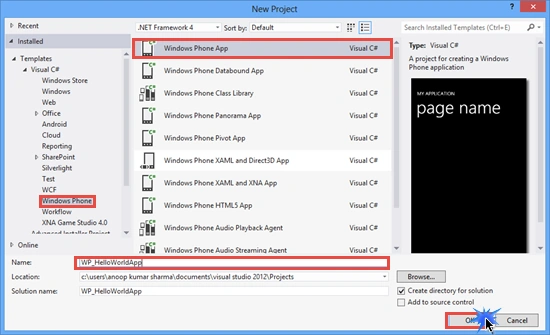
Select Windows Phone OS 8.0 as a target Windows Phone OS for this application and click on OK.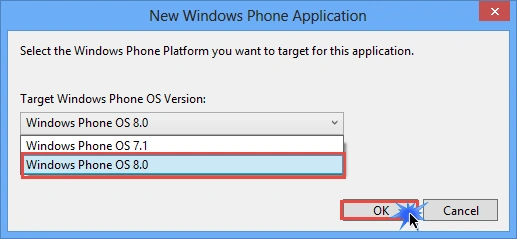
Before starting, let's have a look at the project structure. In Solution Explorer, you will see the structure of the project as in the following: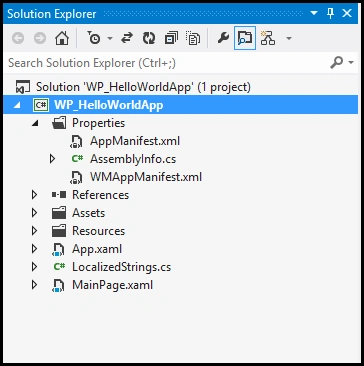
A Windows Phone Project contains Properties, References, Assetts, Resources, App.xaml, MainPage.xaml and a few additional files. WMAppManifest.xml contains metadata for the application and plays an important role in Windows Phone App validation and certification. The Assets folder contains graphics and icons for the application. The Resources folder contains the file that is used for Localization. The App.xaml file is the starting point of the Windows Phone Application and controls the initializing of the application. MainPage.xaml is the main page that is displayed after launching the application.
Let's change the name of the application and the title of the page. Go to the MainPage.xaml file and change the Text property of the TextBlock control.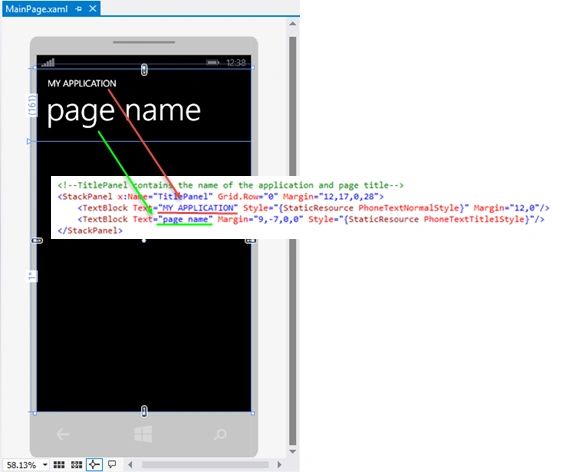
I have changed application title to My First Application and Page Title to Hello World.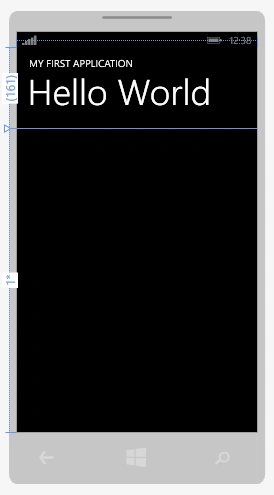
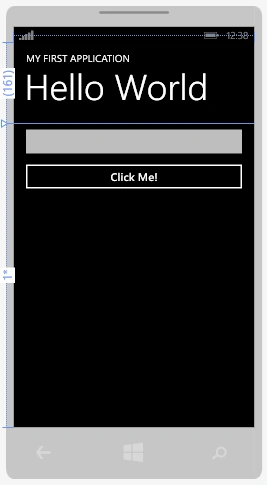
Find the Grid named ContentPanel in the MainPage.xaml code and add a TextBox and Button control in it.

Create Your First Windows Phone 8 Application
Join the conversation! Your thoughts help the community grow.
Sign in to leave a comment
It is the same account you read, post and publish with — and you will come straight back to this page.


SubashPosted Mar 15, 2017, 12:10 AM
How can we use this app in real windows mobile
Anoop Kumar SharmaPosted May 23, 2015, 11:04 AM
Thanks! Santhakumar Munuswamy and Nitin Tyagi
NitinPosted May 23, 2015, 8:59 AM
good one
Santhakumar MunuswamyPosted May 21, 2015, 2:59 PM
Thanks for nice article
Anoop Kumar SharmaPosted May 21, 2015, 1:03 PM
Thanks! Abhishek Jaiswal :) and stay tuned for more..!! :-)
Abhishek JaiswalPosted May 21, 2015, 9:23 AM
Good one. I'll look forward for some more articles on Win Phn8 application. :)
Rahul Kumar SaxenaPosted May 21, 2015, 5:33 AM
Good Show..
Anoop Kumar SharmaPosted May 21, 2015, 5:11 AM
Thanks Abhishek Kumar Ravi..!! :-)
Abhishek Kumar RaviPosted May 21, 2015, 3:08 AM
Nice Start Anoop :)
Anoop Kumar SharmaPosted May 21, 2015, 1:30 AM
Thanks Upendra Pratap Shahi..!!
Upendra Pratap ShahiPosted May 21, 2015, 1:18 AM
nice dude...