
Introduction:
The objective of this article is to create a WCF service that retrieves data from the database using LINQ to SQL classes and a Windows Phone 7 application that consumes that service to display the data.
The article contains three main parts:
- Creating the database
- Creating the WCF Service
- Creating the Windows Phone 7 application that consumes the WCF service
Creating the Database:
The following steps have been followed to create the database.
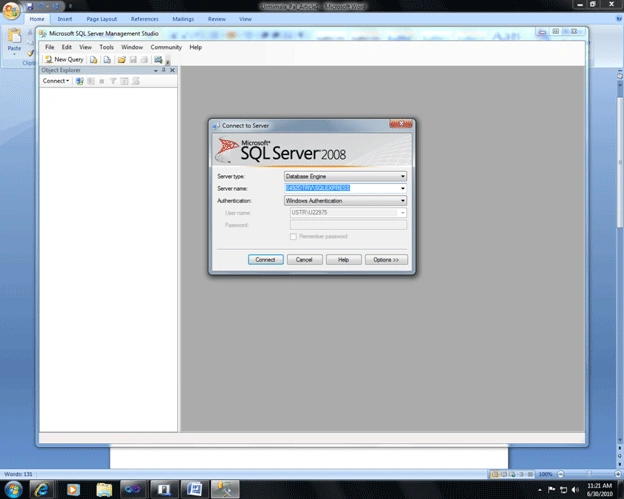
- Open the SQL Server Management Studio and connect to the server.
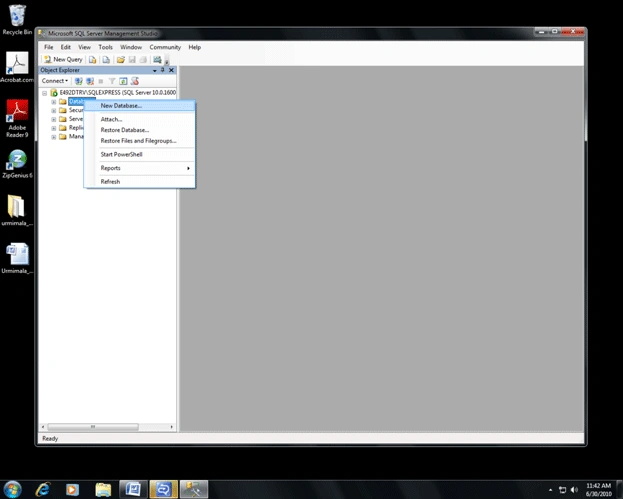
- Create a new database as shown below. (Right Click on the Database and select New Database)
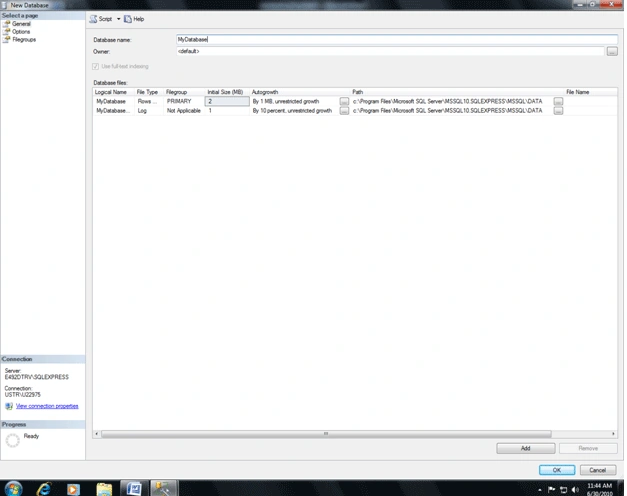
- Give a name to the database (Here I have given the name as MyDatabase) and click OK.
- Now we can see our database (MyDatabase).

- Now create a new table as shown below. (Right Click on table and select New Table)

- We have created a table that contains four columns
- EmpID (Primary Key) [nchar(10)]
- EmpFirstName [nvarchar(50)]
- EmpLastName [nvarchar(50)]
- PhoneNo [numeric(10,0), Allow null]
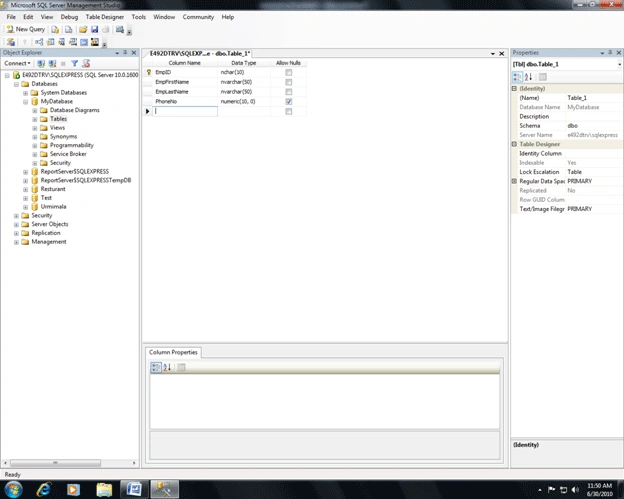
Save the table (ctrl+s) and give it a name (In our case, it is MyEmployee)
- Now some data are added to the table.
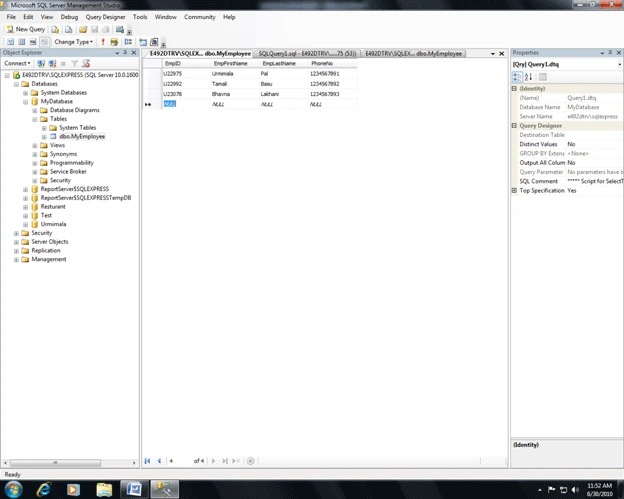
Now we have created our database.
Creating the WCF Service
We have followed the steps given below to create the WCF Service.
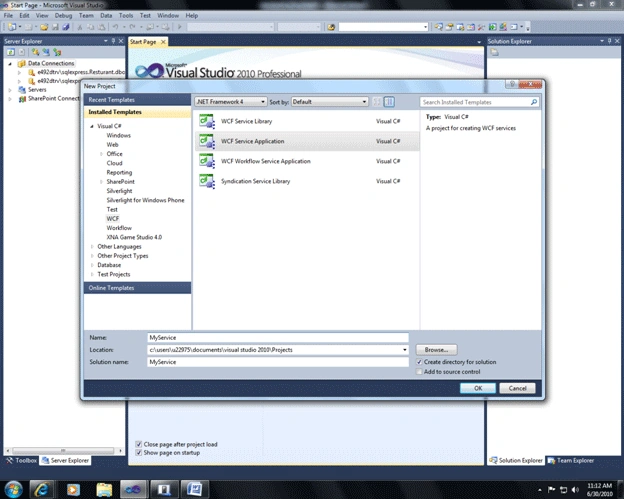
- Open the Visual Studio 2010 & create a new WCF Service Application. (In our case, the name of the WCF service is MyService)
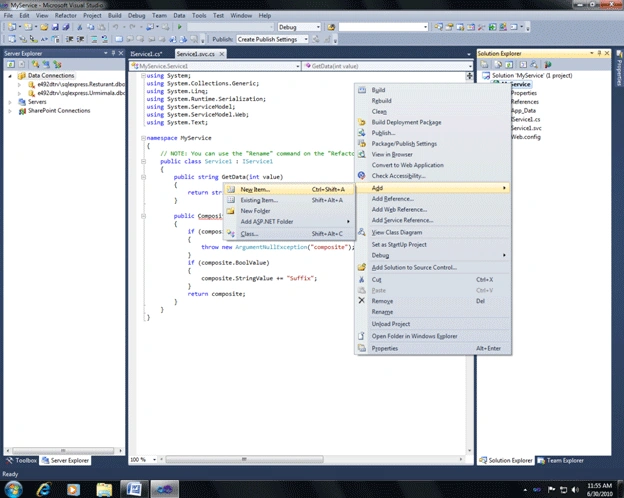
- Right Click on the project name and then add a new item.
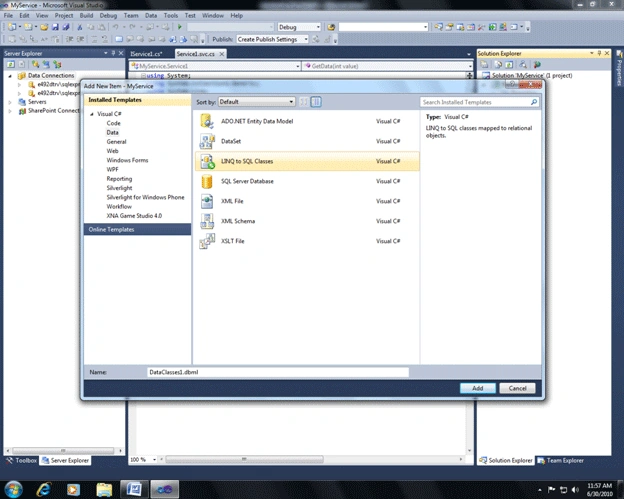
- Now add a LINQ to SQL class to the project.
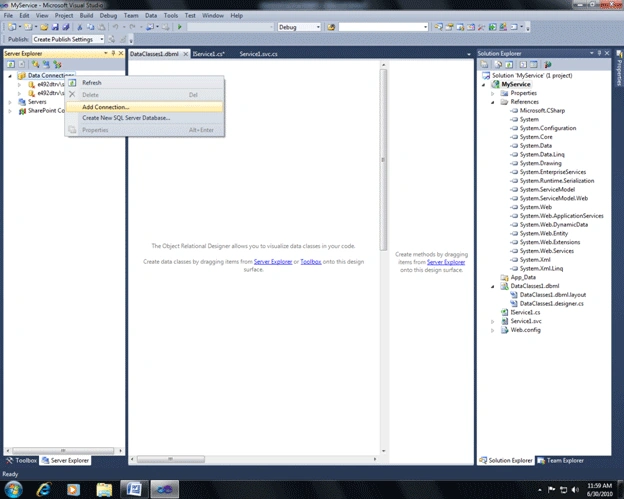
- Now go to server explorer and add a new data connection. (Right click on Data Connection and select Add Connection)
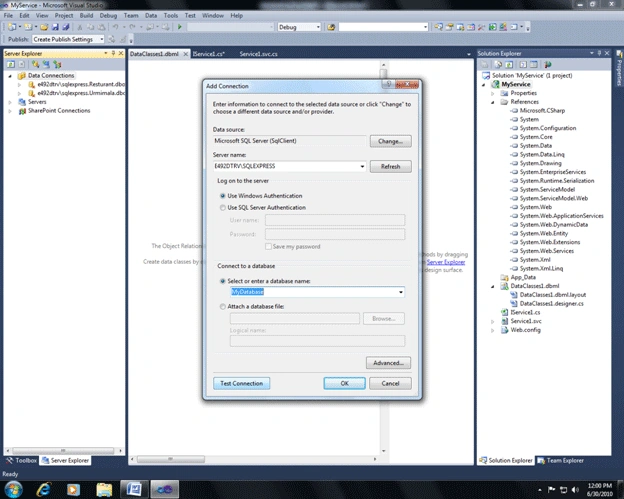
- Give the server name, select the database and click test connection. Then click OK.
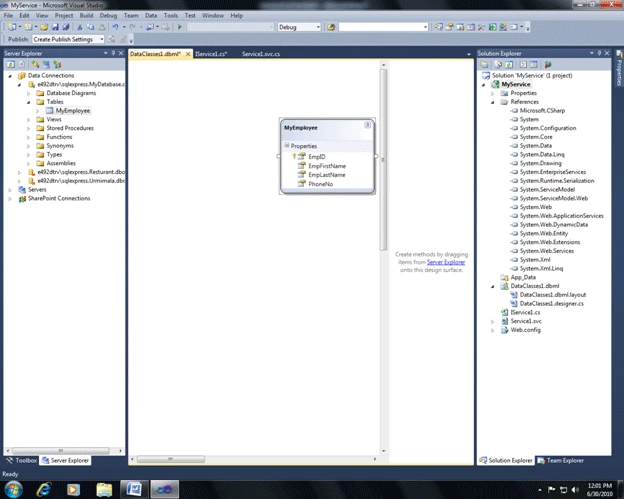
- Now from server explorer select your database and table and drag the table to the middle pane.
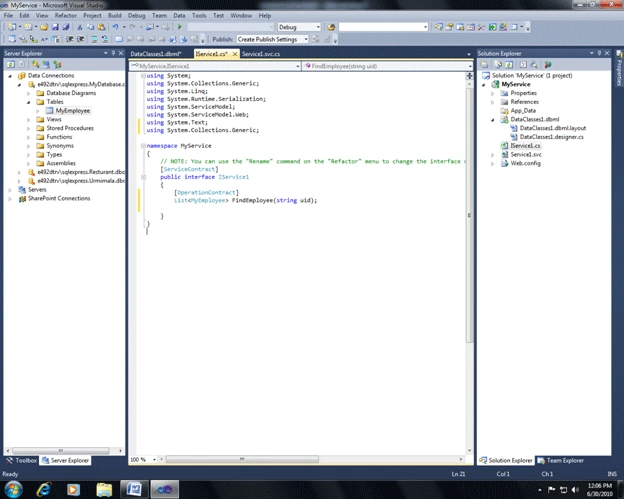
- Now open the IService1.cs and delete all the default codes. Write down the following code there. I have explained the code later.
using System;
using System.Collections.Generic;
using System.Linq;
using System.Runtime.Serialization;
using System.ServiceModel;
using System.ServiceModel.Web;
using System.Text;
using System.Collections.Generic;
namespace MyService
{
[ServiceContract]
public interface IService1
{
[OperationContract]
List<MyEmployee> FindEmployee(string uid);
}
}
Explanation of the code :
The interface Iservice1 is the service contract of our WCF service. We have declared only one function (FindEmployee) as our operation contract. This function takes a string as an argument (which is the employee ID entered by the user) and return a List of MyEmployee which is our data model class.
- Now open the Service1.svc.cs and delete all the default codes. Write down the following code there. I have explained the code later.
using System;
using System.Collections.Generic;
using System.Linq;
using System.Runtime.Serialization;
using System.ServiceModel;
using System.ServiceModel.Web;
using System.Text;
namespace MyService
{
public class Service1 : IService1
{
public List<MyEmployee> FindEmployee(string uid)
{
DataClasses1DataContext context = new DataClasses1DataContext();
var res = from r in context.MyEmployees where r.EmpID == uid select r;
return res.ToList();
}
}
}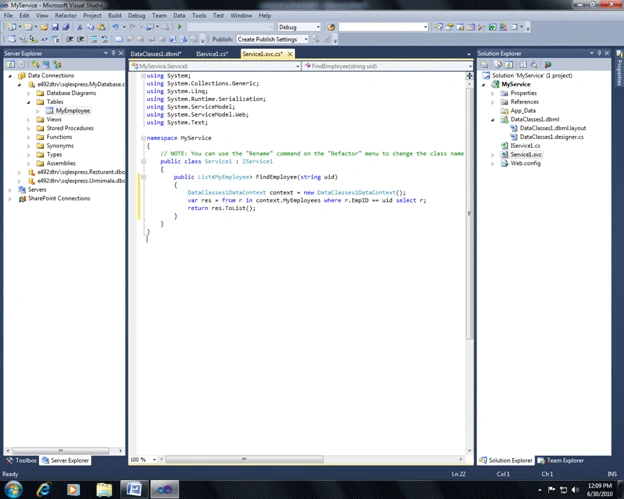
Explanation of the code :
The class Service1 is our service that implements the service contract IService1. In this class we have defined the operation contract FindEmployee. In this method, we have created a data context object. Then we have written a simple LINQ to SQL query that fetches the details of a particular employee whose employee id was passed as an argument of the operation contract. The method returns a list of objects of MyEmployee class. (We could have returned only one object of MyEmployee class also as we are fetching data using the primary key)
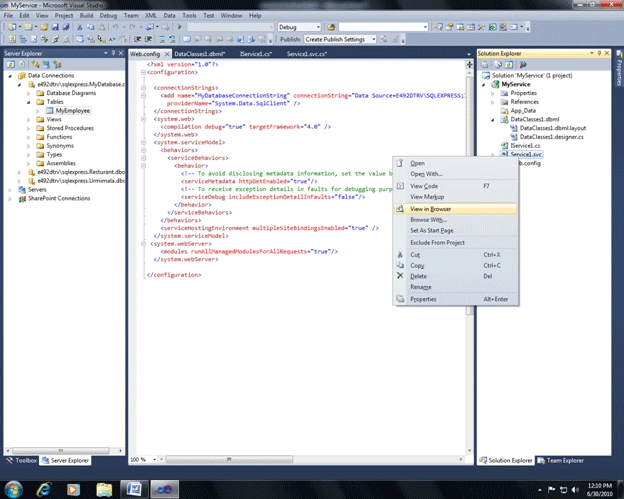
- Right click on service1.svc and select the "view in browser" option.
- Our service is running now (In Cassini server).
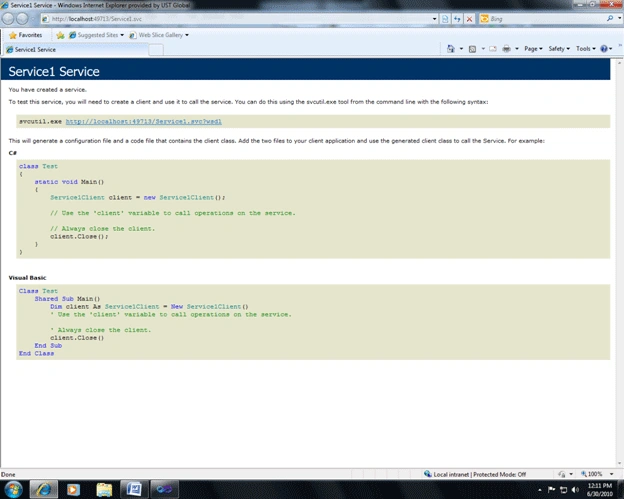
- Copy the URL of the service.
Suresh MPosted Apr 1, 2014, 3:05 AM
please help me how to insert data to SQL server
Nasurudeen YasuPosted Jan 30, 2014, 1:07 AM
please do need full
Nasurudeen YasuPosted Jan 30, 2014, 1:06 AM
i try to this article i will get an error
Nasurudeen YasuPosted Jan 30, 2014, 1:06 AM
An exception of type 'System.ServiceModel.CommunicationException' occurred in System.ServiceModel.ni.dll but was not handled in user code If there is a handler for this exception, the program may be safely continued.
Raj KumarPosted May 19, 2013, 11:13 PM
This article will be very helful to you. http://www.c-sharpcorner.com/uploadfile/raj1979/silverlight-crud-operations-using-wcf-service/
sajid rajaPosted May 19, 2013, 3:57 PM
can you please tell me how can i insert values to database in windowsphone 7 by using a Web services
sajid rajaPosted May 18, 2013, 4:36 PM
Hello I want to to show some records from DB to Windows phone using WCF but issue is it is showing Only last records many times in win app. can you please tell me how can i show multiple records in multiple lines. My code is try { Service1SoapClient proxy = new Service1SoapClient(); for(int i=1; i<=10; i++) { proxy.GetAllAccountsCompleted += new EventHandler<GetAllAccountsCompletedEventArgs>(proxy_GetAllAccountsCompleted); proxy.GetAllAccountsAsync(); } //Service1Client proxy = new Service1Client(); //proxy.FindEmployeeCompleted += new EventHandler<FindEmployeeCompletedEventArgs>(proxy_FindEmployeeCompleted); // proxy.FindEmployeeAsync(); } catch { }
B-AbbasiPosted Mar 9, 2013, 4:25 PM
Thanks a lot...
TamasPosted Sep 10, 2012, 6:25 PM
Hi! I have three table not only one, with foreign keys. How can I use this solution for an insert or an update?
Former memberPosted Aug 22, 2012, 1:25 PM
I have the same problem " Hi, I can get this to run fine on the emulator but when I debug this on the windows phone device I get the following error: $exception {"There was no endpoint listening at http://localhost:3309/Service1.svc that could accept the message. This is often caused by an incorrect address or SOAP action. See InnerException, if present, for more details."} System.Exception {System.ServiceModel.EndpointNotFoundException}Any help much appreciated", so How can I solve it ?
Junior De SantiPosted Aug 19, 2012, 9:42 PM
public Service1Client() KeyNotFoundException Please, how can I solve? Sorry, but I am Brazilian and I can not write English very well. I appreciate everyone's help. Thank you.
KylePosted Aug 18, 2012, 12:28 PM
Ok... He's clearly returning a List<T> via WCF and it's a .NET specific data type. How am I supposed to send it via WCF when it's meant to be used by other clients, not just .NET ones? The author of this article clearly overlooked that and he doesn't cover the configuration for that.
Joe MurphyPosted Jul 5, 2012, 11:02 AM
Hi, I can get this to run fine on the emulator but when I debug this on the windows phone device I get the following error: $exception {"There was no endpoint listening at http://localhost:3309/Service1.svc that could accept the message. This is often caused by an incorrect address or SOAP action. See InnerException, if present, for more details."} System.Exception {System.ServiceModel.EndpointNotFoundException} Any help much appreciated
Systems AdministratorPosted Jan 26, 2012, 9:59 AM
Would you be able to zip the WCF and WP7 projects. I think I have then right, but keep getting a KeyNotFoundException.
JohnPosted Oct 17, 2011, 11:27 AM
I'm getting the following error: {"The remote server returned an error: NotFound."} at the below line of code in Reference.cs, and I'm not sure why, because I can browse to the service running...any ideas? System.Collections.ObjectModel.ObservableCollection<DataBoundApp1.ServiceReference1.Appointment> _result = ((System.Collections.ObjectModel.ObservableCollection<DataBoundApp1.ServiceReference1.Appointment>)(base.EndInvoke("SelectAllUnapproved", _args, result)));
Omar AbdulahPosted Sep 18, 2011, 2:40 AM
Hi, I have error on this line ( public Service1Client() { } ) the error say "KeyNoteFoundException" any idea what thats mean. Regards Omar
Omar AbdulahPosted Sep 17, 2011, 3:06 PM
Hi, I have error on using System.ServiceModel.Web; any idea why. Regards Omar
Chin Xiao YuanPosted Aug 10, 2011, 4:00 AM
Test
Chin Xiao YuanPosted Aug 10, 2011, 3:59 AM
Hey, thanks for the step by step tutorial. It works ! May I know if it is possible to show an article about retrieving image from the database and display it on WP7 ? I'm currently working on it...
tan jamesPosted Jul 18, 2011, 5:27 AM
For example: [OperationContract] bool Employee(string nm, stringuid)
Khairuneesha ShaikeditedPosted Apr 12, 2011, 2:10 AMEdited Apr 12, 2011, 2:23 AM
Hey! I have a problem.. so instead of using a portrait page for the 'page1' i used the pivot page.. and I have an error when adding the MyClientWin7.ServiceReference1 the error: the type or namespace 'ServiceReference1' does not exist in the namespace 'MyClientWin7' (are you missing an assembly reference?) I tried MyClientWin7.ServiceReference1.ServiceReference1 as well but its still not working :( oh and yes! instead of using text blocks in the listbox, i used text box.. helpppp me pleaseee :) :) and just wanted to tell you..This is FABBBB! and you did an amazingggg job! :)))
GERASIMOS VONITSANOSPosted Apr 7, 2011, 4:04 PM
how can we update the textblocks in the listbox? thank you in advance
Marco AlmeidaPosted Apr 6, 2011, 6:15 PM
i having one error wend add using MyClientWin7.ServiceReference1 error: the type or namespace 'ServiceReference1' does not exist in the namespace 'MyClientWin7' (are you missing an assembly reference?) helppppp :)
wahbi tralecyPosted Mar 18, 2011, 9:22 PM
Sorry...i have a problem and i dont know why????a error KeyNotFoundException,,pplease help ;-(
Raj KumarPosted Feb 18, 2011, 1:10 AM
hey Urmimala, I found this article very useful and very clear. Thanks alot for providing such a good article. looking more articles from you. RAJ
Tanmay SonawanePosted Jan 18, 2011, 3:55 AM
I'm having an Issue getting the values from the database. I get 1 Warning message : "Unable to load one or more of the requested types. Retrieve the LoaderExceptions property for more information" Clicking on the Find button doesn't do anything. I have the service running properly. Im not able to find any solution. Any ideas?
Enrique SerraPosted Dec 26, 2010, 4:00 PM
Solved in this post http://social.msdn.microsoft.com/Forums/en-US/wcf/thread/1f52439a-7ac1-4a56-a6cb-2b21dacc1269
Enrique SerraeditedPosted Dec 22, 2010, 1:13 PMEdited Mar 23, 2013, 11:51 PM
I'm on a course at the moment <a href=" http://www.joomx.com ">neurontin 100mg price</a> (462-EV) field must contain the eleven-digit Prior Approval number. If reporting
sella duraiPosted Dec 7, 2010, 1:38 AM
hi, thanks lot yaar. i have to know about 1)How to insert , delete, update a value in LINQ to SQL? 2)How to display the all rows and column values in kist box or other controls in windows phone?
Gino CuiPosted Nov 4, 2010, 1:24 AM
Thanks a lot for your effort. Pretty more details in this article. Looking forward to your next nice article :D
Hector CubillosPosted Sep 28, 2010, 2:15 AM
just what I wanted Excellent work. very good.
Ibrahim ErsoyPosted Jul 1, 2010, 11:01 AM
Well done,Keep up the awesome work ;)
Mahesh ChandPosted Jul 1, 2010, 8:41 AM
Good and clear article Urmimala. Thank you for sharing it. Keep up the good work! Cheers!
Dennis ThomasPosted Jul 1, 2010, 7:24 AM
Great Work Urmimala. Your narration i simple, so easy to understand. Waiting for your new article!
Former memberPosted Jul 1, 2010, 3:37 AM
First article and this is so great :) Really fine Long to go ...... keep it up ..