

Referto the following screenshot of what we are building:
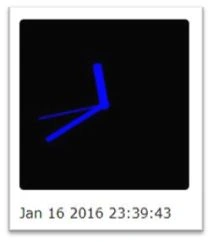
Figure 1: JQuery and CSS3 based Analog Clock
Follow the below steps to achieve what has been shown in Fig.1.
- Create a new html page as clock.htmlandcopy paste below code,
The above code shows reference to moment.js and jQuery. This also has a reference to custom files like clock.css which we will be generating in next step. And all the clock functionality will be added in step 3 as a part of clock.js.- <!DOCTYPE html>
- <html lang="en">
- <head>
- <title>Analog Clock using moment.js and jQuery</title>
- <meta charset="utf-8">
- <meta name="viewport" content="width=device-width, initial-scale=1">
- <scripttype="text/javascript" src="https://ajax.googleapis.com/ajax/libs/jquery/1.11.3/jquery.min.js">
- </script>
- <script type="text/javascript" src="https://cdnjs.cloudflare.com/ajax/libs/moment.js/2.11.1/moment.min.js">
- </script>
- <link rel="stylesheet" href="clock.css">
- <script type="text/javascript" src="clock.js">
- </script>
- </head>
- <body>
- <div class="clockarea">
- <div class="clock">
- <div id="hour" class="hourhand">div>
- <div id="minute" class="minutehand">div>
- <div id="second" class="secondhand">div>
- </div>
- </div>
- <br/>
- <div class="currentDateTime">div>
- </body>
- </html>
As a part of the html body, this is just a DIV based implementation and not any canvas type of object. DIVs are self-explanatory here.
- Create a new stylesheet file as clock.css and copy and paste the following styles to it,
- body
- {
- font - family: Verdana;
- }
- .clockarea
- {
- height: 200 px;
- width: 200 px;
- position: relative;
- border - radius: 5 px;
- background: black;
- }
- .clock
- {
- height: 100 % ;
- width: 100 % ;
- }
- .clock: after
- {
- position: absolute;
- top: 50 % ;
- left: 50 % ;
- width: 12 px;
- height: 12 px;
- margin: -6 px00 - 6 px;
- background: blue;
- border - radius: 6 px;
- content: "";
- display: block;
- }
- .hourhand
- {
- width: 0;
- height: 0;
- position: absolute;
- top: 50 % ;
- left: 50 % ;
- margin: -4 px0 - 4 px - 25 % ;
- padding: 5 px05px25 % ;
- background: blue; - webkit - transform - origin: 100 % 50 % ; - ms - transform - origin: 100 % 50 % ;
- transform - origin: 100 % 50 % ;
- border - radius: 4 px004px;
- }
- .minutehand
- {
- width: 0;
- height: 0;
- position: absolute;
- top: 50 % ;
- left: 50 % ;
- margin: -40 % -3 px0;
- padding: 40 % 3 px0;
- background: blue; - webkit - transform - origin: 50 % 100 % ; - ms - transform - origin: 50 % 100 % ;
- transform - origin: 50 % 100 % ;
- border - radius: 3 px3px00;
- }
- .secondhand
- {
- width: 0;
- height: 0;
- position: absolute;
- top: 50 % ;
- left: 50 % ;
- margin: -40 % -1 px00;
- padding: 40 % 1 px0;
- background: blue; - webkit - transform - origin: 50 % 100 % ; - ms - transform - origin: 50 % 100 % ;
- transform - origin: 50 % 100 % ;
- }
- Create a new JavaScript file clock.js and copy paste the following script code to it,
As a part of JavaScript, we are just getting the current timestamp using moment.js. Once we get the current timestamp, we are calculating hour, minute, and second hand angles based on trigonometric basics.- $(function()
- {
- setInterval(function()
- {
- var now = moment(),
- second = now.seconds() * 6,
- minute = now.minutes() * 6 + second / 60,
- hour = ((now.hours() % 12) / 12) * 360 + 90 + minute / 12;
- $('.hourhand').css("transform", "rotate(" + hour + "deg)");
- $('.minutehand').css("transform", "rotate(" + minute + "deg)");
- $('.secondhand').css("transform", "rotate(" + second + "deg)");
- //Display date and time just below our clock
- $('.currentDateTime').text(moment().format('MMM DD YYYY HH:mm:ss'));
- }, 1000);
- });
Once we get these angles, we are using CSS3 features like "transform" and "rotate" to move these rendered hands. Since we are calculating these angles every second and rotating these DIVs, we will be seeing an actual analog clock effect.
At last, we are showing current time which is graphically being generated using the above logic.
Mohammed IbrahimPosted Jan 18, 2016, 9:27 AM
nice
Ankit BansalPosted Jan 18, 2016, 12:33 AM
Really helpful...
Santhakumar MunuswamyPosted Jan 17, 2016, 2:02 PM
Thanks for nice share
Gowtham KPosted Jan 17, 2016, 11:02 AM
Nice Share