

Introduction
A Dynamic Link library (DLL) is a library that contains functions and codes that can be used by more than one program at a time. Once we have created a DLL file, we can use it in many applications. The only thing we need to do is to add the reference/import the DLL File. Both DLL and .exe files are executable program modules but the difference is that we cannot execute DLL files directly.
Creating DLL File
Step 1. Open Visual Studio then select "File" -> "New" -> "Project..." then select "Visual C#" -> "Class library".
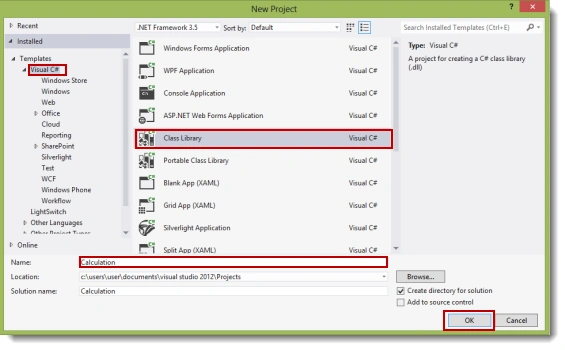
(I give it the name "Calculation".)
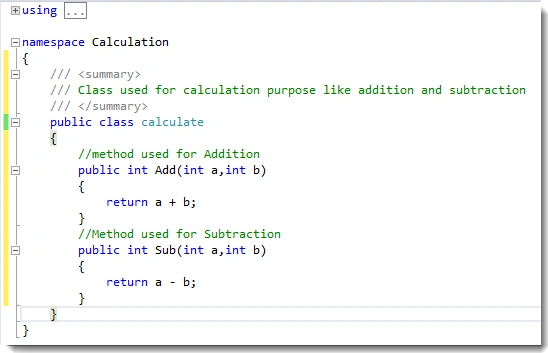
Step 2. Change the class name ("class1.cs") to "calculate.cs".

Step 3. In the calculate class, write methods for the addition and subtraction of two integers (for example purposes).
Step 4. Build the solution (F6). If the build is successful then you will see a "calculation.dll" file in the "bin/debug" directory of your project.
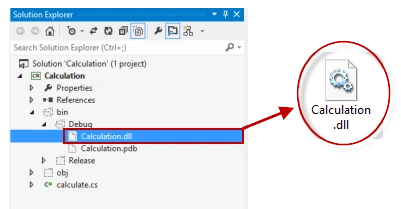
We have created our DLL file. Now we will use it in another application.
Using DLL File
Step 1. Open Visual Studio then select "File" -> "New" -> "Project..." then select "Visual C#" -> "Windows Forms application".
Step 2. Design the form as in the following image:
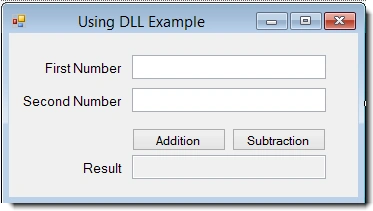
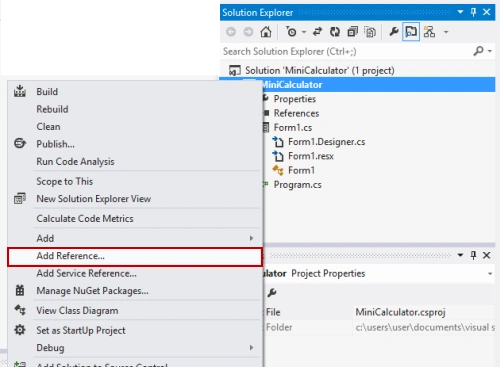
Step 3. Add a reference for the dll file, "calculation.dll", that we created earlier. Right-click on the project and then click on "Add reference".
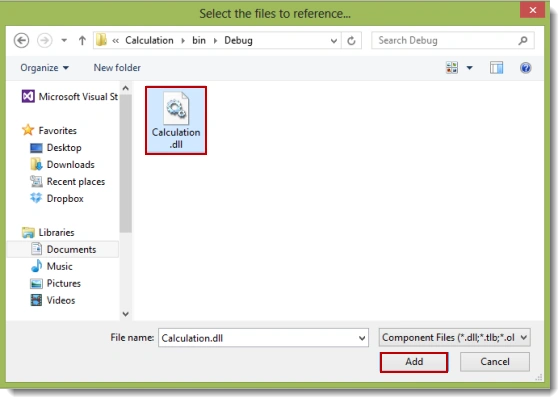
Step 4. Select the DLL file and add it to the project.
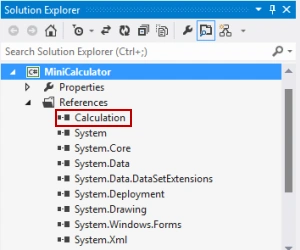
After adding the file, you will see that the calculation namespace has been added (in references) as in the following:
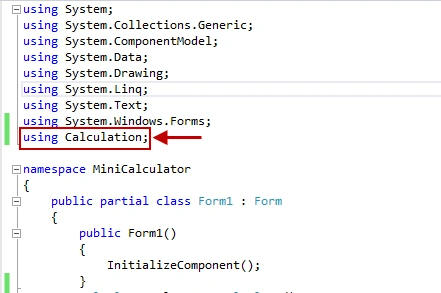
Step 5. Add the namespace ("using calculation;") as in the following:
Step 6
using System;
using System.Collections.Generic;
using System.ComponentModel;
using System.Data;
using System.Drawing;
using System.Linq;
using System.Text;
using System.Windows.Forms;
using Calculation;

namespace MiniCalculator
{
    public partial class Form1 : Form
    {

        public Form1()
        {
            InitializeComponent();
        }
        calculate cal = new calculate();
        //Addition Button click event
        private void button1_Click(object sender, EventArgs e)
        {
            try
            {
                //storing the result in int i
                int i = cal.Add(int.Parse(txtFirstNo.Text), int.Parse(txtSecNo.Text));
                txtResult.Text = i.ToString();
            }

            catch (Exception ex)
            {
                MessageBox.Show(ex.Message);
            }
        }

        //Subtraction button click event

        private void button2_Click(object sender, EventArgs e)
        {
            Try
            {
                //storing the result in int i
                int i = cal.Sub(int.Parse(txtFirstNo.Text), int.Parse(txtSecNo.Text));
                txtResult.Text = i.ToString();
            }
            catch (Exception ex)
            {
                MessageBox.Show(ex.Message);
            }
        }
    }
}
Bhuwan JoshiPosted Nov 22, 2022, 9:45 AM
Does using.system.collection.generic comes under class library???
reza taghaviPosted Nov 8, 2021, 6:14 AM
Thanks. that was very good but i have problem when i add class visual for example make my own text box then i cant use it in another project in toolBox even though another package when added to my project i can see in my toolbox
Xtian CruzPosted Oct 13, 2021, 8:11 AM
This was helpful! Thanks a bunch!
Shia RissPosted Sep 21, 2020, 2:20 PM
Step 6 has no instructions i get stuck
Brad WoodyPosted Jul 3, 2020, 11:13 AM
Thanks! This was the perfect level of granularity - it jump started my efforts without bogging me down with too much minutia...
Damian GriffithsPosted Jun 18, 2020, 12:53 PM
Very good - easy to follow - my first C# app !
Timmy MosuwosPosted May 20, 2019, 5:27 AM
Very Great article !
Sufyan Raza MuhammadPosted May 11, 2019, 4:55 AM
Great article !! are there any more articles depicting some advanced stuff related to this topic ?
Mano176Posted Mar 14, 2019, 5:00 PM
Are you able to see your functions in Dependency Walker or DLL Export Viewer? Everything works fine when I use the DLL for another C# program, but when I want to look up the functions in the Dependency Walker or DLL Export Viewer it just seems empty. Also JNA for Java can't find the functions
Sheikh SaifPosted Feb 15, 2019, 8:28 AM
Bro dll file has been created but when adding to my other application as a reference it doesnt contain the function i created in my library file.. what to do?
Ramesh PasupuletiPosted Jan 4, 2019, 12:44 PM
How can we debug our DLL project ,which has been created with help of break points.
Kyaw NyiPosted Dec 9, 2018, 11:33 PM
Fastboot process how to
Rajesh KumarPosted Nov 4, 2018, 11:51 PM
Nice article. Thanks for sharing.................
Vishwa ShehanPosted Aug 8, 2018, 11:56 AM
Hey, i'am making image editing software i am a beginner to these coding thins too but i'am hoping to add imageprocesser.dll to my image editor for filters but i really can't understand how to use it there are no any tutorials for that library so if u can help me i'll appriciate it http://imageprocessor.org/imageprocessor/imagefactory/
Anjali BhattPosted Jul 12, 2018, 2:02 AM
Hii.. It's working but if we return DTO type from function so how can we access it main program. I am returning Dictionary which contain DTO but when i access it main program it's getting error in case of iterating.
mayank tyagiPosted Mar 22, 2018, 3:14 AM
You can add convert.int32 instead of int.parse
Narendrakumar SPosted Jan 22, 2018, 4:45 AM
Hi, I am getting "Object Reference not set to an instance of an object" while calling a method in DLL from Console app. Please help
Pratik SoniPosted Nov 24, 2017, 4:23 AM
Simple & effective! Thanks.
basab aichPosted Feb 25, 2017, 8:29 AM
This is still not working in VS 2015 c#. the method "Add" & "Sub" is showing error while coding in the form.
Arvind VishwakarmaPosted Oct 4, 2014, 5:23 AM
nice article