

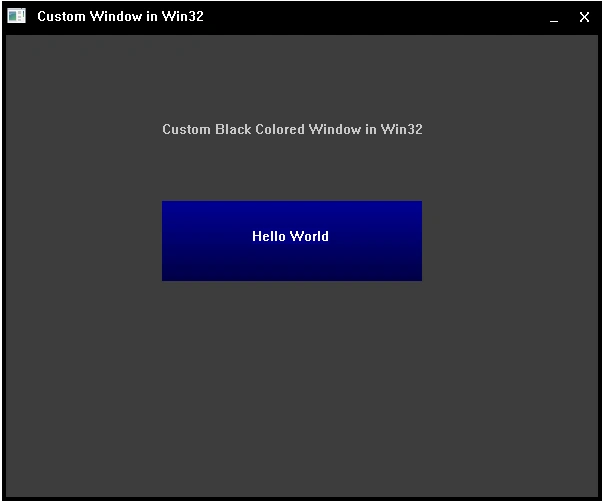
You know what is custom window,the window that looks different. In this article we will create fixed size window having only minimize & close options.
Download the source code for both Visual Studio & MinGW and also demo.
Here's the article to customize windows forms in C#:
But we are talking about customize window in win32 using C/C++. Before you go to start to customize window,you must have some basics of win32 programming.
Following articles covers the basics of win32 programming.
Following articles covers the basics of win32 programming.
Now lets move to customize the window.
First step you need to do is that you must set Window Style to WS_POPUP or WS_POPUPWINDOW.
WS_POPUP or WS_POPUPWINDOW styles set your window borderless with no any controls.
First step you need to do is that you must set Window Style to WS_POPUP or WS_POPUPWINDOW.
WS_POPUP or WS_POPUPWINDOW styles set your window borderless with no any controls.
Now go to the WndProc() function.
In WM_CREATE message, you need to add Minimize & Close buttons at the top layered of the window at top-right location.
Buttons can be created using CreateWindow() statement by passing default text as "button"
I am using minimize_button & close_button HWND variables.
Buttons can be created using CreateWindow() statement by passing default text as "button"
I am using minimize_button & close_button HWND variables.
Syntax:
HWND button = CreateWindow(TEXT("button"), button-text,
HWND button = CreateWindow(TEXT("button"), button-text,
WS_CHILD | WS_VISIBLE | BS_DEFPUSHBUTTON,
x, y, width, height, HWND parent, action ID,HISTANCE, NULL);
Description
- CreateWindow() : this function create a button by passing "button" text to it.
- button-text : It is the text display on the button.
- W_CHILD : By setting this property the created button is added to the currently created window.
- WS_SVISIBLE : By setting this property the created button will be visible.
- BS_DEFPUSHBUTTON : This is style of button.there are many styles of buttons like:
BS_PUSHBUTTON
BS_DEFPUSHBUTTON
BS_FLAT
BS_CHECKBOX
BS_AUTOCHECKBOX
BS_RADIOBUTTON
BS_3STATE
BS_AUTO3STATE
BS_GROUPBOX
BS_AUTORADIOBUTTON
BS_OWNERDRAW - x : Button location X.
- y : Button location Y.
- width & height.
See following complete code.
Download the source code for both Visual Studio & MinGW and also demo.
Creating & Adding buttons to window by setting button style to BS_OWNERDRAW :
Download the source code for both Visual Studio & MinGW and also demo.
Creating & Adding buttons to window by setting button style to BS_OWNERDRAW :
- case WM_CREATE :
- minimize_button = CreateWindow(TEXT("button"), TEXT(""),
- WS_CHILD | WS_VISIBLE | BS_OWNERDRAW,
- 538, 0, 30, 30, hwnd, (HMENU)ID_MINIMIZE,
- hInst, NULL);
- close_button = CreateWindow(TEXT("button"), TEXT(""),
- WS_CHILD | WS_VISIBLE | BS_OWNERDRAW,
- 568, 0, 30, 30, hwnd, (HMENU)ID_CLOSE,
- hInst, NULL);
Next step is to draw borders on the window.this can be done in WM_PAINT message.
Here i drawn a top latered border,window text,icon & left,right,bottom rectangles.
Here i drawn a top latered border,window text,icon & left,right,bottom rectangles.
See WM_PAINT code in following complete code.
Ok now you added buttons & also drawn a top layered border on window.
Ok now you added buttons & also drawn a top layered border on window.
Now it's time to customize buttons.
This can be done by specifying WM_DRAWITEM message.
First declare the LPDRAWITEMSTRUCT structure variable.
LPDRAWITEMSTRUCT : Long Pointer to Draw Item Structure
First define the function that draw on button.
Here's the function that draw a black colored close button.
- void DrawCloseButton(HDC hdc)
- {
- RECT rc;
- rc.left = 0;
- rc.top = 0;
- rc.right = 30;
- rc.bottom = 30;
- HBRUSH br = CreateSolidBrush(RGB(0, 0, 0));
- FillRect(hdc, &rc, br);
- SetBkColor(hdc, RGB(0, 0, 0));
- SetTextColor(hdc, RGB(255, 255, 255));
- TextOut(hdc, 10, 8, L"X", 1);
- }
Now define statement by declaring the condition that LPDRAWITEMSTRUCT variable pointes to CtlID. And call the above drawn close button function by defining the ID of that button.
I have declared the ID_CLOSE to 0x001 and added this id while creating the close button in WM_CREATE message.
See following complete code for better understanding.
I have declared the ID_CLOSE to 0x001 and added this id while creating the close button in WM_CREATE message.
See following complete code for better understanding.
- LPDRAWITEMSTRUCT pdis;
- case WM_DRAWITEM:
- pdis = (LPDRAWITEMSTRUCT)lParam;
- switch (pdis->CtlID)
- {
- case ID_CLOSE:
- //draw close button
- DrawCloseButton(pdis->hDC);
- break;
- }
Moving the window :
Window can be moved by mouse by specifying WM_NCHITTEST message in switch statement.
Here i just want move the window when cursor in on top layered border.
This can be done by getting the cursor position & window rect.
Here's the code that move window by mouse.
- LRESULT move = NULL;
- case WM_NCHITTEST:
- RECT rc;
- POINT pt;
- GetCursorPos(&pt);
- GetWindowRect(hwnd, &rc);
- rc.bottom = rc.bottom - 466;
- //if cursor position is within top layered drawn rectangle then
- //set move to HTCAPTION for moving the window from its client
- if (pt.x <= rc.right && pt.x >= rc.left && pt.y <= rc.bottom && pt.y >= rc.top)
- {
- move = DefWindowProc(hwnd, message, wParam, lParam);
- if (move == HTCLIENT)
- {
- move = HTCAPTION;
- }
- }
- return move;
- break;
Download the source code for both Visual Studio & MinGW and also demo.
Here's the complete code to create black colored window in Visual Studio.
- #include"stdafx.h"
- #include<Windows.h>
- // define id for close, minimize & demo buttons
- #define ID_CLOSE 0x001
- #define ID_MINIMIZE 0x002
- #define ID_DEMOBUTTON 0x00F
- BOOL isMouseDownOnCloseButton = FALSE;
- BOOL isMouseDownOnMinimizeButton = FALSE;
- BOOL isMouseDownOnDemoButton = FALSE;
- //define HISTANCE variable
- HINSTANCE hInst;
- LRESULT CALLBACK WndProc(HWND hwnd, UINT message, WPARAM wParam, LPARAM lparam);
- //main function
- int WINAPI WinMain(HINSTANCE hInstance, HINSTANCE hPrevInstance, PSTR szCmdLine, int iCmdShow)
- {
- TCHAR appname[] = TEXT("Windows Programming");
- WNDCLASS wndclass;
- MSG msg;
- HWND hwnd;
- wndclass.cbClsExtra = 0;
- wndclass.cbWndExtra = 0;
- wndclass.hbrBackground = (HBRUSH)(CreateSolidBrush(RGB(60, 60, 60)));//set back color to window
- wndclass.hCursor = LoadCursor(NULL, IDC_ARROW);
- wndclass.hIcon = LoadIcon(NULL, IDI_APPLICATION);
- wndclass.hInstance = hInstance;
- wndclass.lpfnWndProc = WndProc;
- wndclass.lpszClassName = appname;
- wndclass.lpszMenuName = NULL;
- wndclass.style = CS_HREDRAW | CS_VREDRAW;
- // check this window class is registered or not
- if (!RegisterClass(&wndclass))
- {
- MessageBox(NULL, TEXT("Window class is not registered"), TEXT("Error...."), MB_ICONERROR);
- return 0;
- }
- hwnd = CreateWindow(appname, //window name
- appname, // window text
- WS_POPUP, //set POPUP window style for no border & controls
- 100, //window position x
- 100, //window position y
- 600, //width
- 500, // height
- NULL,
- NULL,
- hInstance,
- NULL
- );
- // show & update created window
- ShowWindow(hwnd, iCmdShow);
- UpdateWindow(hwnd);
- // get message from queue
- while (GetMessage(&msg, NULL, 0, 0))
- {
- TranslateMessage(&msg);
- DispatchMessage(&msg);
- }
- return msg.wParam;
- }
- // function to draw close button
- // for setting back color to when mouse down otherwise set black red & draw X text
- void DrawCloseButton(HDC hdc)
- {
- if (isMouseDownOnCloseButton)
- {
- RECT rc;
- rc.left = 0;
- rc.top = 0;
- rc.right = 30;
- rc.bottom = 30;
- HBRUSH br = CreateSolidBrush(RGB(200, 30, 30));
- FillRect(hdc, &rc, br);
- SetBkColor(hdc, RGB(200, 30, 30));
- SetTextColor(hdc, RGB(255, 255, 255));
- TextOut(hdc, 10, 8, L"X", 1);
- }
- else
- {
- RECT rc;
- rc.left = 0;
- rc.top = 0;
- rc.right = 30;
- rc.bottom = 30;
- HBRUSH br = CreateSolidBrush(RGB(0, 0, 0));
- FillRect(hdc, &rc, br);
- SetBkColor(hdc, RGB(0, 0, 0));
- SetTextColor(hdc, RGB(255, 255, 255));
- TextOut(hdc, 10, 8, L"X", 1);
- }
- }
- //draw minimize button for back color &
- // _ text
- void DrawMinimizeButton(HDC hdc)
- {
- if (isMouseDownOnMinimizeButton)
- {
- RECT rc;
- rc.left = 0;
- rc.top = 0;
- rc.right = 30;
- rc.bottom = 30;
- HBRUSH br = CreateSolidBrush(RGB(60, 60, 100));
- FillRect(hdc, &rc, br);
- SetBkColor(hdc, RGB(60, 60, 100));
- SetTextColor(hdc, RGB(255, 255, 255));
- TextOut(hdc, 10, 5, L"_", 1);
- }
- else
- {
- RECT rc;
- rc.left = 0;
- rc.top = 0;
- rc.right = 30;
- rc.bottom = 30;
- HBRUSH br = CreateSolidBrush(RGB(0, 0, 0));
- FillRect(hdc, &rc, br);
- SetBkColor(hdc, RGB(0, 0, 0));
- SetTextColor(hdc, RGB(255, 255, 255));
- TextOut(hdc, 10, 5, L"_", 1);
- }
- }
- //draw demo button for back color &
- // Hello World text
- void DrawDemoButton(HDC hdc)
- {
- if (isMouseDownOnDemoButton)
- {
- RECT rc;
- rc.left = 0;
- rc.top = 0;
- rc.right = 260;
- rc.bottom = 80;
- HPEN hpen;
- //draw gradient button
- for (int i = 0; i < 80; i++)
- {
- hpen = CreatePen(PS_SOLID, 4, RGB(150 - i, 0, 0));
- SelectObject(hdc, hpen);
- Rectangle(hdc, 0, 0 + i, 262, 1 + i);
- DeleteObject(hpen);
- }
- SetBkColor(hdc, RGB(130, 0, 0));
- SetTextColor(hdc, RGB(255, 255, 255));
- TextOut(hdc, 90, 27, L"Hello World", 11);
- }
- else
- {
- RECT rc;
- rc.left = 0;
- rc.top = 0;
- rc.right = 260;
- rc.bottom = 80;
- HPEN hpen;
- //draw gradient button
- for (int i = 0; i < 80; i++)
- {
- hpen = CreatePen(PS_SOLID, 4, RGB(0, 0, 150 - i));
- SelectObject(hdc, hpen);
- Rectangle(hdc, 0, 0 + i, 262, 1 + i);
- DeleteObject(hpen);
- }
- SetBkColor(hdc, RGB(0, 0, 130));
- SetTextColor(hdc, RGB(255, 255, 255));
- TextOut(hdc, 90, 27, L"Hello World", 11);
- }
- }
- // function to fill rectangles to look like border for
- // left,right & bottom direction
- void Draw_LeftRightBottom_Rectangles(RECT rect, HDC hdc, HBRUSH brush, int width, int height)
- {
- RECT leftrect, rightrect, bottomrect;
- leftrect.left = 0;
- leftrect.top = rect.bottom - 266;
- leftrect.right = 4;
- leftrect.bottom = height;
- //fill left rect of window for border
- FillRect(hdc, &leftrect, brush);
- rightrect.left = width - 4;
- rightrect.top = rect.bottom - 266;
- rightrect.right = width;
- rightrect.bottom = height;
- //fill right rect of window
- FillRect(hdc, &rightrect, brush);
- bottomrect.left = 0;
- bottomrect.top = height - 4;
- bottomrect.right = width;
- bottomrect.bottom = height;
- //fill bottom rect of window
- FillRect(hdc, &bottomrect, brush);
- }
- // WndProc function
- LRESULT CALLBACK WndProc(HWND hwnd, UINT message, WPARAM wParam, LPARAM lParam)
- {
- HDC hdc;
- PAINTSTRUCT ps;
- HWND minimize_button, close_button, demo_button;
- static int X, Y;
- LRESULT move = NULL;
- LPDRAWITEMSTRUCT pdis;
- HICON hIcon;
- switch (message)
- {
- case WM_CREATE:
- //create minimize button with owner draw style
- // location (538,0) & size (30,30)
- minimize_button = CreateWindow(TEXT("button"), TEXT(""),
- WS_CHILD | WS_VISIBLE | BS_OWNERDRAW,
- 538, 0, 30, 30, hwnd, (HMENU)ID_MINIMIZE,
- hInst, NULL);
- //create close button with owner draw style
- // location (568,0) & size (30,30)
- close_button = CreateWindow(TEXT("button"), TEXT(""),
- WS_CHILD | WS_VISIBLE | BS_OWNERDRAW,
- 568, 0, 30, 30, hwnd, (HMENU)ID_CLOSE,
- hInst, NULL);
- //create demo button with owner draw style
- // location (160,200) & size (260,80)
- demo_button = CreateWindow(TEXT("button"), TEXT(""),
- WS_CHILD | WS_VISIBLE | BS_OWNERDRAW,
- 160, 200, 260, 80, hwnd, (HMENU)ID_DEMOBUTTON,
- hInst, NULL);
- break;
- case WM_PAINT:
- hdc = BeginPaint(hwnd, &ps);
- RECT rect;
- HBRUSH brush;
- GetClientRect(hwnd, &rect);
- rect.bottom = rect.bottom - 466;
- brush = CreateSolidBrush(RGB(0, 0, 0));
- // fill rectangle for top layered title border
- FillRect(hdc, &rect, brush);
- // call above function
- Draw_LeftRightBottom_Rectangles(rect, hdc, brush, X, Y);
- //draw text as a window by setting white text color & back color
- SetBkColor(hdc, RGB(0, 0, 0));
- SetTextColor(hdc, RGB(255, 255, 255));
- TextOut(hdc, 35, 7, TEXT("Custom Window in Win32"), 22);
- //draw text on window
- SetBkColor(hdc, RGB(60, 60, 60));
- SetTextColor(hdc, RGB(200, 200, 200));
- TextOut(hdc, 160, 120, TEXT("Custom Black Colored Window in Win32"), 36);
- //draw icon
- hIcon = (HICON)LoadIcon(hInst, IDI_APPLICATION);
- DrawIconEx(hdc, 5, 5, hIcon, 20, 20, 0, brush, 0);
- EndPaint(hwnd, &ps);
- break;
- //draw item
- case WM_DRAWITEM:
- pdis = (LPDRAWITEMSTRUCT)lParam;
- switch (pdis->CtlID)
- {
- case ID_CLOSE:
- //draw close button
- DrawCloseButton(pdis->hDC);
- break;
- case ID_MINIMIZE:
- //draw minimize button
- DrawMinimizeButton(pdis->hDC);
- break;
- case ID_DEMOBUTTON:
- DrawDemoButton(pdis->hDC);
- break;
- }
- //if button is selected then change values
- if (pdis->itemState && ODS_SELECTED)
- {
- isMouseDownOnCloseButton = TRUE;
- isMouseDownOnMinimizeButton = TRUE;
- isMouseDownOnDemoButton = TRUE;
- }
- else
- {
- isMouseDownOnCloseButton = FALSE;
- isMouseDownOnMinimizeButton = FALSE;
- isMouseDownOnDemoButton = FALSE;
- }
- break;
- //actions of buttons
- case WM_COMMAND:
- switch (wParam)
- {
- case ID_CLOSE:
- PostQuitMessage(EXIT_SUCCESS);
- return 0;
- case ID_MINIMIZE:
- SendMessage(hwnd, WM_SYSCOMMAND, SC_MINIMIZE, lParam);
- break;
- case ID_DEMOBUTTON:
- MessageBox(NULL, TEXT("Custom Window in Win32"), TEXT("Hello World"), MB_OK);
- break;
- }
- break;
- //size
- case WM_SIZE:
- X = LOWORD(lParam);
- Y = HIWORD(lParam);
- break;
- //move window
- case WM_NCHITTEST:
- RECT rc;
- POINT pt;
- GetCursorPos(&pt);
- GetWindowRect(hwnd, &rc);
- rc.bottom = rc.bottom - 466;
- //if cursor position is within top layered drawn rectangle then
- //set move to HTCAPTION for moving the window from its client
- if (pt.x <= rc.right && pt.x >= rc.left && pt.y <= rc.bottom && pt.y >= rc.top)
- {
- move = DefWindowProc(hwnd, message, wParam, lParam);
- if (move == HTCLIENT)
- {
- move = HTCAPTION;
- }
- }
- return move;
- break;
- case WM_DESTROY:
- PostQuitMessage(EXIT_SUCCESS);
- return 0;
- }
- return DefWindowProc(hwnd, message, wParam, lParam);
- }
Sonu ChaudharyPosted Jun 6, 2016, 9:57 AM
good one...
Vignesh ManiPosted May 31, 2016, 4:16 PM
Nice