

In this article, I would like to show how to create a SQL Server Backup file in C#. You can create a SQL Server database backup using SQL Server Management Studio and you can also use a Transact-SQL statement. We use a backup database and restore the database when our database becomes corrupted or crashes.
To do it using SQL Server Management Studio:
So let's have a look at a practical example of how to create it using C#. The example is developed in Visual Studio 2010.
In SQL Server
The following Query gives the name of the Database and the server name:
Select *  from sysservers  where srvproduct='SQL Server'

go

Select * from sysdatabases
Output
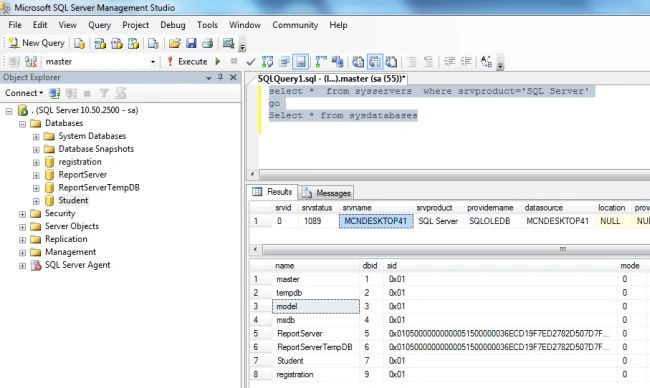
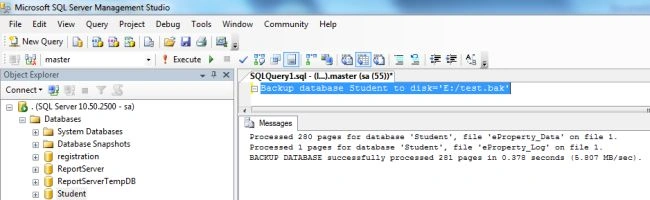
If you want to create a backup of the database just execute the following Query in SQL Server Management Studio.
Backup database Student to disk='E:/test.bak'
The backup of the student database has been created on the given location.
Output
In Visual Studio 2010,
The SQL Server query above returns the server name and all database names. Now execute it using C# code. To do that create a Windows Forms application and drag and drop the following control onto the form.
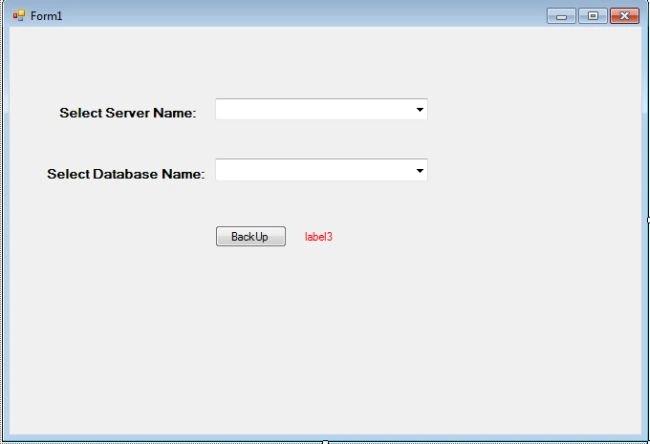
C# code
using System;
using System.Collections.Generic;
using System.ComponentModel;
using System.Data;
using System.Drawing;
using System.Linq;
using System.Text;
using System.Windows.Forms;
using System.Diagnostics;
using System.Data.SqlClient;
namespace SQLBackUpApp
{
    public partial class Form1 : Form
    {
        SqlConnection con;
        SqlCommand cmd;
        SqlDataReader dr;
        public Form1()
        {
            InitializeComponent();
        }
        private void Form1_Load(object sender, EventArgs e)
        {
            label3.Visible = false;
            serverName(".");
        }
        public void serverName(string str)
        {
            con = new SqlConnection("Data Source=" + str + ";Database=Master;data source=.; uid=sa; pwd=Micr0s0ft;");
            con.Open();
            cmd = new SqlCommand("select *  from sysservers  where srvproduct='SQL Server'", con);
            dr = cmd.ExecuteReader();
            while (dr.Read())
            {
                ComboBoxserverName.Items.Add(dr[2]);
            }
            dr.Close();
        }
        public void Createconnection()
        {
            con = new SqlConnection("Data Source=" + (ComboBoxserverName.Text) + ";Database=Master;data source=.; uid=sa; pwd=Micr0s0ft;");
            con.Open();
            ComboBoxDatabaseName.Items.Clear();
            cmd = new SqlCommand("select * from sysdatabases", con);
            dr = cmd.ExecuteReader();
            while(dr.Read())
            {
                ComboBoxDatabaseName.Items.Add(dr[0]);
            }
            dr.Close();
        }
        public void query(string que)
        {
            // ERROR: Not supported in C#: OnErrorStatement
            cmd = new SqlCommand(que, con);
            cmd.ExecuteNonQuery();
        }
        public void blank(string str)
        {
            if (string.IsNullOrEmpty(ComboBoxserverName.Text) | string.IsNullOrEmpty(ComboBoxDatabaseName.Text))
            {
                // label3.Visible = true;
                MessageBox .Show( "Server Name & Database can not be Blank");
                return;
            }
            else
            {
                if (str == "backup")
                {
                    SaveFileDialog1.FileName = ComboBoxDatabaseName.Text;
                    SaveFileDialog1.ShowDialog();
                    string s = null;
                    s = SaveFileDialog1.FileName;
                    query("Backup database " + ComboBoxDatabaseName.Text + " to disk='" + s + "'");
                    label3.Visible = true;
                    label3.Text = "Database BackUp has been created successful";
                }
            }
        }
        private void cmbbackup_Click(object sender, EventArgs e)
        {
            blank("backup");
        }
        private void cmbserver_SelectedIndexChanged(object sender, EventArgs e)
        {
            Createconnection();
        }
    }
}
In the code above you can change the connection string corresponding to your database.
Now run the application and select the server name and database name to create the backup.

Now click on the "Backup" Button and select the backup location.
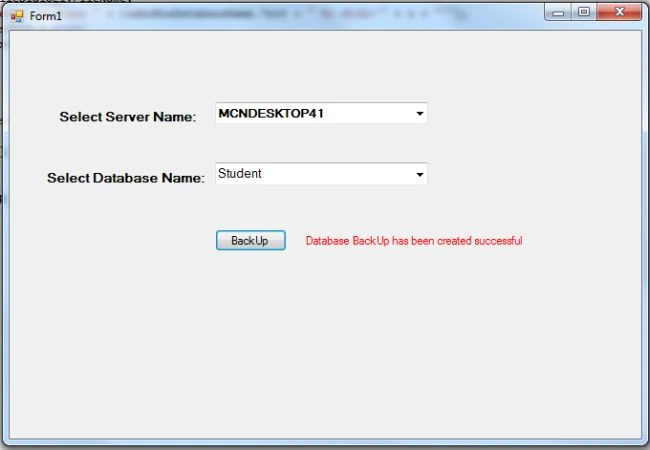
Now open the selected location to see the backup file.
The JokerPosted Apr 18, 2018, 6:32 PM
When i chose a path, and save it an errors says.. "Incorrect syntax on 'databasenameto'. help pls
krish sinPosted Jan 5, 2017, 4:38 AM
Can you tell how to restore
Samuel PrabhuPosted Oct 14, 2016, 3:06 AM
Any idea regarding automatic database backup on a schedule time daily
Arnab MukherjeePosted May 10, 2016, 8:17 AM
when i am trying to take backup in desktop ...it's not working...please help..
Isuru AravindaPosted Jan 29, 2016, 10:48 PM
This is really helpful for me, thank you very much
SharadPosted Jul 22, 2015, 12:30 AM
good one...
Upendra Pratap ShahiPosted Jul 1, 2015, 1:16 AM
nice one @rohatash kumar
vikas manhasPosted Jun 15, 2015, 5:06 AM
can you plz post exe
Vithal WadjePosted Sep 23, 2014, 1:12 PM
very useful keep it up
Saineshwar BageriPosted Sep 23, 2014, 12:35 PM
Nice article sir
Nivas ManePosted Feb 8, 2014, 12:58 AM
thank you very much Sir
Hardik PanchalPosted Nov 7, 2013, 7:01 AM
Thanks this is very helpfull to me. Thank you very much
xuan anh dinhPosted Jul 26, 2013, 5:38 AM
Hi Rohah, I'm using your code to build a test application but your app cannot backup database file name from other SQL Server to my pc. Can you help to do it ?
Sreejesh SPeditedPosted Mar 11, 2013, 1:41 AMEdited Mar 12, 2013, 5:34 AM
Dear Rohath, I am select one location and click back up button but dot back up sql,so your code node working dear Thanks Sreejesh