

Introduction
This article explains how to create a Text Editor using ASP.NET and jQuery.
Step 1. First of all, add a new application to your Visual Studio and name it "ASPNet Text Editor".
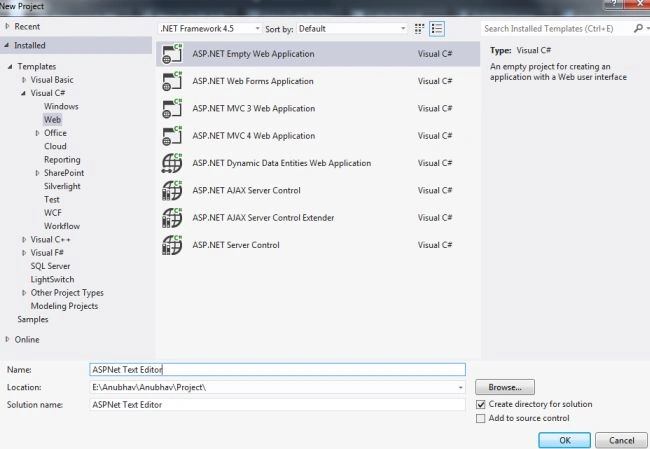
Now in this application, we will add two TextBoxes, one Button, and a Hidden Field.
<asp:TextBox ID="TextBox1" TextMode="MultiLine" runat="server" CssClass="textBox" onblur="Test()"></asp:TextBox>
<asp:Button ID="Button1" runat="server" Text="Show it Below" />
<asp:HiddenField ID="hdField" runat="server" />
<asp:TextBox ID="textBox2" TextMode="MultiLine" runat="server" CssClass="textBox2"></asp:TextBox>
Step 2. As you can see, I provided the CSS Classes in the code above. That's because I had already created the CSS and then I passed its name to these controls.
You can check the CSS code by downloading the Zip Code provided at the start of the article.
After creating the CSS, provide their reference in the Head section of the page like this.
<link href="CSS/demo.css" rel="stylesheet" type="text/css" />
<link href="CSS/demo2.css" rel="stylesheet" type="text/css" />
Step 3. Now you need to add two jQuery files to your application named jquery-1.10.2.min.js and jquery-te-1.4.0.min.js.
You will get these files from my application code provided in the Zip.
Provide this code after the Body tag
<script src="JS/jquery-1.10.2.min.js" type="text/javascript"></script>
<script src="JS/jquery-te-1.4.0.min.js" type="text/javascript"></script>
<script language="javascript" type="text/javascript">
$('.textEditor1').jqte();
$(".textBox2").jqte({
     blur: function() {
          document.getElementById('<%=hdField.ClientID %>').value = document.getElementById('<%=txtBox2.ClientID %>').value;
     }
});
</script>
Step 4. On the Button click pass this code.
protected void btnText_Click(object sender, EventArgs e) {
    textbox2.Text = hdFieldt.Value;
}
Now your complete code will look like this.
<head runat="server">
    <title>ASP.NET Text Editor</title>
    <link href="CSS/demo.css" rel="stylesheet" type="text/css" />
    <link href="CSS/demo2.css" rel="stylesheet" type="text/css" />
</head>
<body>
    <form id="Editor" runat="server">
        <div>
            <asp:TextBox ID="TextBox1" TextMode="MultiLine" runat="server" CssClass="textBox" onblur="Test()"></asp:TextBox>
            <asp:Button ID="Button1" runat="server" Text="Show it Below" />
            <asp:HiddenField ID="hdField" runat="server" />
            <asp:TextBox ID="textBox2" TextMode="MultiLine" runat="server" CssClass="textBox2"></asp:TextBox>
        </div>
    </form>
</body>
<script src="JS/jquery-1.10.2.min.js" type="text/javascript"></script>
<script src="JS/jquery-te-1.4.0.min.js" type="text/javascript"></script>
<script language="javascript" type="text/javascript">
    $('.textEditor1').jqte();
    $(".textBox2").jqte({
        blur: function() {
            document.getElementById('<%=hdField.ClientID %>').value = document.getElementById('<%=txtBox2.ClientID %>').value;
        }
    });
</script>
Output
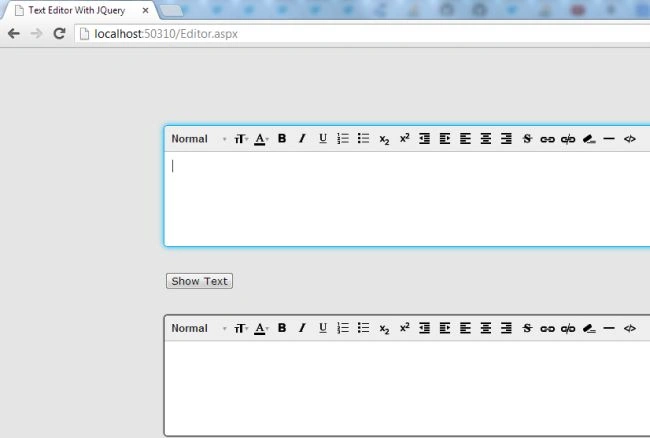
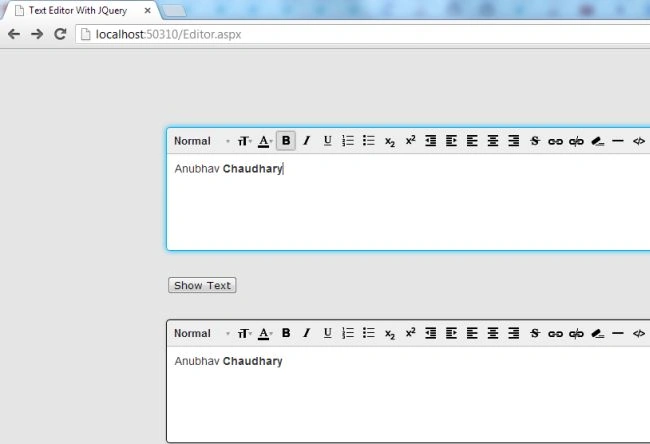
Now write something and modify it according to your needs.
rajitha GPosted Jul 16, 2020, 12:21 AM
Is it possible to add other controls in the text editor?
Jatin DesaiPosted Aug 28, 2016, 11:33 PM
Can you please upload in .zip format; so we don't need any special software for unzip it.
Rahul ShuklaPosted May 20, 2014, 2:41 PM
hi this is working fine but when u try to send the content of editor it always shows the html formated msg not the actually one which sent
anil babuPosted Sep 19, 2013, 5:58 AM
How can i do this one in MVC please help me
spiros klonisPosted Aug 2, 2013, 3:30 AM
Why at the btnText_Click you didn't write {textbox2.Text = textbox1.Value;}. Why we need a HiddenField???
Rosi Sreenivasa ReddyPosted Aug 2, 2013, 12:53 AM
can you say in asp.net 3.5 VS2008
Rosi Sreenivasa ReddyPosted Aug 2, 2013, 12:53 AM
hai,