

Introduction
Solution
This is a very simple problem, and we can easily implement using raw JavaScript.
- Step 1: Create an empty ASP.NET web application.
- Step 2: Add a Webform to it. Also, add Bootstrap references using the NuGet package manager.
- Step 3: Add the following code to it.
- <%@ Page Language="C#" AutoEventWireup="true" CodeBehind="demo.aspx.cs" Inherits="CreditCardDetailsCaptureTextBox.demo" %>
- <!DOCTYPE html>
- <html>
- <head runat="server">
- <title>Credit Card Details Capture using JavaScript</title>
- <link href="Content/bootstrap.min.css" rel="stylesheet" />
- <script type="text/javascript">
- function moveFocus(from, to) {
- var length = from.value.length;
- var maxLength = from.getAttribute("maxLength");
- if (length == maxLength) {
- document.getElementById(to).focus();
- }
- };
- </script>
- </head>
- <body class="container-fluid">
- <form id="form1" runat="server">
- <div id="creditCardDetailsTextboxes" class="jumbotron">
- Enter Card Number:
- <asp:TextBox ID="TextBox1" runat="server" MaxLength="4" Width="50px" onkeyup="moveFocus(this,'TextBox2')"></asp:TextBox>
- <asp:TextBox ID="TextBox2" runat="server" MaxLength="4" Width="50px" onkeyup="moveFocus(this,'TextBox3')"></asp:TextBox>
- <asp:TextBox ID="TextBox3" runat="server" MaxLength="4" Width="50px" onkeyup="moveFocus(this,'TextBox4')"></asp:TextBox>
- <asp:TextBox ID="TextBox4" runat="server" MaxLength="4" Width="50px"></asp:TextBox>
- </div>
- </form>
- </body>
- </html>
Step 4: The following is the explanation of the above mentioned code.
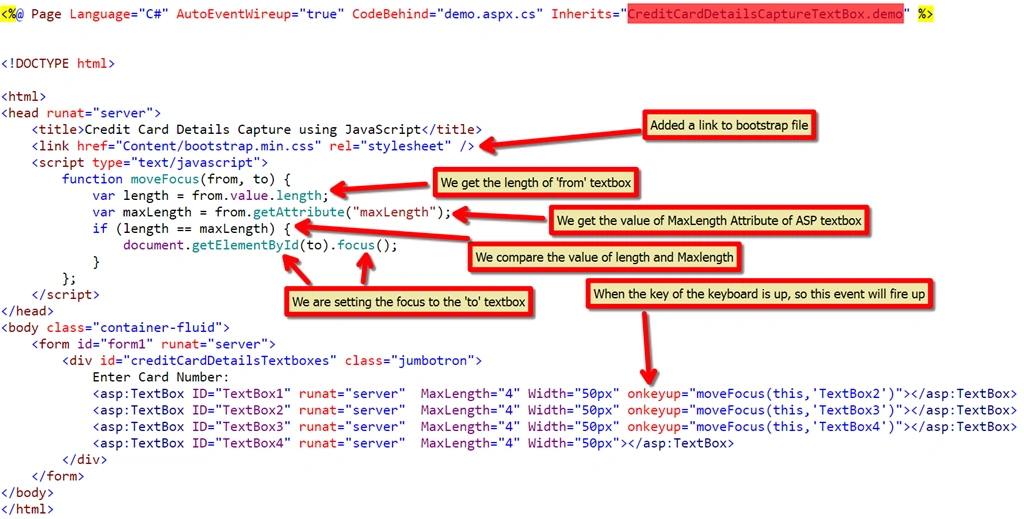 Actually, in the above code, the main magic is of the Keyup event of the textbox. When the key of the keyboard on the 4
th time is up, then the JavaScript method will be called.
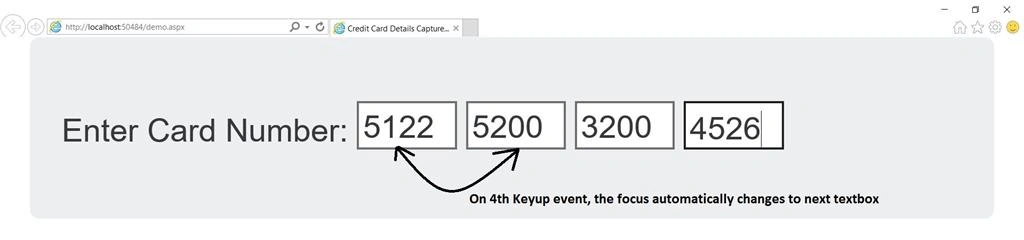
Step 5: When you press F5, you will see the following window.
 That's All. Hope you liked it and please share as much as you can.
Santhakumar MunuswamyPosted Oct 25, 2015, 11:53 AM
Good one
Debendra DashPosted Oct 19, 2015, 4:02 AM
Good one Ankit.
Humayun Kabir MamunPosted Oct 19, 2015, 1:46 AM
Nice...
Chandu KumawatPosted Oct 19, 2015, 1:44 AM
very usefull thanksssss
Kamlesh BhorPosted Oct 19, 2015, 1:31 AM
Thanks for sharing...
Ankit BansalPosted Oct 19, 2015, 1:23 AM
Hi All, If the image is not clear, please visit my blog..the HD Resolution image is available there..
Nilesh JadavPosted Oct 19, 2015, 1:12 AM
Good work !!
Mukesh KumarPosted Oct 19, 2015, 12:58 AM
Great Job