

Before reading this article, please go through the following article series:
- CRUD On List Items Using Web Services And jQuery In SharePoint 2013 - Part One
- CRUD Operation On List Items Using JSOM In SharePoint 2013 - Part Two
Introduction
SharePoint 2013 has greatly expanded the REST services available to developers. With this, we have much more SharePoint functionality exposed via JSOM and Web Services. The goal of this article is to provide how to perform basic create, read, update, and delete (CRUD) operations on lists and list items with the REST services.
SharePoint REST endpoint Overview
The following table contains typical REST endpoint URL examples to get you started working with SharePoint data. Prepend https://server/site/_api/ to the URL fragments shown in the table to construct a fully qualified REST URL. Below is a list of the basic commands used to get List Items from a SharePoint List through the SharePoint 2013 REST Services.
| URL endpoint | Description | Supported HTTP Method |
| /_api/Web/Lists/ getbytitle('listname') | Getting a list details by its title and updating it as well. Ifanyone changes your list title, your code will break. | GET, POST |
| /_api/Web/Lists(guid'guid id of your list') | Same as above but changing list title will not affect the code. | GET, POST |
| /_api/Web/Lists/getbytitle(' listname ')/Fields | Retrieving all fields associated with a list and add new fields | GET, POST |
| /_api/Web/Lists/getbytitle('listname')/ Fields/getbytitle('fieldname') |
Getting details of a field, modifying and deleting it. | GET, PUT, PATCH, MERGE, DELETE |
| /_api/Web/Lists/getbytitle('listname')
/Items |
Retrieving all items in a list and adding new items | GET, POST |
| /_api/web/lists/getbytitle('listname') /GetItemById(itemId) |
This endpoint can be used to get, update and delete a single item. | GET, PUT, PATCH, MERGE, DELETE |
| /_api/lists/ getbytitle (‘'listname')/items?$orderby=Title | Order Your Results | GET, POST |
| /_api/lists/ getbytitle (‘'listname')/items?$select=Title,Id | Retrieve Selected Column Data value | GET, POST |
| /_api/web/lists/getbytitle('listname')/Items/ ?$select=Title,FieldName/Id&$expand= FieldName /Id |
Retrieving the lookup value | GET, POST |
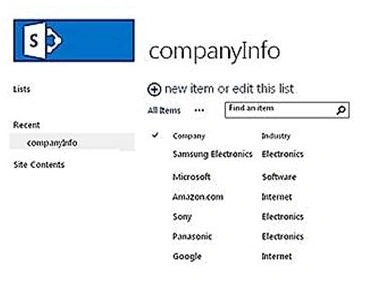
Now, I will demo all the operations on list items, including retrieve, create, update and delete on list items.
Retrieve the list items
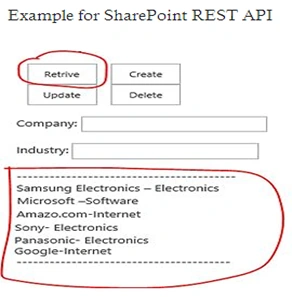
Here is the main code in detail:
function retriveListItem()
{

    $.ajax
    ({
        url: _spPageContextInfo.webAbsoluteUrl + "/_api/web/lists/GetByTitle('companyInfo')/items?$select=Company,Industry",
        type: type,
        data: data,
        headers:
        {
            "Accept": "application/json;odata=verbose",
            "Content-Type": "application/json;odata=verbose",
            "X-RequestDigest": $("#__REQUESTDIGEST").val(),
            "IF-MATCH": "*",
            "X-HTTP-Method": null
        },
        cache: false,
        success: function(data)
        {
            $("#ResultDiv").empty();
            for (var i = 0; i < data.d.results.length; i++)
            {
                var item = data.d.results[i];
                $("#ResultDiv").append(item.Company + "\t" + item.Industry + "<br/>");
            }
        },
        error: function(data)
        {
            $("#ResultDiv").empty().text(data.responseJSON.error);
        }
    });
}
Create list item
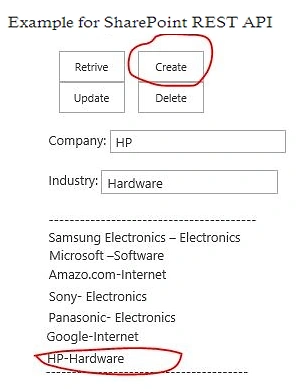
Here is the main code in detail:
function AddListItem()
{
    var industryVal = $("#Industry").val();
    var Company = $("#Company").val();
    $.ajax
        ({
        url: _spPageContextInfo.webAbsoluteUrl + "/_api/web/lists/GetByTitle('companyInfo')/items",
        type: "POST",
        data: JSON.stringify
        ({
            __metadata:
            {
                type: "SP.Data.TestListItem"
            },
            Company: Company,
            Industry: industryVal
        }),
        headers:
        {
            "Accept": "application/json;odata=verbose",
            "Content-Type": "application/json;odata=verbose",
            "X-RequestDigest": $("#__REQUESTDIGEST").val(),
            "X-HTTP-Method": "POST"
        },
        success: function(data, status, xhr)
        {
            retriveListItem();
        },
        error: function(xhr, status, error)
        {
            $("#ResultDiv").empty().text(data.responseJSON.error);
        }
    });
}
Update list item
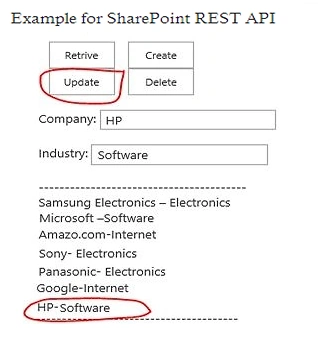
Here is the main code in detail:
function updateListItem()
{
    var industryVal = $("#Industry").val();
    $.ajax
    ({
        url: _spPageContextInfo.webAbsoluteUrl + "/_api/web/lists/GetByTitle('companyInfo')/items(7)", // list item ID
        type: "POST",
        data: JSON.stringify
        ({
            __metadata:
            {
                type: "SP.Data.TestListItem"
            },
            Industry: industryVal
        }),
        headers:
        {
            "Accept": "application/json;odata=verbose",
            "Content-Type": "application/json;odata=verbose",
            "X-RequestDigest": $("#__REQUESTDIGEST").val(),
            "IF-MATCH": "*",
            "X-HTTP-Method": "MERGE"
        },
        success: function(data, status, xhr)
        {
            retriveListItem();
        },
        error: function(xhr, status, error)
        {
            $("#ResultDiv").empty().text(data.responseJSON.error);
        }
    });
Delete list item
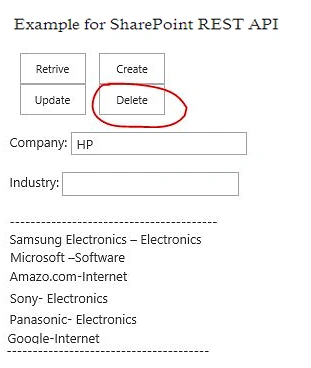
Here is the main code in detail:
function deleteListItem()
{
    $.ajax
    ({
        url: _spPageContextInfo.webAbsoluteUrl + "/_api/web/lists/GetByTitle('companyInfo')/items(7)",
        type: "POST",
        headers:
        {
            "X-RequestDigest": $("#__REQUESTDIGEST").val(),
            "IF-MATCH": "*",
            "X-HTTP-Method": "DELETE"
        },
        success: function(data, status, xhr)
        {
            retriveListItem();
        },
        error: function(xhr, status, error)
        {
            $("#ResultDiv").empty().text(data.responseJSON.error);
        }
    });
}
Summary
In this article, we explored SharePoint 2013 REST API for (CRUD) operations on list items level. I’ve tried to explore crud operation using REST Services, JavaScript Client Side Object Model, and SOAP Services to work on the client side.
Read more articles on SharePoint:
Abhishek DasPosted Mar 15, 2023, 2:41 PM
Hi,could pls share full code to emailid:[email protected]
mohit guptaPosted Feb 26, 2022, 6:01 PM
Nice article! could you please share full code on my emailid: [email protected]
Aravind ManoharanPosted Feb 1, 2022, 9:52 AM
Hi, Is it possible to manage Sharepoint Survey List (Add / update questions) through REST API ? Any reference document will be helpful.
thamizh annaiPosted Jan 14, 2022, 6:27 AM
Hi, the above code is very helpful, could you please share me for the checkbox and radio button? my email address is [email protected]
zain baigPosted Jan 20, 2021, 8:27 PM
Hi sagar,Can you please send me the htm code at: [email protected]
Hari KPosted Nov 12, 2020, 3:11 AM
Hi Sagar, Thank You very much for the quick response, but below is my scenario 1. My on-premise application interacting with 5 different lists using c# based CURD operations 2. organization wise employees using this application 3 .Using the Elevated privileges option we are maintaining user access through lists. How do we manage user access if we re-write application to SharePoint online using REST API? We can't give all employees Edit/Contribute permission on my lists which many leads to security issues if the user directly access-list from UI.
Hari KPosted Nov 10, 2020, 8:34 PM
Hi Sagar, Can you please let me know what permissions the user needs to permissions RESI API calls. IF a user part of SharePoint Viewers Group, Is it possible to call all REST API Methods?
Vm kPosted Aug 5, 2020, 1:30 PM
Hello Sagar. Thank you for creating a very useful document.
parthibanPosted Jul 20, 2020, 11:48 PM
Hello Sagar Pardeshi , i am trying to achive above via rest C# but create operation i am getting error . Can you help , my email address [email protected]
Vikas DadhichPosted Jun 29, 2020, 1:45 PM
Please send HTML file
lavanya sPosted Mar 20, 2020, 4:19 AM
Hey sagar , please do send me the HTML code on [email protected] Thank youuu...
ismile bashaPosted Feb 28, 2020, 5:20 AM
Please send me Html code [email protected]
Ano MepaniPosted Jan 27, 2020, 12:33 AM
Worth to read Spohelper utilities for easy sharepoint rest api crud operation https://anomepani.github.io/
Rishika DPosted Jan 23, 2020, 10:32 AM
Can u send me the html code for [email protected]
Jose CarrilloPosted Nov 25, 2019, 4:30 AM
Hello Sagar, could you please share your html code: [email protected]. Thank you !!
Prem KumarPosted Oct 15, 2019, 1:35 AM
Hi Please send me the HTML code and how to use it as a JSOM in SPOnline to [email protected]
mayo RogerPosted Aug 27, 2019, 7:50 AM
Mr Sagar I couldn't find yet, [email protected]. Thank you!
raj kiranPosted Aug 15, 2019, 9:14 AM
Hello Sagar please send me the html code to [email protected]
Rafael NascimentoPosted Aug 14, 2019, 12:20 PM
Please send me Html [email protected].
Srinath MothePosted Aug 7, 2019, 1:49 AM
Please send me the HTML code to [email protected]
venkat jPosted Jul 21, 2019, 10:54 PM
Please send me Html code [email protected]
Ano MepaniPosted Jul 15, 2019, 2:43 AM
Adding another link for Sharepoint REST API as it is a popular post https://www.c-sharpcorner.com/article/easy-sharepoint-listitem-crud-operation-using-rest-api-wrapper/
manoj tiwariPosted Jul 4, 2019, 12:43 AM
Please send me html code... [email protected]
Erasmo VieyraPosted Jun 27, 2019, 1:29 PM
Please, Send me the html code to [email protected] Thank you in advance!!
gowtham pPosted Jun 23, 2019, 6:03 AM
Send me the html code to [email protected] thank you
Siva MPosted Jun 23, 2019, 1:58 AM
please \Send me the html code to [email protected]
Jones SkipPosted May 31, 2019, 9:48 AM
Please send the html code to [email protected] Thank you so much Sagar!
Adithya AdiPosted May 21, 2019, 2:46 AM
Please send the html code to [email protected] thanks
Adithya AdiPosted May 21, 2019, 2:46 AM
Please send the html code to [email protected] thanks
Naeem KhanPosted May 7, 2019, 2:05 AM
Please send me HTML code [email protected] and will it work in sharepoint online
Mannl LewPosted Apr 30, 2019, 12:29 PM
Please send html as well to - [email protected] thanks
David DPosted Apr 30, 2019, 11:35 AM
Great article...so simple! Looking for alternatives to using DVWPs, hoping I can get this to work. May I also get the HTML? - [email protected]
Ayush GuptaPosted Feb 19, 2019, 5:34 AM
Pls send the UI code- [email protected]
Sagar PardeshiPosted Dec 26, 2018, 11:27 PM
Hello Raja...when new create or update list that time every list haveing metadata that metadata required for crud operation.
Raja KumarPosted Dec 26, 2018, 7:28 AM
Hi Sagar, What is the Purpose of type: "SP.Data.TestListItem"
Akash KumharPosted Aug 23, 2018, 1:30 AM
One of the best articles.. Thanks for sharing..
Bibhash JhaPosted Aug 22, 2018, 8:34 AM
Sagar Pardeshi pls send the UI code
JalloullPosted Jul 7, 2018, 10:19 AM
Hi, thank for the very helpful code. is it possible to have the HTML Code also Please? Thank you !
JalloullPosted Jul 7, 2018, 9:07 AM
Hi, thank for the very helpful code. I am just starting. Is it possible to have the HTML code as well ? many thanks
shobhit AgarwalPosted Jan 24, 2018, 2:00 PM
Where to write this code. I mean in Visual Studio which project to choose then where to write, adding some references.
Jim ShelleyPosted Jul 20, 2017, 2:38 PM
This is the best tutorial I've seen on this subject. I had one snag where I had to wrap the $.ajax in a call variable (because the type was undefined?) but other than that, everything worked great!
Prashant VermaPosted Mar 14, 2016, 10:22 AM
nice share
Kumaresh RajalingamPosted Mar 9, 2016, 8:39 PM
Nice share
Shailesh UkePosted Mar 9, 2016, 1:07 AM
Nice One..
Debasis SahaPosted Mar 9, 2016, 12:09 AM
Nice one...
Humayun Kabir MamunPosted Mar 8, 2016, 11:20 PM
Nice...
Vignesh ManiPosted Mar 8, 2016, 11:38 AM
Nice
Akash KumharPosted Mar 8, 2016, 9:36 AM
its really helpful
Prashant VermaPosted Mar 8, 2016, 5:11 AM
good one