

Introduction
The goal of this article is to provide how to perform basic create, read, update, and delete (CRUD) operations on lists and list items with the JSOM. I have explored the CRUD operation using Web Service in my previous article.
Now, I will demo all the operations on list items, including retrieve, create, update and delete on list items.
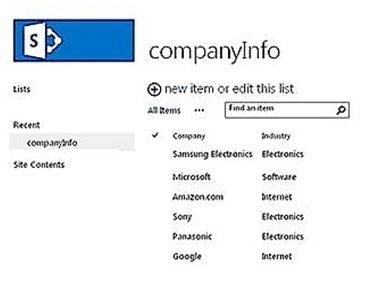
Retrieve the list items
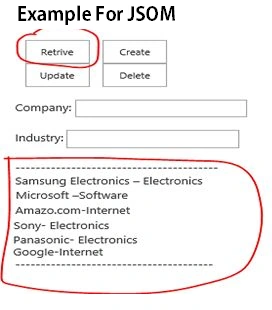
Here is the main code in detail:
function retriveListItem()
{
    //Get the current context
    var context = new SP.ClientContext();
    var list = context.get_web().get_lists().getByTitle(‘companyInfo’);
    var caml = new SP.CamlQuery();
    caml.set_viewXml("<View><Query><OrderBy><FieldRef Name=’Company’ Ascending='TRUE' /></OrderBy></Query></View>");
    returnedItems = list.getItems(caml);
    context.load(returnedItems);
    context.executeQueryAsync(onSucceededCallback, onFailedCallback);
}

function onSucceededCallback(sender, args)
{
    var enumerator = returnedItems.getEnumerator();
    //Formulate HTML from the list items
    var MainResult = 'Items in the Divisions list: <br><br>';
    //Loop through all the items
    while (enumerator.moveNext())
    {
        var listItem = enumerator.get_current();
        var companyName = listItem.get_item(“Company ");
                var Industry = listItem.get_item(“Industry ");
                        MainResult += MainResult + companyName + "-" + Industry + "\n";
                    }
                    //Display the formulated HTML in the displayDiv element
                displayDiv.innerHTML = MainResult;
            }
            //This function fires when the query fails
        function onFailedCallback(sender, args)
        {
            //Formulate HTML to display details of the error
            var markup = '<p>The request failed: <br>';
            markup += 'Message: ' + args.get_message() + '<br>';
            //Display the details
            displayDiv.innerHTML = markup;
        }
   }
}
Create list item
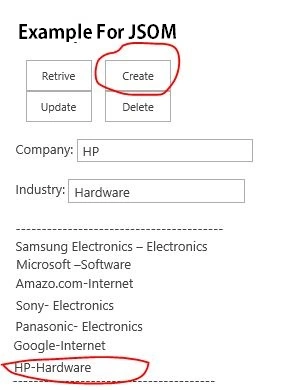
Here is the main code in detail:
function AddListItem()
{
    var listTitle = "companyInfo";
    //Get the current client context
    context = SP.ClientContext.get_current();
    var airportList = context.get_web().get_lists().getByTitle(listTitle);
    //Create a new record
    var listItemCreationInformation = new SP.ListItemCreationInformation();
    var listItem = airportList.addItem(listItemCreationInformation);
    //Set the values
    Var industryVal = $("#Industry").val();
    var Company = $("#Company").val();
    listItem.set_item('Industry', +industryVal);
    listItem.set_item('Company', +new item);
    listItem.update();
    context.load(listItem);
    context.executeQueryAsync(AddListItemSucceeded, AddListItemFailed);
}

function AddListItemSucceeded()
{
    retriveListItem();
}

function AddListItemFailed(sender, args)
{
    alert('Request failed. ' + args.get_message() + '\n' + args.get_stackTrace());
}
Update list item
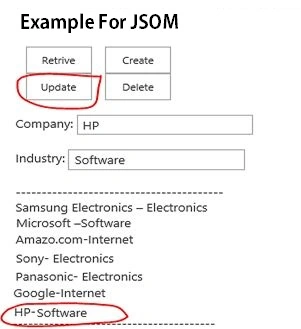
Here is the main code in detail:
function updateListItem()
{
    var ListName = "companyInfo";
    var context = new SP.ClientContext.get_current(); // the current context is taken by default here
    //you can also create a particular site context as follows
    var lstObject = context.get_web().get_lists().getByTitle(ListName);
    this.lstObjectItem = lstObject.getItemById(1);

    Var industryVal = $("#Industry").val();
    var Company = $("#Company").val();
    lstObjectItem.set_item('Industry', “+industryVal + ”);
    lstObjectItem.set_item('Company', ”+Company + ”);
    lstObjectItem.update();
        context.executeQueryAsync(Function.createDelegate(this, this.onSuccess), Function.createDelegate(this, this.onFailure));
}

function onSuccess()
{
    retriveListItem();
}

function onFailure(sender, args)
{
    alert('Request failed. ' + args.get_message() + '\n' + args.get_stackTrace());
}
Delete list item
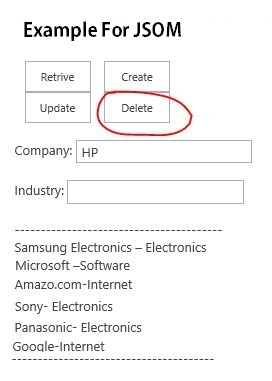
Here is the main code in detail:
function deleteListItem()
{
    var listTitle = "companyInfo";
    //get the current client context
    context = SP.ClientContext.get_current();
    var airportList = context.get_web().get_lists().getByTitle(listTitle);
    //get the list item to delete
    var listItem = airportList.getItemById(1);
    //delete the list item
    listItem.deleteObject();
    context.executeQueryAsync(DeleteItemSucceeded, DeleteItemFailed);
}

function DeleteItemSucceeded()
{
    retriveListItem();
}

function DeleteItemFailed(sender, args)
{
    alert('Request failed. ' + args.get_message() + '\n' + args.get_stackTrace());
}
Summary
In this article, we explored SharePoint JSOM for CRUD operations on list items level. Hope it will be helpful.
CRUD On List Items Using Web Services And jQuery In SharePoint 2013 - Part 1
CRUD Operation On List Items Using REST API Services In SharePoint 2013: Part Three
Akash KumharPosted Sep 13, 2018, 1:38 PM
Nice Article Sagar.. Thanks for Sharing
Shristy ShrivastavaPosted Aug 16, 2018, 3:54 AM
Pls help!!!!
Shristy ShrivastavaPosted Aug 16, 2018, 3:54 AM
Instead of applying \n
Shristy ShrivastavaPosted Aug 16, 2018, 3:54 AM
It is showing all items in one line
Shristy ShrivastavaPosted Aug 16, 2018, 3:54 AM
When we are retrieving items
pawan kotakPosted Aug 12, 2017, 4:58 PM
Nice Article.. can you please update code for lookup field and people/group field. Thanks
Humayun Kabir MamunPosted Mar 8, 2016, 11:22 PM
Nice...
Gowtham RajamanickamPosted Jan 29, 2016, 3:22 AM
good show
Shubham KumarPosted Jan 28, 2016, 5:36 AM
thnx sir
Debasis SahaPosted Jan 27, 2016, 11:58 PM
Nice one..
Arul RPosted Jan 27, 2016, 11:22 PM
Nice share
Vignesh ManiPosted Jan 27, 2016, 5:27 PM
Nice
Santhakumar MunuswamyPosted Jan 27, 2016, 1:51 PM
Thanks for nice share