

This article will take you on a journey of MVC Create, Replace, Update and Delete (CRUD) operations. I'll show you step-by-step operations using simple images and charts. So buckle up for that journey.
Agenda
- Overview
- Introduction
- Procedure
- Creating a MVC Project
- Adding EDM
- DB Settings
- Adding a controller
- (Ref code Snippet)
- Routing
- Conclusion
Overview
This article will explain MVCs base operations rather than any fundamentals and anything like that so if you are new to MVC then I'll suggest you first explore the basics, it will hardly take a few hours then you can read this article.
In spite of these entire one more thing, I'm using MVC4 here for these operations. You can use any version but in the earlier versions, like in case of VS'8 and below you need to install templates first, then you can have fun.
Introduction
This article is all about ASP.NET MVC CRUD operations using Entity Data Model (DB First Approach). This will explain it in baby steps using images. One more interesting fact about this article is, you are not going to write even a single line of code.
Here we go.
Procedure
I am dividing this into 7 major steps, these steps will contain several sub steps. The major steps of this project are: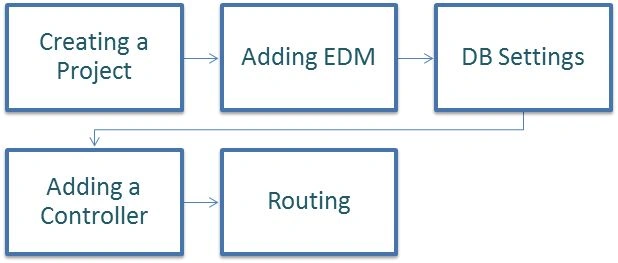
Step 1: Creating a MVC Project
Just click on File > New project.
On clicking New Project you will get a window like this, in that window does these tiny steps:
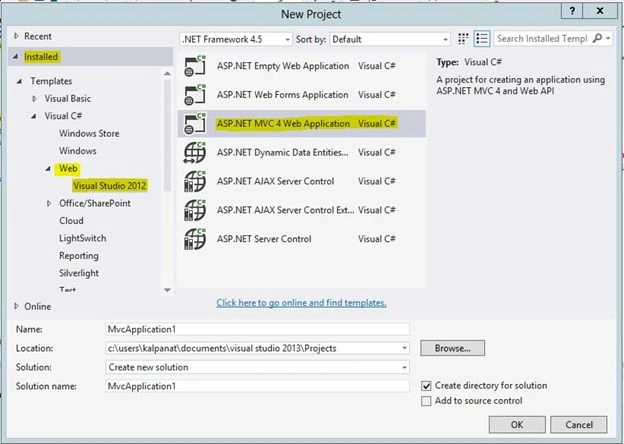
In this window simply fill in the project name depending on you; in my case it is "CRUDoperation" and then click on OK.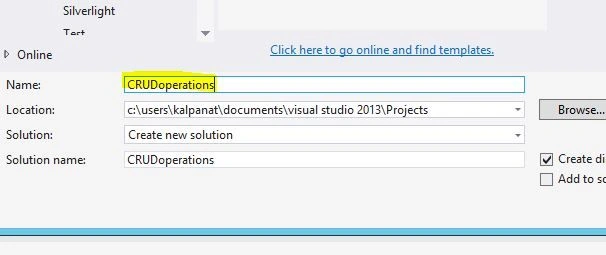
On clicking OK a window like this will pop up on your screen. 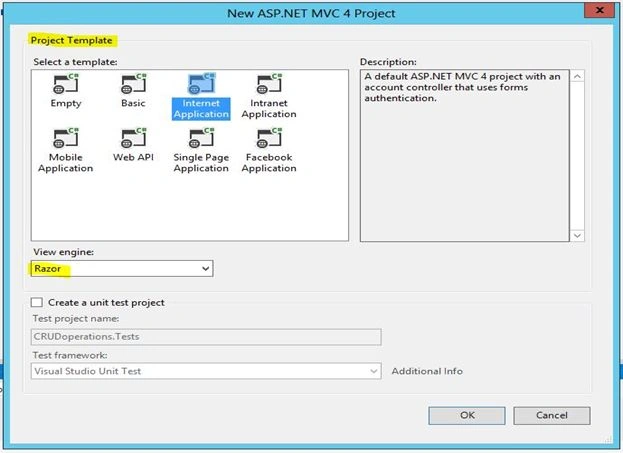
In that window from Project Templates you have several options like:
- Empty
(Simply a blank view)
- Basic
(Contains a few options and a few folders)
- Internet Template
(Contains all the folders for global use)
- Intranet Template
(Contains all the folders but for a specific scenario)
- Mobile Application
(For mobile app dev)
- Web API
(Extra features of Razor, Routing and others)
- Single Page Application
(For single page app dev)
- Facebook Application
(Facebook app dev)
From those select Intranet Application and then from View Engine select Razor Engine View (it's the default actually).
Then after View Engine there is an option for Create a Unit Test Project, this option is for creating a step-wise unit test for your project. (Microsoft provides that functionality in the default in MVC. It's not mandatory to create a unit test project but in my case I am using it.)
Now just create a Test Project and click OK.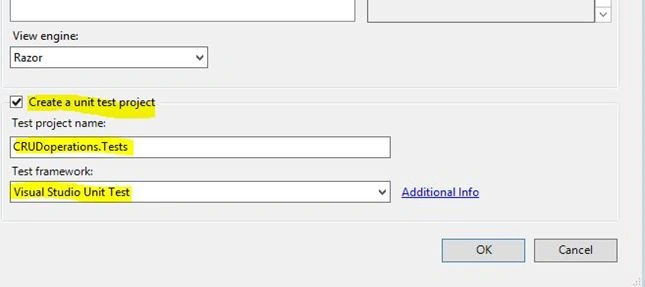
On clicking okay it will take a while to create the project.
Then you will get a window containing these folders:
- Solution Explorer
- Test Explore
- Class View
- Properties
From these options select Solution Explorer, click CRUDoperations, just click on that and you will get a view of this window.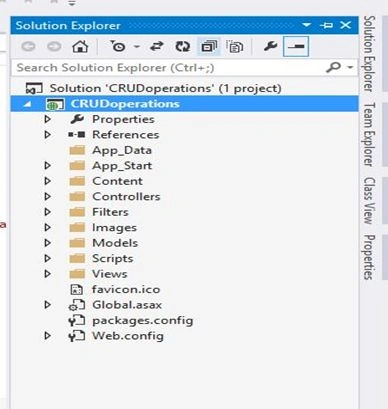
Step 2: Adding EDM
(For data I am selecting ADO.Net Entity Data Model, you can select several other available options.)
Just do this procedure, right-click on CRUDoperation > Add New Item
Then follow this procedure, respectively: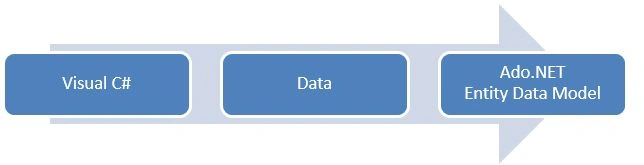
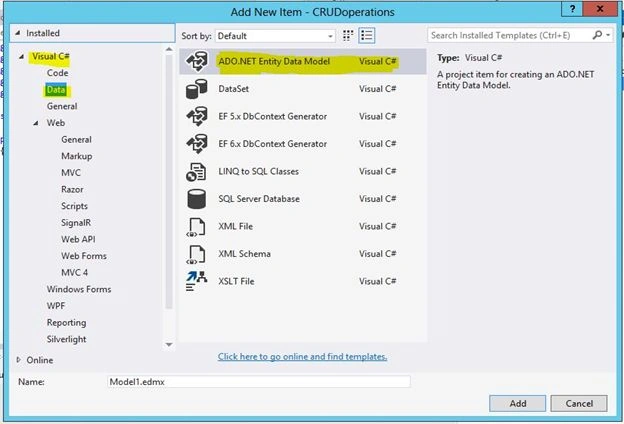
Simply name your EDM model (in my case it's EDM) and then click OK.
Now you will get a pop-up window, named Choose Model Contents. This contains the following 2 types of model contents:
- Generate from Database (DB first approach)
- Empty Model (Modal first approach)
(In my case I am using the DB first approach (Generate from Database), just select it and click on "Next" )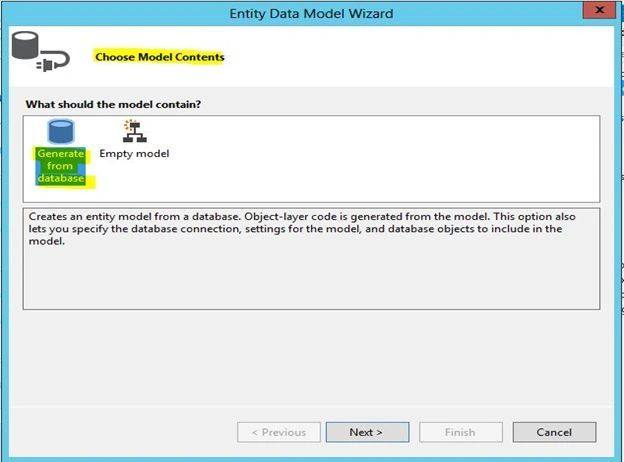
On clicking Next, you will get a option Choose Your Data Connection, from here just select a connection string if you already have one or else you can go with New Connection.
Just click on New Connection.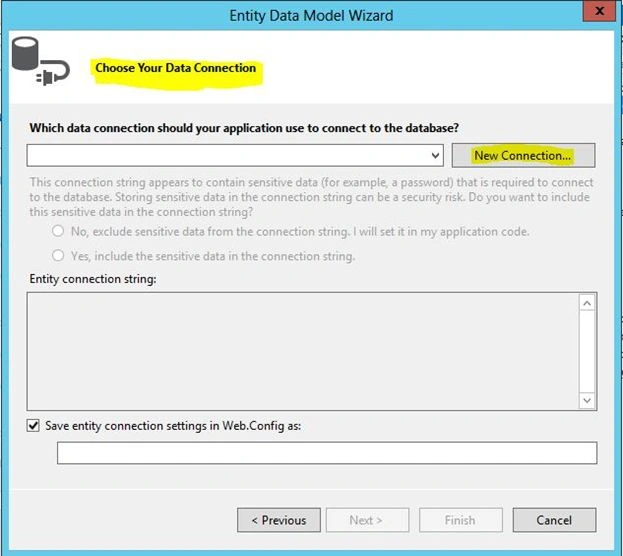
Now set your connection properties as in the following: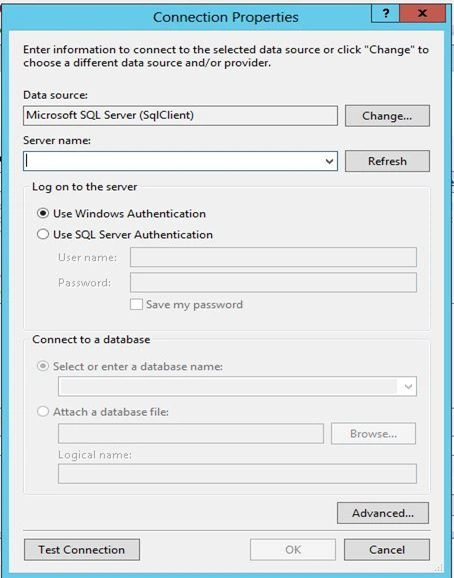
Just fill in all the required details of your server and database and proceed further.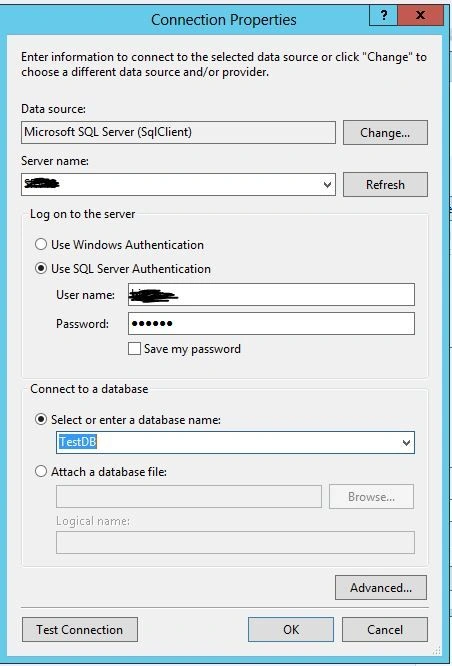
Microsoft has provided a beautiful option to check your connection, down the pop box. Just click on Test Connection, if everything until now will be smooth and clear then you will get a pop-up box saying- "Test connection Succeeded" as shown below.
(Otherwise you need to recheck your DB and server details again and try to establish the connection again and then you can check your connection.)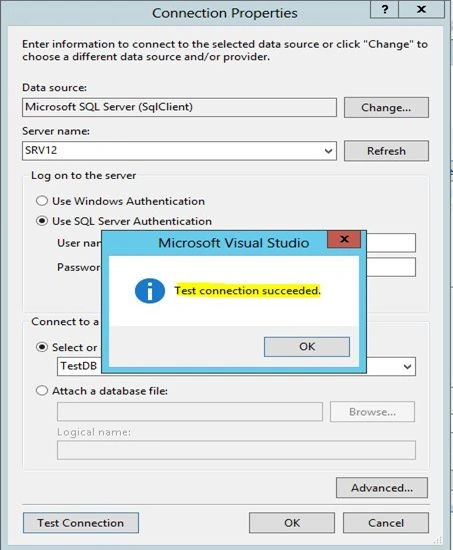
Now you can see the generated Data Connection in the box as shown below. Just select a few further settings like Security and march forward.
Just click on “Finish”.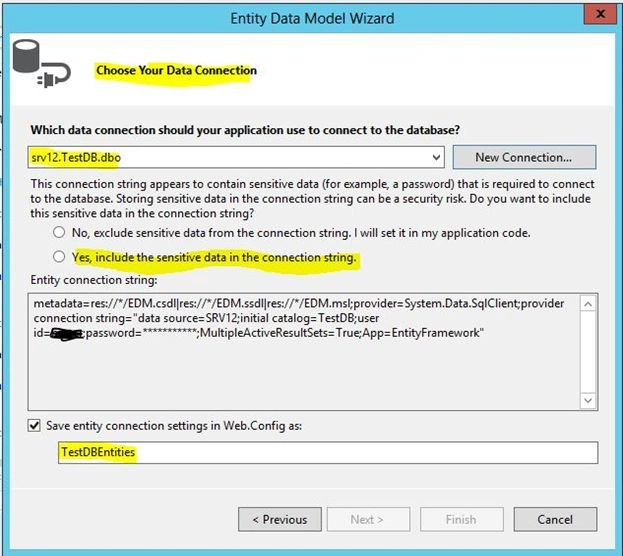
On clicking Finish it will show a box saying Model Wizard, just select any of the wizards depending on availability (in my case I am selecting Entity Framework 5.0).
Click Next for further settings.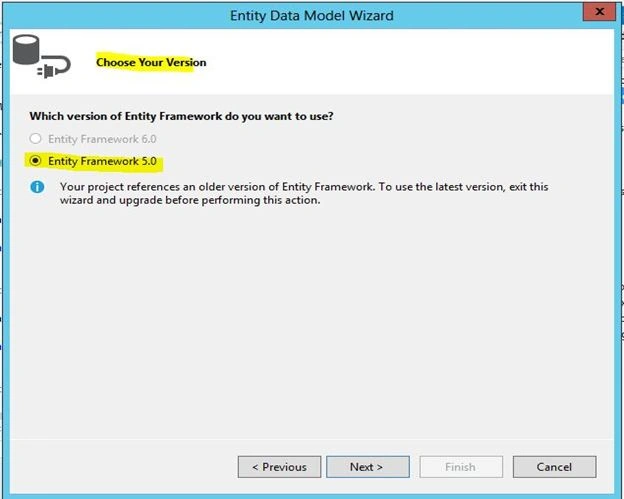
Step 3: Selecting you DB Settings
Now in this step just click on Table, dbo (as I already have a table in my DB, but if you created a Stored Procedure or view then select it respectively).
In model Namespace just leave it as it is or change it depending on you. In my case its TestDBModel, click Finish.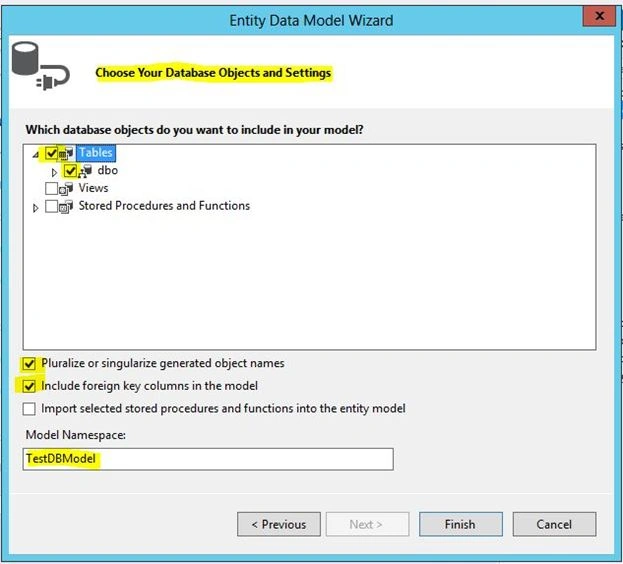
This will redirect you to a page containing a structure diagram of all the available tables in that select DB in step 3. You remove others depending on you (in my case it's Employee having the columns EmployeeId, FirstName, LastName, Age, Project and Address).
You don't need to do anything here, just chill it's more than half done.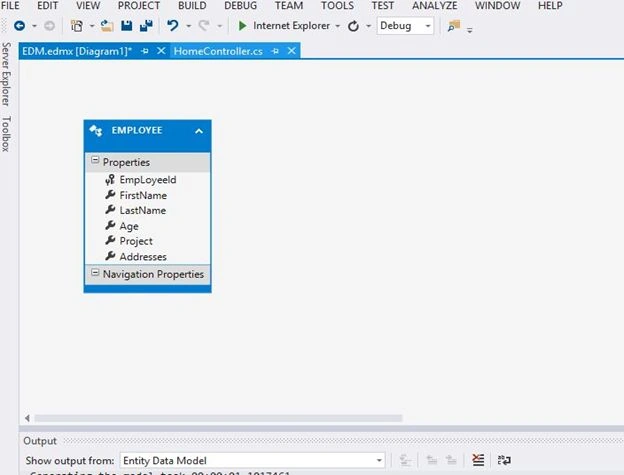
You can see all these EDM files in the Solution Explorer, having all the required fields, pages and reference files of all your available tables with ".cs extension".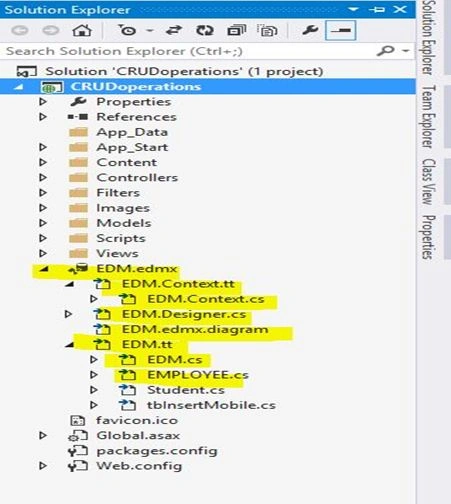
Note: Before proceeding to Step 5, build the project. It's recommended.
Step 4: Adding a Controller
For adding a controller do this procedure:
On clicking Add Controller, it will redirect to you to this window, having these fields:
- Controller Name
- Scaffolding Template
- Model Class
- Data Context Class
- Views
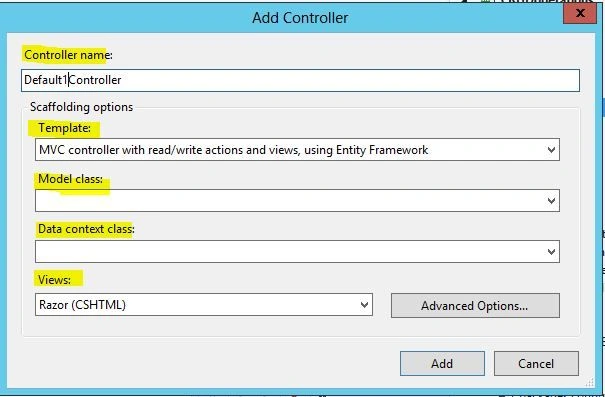
Just modify entries depending on you. (My entries are shown below.)
Now click Add.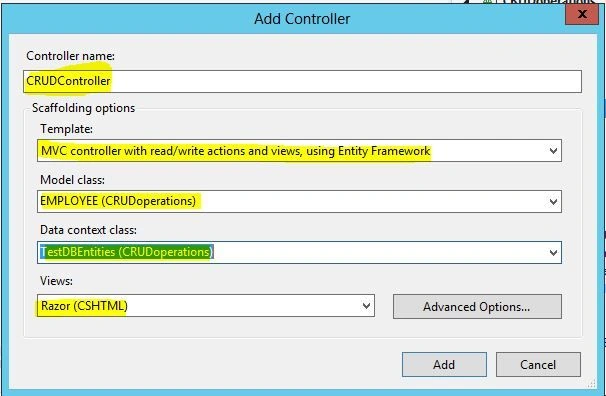
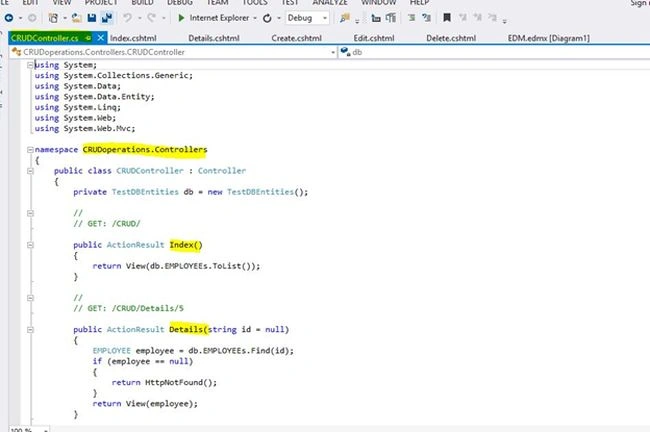
It will redirect you to a page named "CRUDcontroller.cs" (as I modified it). This page contains all the CRUD operation related functions and two others, such as:
- Index.cs
- Details.cs
Reference Code | Snippet
This is of the CRUDcontoller.cs page that represents all the base operations with their respective get and set methods.
- using System;
- using System.Collections.Generic;
- using System.Data;
- using System.Data.Entity;
- using System.Linq;
- using System.Web;
- using System.Web.Mvc;
- namespace CRUDoperations.Controllers
- {
- public class CRUDController : Controller
- {
- private TestDBEntities db = new TestDBEntities();
- //
- // GET: /CRUD/
- public ActionResult Index()
- {
- return View(db.EMPLOYEEs.ToList());
- }
- //
- // GET: /CRUD/Details/5
- public ActionResult Details(string id = null)
- {
- EMPLOYEE employee = db.EMPLOYEEs.Find(id);
- if (employee == null)
- {
- return HttpNotFound();
- }
- return View(employee);
- }
- //
- // GET: /CRUD/Create
- public ActionResult Create()
- {
- return View();
- }
- //
- // POST: /CRUD/Create
- [HttpPost]
- [ValidateAntiForgeryToken]
- public ActionResult Create(EMPLOYEE employee)
- {
- if (ModelState.IsValid)
- {
- db.EMPLOYEEs.Add(employee);
- db.SaveChanges();
- return RedirectToAction("Index");
- }
- return View(employee);
- }
- //
- // GET: /CRUD/Edit/5
- public ActionResult Edit(string id = null)
- {
- EMPLOYEE employee = db.EMPLOYEEs.Find(id);
- if (employee == null)
- {
- return HttpNotFound();
- }
- return View(employee);
- }
- //
- // POST: /CRUD/Edit/5
- [HttpPost]
- [ValidateAntiForgeryToken]
- public ActionResult Edit(EMPLOYEE employee)
- {
- if (ModelState.IsValid)
- {
- db.Entry(employee).State = EntityState.Modified;
- db.SaveChanges();
- return RedirectToAction("Index");
- }
- return View(employee);
- }
- //
- // GET: /CRUD/Delete/5
- public ActionResult Delete(string id = null)
- {
- EMPLOYEE employee = db.EMPLOYEEs.Find(id);
- if (employee == null)
- {
- return HttpNotFound();
- }
- return View(employee);
- }
- //
- // POST: /CRUD/Delete/5
- [HttpPost, ActionName("Delete")]
- [ValidateAntiForgeryToken]
- public ActionResult DeleteConfirmed(string id)
- {
- EMPLOYEE employee = db.EMPLOYEEs.Find(id);
- db.EMPLOYEEs.Remove(employee);
- db.SaveChanges();
- return RedirectToAction("Index");
- }
- protected override void Dispose(bool disposing)
- {
- db.Dispose();
- base.Dispose(disposing);
- }
- }
- }
You can see the controller info on the preceding page but if you want to see their views then simply click on Views, it will show you a separate folder named CRUD and all the pages for the CRUD operations.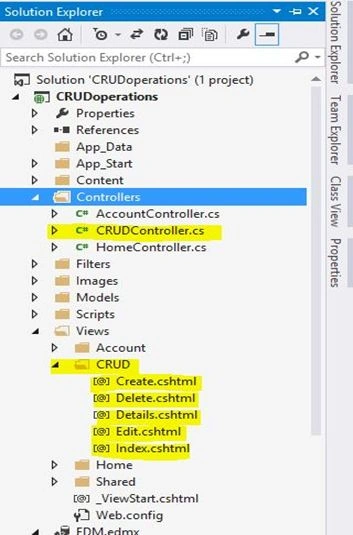
You can see the razor engine functionality in any of the pages, as shown below. This page shows a view of the create page, I'll show you that page later in this article.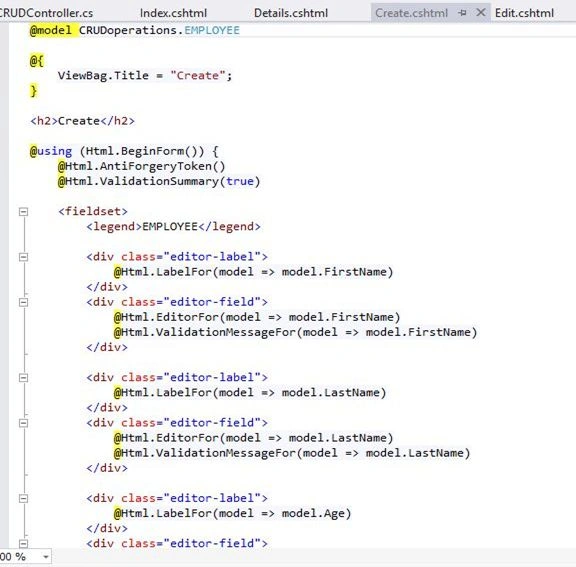
Step 5: Routing
Routing is itself a complex mechanism, but here I am showing you only the base access functionality. For that base functionality, follow this procedure: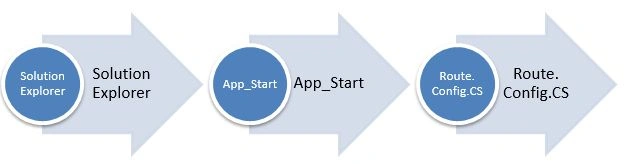
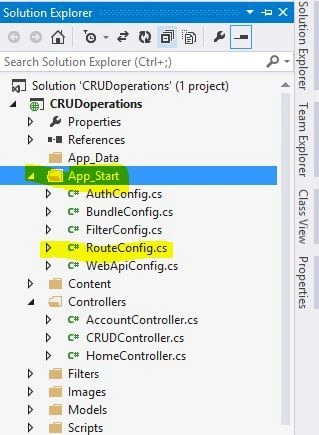
On clicking Route.Config.CS it will redirect you to that window (below). You need to make some changes in that page such as:
- Controller Name
- Action
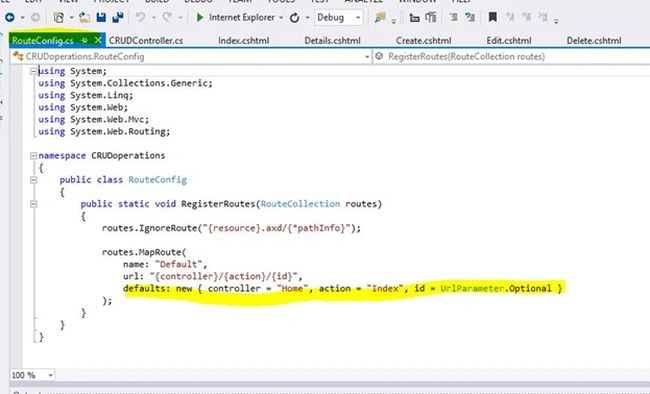
All other options are the default for the operation.
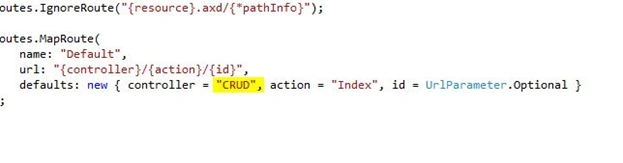
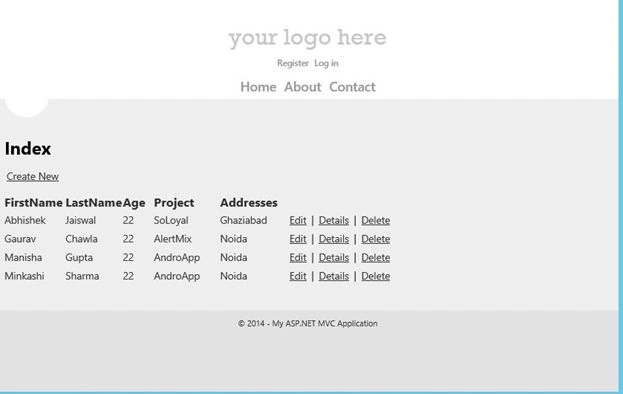
Just run that page and you will see a page like this. This is your default page of CRUD operations. You can access all the other options.
This is the base structure of the create page, as I was talking about in Step 5.
You can create entries from here.
Conclusion
Cognates buddies!
Just clap for yourself, because you have done a great job. You performed CRUD operations using ASP.NET MVC without writing a single line of code.
I wish you liked this, I'll come with some other exciting parts of MVC operations soon, until then enjoy coding and if you encounter any problem then feel free to ping me.
Naveen NaveenPosted Oct 23, 2021, 5:14 AM
In insert action result its only went first action its not went second insert action result ..but i gave all things [httppost] i was gave ..inside the also i gave all things model ,using begin,antiforgery token also @html.editorfor(model=>model.name) also i gave but....why it not went to second insert actionresult..
priyanka palandePosted Apr 27, 2020, 12:03 AM
How can we show this in a gridview
akshay shakyaPosted Jun 13, 2018, 9:01 AM
Its really helpfull thank u so much ...awesome way of explanation
Tamheed KhanPosted Jan 22, 2018, 1:25 PM
Hi Abhishek, Thanks.. it's really cool and helpfull
Rashmi JoshiPosted Jan 15, 2018, 1:52 AM
Hello where is required sql
Anjali KhanPosted May 24, 2017, 2:39 AM
Hi Can you help me ..i want to perform crud operation without using procedure , and use entity framework with linq . i dont want to use scaffolding
Kd NimavatPosted May 17, 2017, 3:21 AM
Can you help me please.....i did it and its greatest but data of database dose not show and also i enter new entry and its not updated in database so what to do
Ardi PratamaPosted Jan 5, 2017, 8:54 PM
Please update for view page .. thanks by the way
Manav PandyaPosted Dec 20, 2016, 9:17 AM
But i want to ask that how to do CRUD without creating Entity(EDM) , by just declaring object
Manav PandyaPosted Dec 20, 2016, 9:16 AM
Hi nice article buddy Abhishek Jaiswal :) sir
Anup PalPosted Dec 19, 2016, 7:31 AM
ALTER Procedure [dbo].[Check] @Title nvarchar(50)=null, @Link nvarchar(50)=null, @Description nvarchar(50)=null, @CurrentDatetime datetime=null AS BEGIN DECLARE @count int; set @count =(select count(*) from GlobalExchange) if(@count=0) Begin Insert into GlobalExchange values(@Title,@Link,@Description,@CurrentDatetime) end else if exists(select * from GlobalExchange where title = @Title) Begin update GlobalExchange set link=@Link ,Description=@Description,CreatedDate=@CurrentDatetime Where title=@Title end else Begin Insert into GlobalExchange values(@Title,@Link,@Description,@CurrentDatetime) end END
Suresh MolabantiPosted Jul 11, 2016, 5:06 AM
Prepare one video for this it's very very useful all c# corner users
Suresh MolabantiPosted Jul 11, 2016, 5:06 AM
Nice sir
santosh yadavPosted Apr 7, 2016, 11:30 PM
In above example there is no Module but at the time of adding controller you are giving the name of module.
Rajesh GondaliaPosted Feb 24, 2016, 4:00 AM
Please suggest me .. how to use stored procedure in mvc4
Muhammad Uzair RasheedPosted Oct 11, 2015, 7:05 AM
How can i use internet application to be accessed by my local network?
Abhishek JaiswalPosted Sep 26, 2015, 3:08 PM
Are you accessing the controller that is returning a view, if not then go to controller action and return a view that you want to access. I hope it helps. CHeers!! :)
Nikhil MehtaPosted Aug 31, 2015, 8:42 AM
any button including edit, details, and delete
Nikhil MehtaPosted Aug 31, 2015, 8:22 AM
thanx!!!! but one problem is there, when i click it shows that the resource not found error..........tell me the solution
Abhishek JaiswalPosted Aug 11, 2015, 2:11 PM
Glad, I could help! :)
jayant tripathyPosted Aug 10, 2015, 3:57 AM
Nice one. Very Helpful.
Shivam SrivastavaPosted May 22, 2015, 10:42 AM
nice sir
Abhishek JaiswalPosted Sep 11, 2014, 1:07 PM
Thanks for figuring out that silent loop hole! :)
Ragavan BPosted Sep 11, 2014, 12:55 AM
Very nice. and very small mistake, From those select [< Intranet Application >] and then from View Engine select Razor Engine View
Abhishek JaiswalPosted Sep 9, 2014, 11:47 AM
Thanks Buddy! :)
M SKPosted Sep 9, 2014, 5:19 AM
Good one..