

Introduction
These days Rapid Application Development (RAD) is growing quickly. There are numerous frameworks available to develop Web Applications or Web Projects. We can use either ASP.Net or ASP.Net MVC from Microsoft or any other framework. Although NancyFx has its own support for View Engines for example Super Simple View Engine or Razor View Engine. Also, anyone can define their own custom view engine. In this article we will use NancyFx to build a restful service using ASP.Net and FluentNHibernate and understand how it works step-by-step.
NancyFx
In simple and shorter words NancyFx is a lightweight web framework for .Net. In these days, this tool is the most popular among C# developers for web development. NancyFx is inspired by ruby's Sinatra. I have never worked on Ruby, so I can't compare Sinatra and NancyFX. NancyFX has builtin support for all requests (GET, PUT, POST, DELETE and so on).
Why Use NancyFx
There are numerous reasons to adopt NancyFX for your web development. Here are my views (we are not discussing these points in this article):
- Less costlier.
- Builtin IoC container (TinyIOC).
- Easy to test (just like ASP.Net MVC).
- Not limited to, or biased toward, any UI framework (viz. MVM, MVC and so on).
- Providing customization (built-in feature to replace any part as required).
- Runs on Mono.
- No configuration required to setup NancyFx.
- Free from Design Framework.
- Can run anywhere (IIS, WCF, can embed within an EXE, as a Window Service and so on).
Let's Start Creation of a Sample Project
We need to setup NancyFx and FluentNHibenrate support for our project.
Prerequisites
To implement and play with the source code, one should have:
- Visual Studio 2013 express or later
- ASP.Net
- Basic knowledge of RestFul services
- Basic knowledge of FluentNHibernate
Create Skeleton/Empty ASP.Net project
To start we are using a simple empty ASP.Net project:
- Start Visual Studio and select "File" -> "New" -> "Project..." (or type Ctrl + Shift + N).
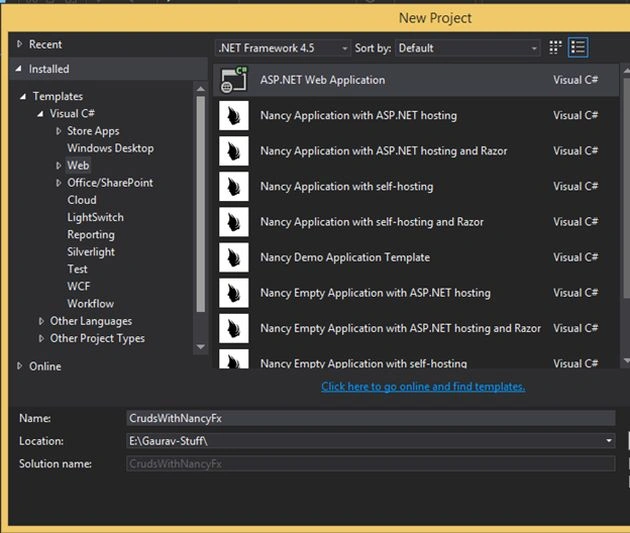
Note: do not confuse that with the installed Nancy template (we will discuss it in the next article).
- In the Template dialog select Empty template as in the following:
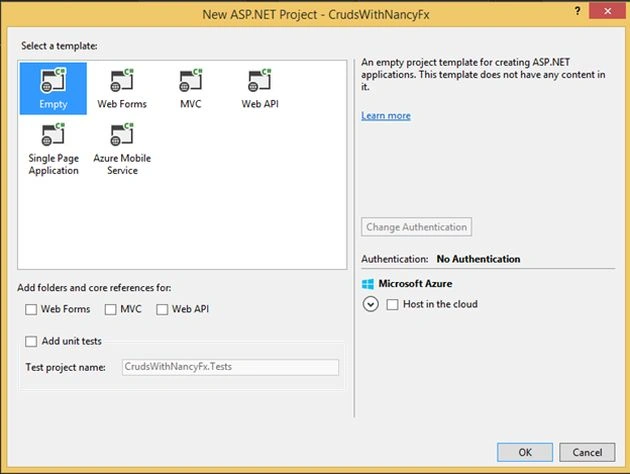
(P.S.: Alternatively you can host this on cloud; we are not discussing this topic here.)
Adding NancyFx and FluentNHibernate support
We can add NancyFx and FluentNHibernate in many ways, here we are using a Nugget package:
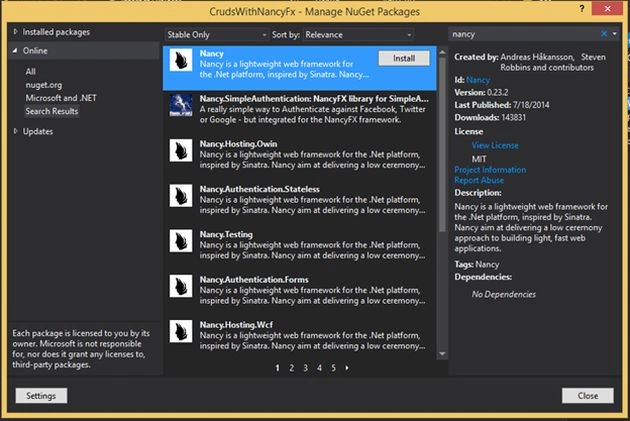
- Open the Nugget Package Manager and search for "Nancy" and select it as shown in the following image:
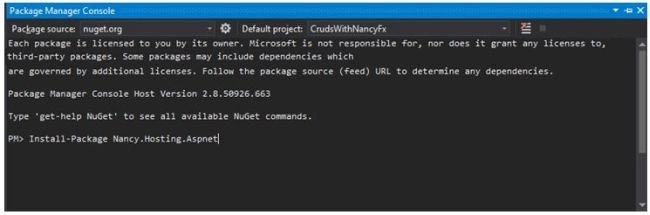
- Alternatively, go to the Package Manager Console and enter the following command.
- To install FluentNHibernate go to Package Manager Console and enter the following command.
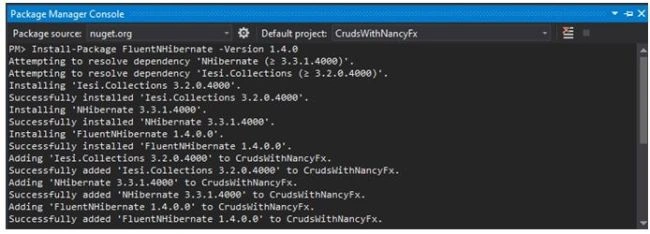
(P.S. We installed the stable release, currently there is a pre-release available you can use if want to try a pre-release).
We are ready with a template of our app. Now, let's start writing simple CRUD Operations.
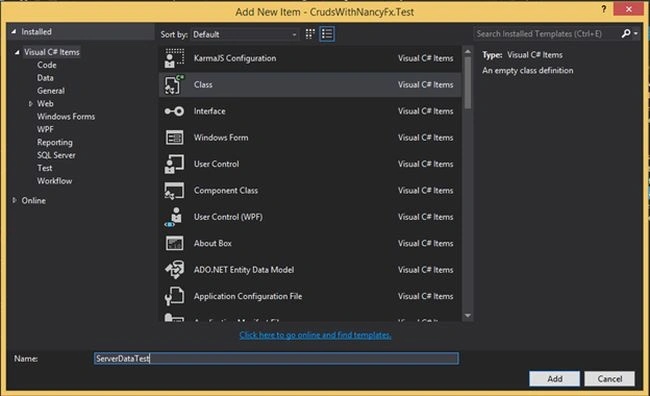
- Add a new class file and name it "ServerDataModule.cs".
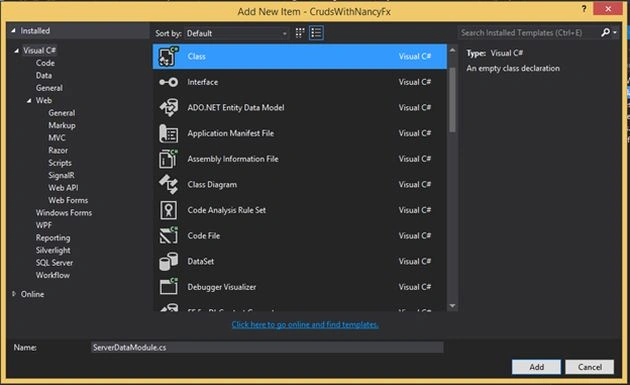
- Add the following code to your class (this is just to test that your NancyFx has been set up).
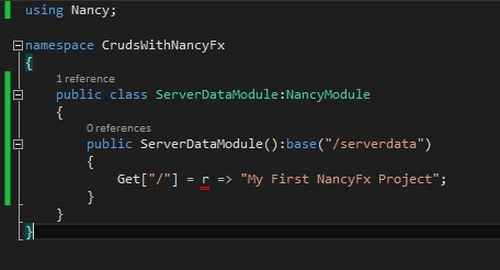
- Let's check our NancyFx resources. Run your application (Hit F5) from Visual Studio.
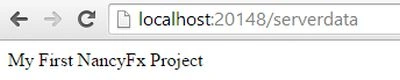
If you see the output in your browser, it means you have successfully set up the required things.
- Now, let's set up our model classes and Repository.
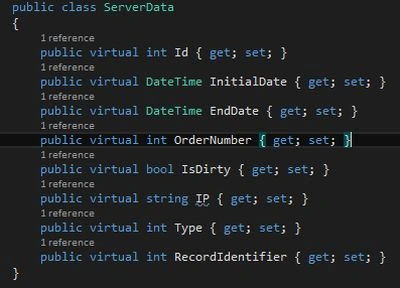
- Add a new folder named Models from Solution Explorer and add the following classes:
- ServerData.cs
- ServerDataMap.cs
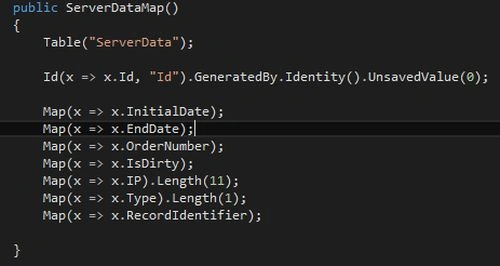
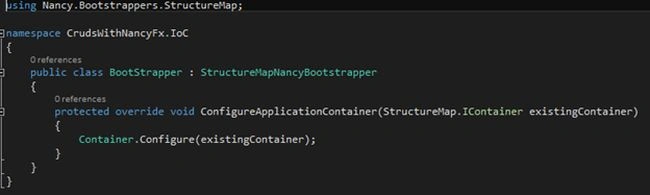
P.S. Do not forget to add:

- ServerData.cs
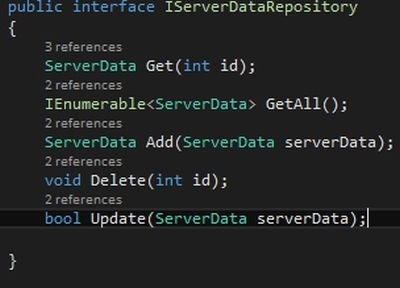
- Add a new folder named Persistent beneath the Models from the Solution Explorer and add an Interface IServerDataRepository:
- Add a new folder named Models from Solution Explorer and add the following classes:
- For our project we have created a helper class that supports our repository Pattern of NHibenrate. Just add a new folder named Helper using Solution Explorer and add a class NHibernateHelper.
At this point, we are done with the core preparation of our project. Now, we just need to implement our repositories in the flavor of NancyFX.
Let's revisit our NancyModule class ServerDataModule and modify it.

Here, we are passing an int type parameter and returning a JSON object. One most exciting thing of NancyFx is that it will automatically recognize the parameters [parameters are defined within {} braces], we call this dynamic parameterization of resources.

Here, we are using the Post resource and this.Bind<ServerData>() is automatically bound in the incoming request to our ServerData model.


Ramesh PalaniappanPosted Aug 18, 2016, 8:16 AM
Good one
kalu singh raoPosted Jul 7, 2016, 1:41 AM
Nice...
Thiruppathi RPosted Jun 3, 2016, 2:29 AM
Great Sharing..
Neeraj KumarPosted Jul 5, 2015, 8:37 AM
Good
Gowtham RajamanickamPosted Mar 27, 2015, 9:43 AM
great...
Gaurav Kumar AroraPosted Dec 15, 2014, 8:12 AM
Thanks all readers, I glad to get your response on this article, this is not possible without the platform provided by csharpcorner team Dinesh Beniwal . You will be reading next part of this series and I believe you will love to read next-to-next series
Gaurav Kumar AroraPosted Nov 30, 2014, 11:02 AM
saravana kumar - thanks
Saravanakumar SekaranPosted Nov 30, 2014, 8:27 AM
superb
Gaurav Kumar AroraPosted Nov 29, 2014, 12:26 PM
Dinesh Beniwal - sure sir, you will definitely see more articles in this series very soon.
Dinesh BeniwalPosted Nov 29, 2014, 11:50 AM
This article is biggest hit,, waiting for more articles on this series.
Gaurav Kumar AroraPosted Nov 29, 2014, 11:46 AM
Shuby Arora - Yes, you will see next article of the series very soon. I am glad to know that you guys are waiting for next article and thanks for all of your valuable views.
Shuby AroraPosted Nov 29, 2014, 11:13 AM
Gaurav Arora - you mentioned that there are more articles on NancyFX. I am waiting for next article on NancyFX, when are you going to publish the next one?
nathaJegamoorty PillaiPosted Nov 28, 2014, 4:29 AM
Great Article sir
Shuby AroraPosted Nov 27, 2014, 12:38 PM
Congratulation to author and editorial members. This articles hit 25000 views (y)
Vithal WadjePosted Nov 24, 2014, 3:41 AM
congrats ,article of the day on Microsoft Asp.net official site
Nimit JoshiPosted Nov 5, 2014, 7:30 AM
Very Impressive Gaurav..
Gaurav Kumar AroraPosted Nov 5, 2014, 1:24 AM
thanks Dinesh Beniwal
Gaurav Kumar AroraPosted Nov 4, 2014, 3:02 AM
Glad to read that Dinesh Beniwal. Need your reviews to improve contents, if required.
Dinesh BeniwalPosted Nov 4, 2014, 2:09 AM
Detailed article, good work Gaurav.
Gurunatha DogiPosted Nov 4, 2014, 2:02 AM
Great article Sir..Thanks for sharing with us
Gaurav Kumar AroraPosted Nov 3, 2014, 11:06 PM
Thanks, I will be happy to hear your reviews so, I can improve articles.
Shuby AroraPosted Nov 3, 2014, 1:57 PM
Well defined and good described by demo code. Congrats Gaurav, keep posting good stuffs.
Vithal WadjePosted Nov 3, 2014, 12:46 PM
good one keep it up