

Introduction
In this article, we will learn how to use Firebase Cloud Fire Store in Android and how to do CRUD operations with Firebase Cloud Fire Store.
Getting started with Firebase
Read the following to learn how to set up the Firebase in your Android project.
Reference - https://androidmads.blogspot.in/2016/10/android-getting-started-with-firebase.html
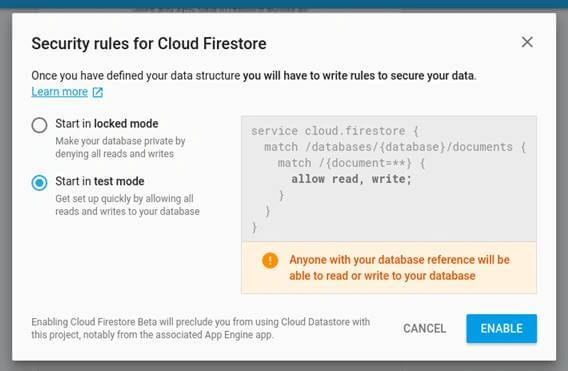
Additionally, do the following for Cloud Firestore.
You can enable the test mode to make the database accessible to all users.
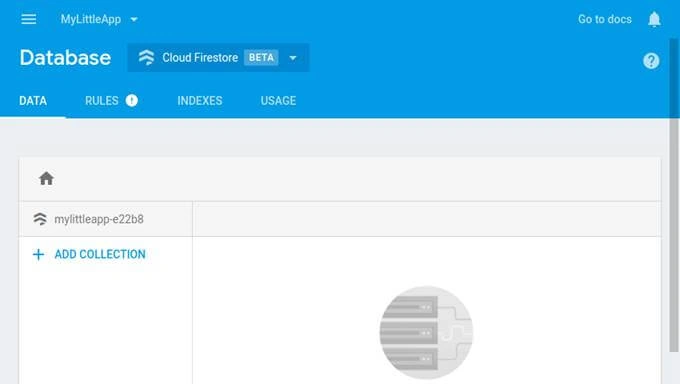
At this point, the empty DB is created as shown in the figure below.
Firebase Cloud Fire store
It is a flexible, scalable NoSQL cloud database to store and sync data for the client- and server-side development.
Key capabilities
- Flexibility
- Expressive Querying
- Real-time Updates
- Offline Support
- Designed to Scale
Concepts
Firestore hosted the data like NoSQL Database.
Database -> Collections
Table -> Document
Column -> Field
Coding Part
I have split this part into 3 steps as in the following.
- Step 1 - Creating a New Project with Empty Activity.
- Step 2 - Setting up the Firebase Library.
- Step 3 - Implementation of CRUD with Cloud Firestore.
Step 1 - Create a new project with Empty Activity
- Open Android Studio and Select create a new project.
- Name the project as per your wish and select an Empty activity.
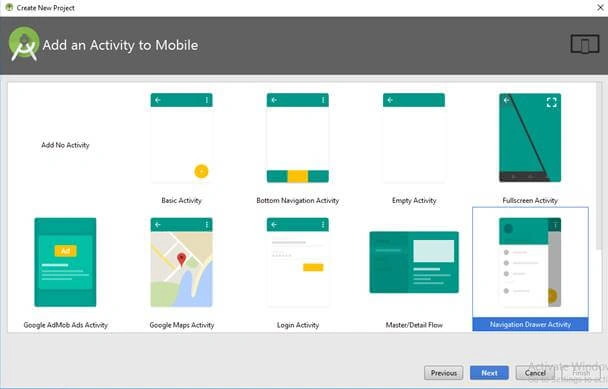
- Click the “Finish” button to create a new project in Android Studio.
Step 2 - Setting up the Firebase Library
In this part, we will see how to set up the library for the project.
- Open your project level build.gradle file and add the following lines in dependencies
- {
- …
- classpath 'com.google.gms:google-services:3.1.0'
- …
- }
- Then add the following lines in all projects in the project level build.gradle file.
- allprojects {
- repositories {
- google()
- jcenter()
- maven {
- url "https://maven.google.com"
- }
- }
- }
- Then add the following lines in app level build.gradle file to apply Google services to your project.
- dependencies {
- ...
- implementation 'com.google.firebase:firebase-firestore:11.8.0'
- }
- Then click “Sync Now” to set up your project.
Step 3 - Implementation of CRUD with Cloud Firestore
In this part, we will see how to implement CRUD operations with Firestore.
First, we will initialize the Firestore Database.
- FirebaseFirestore myDB;
- // Init FireStore
- myDB = FirebaseFirestore.getInstance();
INSERT DATA
You can insert the data to Firestore like the following.
- Map<String, Object> data = new HashMap<>();
- data.put("task_name", edtData.getText().toString());
- myDB.collection("tasks")
- .add(data)
- .addOnSuccessListener(new OnSuccessListener<DocumentReference>() {
- @Override
- public void onSuccess(DocumentReference documentReference) {
- toastResult("Data added successfully");
- }
- })
- .addOnFailureListener(new OnFailureListener() {
- @Override
- public void onFailure(@NonNull Exception e) {
- toastResult("Error while adding the data : " + e.getMessage());
- }
- });
Here, we created a collection named “tasks” and we inserted the data with “task_name”. The add() method automatically generates and assigns a unique alphanumeric identifier to every document it creates. If you want your documents to have your own custom IDs instead, you must first manually create those documents by calling the document() method, which takes a unique ID string as its input. You can then populate the documents by calling the set() method, which, like the add method, expects a map as its only argument.
You can set user preferred document name instead of auto generated unique identifier using the following method
- myDB.collection("tasks").document("user_preferred_id").set(data)
The following figure shows the DB after inserting the data.
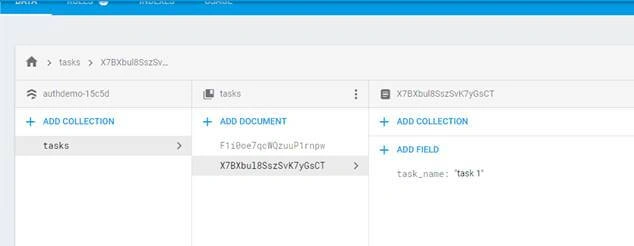
READ DATA
You can read the collection of data from firestore using “addSnapShotListener”. The code explains how to read data from Cloud Firestore.
- myDB.collection("tasks").addSnapshotListener(new EventListener<QuerySnapshot>() {
- @Override
- public void onEvent(QuerySnapshot documentSnapshots, FirebaseFirestoreException e) {
- if (e != null)
- toastResult(e.getMessage());
- list.clear();
- for (DocumentSnapshot doc : documentSnapshots) {
- list.add(doc.getString("task_name"));
- }
- }
- });
UPDATE DATA
You can update the record in the collection if you know the name/Id of the document. The following code shows how to update the data. Map is used to update the data with the same in the document.
- Map<String, Object> data = new HashMap<>();
- data.put("data", edtData.getText().toString());
- myDB.collection("myData").document("1").update(data)
- .addOnSuccessListener(new OnSuccessListener<Void>() {
- @Override
- public void onSuccess(Void aVoid) {
- toastResult("Data updated successfully");
- }
- })
- .addOnCompleteListener(new OnCompleteListener<Void>() {
- @Override
- public void onComplete(@NonNull Task<Void> task) {
- toastResult("Data update Completed");
- }
- })
- .addOnFailureListener(new OnFailureListener() {
- @Override
- public void onFailure(@NonNull Exception e) {
- toastResult("Error while updating the data : " + e.getMessage());
- }
- });
DELETE DATA
The existing data can be deleted from Firestore using delete() function. The following code shows how to implement the delete function.
- myDB.collection("myData").document("1").delete()
- .addOnSuccessListener(new OnSuccessListener<Void>() {
- @Override
- public void onSuccess(Void aVoid) {
- toastResult("Data deleted successfully");
- }
- })
- .addOnFailureListener(new OnFailureListener() {
- @Override
- public void onFailure(@NonNull Exception e) {
- toastResult("Error while deleting the data : " + e.getMessage());
- }
- });
Download Code
If you think this article is informative do like and star the repo in GitHub. You can download the full sample code here.
Demo
You can find the demo video on YouTube.
Thiago VivasPosted Apr 29, 2018, 12:04 PM
Good one, well explained.
Vignesh ManiPosted Apr 29, 2018, 2:09 AM
Nice One Thank you for Sharing