

In this demo application our main concern will be on AngularJS data-binding and routing. I also used Entity Framework Code First approach for database operation.
Functionality present in this application:
- Data Binding using AngularJS
- Client side routing using Angular Routing
- Cascading Dropdown using AngularJS
- Conditional formatting using AngularJS
- Select, Insert, Update and Delete record in SQL Server database.
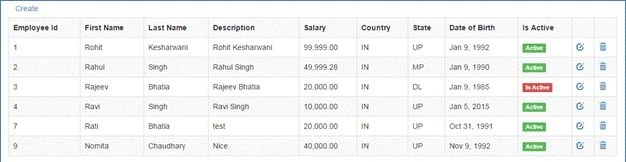
Let’s start step by step so that we can achieve our objective at the end of this article. After completing this demo our application should look like this:
- Employee List page:
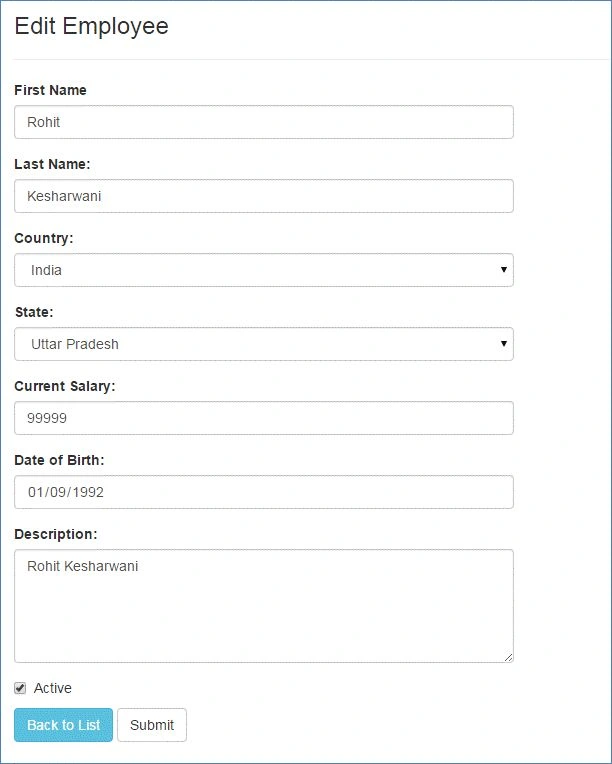
- Employee Page for Creating and Editing a record.
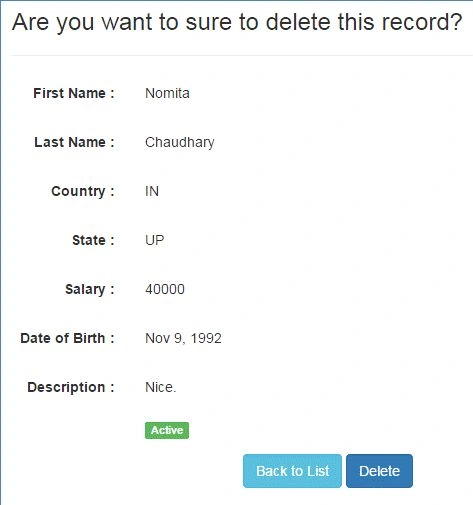
- Employee Delete Confirmation page with details:
To achieve the above, follow the steps given below:
- Create a new ASP.NET MVC Empty Web Application.
- Add the following package in your application:
- AngularJS.Core
- AngularJS.Route
- Bootstrap
- EntityFramework
- Create a Model named Employee in Models folder and replace the code with the following:
- public class Employee
- {
- public int EmployeeId
- {
- get;
- set;
- }
- [Required]
- [StringLength(20)]
- public string FirstName
- {
- get;
- set;
- }
- [Required]
- [StringLength(20)]
- public string LastName
- {
- get;
- set;
- }
- [Required]
- [StringLength(100)]
- public string Description
- {
- get;
- set;
- }
- public float Salary
- {
- get;
- set;
- }
- [Required]
- [StringLength(50)]
- public string Country
- {
- get;
- set;
- }
- [Required]
- [StringLength(50)]
- public string State
- {
- get;
- set;
- }
- public DateTime DateofBirth
- {
- get;
- set;
- }
- public bool IsActive
- {
- get;
- set;
- }
- }
- public class EmployeeDbContext: DbContext
- {
- public EmployeeDbContext(): base()
- {
- Database.SetInitializer < EmployeeDbContext > (newEmployeeDbContextInitializer());
- }
- public DbSet < Employee > Employees
- {
- get;
- set;
- }
- }
- public class EmployeeDbContextInitializer: DropCreateDatabaseIfModelChanges < EmployeeDbContext >
- {
- protected override void Seed(EmployeeDbContext context)
- {
- var list = new List < Employee >
- {
- new Employee
- {
- FirstName = "Rohit", LastName = "Mane", Description = "Rohit Mane", DateofBirth = DateTime.Now.AddYears(-24), Country = "IN", State = "MH", Salary = 99999, IsActive = true
- },
- new Employee
- {
- FirstName = "Shankar", LastName = "Kanase", Description = "Rahul Singh", DateofBirth = DateTime.Now.AddYears(-23), Country = "IN", State = "MH", Salary = 49999.28 f, IsActive = true
- }
- };
- list.ForEach(m =>
- {
- context.Employees.Add(m);
- });
- context.SaveChanges();
- base.Seed(context);
- }
- }
- Add a connection string with same name of EmployeeDbContext in web.config:
- <connectionStrings>
- <add name="EmployeeDbContext" connectionString="Data Source=(local);Initial Catalog=EmpDb;Integrated Security=true;" providerName="System.Data.SqlClient"/>
- </connectionStrings>
- Now create a Employee API controller to perform crud in database:
- public class EmployeeController: ApiController
- {
- EmployeeDbContext db = new EmployeeDbContext();
- // GET api/employee
- [ActionName("get"), HttpGet]
- public IEnumerable < Employee > Emps()
- {
- return db.Employees.ToList();
- }
- // GET api/employee/5
- public Employee Get(int id)
- {
- return db.Employees.Find(id);
- }
- // POST api/employee
- public HttpResponseMessage Post(Employee model)
- {
- if (ModelState.IsValid)
- {
- db.Employees.Add(model);
- db.SaveChanges();
- HttpResponseMessage response = Request.CreateResponse(HttpStatusCode.Created, model);
- return response;
- }
- else
- {
- return Request.CreateErrorResponse(HttpStatusCode.BadRequest, ModelState);
- }
- }
- // PUT api/employee/5
- public HttpResponseMessage Put(Employee model)
- {
- if (ModelState.IsValid)
- {
- db.Entry(model).State = System.Data.Entity.EntityState.Modified;
- db.SaveChanges();
- HttpResponseMessage response = Request.CreateResponse(HttpStatusCode.OK, model);
- return response;
- }
- else
- {
- return Request.CreateErrorResponse(HttpStatusCode.BadRequest, ModelState);
- }
- }
- // DELETE api/employee/5
- public HttpResponseMessage Delete(int id)
- {
- Employee emp = db.Employees.Find(id);
- if (emp == null)
- {
- return Request.CreateResponse(HttpStatusCode.NotFound);
- }
- db.Employees.Remove(emp);
- db.SaveChanges();
- return Request.CreateResponse(HttpStatusCode.OK, emp);
- }
- Also create a Country controller to retrieve country and its states from server side in order to implement cascading dropdown list:
- public class CountryController: ApiController
- {
- // GET api/country
- public IEnumerable < System.Web.Mvc.SelectListItem > Get()
- {
- List < System.Web.Mvc.SelectListItem > countries = newList < System.Web.Mvc.SelectListItem >
- {
- new System.Web.Mvc.SelectListItem
- {
- Text = "India", Value = "IN"
- },
- new System.Web.Mvc.SelectListItem
- {
- Text = "United States", Value = "US"
- },
- new System.Web.Mvc.SelectListItem
- {
- Text = "United Kingdom", Value = "UK"
- },
- new System.Web.Mvc.SelectListItem
- {
- Text = "Australlia", Value = "CA"
- }
- };
- return countries;
- }
- // GET api/country/5
- public IEnumerable < System.Web.Mvc.SelectListItem > Get(string id)
- {
- List < System.Web.Mvc.SelectListItem > states = newList < System.Web.Mvc.SelectListItem > ();
- switch (id)
- {
- case "IN":
- states.Add(new System.Web.Mvc.SelectListItem
- {
- Text = "Maharashtra, Value = "
- MH " });
- states.Add(new System.Web.Mvc.SelectListItem
- {
- Text = "Madhya Pradesh", Value = "MP"
- });
- states.Add(new System.Web.Mvc.SelectListItem
- {
- Text = "Delhi", Value = "DL"
- });
- states.Add(new System.Web.Mvc.SelectListItem
- {
- Text = "Kanpur", Value = "KN"
- });
- break;
- case "US":
- states.Add(new System.Web.Mvc.SelectListItem
- {
- Text = "California", Value = "CA"
- });
- states.Add(new System.Web.Mvc.SelectListItem
- {
- Text = "Newyork", Value = "NY"
- });
- break;
- case "UK":
- states.Add(new System.Web.Mvc.SelectListItem
- {
- Text = "London", Value = "LN"
- });
- states.Add(new System.Web.Mvc.SelectListItem
- {
- Text = "Paris", Value = "PR"
- });
- break;
- case "CA":
- states.Add(new System.Web.Mvc.SelectListItem
- {
- Text = "Sydney", Value = "SD"
- });
- states.Add(new System.Web.Mvc.SelectListItem
- {
- Text = "Melbourne", Value = "MB"
- });
- break;
- }
- return states;
- }
- }
- Now create a Home controller and add an Index view and reference some CSS and JavaScript files of AngularJS and bootstrap to create a view and partial views:
- public class HomeController: Controller
- {
- public ActionResult Index()
- {
- return View();
- }
- }
- Index view with JS and CSS references:I have highlighted ng-app and ng-view attribute. This is for initializing module under app and rendering of partial views inside ng-view.
- @{
- Layout = null;
- }
- <!DOCTYPE html>
- <html ng-app="EmpApp">
- <head>
- <meta name="viewport" content="width=device-width" />
- <title>Index</title>
- <link href="@Url.Content("~/Content/bootstrap.min.css")" rel="stylesheet"type="text/css" />
- <script src="@Url.Content("~/Scripts/angular.min.js")" type="text/javascript"></script>
- <script src="@Url.Content("~/Scripts/angular-route.js")"type="text/javascript"></script>
- <script src="@Url.Content("~/Scripts/app/app.js")" type="text/javascript"></script>
- <script src="@Url.Content("~/Scripts/app/controller.js")"type="text/javascript"></script>
- </head>
- <body>
- <div class="main container" ng-view></div>
- </body>
- </html>
- Now create an app.js file for configuration of route and controllers. The code of app.js is given below:
- var EmpApp = angular.module('EmpApp', ['ngRoute', 'EmpControllers']);
- EmpApp.config(['$routeProvider', function($routeProvider)
- {
- $routeProvider.when('/list',
- {
- templateUrl: 'Employee/list.html',
- controller: 'ListController'
- }).
- when('/create',
- {
- templateUrl: 'Employee/edit.html',
- controller: 'EditController'
- }).
- when('/edit/:id',
- {
- templateUrl: 'Employee/edit.html',
- controller: 'EditController'
- }).
- when('/delete/:id',
- {
- templateUrl: 'Employee/delete.html',
- controller: 'DeleteController'
- }).
- otherwise(
- {
- redirectTo: '/list'
- });
- }]);
- Now add a folder named Employee under root directory of an application and following three views (html files) list.html, edit.html and delete.html.
- List.html
- <div>
- <a href="#/create" class="btn">Create</a>
- </div>
- <div class="table-responsive">
- <table class="table table-striped table-bordered">
- <tr>
- <th>Employee Id</th>
- <th>First Name</th>
- <th>Last Name</th>
- <th>Description</th>
- <th>Salary</th>
- <th>Country</th>
- <th>State</th>
- <th>Date of Birth</th>
- <th>Is Active</th>
- <th></th>
- <th></th>
- </tr>
- <tr ng-repeat="item in employees">
- <td>{{ item.EmployeeId }}</td>
- <td>{{ item.FirstName }}</td>
- <td>{{ item.LastName }}</td>
- <td>{{ item.Description }}</td>
- <td>{{ item.Salary | number: 2 }}</td>
- <td>{{ item.Country }}</td>
- <td>{{ item.State }}</td>
- <td>{{ item.DateofBirth | date }}</td>
- <td>
- <span class="label" ng-class="{true:'label-success', false:'label-danger', '':'hidden'}[item.IsActive]">
- {{ item.IsActive ? 'Active' : 'In Active' }}</span>
- </td>
- <td>
- <a href="#/edit/{{item.EmployeeId}}" class="glyphicon glyphicon-edit"></a>
- </td>
- <td>
- <a href="#/delete/{{item.EmployeeId}}" class="glyphicon glyphicon-trash"></a>
- </td>
- </tr>
- </table>
- </div>
- Edit.html
- <h3>
- {{ title }}</h3>
- <hr />
- <form role="form" style="max-width: 500px;">
- <strong class="error">{{ error }}</strong>
- <div class="form-group">
- <label for="firstname">
- First Name</label>
- <input type="text" class="form-control" id="firstname" ng-model="firstname" />
- </div>
- <div class="form-group">
- <label for="lastname">
- Last Name:</label>
- <input type="text" class="form-control" id="lastname" ng-model="lastname" />
- </div>
- <div class="form-group">
- <label for="country">
- Country:</label>
- <select class="form-control" id="country" ng-model="country" ng-options="c.Value as c.Text for c in countries" ng-change="getStates()">
- <option value="">-- Select Country --</option>
- </select>
- </div>
- <div class="form-group">
- <label for="state">
- State:</label>
- <select class="form-control" id="state" ng-model="state" ng-disabled="!states"ng-options="s.Value as s.Text for s in states">
- <option value="">-- Select State --</option>
- </select>
- </div>
- <div class="form-group">
- <label for="salary">
- Current Salary:</label>
- <input type="text" class="form-control" id="salary" ng-model="salary" />
- </div>
- <div class="form-group">
- <label for="dob">
- Date of Birth:</label>
- <input type="date" class="form-control" id="dob" ng-model="dob" />
- </div>
- <div class="form-group">
- <label for="description">
- Description:</label>
- <textarea rows="5" cols="10" class="form-control" id="description" ng-model="description"></textarea>
- </div>
- <div class="form-group checkbox">
- <label>
- <input type="checkbox" ng-model="active" />Active
- </label>
- </div>
- <a href="#/list" class="btn btn-info">Back to List</a>
- <button type="submit" class="btn btn-default" ng-click="save()">
- Submit
- </button>
- </form>
- Delete.html
- <h3>
- Are you want to sure to delete this record?</h3>
- <hr />
- <form class="form-horizontal" style="max-width: 500px;">
- <div class="form-group">
- <label class="control-label col-xs-3">
- First Name :</label>
- <div class="col-xs-9">
- <p class="form-control-static">
- {{ firstname }}</p>
- </div>
- </div>
- <div class="form-group">
- <label class="control-label col-xs-3">
- Last Name :</label>
- <div class="col-xs-9">
- <p class="form-control-static">
- {{ lastname }}</p>
- </div>
- </div>
- <div class="form-group">
- <label class="control-label col-xs-3">
- Country :</label>
- <div class="col-xs-9">
- <p class="form-control-static">
- {{ country }}</p>
- </div>
- </div>
- <div class="form-group">
- <label class="control-label col-xs-3">
- State :</label>
- <div class="col-xs-9">
- <p class="form-control-static">
- {{ state }}</p>
- </div>
- </div>
- <div class="form-group">
- <label class="control-label col-xs-3">
- Salary :</label>
- <div class="col-xs-9">
- <p class="form-control-static">
- {{ salary }}</p>
- </div>
- </div>
- <div class="form-group">
- <label class="control-label col-xs-3">
- Date of Birth :</label>
- <div class="col-xs-9">
- <p class="form-control-static">
- {{ dob | date }}</p>
- </div>
- </div>
- <div class="form-group">
- <label class="control-label col-xs-3">
- Description :</label>
- <div class="col-xs-9">
- <p class="form-control-static">
- {{ description }}</p>
- </div>
- </div>
- <div class="form-group">
- <div class="col-xs-offset-3 col-xs-9">
- <span class="label" ng-class="{true:'label-success', false:'label-danger', '':'hidden'}[active]">
- {{ active ? 'Active' : 'In Active' }}</span>
- </div>
- </div>
- <div class="form-group">
- <div class="col-xs-offset-3 col-xs-9 text-center">
- <a href="#/list" class="btn btn-info">Back to List</a>
- <button type="submit" class="btn btn-primary" ng-click="delete()">
- Delete</button>
- </div>
- </div>
- </form>
We had setup three views for list, create, edit and delete. Now we will implement the functionalities for these three views.
- List.html
- Create a controller.js file and add the following code given below:
In this controller.js we have multiple controllers for different views. Like ListController for list view (display the list of employees), Edit controller for edit view (create and modify the record), DeleteController for delete view (delete confirmation and delete the record).- var EmpControllers = angular.module("EmpControllers", []);
- // this controller call the api method and display the list of employees
- // in list.html
- EmpControllers.controller("ListController", ['$scope', '$http',
- function($scope, $http)
- {
- $http.get('/api/employee').success(function(data)
- {
- $scope.employees = data;
- });
- }
- ]);
- // this controller call the api method and display the record of selected employee
- // in delete.html and provide an option for delete
- EmpControllers.controller("DeleteController", ['$scope', '$http', '$routeParams', '$location',
- function($scope, $http, $routeParams, $location)
- {
- $scope.id = $routeParams.id;
- $http.get('/api/employee/' + $routeParams.id).success(function(data)
- {
- $scope.firstname = data.FirstName;
- $scope.lastname = data.LastName;
- $scope.country = data.Country;
- $scope.state = data.State;
- $scope.salary = data.Salary;
- $scope.active = data.IsActive;
- $scope.dob = data.DateofBirth;
- $scope.description = data.Description;
- });
- $scope.delete = function()
- {
- $http.delete('/api/Employee/' + $scope.id).success(function(data)
- {
- $location.path('/list');
- }).error(function(data)
- {
- $scope.error = "An error has occured while deleting employee! " + data;
- });
- };
- }
- ]);
- // this controller call the api method and display the record of selected employee
- // in edit.html and provide an option for create and modify the employee and save the employee record
- EmpControllers.controller("EditController", ['$scope', '$filter', '$http', '$routeParams', '$location',
- function($scope, $filter, $http, $routeParams, $location)
- {
- $http.get('/api/country').success(function(data)
- {
- $scope.countries = data;
- });
- $scope.id = 0;
- $scope.getStates = function()
- {
- var country = $scope.country;
- if (country)
- {
- $http.get('/api/country/' + country).success(function(data)
- {
- $scope.states = data;
- });
- }
- else
- {
- $scope.states = null;
- }
- }
- $scope.save = function()
- {
- var obj = {
- EmployeeId: $scope.id,
- FirstName: $scope.firstname,
- LastName: $scope.lastname,
- Country: $scope.country,
- State: $scope.state,
- Salary: $scope.salary,
- IsActive: $scope.active,
- Description: $scope.description,
- DateofBirth: $scope.dob
- };
- if ($scope.id == 0)
- {
- $http.post('/api/Employee/', obj).success(function(data)
- {
- $location.path('/list');
- }).error(function(data)
- {
- $scope.error = "An error has occured while adding employee! " + data.ExceptionMessage;
- });
- }
- else
- {
- $http.put('/api/Employee/', obj).success(function(data)
- {
- $location.path('/list');
- }).error(function(data)
- {
- console.log(data);
- $scope.error = "An Error has occured while Saving customer! " + data.ExceptionMessage;
- });
- }
- }
- if ($routeParams.id)
- {
- $scope.id = $routeParams.id;
- $scope.title = "Edit Employee";
- $http.get('/api/employee/' + $routeParams.id).success(function(data)
- {
- $scope.firstname = data.FirstName;
- $scope.lastname = data.LastName;
- $scope.country = data.Country;
- $scope.state = data.State;
- $scope.salary = data.Salary;
- $scope.active = data.IsActive;
- $scope.description = data.Description;
- $scope.dob = new Date(data.DateofBirth);
- $scope.getStates();
- });
- }
- else
- {
- $scope.title = "Create New Employee";
- }
- }
- ]);
Now we have implement ed and successfully completed all the steps.
To test the process you can build and run an application. I hope it works fine.
Thanks for reading this article. If you have any queries and suggestion please feel free to ask me and also your valuable comments are important for me and motivates me to write articles.
Ronaldo DupraPosted May 27, 2020, 8:24 AM
My email address is [email protected]
Ronaldo DupraPosted May 27, 2020, 8:23 AM
Hi Rohit, can you also provide me the source code, Thanks
Zeel SharpPosted Jun 25, 2019, 11:42 AM
Where is source code link?
Ravi NisadPosted Dec 13, 2018, 10:05 AM
Above crud
Ravi NisadPosted Dec 13, 2018, 10:05 AM
Provide source file link
Ravi NisadPosted Dec 13, 2018, 2:42 AM
Very bad coding very bad
Guereiro ChuzePosted Sep 18, 2017, 12:36 AM
Hi Rohit, It is fine article, and amazing for the starter like me in web api design, so i would like to suggest to demonstrate the folder status in solution explorer, what to add exactly and in wich folder (as you did in model), so it is good .
RohitPosted Sep 2, 2017, 11:26 PM
Hello, I implemented above code. If anyone need help / complete source code contact via email [email protected]
Fabrizio RicciarelliPosted Aug 4, 2017, 5:53 AM
Hallo Rohit Mane, I can't get it to work but I absolutely need it to start my Angular+WebApi+EntityFramwork knowledge. Please, come in contact with me via email at [email protected] so I will be able to send you the complete Visual Studio's solution I made to be inspected by you. This way, you'll also be able to edit your post and help many others to understand the working principles behind your article (also, I've noticed that some asked for a source code download, so you can use mine, corrected). Many thanks, have a nice day.
Pankaj KadamPosted Jun 20, 2017, 2:33 AM
Where is the Source code?
arvind haritusPosted Feb 23, 2017, 4:12 AM
Why my url have hashband for above code i.e http://localhost:51268/#!/list
ankush ankushPosted Feb 10, 2017, 4:04 AM
Nice one.and get to learn something new..
mahmoud eidPosted Jan 2, 2017, 3:18 PM
How i can download this project
ukeypunchPosted Nov 6, 2016, 12:54 PM
Can you please attach the source code for this article? It would be very kind of you.Thank you
khaled husseinPosted Oct 8, 2016, 7:19 AM
Where is the source code?
kalu singh raoPosted Apr 26, 2016, 1:52 PM
Nice...
Rahul Pushpendu BhaskarPosted Apr 24, 2016, 1:29 PM
Nice Job...
Pruthwiraj JagadalePosted Apr 13, 2016, 8:38 AM
Nice article
Shaili DashoraPosted Apr 13, 2016, 5:06 AM
Nice one..
Humayun Kabir MamunPosted Apr 4, 2016, 6:03 AM
Nice...
Kuppurasu NagarajPosted Apr 3, 2016, 4:29 AM
Good
Gowtham RajamanickamPosted Apr 2, 2016, 12:37 PM
Good one..
sreenivasa kPosted Mar 30, 2016, 2:32 PM
good
Ankur MistryPosted Mar 30, 2016, 1:39 PM
Nice share Rohit Mane
Karthikeyan KPosted Mar 30, 2016, 12:51 PM
Good one
Jaipal ReddyPosted Mar 30, 2016, 12:09 PM
nice article. .
Gopi ChandPosted Mar 30, 2016, 11:28 AM
Good work done
Saillesh PawarPosted Mar 30, 2016, 11:26 AM
NIce share
Debasis SahaPosted Mar 30, 2016, 9:06 AM
Good One..
Vignesh ManiPosted Mar 30, 2016, 5:58 AM
Nice
Kashif SohailPosted Mar 30, 2016, 3:13 AM
Nice start