

What is CSS?
A Cascading Style Sheet (CSS) file allows you to separate your website's (X)HTML content from its style. As always you use your (X) HTML file to arrange the content, but all of the presentation (fonts, colors, background, borders, text formatting, link effects & so on...) are accomplished within a CSS.
Slow Rise of CSS
CSS1 marked its first appearance as a standard in late 1996 and CSS2 quickly followed in 1998. Newer versions of browsers are far better than their predecessors, and now have good support for CSS1 and CSS 2.1 as well as many features from CSS3. Yet even as CSS support has become more commonplace, significant issues remain. Browser bugs still exist, portions of the CSS specification remain unsupported, developer education and uptake are lagging, and proprietary extensions to style sheets are rapidly being introduced by browser vendors. It seems the more things change the more they stay the same regardless of the technology in use.
Start CSS
CSS rules are defined as a property name followed by a colon and then a property value. Individual rules are terminated by semicolons, with the final rule having an optional semicolon as in the following.
property-name1 : value1; ... property-nameN : valueN;
CSS rules are placed directly within most HTML tags by setting the core attribute style to the rule. For example, to set the color and alignment of an h1 heading.
<h1 style="color: red; text-align: center;">Big CSS!</h1>
This type of direct use of CSS is known as Inline Style and is the least favorite form of CSS because of its tight coupling to the actual (X)HTML tags. Instead of placing the rules directly within the markup elements, we create a rule that binds to a specific element or a set of elements, that will also be for future reuse.
CSS rules not found within a specified tag consist of a Selector followed by its associated style declarations within curly braces. The syntax of the Selector.
Selector {property1: value1; property: valueN ;}
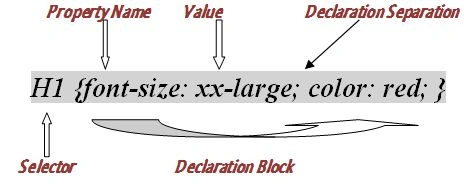
CSS property names are separated by dashes when they are multiple words. For instance, font face, font size, line height, and so on. And if we see values, they also exist in many forms; from small keywords like xx-small, strings like Arial, plain numbers like 0, numbers with a unit like 100px or 2 cm, and some special delimited values such as URLs, URL (... /style/fancy.css).
To create a style dictating that all h1 elements are yellow and centered, use the following rule.
H1 {color: yellow; text-align: center;}
CSS is not whitespace sensitive, so:
H1 {font-size: xx-large; color: red; font-family: Arial;}
Will render the same as:
H1 {font-size: xx-large;
color: red;

font-family: Arial ;}
CSS also allows comments /* */.
For example:
/* first CSS rule below*/

h1 {font-size: 28px; color: red; font-family: Arial;}
Remember point
When publishing CSS and HTML on public-facing Websites, remove comments and reduce white space to improve delivery and perfect execution.
CSS is Case-Sensitive or not!!
In CSS, property names and many values are case insensitive.
h1 {FONT-SIZE:25px;color:RED;FONT-WEIGHT:bold;}
And
h1 {font-size:28px;color:red;font-weight:bold;}
Are the same. But if we see cases type such as with URL values, font names, and certain selectors such as id and class values, CSS considers that as case-sensitive.
For example
#foo {background-image url(tile.gif); font-family: Arial;}
And
#FOO {background-image url(TILE.GIF); font-family: AriaL;}
In the example given above, both cases are different because in the URL case sometimes it depends on the Web server, the fonts potentially do not match, and the differing id selectors possibly do not work. That can be confusing, it is much safer to assume that CSS is case-sensitive.
CSS Example
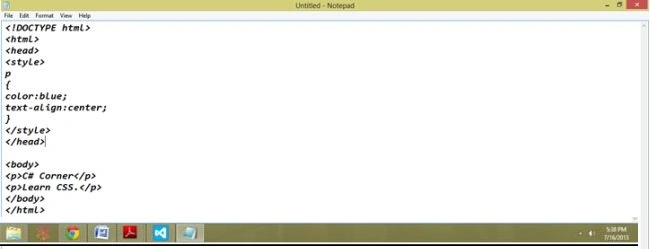
Code Used
<!DOCTYPE html>
<html>
   <head>
      <style>p{color: blue;text-align: center;}</style>
   </head>
   <body>
      <p>C# Corner</p>
      <p>
         Learn CSS.
      </p>
   </body>
</html>
Save
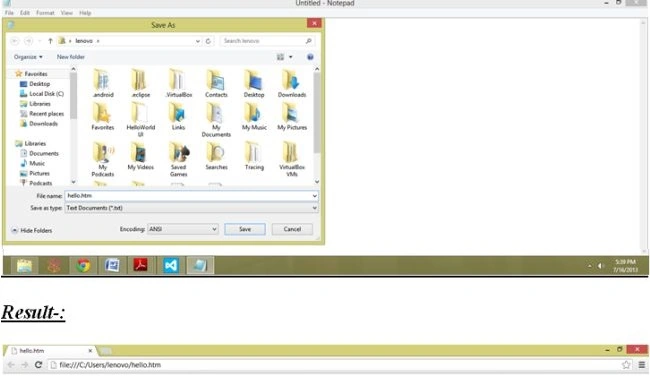
Result

How to use CSS, either externally or internally?
First, we explore the Internal style sheet method. In this way, you are simply placing the CSS code within the <head> </head> tags of each (X)HTML file you want to style with the CSS.
For Example
<head>
   <title>
   <title>
   <style type="text/css"> CSS Content Goes Here </style>
</head>
<body>
With this method, each (X)HTML file contains the CSS code needed to style the page. This means that any changes you want to make to one page will need to be made to all. This method can be good if you need to style only one page, or if you want each page to have a different style.
External Stylesheet
An external CSS file can be created with any text or HTML editor such as "Notepad" or "Dreamweaver". A CSS file contains no (X)HTML, only CSS. You simply save it with the .css file extension. You can link to the file externally by placing one of the following links in the head section of every (X)HTML file you want to style with the CSS file. You can also use the import method as shown below.
<style type="text/css">@import url(Path To stylesheet.css)</style>
Either of these methods is done by placing one or the other in the head section.
For Example
<head>
   <title>
   <title>
   <style type="text/css"> CSS Content Goes Here </style>
</head>
<body>
   <link rel="stylesheet" type="text/css" href="Path To stylesheet.css" />
   Or:
   <head>
      <title>
      <title>
      <style type="text/css"> @import url(Path To stylesheet.css) </style>
   </head>
   <body>
By external Style, Sheet means, that if you need to alter the design of all your pages, you only need to edit one .css file to make global changes to your entire website.
The Two Most Common Forms of CSS
The two most common forms of CSS rules are id selectors, which are used to specify a rule to bind to a particularly unique element, and class selectors, that is used to specify a group of elements.
The id selector specifies a style for a single, unique element. The id selector uses the id attribute of the HTML element, and is defined with"#". The style rule below will be applied to the element with id="demo"
<!DOCTYPE html>
<html>
   <head>
      <style> #demo {text-align: center; color: red; }</style>
   </head>
   <body>
      <p id="demo">         Something here</p>
      <p>         This paragraph is not affected by the style.</p>
   </body>
</html>
Open notepad
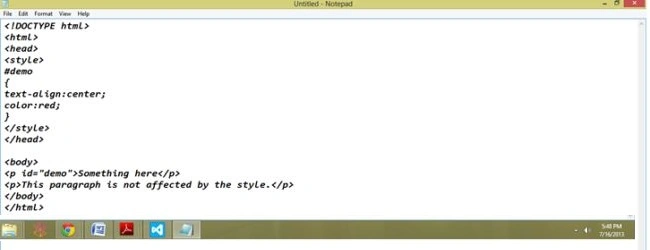
Save and see the Result

Class Selector
The class selector specifies a style for a group of elements. Unlike the id selector, the class selector is most often used on several elements. This allows you to set a particular style for many HTML elements with the same class. The class selector uses the HTML class attribute, and is defined with a "."
For example
<!DOCTYPE html>
<html>
   <head>
      <style>
         .bold
         {
         text-align: center;
         color: red;
         }
      </style>
   </head>
   <body>
      <h1 class="bold">
         Make your Text
      </h1>
      <p class="bold">
         Text bold
      </p>
   </body>
</html>
Save
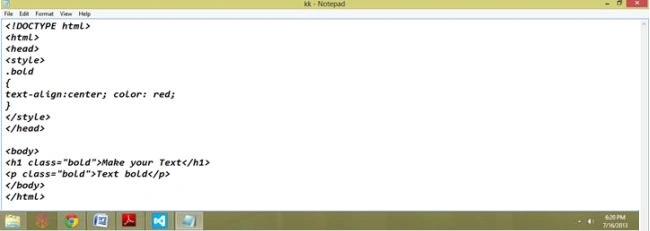
Result

Now Look at the Complete Example of CSS.
<!DOCTYPE html>
<html>
<head>
    <meta http-equiv="Content-Type" content="text/html; charset=utf-8">
    <title>Hello CSS World</title>
    <style type="text/css">
        /* sample style sheet */
        body
        {
            background-color: black;
            color: white;
        }
        h1
        {
            color: red;
            font-size: xx-large;
            text-align: center;
        }
        #heart
        {
            color: red;
            font-size: xx-large;
        }
        .fancy
        {
            background-color: orange;
            color: black;
            font-weight: bold;
        }
    </style>
</head>
<body>
    <h1>
        Welcome to the World of CSS</h1>
    <hr>
    <p>
        CSS <em class="fancy">really</em> isn't so hard either!</p>
    <p>
        Soon you will also <span id="heart">♥</span> using CSS.</p>
    <p>
        You can put lots of text here if you want. We could go on and on with <span class="fancy">
            fake</span> text for you to read, but let's get back to the book.</p>
</body>
</html>
Open Notepad and save this code.
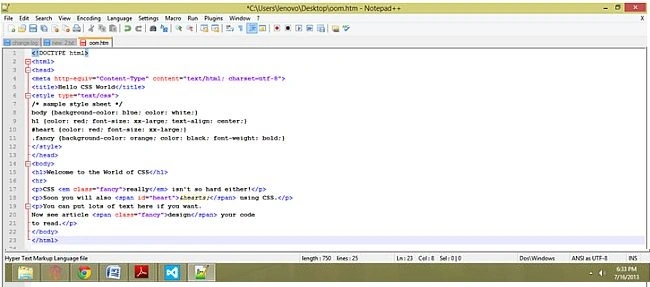
Result

Inline Styles
Inline styles are defined right in the (X)HTML file alongside the element you want to style. See example.
<p style="color: #ff0000;">Some red text</p>

Inline styles will not allow the user to change styles of elements or text formatted this way.
So, which is better?
So with all these various ways of inserting CSS into your (X)HTML files, you may now be asking, well which is better, and if I use more than one method, in what order do these various ways load into my browser? All the various methods will cascade into a new "pseudo" stylesheet in the following order:
- Inline Style (inside (X) HTML element)
- Internal Style Sheet (inside the <head> tag)
- External Style Sheet
As far as which way is better, it depends on what you want to do. If you have only one file to style then placing it within the <head></head> tags (internal) will work fine. However, if you are planning on styling multiple files then the external file method is the way to go. Choosing between the <link related=> & the @import methods is completely up to you. I will mention that the @import method may take a second longer to read the CSS file in Internet Explorer than the<link related=> option.
Users with Disabilities
The use of external style sheets also can benefit users who suffer from disabilities. For instance, a user can turn off your stylesheet or substitute one of their own to increase text size, change colors, and so on.
Power Users
Swapping stylesheets is beneficial not only for users with disabilities but also for particular power users about how they read Web documents.
Browser Issues
You will discover as you delve farther into the world of CSS that all browsers are not created equally, to say the least. CSS can and will render differently in various browsers causing numerous headaches.
CSS Versions
- CSS 1. Provided many features to change borders, margins, backgrounds, colors, and a variety of text characteristics, but the highly demanded ability to directly position objects was absent. Initially defined in 1996, almost every feature of CSS1 is supported in Web browsers.
- CSS 2. Specification that is primarily known for positioning and media, particularly print style sheet features. Many aspects of CSS2, such as aural style sheets, were never widely implemented and were removed in a later iteration of the CSS specification.
- CSS 3. The CSS3 Color module addresses color correction, transparency, and more, while the CSS3 Fonts module addresses features to add effects to fonts, adjust their display, and even download custom fonts.
Selectors
1. Element Selectors
These selectors are called element selectors and are used as follows
element-name { /* properties */ }
For example. To set the line spacing for all paragraphs, use a rule such as the following.
p {line-height: 150%;}
To set a value for all elements, the wildcard selector * (asterisk) can be used.
For example. To remove the margins on all elements, use
* {margin: 0;}
To set a value for more than one but fewer than all elements, we can group elements by separating them with a comma.
For example. If you want the tags <h1>, <h2>, and <h3> to have the same basic background and color, use the rule.
h1, h2, h3 {background-color: yellow; color: black;}
2. Id Selectors
By applying an id rule, a style can be applied to just a single tag. For example, if we name a tag with a unique id attribute as follows.
<tag id="id-value">Affected Text</tag>
Then we can reference it with a CSS selector #id-value.
For example
<h1 id="FirstHeading">This is the First Heading!</h1>
Can be styled with
#FirstHeading {background-color: green;}
This would apply a green background to the element that has its id attribute set to FirstHeading.
For Example
<!DOCTYPE html>
<html>
<head>
    <meta http-equiv="Content-Type" content="text/html; charset=utf-8">
    <title>Id Selector Example</title>
    <style type="text/css" media="all">
        #p2
        {
            background-color: green;
        }
    </style>
</head>
<body>
    <p>
        Let See.</p>
    <p id="p2">
        What happen.</p>
    <p>
        and this is third para.</p>
</body>
</html>
Open Notepad, Write code, and save this.

Result

Summary
In this article, we learned about CSS Basics With Selectors and Class.
Arjun DhilodPosted Sep 16, 2013, 3:25 AM
As you r mentioned you r Microsoft certified so accept good coding use ARTICLE from you end
Arjun DhilodPosted Sep 16, 2013, 3:22 AM
all in one CSS
siva kumarPosted Jul 26, 2013, 6:10 AM
good article tripati thank you for the nice article.
Dinesh BeniwalPosted Jul 18, 2013, 4:54 AM
Good Work Tripti.