

CSS Selectors in HTML : Part 2
Today, we are going to explore CSS Selectors.
This is the second part of my article. If you have not read the previous article then please go through the first part of that article:
CSS language selector example
The CSS language pseudo-class selector ( X:lang() { } ) is used to target and style elements where their HTML "lang" attribute value matches the selectors defined language code.
In the example below only the Spanish language, HTML elements will be selected and styled independently because they have the HTML language attribute set for that particular language.
- <html>
- <head>
- <title>CSS-Selector</title>
- <link href="style.css" rel="Stylesheet" type="text/css" />
- <style>
- *:lang(es) {color:#090; font-style:italic;}
- </style>
- </head>
- <body>
- <p>My paragraph content....</p>
- <p lang="es">Mi punto contenido....</p>
- <p>My paragraph content....</p>
- <p lang="es">Mi punto contenido....</p>
- </body>
- </html>
CSS disabled Selector example
The CSS disabled UI element states selector ( X:disabled { } ) is used to target and style disabled HTML form input elements. Where applicable form input elements are set to "disabled" they will receive your specified style properties.
- <html>
- <head>
- <title>CSS Selector</title>
- <style type="text/css">
- *:disabled {background-color:#000000; border:red 1px dashed;}
- </style>
- </head>
- <body>
- <input type="text" name="firstname" disabled="disabled">
- <br /><br />
- <textarea name="comment" disabled="disabled"></textarea>
- </body>
- </html>
In the code example above we are using the Universal Selector together with the Disabled Selector to style any and all elements that happened to be set as disabled in the document.
CSS enabled Selector example
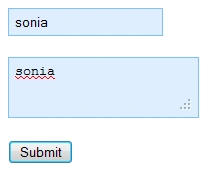
The CSS enabled UI element states selector ( X:enabled { } ) is used to target and style enabled HTML form elements. Form elements are enabled by default unless they have the HTML "disabled" attribute set on them.
- <html>
- <head>
- <title>CSS Selector</title>
- <style type="text/css">
- input, textarea:enabled {background-color:#def; border:#80bfff 1px solid; padding:5px;}
- </style>
- </head>
- <body>
- <input type="text" name="firstname">
- <br /><br />
- <textarea name="comment"></textarea>
- <br />
- <br />
- <button type="button">Submit</button>
- </body>
- </html>
CSS checked Selector example
The CSS checked pseudo selector ( X:checked { } ) is used to target elements that have a "checked" state.
- <html>
- <head>
- <title>CSS Selector</title>
- <style type="text/css">
- input:checked { cursor: help;}
- </style>
- </head>
- <body>
- <input type="checkbox" name="cb1">
- <input type="checkbox" name="cb12" checked="checked">
- </body>
- </html>

CSS nth-child Selector example
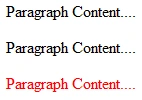
The CSS nth-child structural pseudo-class selector ( X:nth-child() { } ) is used to target and style child elements according to their position in their specified parent element.
Define the numeric value for position in between the parenthesis; see:
- <html>
- <head>
- <title>CSS Selector</title>
- <style type="text/css">
- div p:nth-child(3) { color:Red;}
- </style>
- </head>
- <body>
- <div>
- <p>Paragraph Content....</p>
- <p>Paragraph Content....</p>
- <p>Paragraph Content....</p>
- </div>
- </body>
- </html>
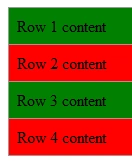
Using numeric values with "n", "+" and "-" will allow you to set style logic for many selection methods. You can use the keywords of "odd" and "even" for alternating styles every other element.
- <html>
- <head>
- <title>CSS Selector</title>
- <style type="text/css">
- .myTable { width:100%; border-collapse:collapse; }
- .myTable td { padding:8px; border:#999 1px solid; }
- .myTable tr:nth-child(2n+0) { background:red;}
- .myTable tr:nth-child(2n+1) {background: green;}
- </style>
- </head>
- <body>
- <table class="myTable">
- <tr>
- <td>Row 1 content</td>
- </tr>
- <tr>
- <td>Row 2 content</td>
- </tr>
- <tr>
- <td>Row 3 content</td>
- </tr>
- <tr>
- <td>Row 4 content</td>
- </tr>
- </table>
- </body>
- </html>
CSS nth-last-child Selector example
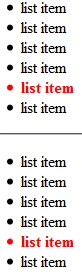
The CSS nth-last-child structural pseudo-class selector ( X:nth-last-child() { } ) is very similar to the X:nth-child() selector except that it counts inward from the last element of type.
- <html>
- <head>
- <title>CSS Selector</title>
- <style>
- ul li:nth-last-child(2) { color:red; font-weight:bold;}
- </style>
- </head>
- <body>
- <ul>
- <li>list item</li>
- <li>list item</li>
- <li>list item</li>
- <li>list item</li>
- <li>list item</li>
- <li>list item</li>
- </ul>
- <hr />
- <ul>
- <li>list item</li>
- <li>list item</li>
- <li>list item</li>
- <li>list item</li>
- <li>list item</li>
- <li>list item</li>
- </ul>
- </body>
- </html>
CSS nth-of-type Selector example
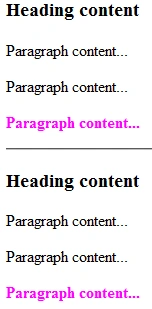
The CSS nth-of-type structural pseudo-class selector ( X:nth-of-type() { } ) is used to target and style specified child elements according to their position in their specified parent element. This selector is similar to the X:nth-child() selector, but differs by only counting specified elements to make selections and it does not count other element types in the parent.
- <html>
- <head>
- <title>CSS Selector</title>
- <style type="text/css">
- div p:nth-of-type(3) { color:#F0F; font-weight:bold;}
- </style>
- </head>
- <body>
- <div>
- <h3>Heading content</h3>
- <p>Paragraph content...</p>
- <p>Paragraph content...</p>
- <p>Paragraph content...</p>
- </div>
- <hr />
- <div>
- <h3>Heading content</h3>
- <p>Paragraph content...</p>
- <p>Paragraph content...</p>
- <p>Paragraph content...</p>
- </div>
- </body>
- </html>
CSS nth-last-of-type Selector example
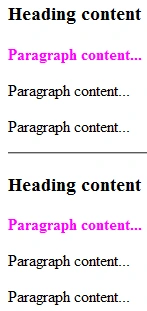
The CSS nth-last-of-type structural pseudo-class selector ( X:nth-last-of-type() { } ) is used to target and style specified child elements according to their position in their specified parent element. This selector is similar to the X:nth-of-type() selector, except that it starts counting from the last element instead of counting from the first element.
- <html>
- <head>
- <title>CSS Selector</title>
- <style type="text/css">
- div p:nth-last-of-type(3) { color:#F0F; font-weight:bold;}
- </style>
- </head>
- <body>
- <div>
- <h3>Heading content</h3>
- <p>Paragraph content...</p>
- <p>Paragraph content...</p>
- <p>Paragraph content...</p>
- </div>
- <hr />
- <div>
- <h3>Heading content</h3>
- <p>Paragraph content...</p>
- <p>Paragraph content...</p>
- <p>Paragraph content...</p>
- </div>
- </body>
- </html>
CSS nth-first-child Selector example
The CSS first-child structural pseudo-class selector ( X:first-child { } ) is used to target and style the first child of its parent element.
- <html>
- <head>
- <title>CSS Selector</title>
- <style>
- div:first-child { color:Red; font-weight:bold;}
- </style>
- </head>
- <body>
- <div>
- <p>Paragraph Content....</p>
- <p>Paragraph Content....</p>
- </div>
- <div>
- <p>Paragraph Content....</p>
- <p>Paragraph Content....</p>
- </div>
- </body>
- </html>

or
- <html>
- <head>
- <title>CSS Selector</title>
- <style>
- div p:first-child { color:#f0f; font-weight:bold;}
- </style>
- </head>
- <body>
- <div>
- <p>Paragraph Content....</p>
- <p>Paragraph Content....</p>
- </div>
- <div>
- <p>Paragraph Content....</p>
- <p>Paragraph Content....</p>
- </div>
- </body>
- </html>

CSS last-child Selector example
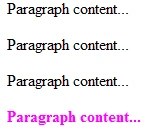
The CSS last-child structural pseudo-class selector ( X:last-child { } ) is used to target and style the last child of its parent element.
- <html>
- <head>
- <title>CSS Selector</title>
- <style type="text/css">
- #mydiv p:last-child {color:#F0F;font-weight:bold;}
- </style>
- </head>
- <body>
- <div id="mydiv">
- <p>Paragraph content...</p>
- <p>Paragraph content...</p>
- <p>Paragraph content...</p>
- <p>Paragraph content...</p>
- </div>
- </body>
- </html>
CSS first-of-type Selector example
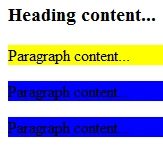
The CSS first-of-type structural pseudo-class selector ( X:first-of-type ) is used to target and style the first occurrence of the specified element inside of a specified parent element. It is exactly the same as using X:nth-of-type(1) with a value of "1".
- <html>
- <head>
- <title>CSS Selector</title>
- <style>
- div p { background-color:blue;}
- div p:first-of-type { background-color:yellow;}
- </style>
- </head>
- <body>
- <div>
- <h3>Heading content...</h3>
- <p>Paragraph content...</p>
- <p>Paragraph content...</p>
- <p>Paragraph content...</p>
- </div>
- </body>
- </html>
CSS last-of-type Selector example
The CSS last-of-type structural pseudo-class selector ( X:last-of-type ) is used to target and style the last occurrence of the specified element inside of a specified parent element. It is exactly the same as using X:nth-last-of-type(1) with a value of "1".
- <html>
- <head>
- <title>CSS Selector</title>
- <style>
- ol li{ background-color:blue;}
- ol li:last-of-type { background-color:yellow;}
- </style>
- </head>
- <body>
- <ol>
- <li>list item</li>
- <li>list item</li>
- <li>list item</li>
- </ol>
- </body>
- </html>

CSS only-child Selector example
The CSS only-child structural pseudo-class selector ( X:only-child ) is used to target and style an element if it is an only child of its parent element.
- <html>
- <head>
- <title>CSS Selector</title>
- <style>
- div p:only-child{ background-color:#fca7e7;}
- </style>
- </head>
- <body>
- <div>
- <p>Content....</p>
- <span>Content....</span>
- </div>
- <div>
- <p>Content....</p>
- </div>
- </body>
- </html>

CSS empty Selector example
The CSS empty structural pseudo-class selector ( X:empty ) is used to target and style an empty element that has no child elements including text nodes.
- <html>
- <head>
- <title>CSS Selector</title>
- <style>
- ul li:empty { background-color:#ccc;}
- </style>
- </head>
- <body>
- <ul>
- <li>list item....</li>
- <li></li>
- <li>list item....</li>
- </ul>
- </body>
- </html>

Summary
This article is useful in styling elements using the CSS tag in HTML.
Sonia Bhadouria VishvkarmaPosted Nov 8, 2012, 11:21 PM
Yes....
Anil KumarPosted Nov 7, 2012, 4:56 AM
Does it works in all version?