

Introduction
A cursor in SQL is a database object stored in temp memory and used to work with datasets. You can use cursors to manipulate data in a database, one row at a time. A cursor uses a SQL SELECT statement to fetch a rowset from a database and then can read and manipulate one row at a time.
Implicit vs explicit cursors
There are the following two types of cursors in SQL:
- Implicit Cursor
- Explicit Cursor
Implicit Cursor
The system generates and uses these types of cursors to manipulate a DML query (INSERT, UPDATE, and DELETE). In addition, a system also generates an implicit cursor when a SELECT command selects a single row.
Explicit Cursor
This type of cursor is generated by the user using a SELECT command. An explicit cursor contains more than one row, but only one row can be processed at a time. An explicit cursor moves one by one over the records. An explicit cursor uses a pointer that holds the record of a row. After fetching a row, the cursor pointer moves to the next row.
How to use a cursor in SQL?
To use a cursor, you must declare and execute a cursor. The process includes the following five steps.
- Declare Cursor: In this part, we declare variables and return a set of values.
- Open: This is the entering part of the cursor.
- Fetch: Used to retrieve the data row by row from a cursor.
- Close: This is an exit part of the cursor and is used to close a cursor.
- Deallocate: In this part, we delete the cursor definition and release all the system resources associated with the cursor.
Syntax
DECLARE @Variable nvarchar(50); -- Declare all required variables
DECLARE Cursor_Name CURSOR -- Declare Cursor Name
[LOCAL | GLOBAL] -- Define cursor scope
[FORWARD_ONLY | SCROLL] -- Define movement direction of cursor
[KEYSET | DYNAMIC | STATIC | FAST_FORWARD] -- Define basic type of cursor
[SCROLL_LOCKS | OPTIMISTIC | READ_ONLY] -- Define locks

OPEN Cursor_Name; -- Open cursor
FETCH NEXT FROM Cursor_Name; -- Fetch data from cursor
-- Implement SQL query
CLOSE Cursor_Name; -- Close the cursor
DEALLOCATE Cursor_Name; -- Deallocate all resources and memory.
Fetch data from a SQL cursor
The following are 6 methods for fetching data from a cursor in SQL
- FETCH NEXT retrieves the next row from the cursor's result set. It moves the cursor position forward by one row. In SQL Server, for example, you can use the FETCH NEXT statement to retrieve the next row.
- FETCH FIRST retrieves the first row from the cursor's result set. It is commonly used in combination with an ORDER BY clause to fetch the first row based on a specified sorting order.
- FETCH LAST retrieves the last row from the cursor's result set. Like FETCH FIRST, it is often used with an ORDER BY clause to fetch the last row based on a specific sorting order.
- FETCH PRIOR retrieves the row prior to the current cursor position. It moves the cursor backward by one row. FETCH PRIOR is useful when you need to traverse the result set in reverse order.
- FETCH ABSOLUTE retrieves a row from the cursor's result set at a specific position, regardless of the cursor's current position. It allows you to fetch a row by specifying an absolute row number.
- FETCH RELATIVE retrieves a row from the cursor's result set relative to the current cursor position. It allows you to fetch a row by specifying a relative position, such as moving forward or backward a certain number of rows from the current position.
Now we will explain four important terminologies of cursors.
Cursor Scope
Microsoft SQL Server supports the GLOBAL and LOCAL keywords on the DECLARE CURSOR statement to define the scope of the cursor name.
- GLOBAL - specifies that the cursor name is global to the connection.
- LOCAL - specifies that the cursor name is local to the Stored Procedure, trigger, or query that holds the cursor.
Data Fetch Option in Cursors
Microsoft SQL Server supports the following two fetch options for data:
- FORWARD_ONLY - Specifies that the cursor can only be scrolled from the first to the last row.
- SCROLL - It provides six options to fetch the data (FIRST, LAST, PRIOR, NEXT, RELATIVE, and ABSOLUTE).
Types of SQL Cursors
Microsoft SQL Server supports the following four types of cursors.
- STATIC CURSOR
A static cursor populates the result set during cursor creation, and the query result is cached for the lifetime of the cursor. A static cursor can move forward and backward. - FAST_FORWARD
This is the default type of cursor. It is identical to the static, except you can only scroll forward. - DYNAMIC
In a dynamic cursor, additions, and deletions are visible to others in the data source while the cursor is open. - KEYSET
This is similar to a dynamic cursor, except we can't see records others add. Likewise, if another user deletes a record, it is inaccessible from our recordset.
Types of locks on a Cursor
Locking is the process by which a DBMS restricts access to a row in a multi-user environment. When a row or column is exclusively locked, other users are not permitted to access the locked data until the lock is released. It is used for data integrity. This ensures that two users cannot simultaneously update the same column in a row.
Microsoft SQL Server supports the following three types of Locks.
- READ-ONLY
Specifies that the cursor cannot be updated. - SCROLL_LOCKS
Provides data integrity into the cursor. It specifies that the cursor will lock the rows as they are read into the cursor to ensure that updates or deletes made using the cursor will succeed. - OPTIMISTIC
Specifies that the cursor does not lock rows as they are read into the cursor. So, the updates or deletes made using the cursor will not succeed if the row has been updated outside the cursor.
First, we create a table as in the following,
CREATE TABLE [dbo].[Employee](
    [Emp_ID] [int] NOT NULL,
    [Emp_Name] [nvarchar](50) NOT NULL,
    [Emp_Salary] [int] NOT NULL,
    [Emp_City] [nvarchar](50) NOT NULL,
    CONSTRAINT [PK_Employee] PRIMARY KEY CLUSTERED
    (
        [Emp_ID] ASC
    )WITH (PAD_INDEX = OFF, STATISTICS_NORECOMPUTE = OFF, IGNORE_DUP_KEY = OFF, ALLOW_ROW_LOCKS = ON, ALLOW_PAGE_LOCKS = ON) ON [PRIMARY]
) ON [PRIMARY]
GO
Now insert some values into the table as in the following,
INSERT INTO Employee
SELECT 1, 'Pankaj', 25000, 'Alwar' UNION ALL
SELECT 2, 'Rahul', 26000, 'Alwar' UNION ALL
SELECT 3, 'Sandeep', 25000, 'Alwar' UNION ALL
SELECT 4, 'Sanjeev', 24000, 'Alwar' UNION ALL
SELECT 5, 'Neeraj', 28000, 'Alwar' UNION ALL
SELECT 6, 'Naru', 20000, 'Alwar' UNION ALL
SELECT 7, 'Omi', 23000, 'Alwar';
Select all values from the table as in the following,
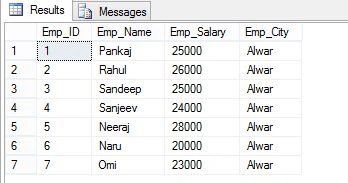
Example 1
SET NOCOUNT ON;
DECLARE @EMP_ID INT;
DECLARE @EMP_NAME NVARCHAR(MAX);
DECLARE @EMP_SALARY INT;
DECLARE @EMP_CITY NVARCHAR(MAX);

DECLARE EMP_CURSOR CURSOR
    LOCAL FORWARD_ONLY FOR
    SELECT * FROM Employee;
OPEN EMP_CURSOR;
FETCH NEXT FROM EMP_CURSOR INTO @EMP_ID, @EMP_NAME, @EMP_SALARY, @EMP_CITY;

WHILE @@FETCH_STATUS = 0
BEGIN
    PRINT 'EMP_ID: ' + CONVERT(NVARCHAR(MAX), @EMP_ID) + '  EMP_NAME ' + @EMP_NAME + '  EMP_SALARY ' + CONVERT(NVARCHAR(MAX), @EMP_SALARY) + '  EMP_CITY ' + @EMP_CITY;
    FETCH NEXT FROM EMP_CURSOR INTO @EMP_ID, @EMP_NAME, @EMP_SALARY, @EMP_CITY;
END;

CLOSE EMP_CURSOR;
DEALLOCATE EMP_CURSOR;
Output
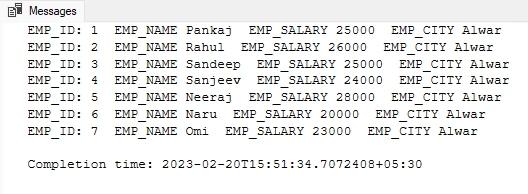
This is a simple example of a cursor that prints the value of a table.
Example 2 (SCROLL)
SET NOCOUNT ON
DECLARE @EMP_ID INT
DECLARE @EMP_NAME NVARCHAR(MAX)
DECLARE @EMP_SALARY INT
DECLARE @EMP_CITY NVARCHAR(MAX)

DECLARE EMP_CURSOR CURSOR
LOCAL  SCROLL  FOR
SELECT * FROM Employee
OPEN EMP_CURSOR
FETCH NEXT FROM EMP_CURSOR INTO  @EMP_ID ,@EMP_NAME,@EMP_SALARY,@EMP_CITY

FETCH RELATIVE 3 FROM EMP_CURSOR INTO  @EMP_ID ,@EMP_NAME,@EMP_SALARY,@EMP_CITY
PRINT  'EMP_ID: ' + CONVERT(NVARCHAR(MAX),@EMP_ID)+  '  EMP_NAME '+@EMP_NAME+'  EMP_SALARY '  +CONVERT(NVARCHAR(MAX),@EMP_SALARY)  +  '  EMP_CITY ' +@EMP_CITY
FETCH ABSOLUTE  3 FROM EMP_CURSOR INTO  @EMP_ID ,@EMP_NAME,@EMP_SALARY,@EMP_CITY

PRINT  'EMP_ID: ' + CONVERT(NVARCHAR(MAX),@EMP_ID)+  '  EMP_NAME '+@EMP_NAME+'  EMP_SALARY '  +CONVERT(NVARCHAR(MAX),@EMP_SALARY)  +  '  EMP_CITY ' +@EMP_CITY
FETCH FIRST FROM EMP_CURSOR INTO  @EMP_ID ,@EMP_NAME,@EMP_SALARY,@EMP_CITY
PRINT  'EMP_ID: ' + CONVERT(NVARCHAR(MAX),@EMP_ID)+  '  EMP_NAME '+@EMP_NAME+'  EMP_SALARY '  +CONVERT(NVARCHAR(MAX),@EMP_SALARY)  +  '  EMP_CITY ' +@EMP_CITY
FETCH LAST FROM EMP_CURSOR INTO  @EMP_ID ,@EMP_NAME,@EMP_SALARY,@EMP_CITY
PRINT  'EMP_ID: ' + CONVERT(NVARCHAR(MAX),@EMP_ID)+  '  EMP_NAME '+@EMP_NAME+'  EMP_SALARY '  +CONVERT(NVARCHAR(MAX),@EMP_SALARY)  +  '  EMP_CITY ' +@EMP_CITY
FETCH PRIOR FROM EMP_CURSOR INTO  @EMP_ID ,@EMP_NAME,@EMP_SALARY,@EMP_CITY
PRINT  'EMP_ID: ' + CONVERT(NVARCHAR(MAX),@EMP_ID)+  '  EMP_NAME '+@EMP_NAME+'  EMP_SALARY '  +CONVERT(NVARCHAR(MAX),@EMP_SALARY)  +  '  EMP_CITY ' +@EMP_CITY
FETCH NEXT FROM EMP_CURSOR INTO  @EMP_ID ,@EMP_NAME,@EMP_SALARY,@EMP_CITY
PRINT  'EMP_ID: ' + CONVERT(NVARCHAR(MAX),@EMP_ID)+  '  EMP_NAME '+@EMP_NAME+'  EMP_SALARY '  +CONVERT(NVARCHAR(MAX),@EMP_SALARY)  +  '  EMP_CITY ' +@EMP_CITY


CLOSE EMP_CURSOR
DEALLOCATE EMP_CURSOR
Output
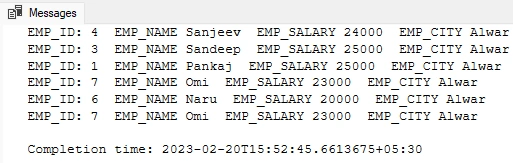
In this example, we will use SCROLL to fetch the data. This example contains all six modes of SCROLL (FIRST, LAST, PRIOR, NEXT, RELATIVE, and ABSOLUTE).
Example 3 (STATIC CURSOR)
SET NOCOUNT ON;
DECLARE @EMP_ID INT;
DECLARE @EMP_NAME NVARCHAR(MAX);
DECLARE @EMP_SALARY INT;
DECLARE @EMP_CITY NVARCHAR(MAX);

DECLARE EMP_CURSOR CURSOR STATIC FOR
SELECT * FROM Employee;

OPEN EMP_CURSOR;
FETCH NEXT FROM EMP_CURSOR INTO @EMP_ID, @EMP_NAME, @EMP_SALARY, @EMP_CITY;

WHILE @@FETCH_STATUS = 0
BEGIN
    IF @EMP_ID % 2 = 0
    BEGIN
        PRINT 'EMP_ID: ' + CONVERT(NVARCHAR(MAX), @EMP_ID) + '  EMP_NAME ' + @EMP_NAME + '  EMP_SALARY ' + CONVERT(NVARCHAR(MAX), @EMP_SALARY) + '  EMP_CITY ' + @EMP_CITY;
    END
    FETCH FROM EMP_CURSOR INTO @EMP_ID, @EMP_NAME, @EMP_SALARY, @EMP_CITY;
END

CLOSE EMP_CURSOR;
DEALLOCATE EMP_CURSOR;
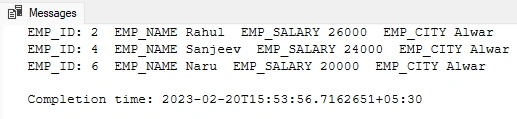
Output
Example 4
SET NOCOUNT ON;
DECLARE @EMP_ID INT;
DECLARE @EMP_NAME NVARCHAR(MAX);
DECLARE @EMP_SALARY INT;
DECLARE @EMP_CITY NVARCHAR(MAX);

DECLARE EMP_CURSOR CURSOR STATIC FOR
SELECT * FROM Employee;

OPEN EMP_CURSOR;
FETCH NEXT FROM EMP_CURSOR INTO @EMP_ID, @EMP_NAME, @EMP_SALARY, @EMP_CITY;

WHILE @@FETCH_STATUS = 0
BEGIN
    IF @EMP_ID % 2 = 0
    BEGIN
        UPDATE Employee SET Emp_Salary = 15000 WHERE CURRENT OF EMP_CURSOR;
    END

    FETCH FROM EMP_CURSOR INTO @EMP_ID, @EMP_NAME, @EMP_SALARY, @EMP_CITY;
END

CLOSE EMP_CURSOR;
DEALLOCATE EMP_CURSOR;
Output
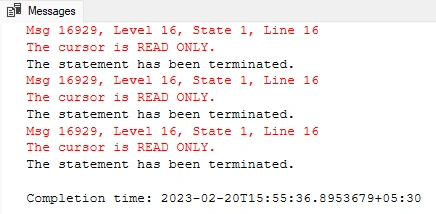
When executing this cursor, we will get an error because the static cursor does not allow modifications in data.
Example 5 (DYNAMIC CURSOR)
SET NOCOUNT ON;
DECLARE @EMP_ID INT;
DECLARE @EMP_NAME NVARCHAR(MAX);
DECLARE @EMP_SALARY INT;
DECLARE @EMP_CITY NVARCHAR(MAX);

DECLARE EMP_CURSOR CURSOR DYNAMIC FOR
SELECT * FROM Employee;

OPEN EMP_CURSOR;
FETCH NEXT FROM EMP_CURSOR INTO @EMP_ID, @EMP_NAME, @EMP_SALARY, @EMP_CITY;

WHILE @@FETCH_STATUS = 0
BEGIN
    IF @EMP_ID % 2 = 0
    BEGIN
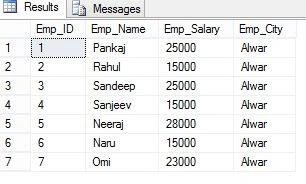
        UPDATE Employee SET Emp_Salary = 15000 WHERE CURRENT OF EMP_CURSOR;
    END

    FETCH FROM EMP_CURSOR INTO @EMP_ID, @EMP_NAME, @EMP_SALARY, @EMP_CITY;
END

CLOSE EMP_CURSOR;
DEALLOCATE EMP_CURSOR;

SELECT * FROM Employee;
Output
Example 6
SET NOCOUNT ON;
DECLARE @EMP_ID INT;
DECLARE @EMP_NAME NVARCHAR(MAX);
DECLARE @EMP_SALARY INT;
DECLARE @EMP_CITY NVARCHAR(MAX);

DECLARE EMP_CURSOR CURSOR FAST_FORWARD FOR
    SELECT * FROM Employee;

OPEN EMP_CURSOR;
FETCH NEXT FROM EMP_CURSOR INTO @EMP_ID, @EMP_NAME, @EMP_SALARY, @EMP_CITY;

WHILE @@FETCH_STATUS = 0
BEGIN
    IF @EMP_ID % 2 = 0
    BEGIN
        UPDATE Employee SET Emp_Salary = 15000 WHERE CURRENT OF EMP_CURSOR;
    END;

    FETCH FROM EMP_CURSOR INTO @EMP_ID, @EMP_NAME, @EMP_SALARY, @EMP_CITY;
END;

CLOSE EMP_CURSOR;
DEALLOCATE EMP_CURSOR;
Output
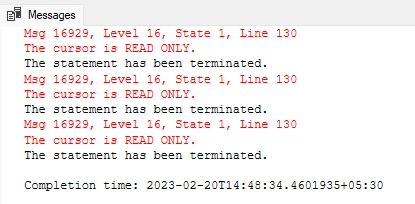
A FAST_FORWARD cursor also reads as a static cursor. We cannot modify data in a FAST_FORWARD cursor.
Example 7
SET NOCOUNT ON;
DECLARE @EMP_ID INT;
DECLARE @EMP_NAME NVARCHAR(MAX);
DECLARE @EMP_SALARY INT;
DECLARE @EMP_CITY NVARCHAR(MAX);

DECLARE EMP_CURSOR1 CURSOR KEYSET scroll FOR
    SELECT EMP_ID, EMP_NAME, EMP_SALARY, EMP_CITY FROM Employee order by Emp_Id;

OPEN EMP_CURSOR1;

IF @@CURSOR_ROWS > 0
BEGIN
    FETCH NEXT FROM EMP_CURSOR1 INTO @EMP_ID, @EMP_NAME, @EMP_SALARY, @EMP_CITY;

    WHILE @@FETCH_STATUS = 0
    BEGIN
        If @EMP_ID % 2 = 0
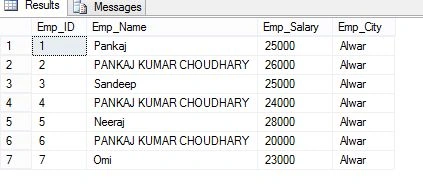
            UPDATE Employee SET EMP_NAME = 'PANKAJ KUMAR CHOUDHARY' WHERE CURRENT OF EMP_CURSOR1;

        FETCH NEXT FROM EMP_CURSOR1 INTO @EMP_ID, @EMP_NAME, @EMP_SALARY, @EMP_CITY;
    END
END

CLOSE EMP_CURSOR1;
DEALLOCATE EMP_CURSOR1;

SET NOCOUNT OFF;

SELECT * FROM Employee;
Output
What are the drawbacks of implicit cursors?
Implicit cursors in SQL are automatically created to process SQL statements not explicitly defined in the code. While implicit cursors can make programming more convenient, they also have some drawbacks:
Performance: Implicit cursors can be less efficient than explicit cursors, especially when processing large amounts of data.
Lack of control: The programmer has less control over the processing of the SQL statements. For example, it may be more difficult to specify the order in which the data is retrieved.
Maintenance: Implicit cursors can make code harder to read and maintain, especially if the SQL statements are embedded within other code. This can make it more challenging to identify and fix errors or to update the code as requirements change.
Scalability: As the size and complexity of the database grow, implicit cursors may become more challenging to manage. This can lead to memory and resource usage issues or performance problems that can impact the application's overall performance.
What are Cursor exceptions?
SQL cursor exceptions refer to errors or unexpected behavior that can occur when using a cursor in a database. Cursors are used to go through a set of rows returned by a SQL query, and can be used to do various operations on each row.
What are the types of Cursor exceptions?
Duplicate key value: This occurs when the cursor tries to insert a row with a key value that already exists in the database. This can happen if the cursor is not properly configured to handle duplicate values.
Invalid cursor state: This occurs when the cursor is in an invalid state, such as being closed or not being open. This can happen if the cursor is not properly initialized or if the database connection is lost.
Cursor concurrency violation: This occurs when two or more cursors try to modify the same row in the database at the same time. This can happen if the cursors are not properly configured to handle concurrent updates.
Lock timeout: This occurs when the cursor tries to obtain a lock on a row or table, but the lock is already held by another transaction. This can happen if the cursor is not properly configured to handle locking and concurrency.
How to handle Cursor exceptions?
SQL provides various mechanisms for error handling, such as TRY/CATCH blocks, which can be used to catch and manage exceptions in a controlled way. Proper exception handling is important in SQL to ensure that the database remains consistent and data integrity is maintained.
Why do we use a cursor in SQL Server?
- Cursors in SQL are used to retrieve and manipulate data one row at a time and we are often used them in situations where it is necessary to process the data row by row.
- Cursors are useful when working with large datasets or when performing complex calculations on the data.
- Cursors allow us to perform operations such as updating, deleting, or inserting records based on some condition or criteria.
- Cursors are especially useful when processing data from multiple tables where the relationships are not straightforward.
- Cursors can be used for transaction processing when it is necessary to process multiple operations as part of a single transaction.
- Cursors can have a performance impact on the database, especially when processing large datasets.
- Cursors should be used carefully and only when necessary.
Summary
In this article, we learned about cursors in SQL. We learned about types of SQL cursors and how to write a cursor in SQL and execute it.
Nikunj SatasiyaPosted Feb 28, 2019, 4:23 AM
Nice Explanation....
Shuvo SarkerPosted Dec 27, 2016, 6:24 AM
Good job.really helpful for practical work.
Yashwanth MuthineniPosted Aug 27, 2015, 5:56 AM
Nice Share
Santhakumar MunuswamyPosted Jun 6, 2015, 2:45 AM
Thanks for nice article
Pankaj Kumar ChoudharyPosted Jun 4, 2015, 10:45 AM
Thanks @Nitin sir........
NitinPosted Jun 4, 2015, 9:41 AM
nice
Sibeesh VenuPosted Jun 4, 2015, 8:10 AM
Good one.
Gakenh01Posted Jun 4, 2015, 7:26 AM
Nice comprehensive write-up.