
Introduction
In this article, we will demonstrate how we can create custom authentication app. As you know, authentication and authorization in a website project are still very important to give access to the users based on their roles. For building custom authentication, we use membership provider class which is able to check the user credentials (username & password) and role provider class that is used to verify the user authorization based on his/her roles.
Finally, I'd like to mention that we are using ASP.NET MVC framework in order to build our system. I hope you will like it.
Contents
- Overview.
- Prerequisites.
- Create MVC application.
- Create a database (Using Entity Framework Code First).
- Implementing Membership provider and role provider.
- Create controller.
- Add Authorization filter.
Overview
The scenario of our authentication system is as follows -
- The user will provide his/her credentials data (Login & Password) then we need to call ValidateUser method which is defined within our custom membership provider class. TValidateUser method will return true or false value to see if the user already exists from database or not.
- Notice that, we must specify custom membership provider which will be used. This update we need to do it within Web.config file.
- When the user is authenticated successfully, Authorize Attribute filter will be invoked automatically to check if the user has access or not for requested resource and role provider is the class that is responsible to do that based on user role.
- Note, we must also specify role provider which will be used within Web.config file.
Prerequisites
Make sure you have installed Visual Studio 2015 (.Net Framework 4.5.2) and SQL Server.
Create your MVC application
Open Visual Studio and select File >> New Project.
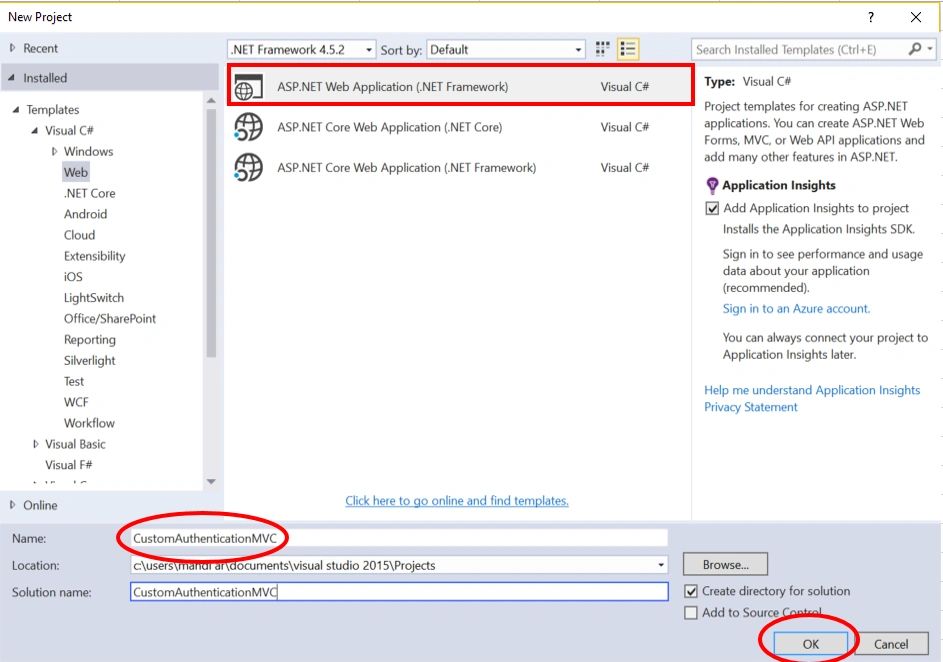
The "New Project" window will pop up. Select ASP.NET Web Application (.NET Framework), name your project, and click OK.
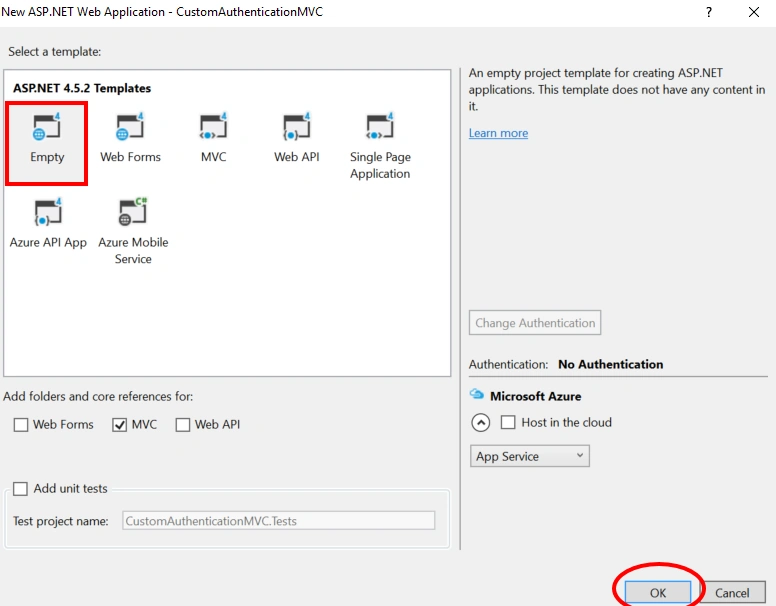
Next, new dialog will pop up for selecting the template. We are going choose Empty template and click Ok.
Once our project is created, we will create database using entity framework (Code first approach).
SQL Database part
As you know, entity framework has a different approach to map database such as database first, model first, and code first. In this article, I’d like to show you how we can create database using code first approach.
Let’s follow the steps below to create our database. Before of all, we are going create Data Access folder.
To do that. From solution explorer >> right click on project name >> Add >> New Folder.
After that, we are adding User and Role entities respectively.
User.cs
using System;
using System.Collections.Generic;
using System.Linq;
using System.Web;

namespace CustomAuthenticationMVC.DataAccess
{
    public class User
    {
        public int UserId { get; set; }
        public string Username { get; set; }
        public string FirstName { get; set; }
        public string LastName { get; set; }
        public string Email { get; set; }
        public string Password { get; set; }
        public bool IsActive { get; set; }
        public Guid ActivationCode { get; set; }
        public virtual ICollection<Role> Roles { get; set; }

    }
}
Role.cs
using System;
using System.Collections.Generic;
using System.Linq;
using System.Web;

namespace CustomAuthenticationMVC.DataAccess
{
    public class Role
    {
        public int RoleId { get; set; }
        public string RoleName { get; set; }
        public virtual ICollection<User> Users { get; set; }
    }
}
As final step. We are adding our AuthenticationDB context which will help us to access data from database. Usually context inherits from dbcontext class.
AuthenticationDB.cs
using CustomAuthenticationMVC.DataAccess;
using System;
using System.Collections.Generic;
using System.Data.Entity;
using System.Linq;
using System.Web;
using System.Web.Configuration;

namespace CustomAuthenticationMVC.DataAccess
{
    public class AuthenticationDB : DbContext
    {
        public AuthenticationDB()
            :base("AuthenticationDB")
        {

        }

        protected override void OnModelCreating(DbModelBuilder modelBuilder)
        {
            modelBuilder.Entity<User>()
                .HasMany(u => u.Roles)
                .WithMany(r => r.Users)
                .Map(m =>
                {
                    m.ToTable("UserRoles");
                    m.MapLeftKey("UserId");
                    m.MapRightKey("RoleId");
                });
        }

        public DbSet<User> Users { get; set; }
        public DbSet<Role> Roles { get; set; }
    }
}
Note
Make sure that you have added connection string of your database in Web.config file.
<connectionStrings>
    <add name="AuthenticationDB" connectionString=" Data Source=.;Initial Catalog=CustomAuthenticationDB;Integrated Security=True" providerName="System.Data.SqlClient" />
</connectionStrings>
Now, Open Package Manager console and type the following command.
Enable-migrations
After that, I can see that we are ready to create our database. Run the following commands respectively.
add-migration "initial_migration"
update-database –verbose
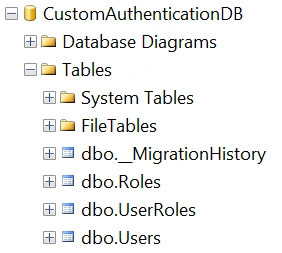
As you can see above, all the tables have been added successfully.
Implementing Membership Provider and Role Provider
Let's start implementing custom MemberShip Provider.
Now, first thing that we need to do is to create CustomMembership class that should inherits from MembershipProvider.
After doing that, according to our requirement, we are going to override the following methods,
- ValidateUser which takes username and password as parameters and test simply if user exists or not.
- GetUser is responsible to return user data based on username parameter.
- GetUserNameByEmail accepts email as parameter, and return username as result.
CustomMembership.cs
using CustomAuthenticationMVC.DataAccess;
using System;
using System.Collections.Generic;
using System.Linq;
using System.Web;
using System.Web.Security;

namespace CustomAuthenticationMVC.CustomAuthentication
{
    public class CustomMembership : MembershipProvider
    {


        /// <summary>
        ///
        /// </summary>
        /// <param name="username"></param>
        /// <param name="password"></param>
        /// <returns></returns>
        public override bool ValidateUser(string username, string password)
        {
            if(string.IsNullOrEmpty(username) || string.IsNullOrEmpty(password))
            {
                return false;
            }

            using (AuthenticationDB dbContext = new AuthenticationDB())
            {
                var user = (from us in dbContext.Users
                            where string.Compare(username, us.Username, StringComparison.OrdinalIgnoreCase) == 0
                            && string.Compare(password, us.Password, StringComparison.OrdinalIgnoreCase) == 0
                            && us.IsActive == true
                            select us).FirstOrDefault();

                return (user != null) ? true : false;
            }
        }

        /// <summary>
        ///
        /// </summary>
        /// <param name="username"></param>
        /// <param name="password"></param>
        /// <param name="email"></param>
        /// <param name="passwordQuestion"></param>
        /// <param name="passwordAnswer"></param>
        /// <param name="isApproved"></param>
        /// <param name="providerUserKey"></param>
        /// <param name="status"></param>
        /// <returns></returns>
        public override MembershipUser CreateUser(string username, string password, string email, string passwordQuestion, string passwordAnswer, bool isApproved, object providerUserKey, out MembershipCreateStatus status)
        {
            throw new NotImplementedException();
        }

        /// <summary>
        ///
        /// </summary>
        /// <param name="username"></param>
        /// <param name="userIsOnline"></param>
        /// <returns></returns>
        public override MembershipUser GetUser(string username, bool userIsOnline)
        {
            using (AuthenticationDB dbContext = new AuthenticationDB())
            {
                var user = (from us in dbContext.Users
                            where string.Compare(username, us.Username, StringComparison.OrdinalIgnoreCase) == 0
                            select us).FirstOrDefault();

                if(user == null)
                {
                    return null;
                }
                var selectedUser = new CustomMembershipUser(user);

                return selectedUser;
            }
        }

        public override string GetUserNameByEmail(string email)
        {
            using (AuthenticationDB dbContext = new DataAccess.AuthenticationDB())
            {
                string username = (from u in dbContext.Users
                                   where string.Compare(email, u.Email) == 0
                                   select u.Username).FirstOrDefault();

                return !string.IsNullOrEmpty(username) ? username : string.Empty;
            }
        }

        #region Overrides of Membership Provider

        public override string ApplicationName
        {
            get
            {
                throw new NotImplementedException();
            }

            set
            {
                throw new NotImplementedException();
            }
        }

        public override bool EnablePasswordReset
        {
            get
            {
                throw new NotImplementedException();
            }
        }

        public override bool EnablePasswordRetrieval
        {
            get
            {
                throw new NotImplementedException();
            }
        }

        public override int MaxInvalidPasswordAttempts
        {
            get
            {
                throw new NotImplementedException();
            }
        }

        public override int MinRequiredNonAlphanumericCharacters
        {
            get
            {
                throw new NotImplementedException();
            }
        }

        public override int MinRequiredPasswordLength
        {
            get
            {
                throw new NotImplementedException();
            }
        }

        public override int PasswordAttemptWindow
        {
            get
            {
                throw new NotImplementedException();
            }
        }

        public override MembershipPasswordFormat PasswordFormat
        {
            get
            {
                throw new NotImplementedException();
            }
        }

        public override string PasswordStrengthRegularExpression
        {
            get
            {
                throw new NotImplementedException();
            }
        }

        public override bool RequiresQuestionAndAnswer
        {
            get
            {
                throw new NotImplementedException();
            }
        }

        public override bool RequiresUniqueEmail
        {
            get
            {
                throw new NotImplementedException();
            }
        }

        public override bool ChangePassword(string username, string oldPassword, string newPassword)
        {
            throw new NotImplementedException();
        }

        public override bool ChangePasswordQuestionAndAnswer(string username, string password, string newPasswordQuestion, string newPasswordAnswer)
        {
            throw new NotImplementedException();
        }

        public override bool DeleteUser(string username, bool deleteAllRelatedData)
        {
            throw new NotImplementedException();
        }

        public override MembershipUserCollection FindUsersByEmail(string emailToMatch, int pageIndex, int pageSize, out int totalRecords)
        {
            throw new NotImplementedException();
        }

        public override MembershipUserCollection FindUsersByName(string usernameToMatch, int pageIndex, int pageSize, out int totalRecords)
        {
            throw new NotImplementedException();
        }

        public override MembershipUserCollection GetAllUsers(int pageIndex, int pageSize, out int totalRecords)
        {
            throw new NotImplementedException();
        }

        public override int GetNumberOfUsersOnline()
        {
            throw new NotImplementedException();
        }

        public override string GetPassword(string username, string answer)
        {
            throw new NotImplementedException();
        }

        public override MembershipUser GetUser(object providerUserKey, bool userIsOnline)
        {
            throw new NotImplementedException();
        }

        public override string ResetPassword(string username, string answer)
        {
            throw new NotImplementedException();
        }

        public override bool UnlockUser(string userName)
        {
            throw new NotImplementedException();
        }

        public override void UpdateUser(MembershipUser user)
        {
            throw new NotImplementedException();
        }

        #endregion
    }
}
As you can see, MembershipProvider has so many methods such as Create User, ChangePassword, GetPassword ... but for us we need only ValidateUser, GetUser, GetUserNameByEmail methods.
I’d like to point out, GetUser method uses CustomMemberShipUser class to get only what we need as user informations.
CustomMemberShipUser.cs
using System;
using CustomAuthenticationMVC.DataAccess;
using System.Collections.Generic;
using System.Linq;
using System.Web;
using System.Web.Security;

namespace CustomAuthenticationMVC.CustomAuthentication
{
    public class CustomMembershipUser : MembershipUser
    {
        #region User Properties

        public int UserId { get; set; }
        public string FirstName { get; set; }
        public string LastName { get; set; }
        public ICollection<Role> Roles { get; set; }

        #endregion

        public CustomMembershipUser(User user):base("CustomMembership", user.Username, user.UserId, user.Email, string.Empty, string.Empty, true, false, DateTime.Now, DateTime.Now, DateTime.Now, DateTime.Now, DateTime.Now)
        {
            UserId = user.UserId;
            FirstName = user.FirstName;
            LastName = user.LastName;
            Roles = user.Roles;
        }
    }
}
Note, as we mentioned before, the second step consists of adding our customerMembership within Web.config file. This is what we are going to do now, edit web.config file and adding the following code snipped.
<membership defaultProvider="CustomMembership">
    <providers>
      <clear/>
      <add name="CustomMembership"
           type="CustomAuthenticationMVC.CustomAuthentication.CustomMembership"/>
    </providers>
</membership>
Now, we will switch to implement Custom Role Provider.
Here, we need to create CustomRole class that should inherits from RoleProvider then we will override GetRolesForUser & IsUserInRole methods respectively.
CustomRole.cs
using CustomAuthenticationMVC.DataAccess;
using System;
using System.Collections.Generic;
using System.Linq;
using System.Web;
using System.Web.Security;

namespace CustomAuthenticationMVC.CustomAuthentication
{
    public class CustomRole : RoleProvider
    {
        /// <summary>
        ///
        /// </summary>
        /// <param name="username"></param>
        /// <param name="roleName"></param>
        /// <returns></returns>
        public override bool IsUserInRole(string username, string roleName)
        {
            var userRoles = GetRolesForUser(username);
            return userRoles.Contains(roleName);
        }

        /// <summary>
        ///
        /// </summary>
        /// <param name="username"></param>
        /// <returns></returns>
        public override string[] GetRolesForUser(string username)
        {
            if (!HttpContext.Current.User.Identity.IsAuthenticated)
            {
                return null;
            }

            var userRoles = new string[] { };

            using (AuthenticationDB dbContext = new AuthenticationDB())
            {
                var selectedUser = (from us in dbContext.Users.Include("Roles")
                                    where string.Compare(us.Username, username, StringComparison.OrdinalIgnoreCase) == 0
                                    select us).FirstOrDefault();
                if(selectedUser != null)
                {
                    userRoles = new[] { selectedUser.Roles.Select(r=>r.RoleName).ToString() };
                }

                return userRoles.ToArray();
            }
        }

        #region Overrides of Role Provider

        public override string ApplicationName
        {
            get
            {
                throw new NotImplementedException();
            }

            set
            {
                throw new NotImplementedException();
            }
        }

        public override void AddUsersToRoles(string[] usernames, string[] roleNames)
        {
            throw new NotImplementedException();
        }

        public override void CreateRole(string roleName)
        {
            throw new NotImplementedException();
        }

        public override bool DeleteRole(string roleName, bool throwOnPopulatedRole)
        {
            throw new NotImplementedException();
        }

        public override string[] FindUsersInRole(string roleName, string usernameToMatch)
        {
            throw new NotImplementedException();
        }

        public override string[] GetAllRoles()
        {
            throw new NotImplementedException();
        }

        public override string[] GetUsersInRole(string roleName)
        {
            throw new NotImplementedException();
        }


        public override void RemoveUsersFromRoles(string[] usernames, string[] roleNames)
        {
            throw new NotImplementedException();
        }

        public override bool RoleExists(string roleName)
        {
            throw new NotImplementedException();
        }

        #endregion
    }
}
Notice that GetRolesForUser method accepts username as parameter, then it will return all roles of the given username. For IsUserInRole method takes username and rolename as parameters and checks if user has a role that will allow him access to the requested resource.
Next, do not forget editing web.config file and adding the following code snippet.
<roleManager defaultProvider="CustomRole" enabled="true">
    <providers>
      <clear/>
      <add name="CustomRole" type="CustomAuthenticationMVC.CustomAuthentication.CustomRole" />
    </providers>
</roleManager>
Now, we are implementing custom principal and identity. By default to get user informations from http request, we have user property that contains basics user data. Deeply, user informations is accessed via IPrincipal interface. In fact, this interface has Identity property that encapsulates all user information.
As we mentioned before, user property holds only basic user informations but the idea is to extend this property in order to have more informations which will be helpful.
Now, we are going create CustomPrincipal class that inherits from IPrincipal interface.
CustomPrincipal.cs
using System;
using System.Collections.Generic;
using System.Linq;
using System.Security.Principal;
using System.Web;

namespace CustomAuthenticationMVC.CustomAuthentication
{
    public class CustomPrincipal : IPrincipal
    {
        #region Identity Properties

        public int UserId { get; set; }
        public string FirstName { get; set; }
        public string LastName { get; set; }
        public string Email { get; set; }
        public string[] Roles { get; set; }
        #endregion

        public IIdentity Identity
        {
            get; private set;
        }

        public bool IsInRole(string role)
        {
            if (Roles.Any(r => role.Contains(r)))
            {
                return true;
            }
            else
            {
                return false;
            }
        }

        public CustomPrincipal(string username)
        {
            Identity = new GenericIdentity(username);
        }
    }
}
Note
To replace the default user property from HttpContext. We will add the following code snippet inside Global.asax
protected void Application_PostAuthenticateRequest(Object sender, EventArgs e)
{
    HttpCookie authCookie = Request.Cookies["Cookie1"];
    if (authCookie != null)
    {
        FormsAuthenticationTicket authTicket = FormsAuthentication.Decrypt(authCookie.Value);

        var serializeModel = JsonConvert.DeserializeObject<CustomSerializeModel>(authTicket.UserData);
        CustomPrincipal principal = new CustomPrincipal(authTicket.Name);
        principal.UserId = serializeModel.UserId;
        principal.FirstName = serializeModel.FirstName;
        principal.LastName = serializeModel.LastName;
        principal.Roles = serializeModel.RoleName.ToArray<string>();

        HttpContext.Current.User = principal;
    }
}
Create a controller
After implementing Custom Membership Provider and Custom Role Provider, I think that the time has come to define Account Controller with all the needed actions which help us authenticating users.
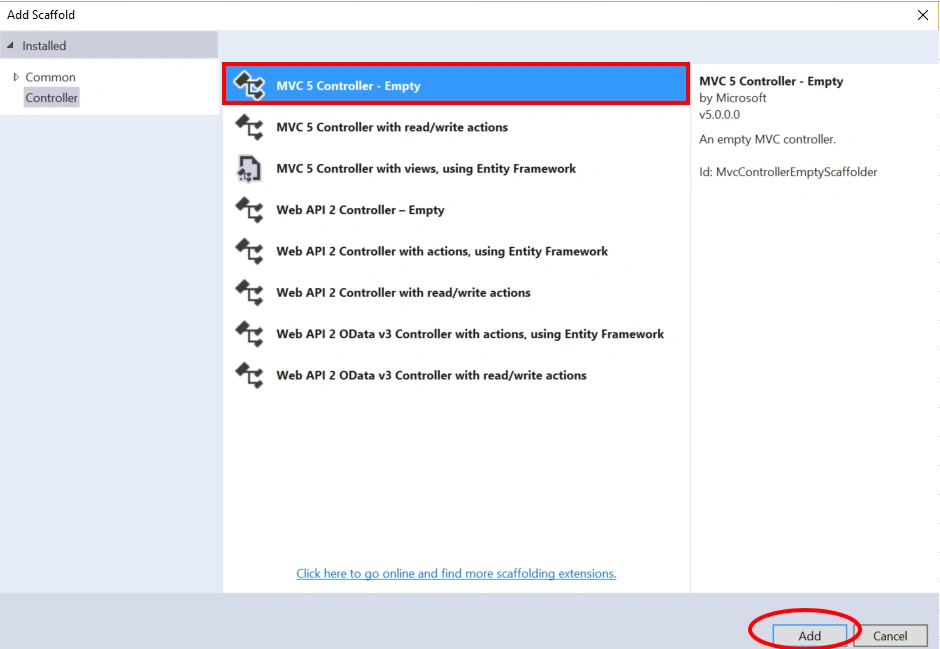
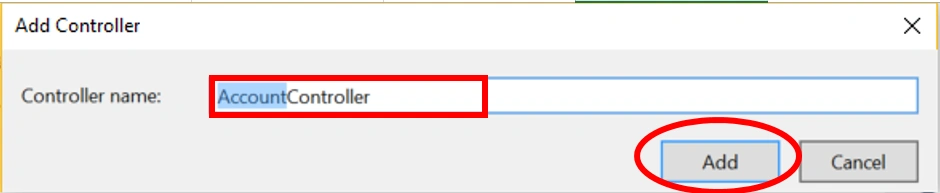
Now, we are going to create a controller. Right click on the controllers folder> > Add >> Controller>> selecting MVC 5 Controller - Empty>> click Add. In the next dialog name the controller AccountController and then click Add.
AccountController.cs
using CustomAuthenticationMVC.CustomAuthentication;
using CustomAuthenticationMVC.DataAccess;
using CustomAuthenticationMVC.Models;
using Newtonsoft.Json;
using System;
using System.Collections.Generic;
using System.Linq;
using System.Net;
using System.Net.Mail;
using System.Web;
using System.Web.Mvc;
using System.Web.Security;

namespace CustomAuthenticationMVC.Controllers
{
    [AllowAnonymous]
    public class AccountController : Controller
    {
        // GET: Account
        public ActionResult Index()
        {
            return View();
        }

        [HttpGet]
        public ActionResult Login(string ReturnUrl = "")
        {
            if (User.Identity.IsAuthenticated)
            {
                return LogOut();
            }
            ViewBag.ReturnUrl = ReturnUrl;
            return View();
        }

        [HttpPost]
        public ActionResult Login(LoginView loginView, string ReturnUrl = "")
        {
            if (ModelState.IsValid)
            {
                if (Membership.ValidateUser(loginView.UserName, loginView.Password))
                {
                    var user = (CustomMembershipUser)Membership.GetUser(loginView.UserName, false);
                    if (user != null)
                    {
                        CustomSerializeModel userModel = new Models.CustomSerializeModel()
                        {
                            UserId = user.UserId,
                            FirstName = user.FirstName,
                            LastName = user.LastName,
                            RoleName = user.Roles.Select(r => r.RoleName).ToList()
                        };

                        string userData = JsonConvert.SerializeObject(userModel);
                        FormsAuthenticationTicket authTicket = new FormsAuthenticationTicket
                            (
                            1, loginView.UserName, DateTime.Now, DateTime.Now.AddMinutes(15), false, userData
                            );

                        string enTicket = FormsAuthentication.Encrypt(authTicket);
                        HttpCookie faCookie = new HttpCookie("Cookie1", enTicket);
                        Response.Cookies.Add(faCookie);
                    }

                    if (Url.IsLocalUrl(ReturnUrl))
                    {
                        return Redirect(ReturnUrl);
                    }
                    else
                    {
                        return RedirectToAction("Index");
                    }
                }
            }
            ModelState.AddModelError("", "Something Wrong : Username or Password invalid ^_^ ");
            return View(loginView);
        }

        [HttpGet]
        public ActionResult Registration()
        {
            return View();
        }

        [HttpPost]
        public ActionResult Registration(RegistrationView registrationView)
        {
            bool statusRegistration = false;
            string messageRegistration = string.Empty;

            if (ModelState.IsValid)
            {
                // Email Verification
                string userName = Membership.GetUserNameByEmail(registrationView.Email);
                if (!string.IsNullOrEmpty(userName))
                {
                    ModelState.AddModelError("Warning Email", "Sorry: Email already Exists");
                    return View(registrationView);
                }

                //Save User Data
                using (AuthenticationDB dbContext = new AuthenticationDB())
                {
                    var user = new User()
                    {
                        Username = registrationView.Username,
                        FirstName = registrationView.FirstName,
                        LastName = registrationView.LastName,
                        Email = registrationView.Email,
                        Password = registrationView.Password,
                        ActivationCode = Guid.NewGuid(),
                    };

                    dbContext.Users.Add(user);
                    dbContext.SaveChanges();
                }

                //Verification Email
                VerificationEmail(registrationView.Email, registrationView.ActivationCode.ToString());
                messageRegistration = "Your account has been created successfully. ^_^";
                statusRegistration = true;
            }
            else
            {
                messageRegistration = "Something Wrong!";
            }
            ViewBag.Message = messageRegistration;
            ViewBag.Status = statusRegistration;

            return View(registrationView);
        }

        [HttpGet]
        public ActionResult ActivationAccount(string id)
        {
            bool statusAccount = false;
            using (AuthenticationDB dbContext = new DataAccess.AuthenticationDB())
            {
                var userAccount = dbContext.Users.Where(u => u.ActivationCode.ToString().Equals(id)).FirstOrDefault();

                if (userAccount != null)
                {
                    userAccount.IsActive = true;
                    dbContext.SaveChanges();
                    statusAccount = true;
                }
                else
                {
                    ViewBag.Message = "Something Wrong !!";
                }

            }
            ViewBag.Status = statusAccount;
            return View();
        }

        public ActionResult LogOut()
        {
            HttpCookie cookie = new HttpCookie("Cookie1", "");
            cookie.Expires = DateTime.Now.AddYears(-1);
            Response.Cookies.Add(cookie);

            FormsAuthentication.SignOut();
            return RedirectToAction("Login", "Account", null);
        }

        [NonAction]
        public void VerificationEmail(string email, string activationCode)
        {
            var url = string.Format("/Account/ActivationAccount/{0}", activationCode);
            var link = Request.Url.AbsoluteUri.Replace(Request.Url.PathAndQuery, url);

            var fromEmail = new MailAddress("[email protected]", "Activation Account - AKKA");
            var toEmail = new MailAddress(email);

            var fromEmailPassword = "******************";
            string subject = "Activation Account !";

            string body = "<br/> Please click on the following link in order to activate your account" + "<br/><a href='" + link + "'> Activation Account ! </a>";

            var smtp = new SmtpClient
            {
                Host = "smtp.gmail.com",
                Port = 587,
                EnableSsl = true,
                DeliveryMethod = SmtpDeliveryMethod.Network,
                UseDefaultCredentials = false,
                Credentials = new NetworkCredential(fromEmail.Address, fromEmailPassword)
            };

            using (var message = new MailMessage(fromEmail, toEmail)
            {
                Subject = subject,
                Body = body,
                IsBodyHtml = true

            })

                smtp.Send(message);

        }
    }
}
As you can see above, account controller has three main actions,
- Login action accepts loginView model as parameter which contains username and password properties, then this action will verify user credentials using ValidateUser method from custom Membership. If user validation is true, we are getting user data based on GetUser method.
Next, we are creating authentication ticket that should be encrypted using the following expression FormsAuthentication.Encrypt (authTicket) and finally creating faCookie object that has our ticket encrypted as value.
- Registration action is used to create new user account. Deeply this action will do three things,
- Verify if user who would create new account has already been created. To check that, we will use GetUserNameByEmail method from CustomMembershipProvider.
- Next, we will save user data.
- We must activate user account by using verification email which will send an email to user and tells him that you should activate your account by clicking on activation link.
- LogOut action as its name suggests, this action enables user to log out his/her session.
Now, we need to add login, registration and activation account views.
Login.cshtml
@model CustomAuthenticationMVC.Models.LoginView

@{
    ViewBag.Title = "Login";
}

<h2>Login</h2>


@using (Html.BeginForm(null, null, new { ReturnUrl = ViewBag.ReturnUrl }, FormMethod.Post))
{
    @Html.AntiForgeryToken()

    <div class="form-horizontal">
        <h4>LoginView</h4>
        <hr />
        @Html.ValidationSummary(true, "", new { @class = "text-danger" })
        <div class="form-group">
            @Html.LabelFor(model => model.UserName, htmlAttributes: new { @class = "control-label col-md-2" })
            <div class="col-md-10">
                @Html.EditorFor(model => model.UserName, new { htmlAttributes = new { @class = "form-control" } })
                @Html.ValidationMessageFor(model => model.UserName, "", new { @class = "text-danger" })
            </div>
        </div>

        <div class="form-group">
            @Html.LabelFor(model => model.Password, htmlAttributes: new { @class = "control-label col-md-2" })
            <div class="col-md-10">
                @Html.EditorFor(model => model.Password, new { htmlAttributes = new { @class = "form-control" } })
                @Html.ValidationMessageFor(model => model.Password, "", new { @class = "text-danger" })
            </div>
        </div>

        <div class="form-group">
            @Html.LabelFor(model => model.RememberMe, htmlAttributes: new { @class = "control-label col-md-2" })
            <div class="col-md-10">
                <div class="checkbox">
                    @Html.EditorFor(model => model.RememberMe)
                    @Html.ValidationMessageFor(model => model.RememberMe, "", new { @class = "text-danger" })
                </div>
            </div>
        </div>

        <div class="form-group">
            <div class="col-md-offset-2 col-md-10">
                <input type="submit" value="Log In" class="btn btn-default" />
            </div>
        </div>
    </div>
}

<div>
    @Html.ActionLink("Back to List", "Index")
</div>

<script src="~/Scripts/jquery-1.10.2.min.js"></script>
<script src="~/Scripts/jquery.validate.min.js"></script>
<script src="~/Scripts/jquery.validate.unobtrusive.min.js"></script>
Registration.cshtml
@model CustomAuthenticationMVC.Models.RegistrationView

@{
    ViewBag.Title = "Registration";
}

<h2>Registration</h2>

@if (ViewBag.Status != null && Convert.ToBoolean(ViewBag.Status))
{
    if (ViewBag.Message != null)
    {
        <div class="alert alert-success">
            <strong>Success!</strong> @ViewBag.Message
        </div>
    }
}
else
{
    using (Html.BeginForm())
    {
        @Html.AntiForgeryToken()

        <div class="form-horizontal">
            <h4>RegistrationView</h4>
            <hr />
            @Html.ValidationSummary(true, "", new { @class = "text-danger" })
            <div class="form-group">
                @Html.LabelFor(model => model.Username, htmlAttributes: new { @class = "control-label col-md-2" })
                <div class="col-md-10">
                    @Html.EditorFor(model => model.Username, new { htmlAttributes = new { @class = "form-control" } })
                    @Html.ValidationMessageFor(model => model.Username, "", new { @class = "text-danger" })
                </div>
            </div>

            <div class="form-group">
                @Html.LabelFor(model => model.FirstName, htmlAttributes: new { @class = "control-label col-md-2" })
                <div class="col-md-10">
                    @Html.EditorFor(model => model.FirstName, new { htmlAttributes = new { @class = "form-control" } })
                    @Html.ValidationMessageFor(model => model.FirstName, "", new { @class = "text-danger" })
                </div>
            </div>

            <div class="form-group">
                @Html.LabelFor(model => model.LastName, htmlAttributes: new { @class = "control-label col-md-2" })
                <div class="col-md-10">
                    @Html.EditorFor(model => model.LastName, new { htmlAttributes = new { @class = "form-control" } })
                    @Html.ValidationMessageFor(model => model.LastName, "", new { @class = "text-danger" })
                </div>
            </div>

            <div class="form-group">
                @Html.LabelFor(model => model.Email, htmlAttributes: new { @class = "control-label col-md-2" })
                <div class="col-md-10">
                    @Html.EditorFor(model => model.Email, new { htmlAttributes = new { @class = "form-control" } })
                    @Html.ValidationMessageFor(model => model.Email, "", new { @class = "text-danger" })
                    @Html.ValidationMessage("ErrorEmail", new { @class = "text-danger" })
                </div>
            </div>

            <div class="form-group">
                @Html.LabelFor(model => model.Password, htmlAttributes: new { @class = "control-label col-md-2" })
                <div class="col-md-10">
                    @Html.EditorFor(model => model.Password, new { htmlAttributes = new { @class = "form-control" } })
                    @Html.ValidationMessageFor(model => model.Password, "", new { @class = "text-danger" })
                </div>
            </div>

            <div class="form-group">
                @Html.LabelFor(model => model.ConfirmPassword, htmlAttributes: new { @class = "control-label col-md-2" })
                <div class="col-md-10">
                    @Html.EditorFor(model => model.ConfirmPassword, new { htmlAttributes = new { @class = "form-control" } })
                    @Html.ValidationMessageFor(model => model.ConfirmPassword, "", new { @class = "text-danger" })
                </div>
            </div>

            <div class="form-group">
                <div class="col-md-offset-2 col-md-10">
                    <input type="submit" value="Create" class="btn btn-default" />
                </div>
            </div>
        </div>

        if(ViewBag.Message != null)
        {
            <div class="alert alert-danger">
                <strong>Error!</strong> @ViewBag.Message
            </div>
        }

    }
}

<div>
    @Html.ActionLink("Login", "Login")
</div>

@section Scripts{

<script src="~/Scripts/jquery.validate.min.js"></script>
<script src="~/Scripts/jquery.validate.unobtrusive.min.js"></script>
}
ActivationAccount.cshtml
@{
    ViewBag.Title = "Activation Account ^_^";
}

<h2>Activation Account</h2>

@if(ViewBag.Status != null && Convert.ToBoolean(ViewBag.Status))
{
    <div class="alert alert-success">
        <strong>Success!</strong>  Your account has been activated successfully.
    </div>
}
else
{
    <div class="alert alert-danger">
        <strong>Error!</strong>@ViewBag.Message
    </div>
}
Authorization Filter
In this part, we will implement custom authorization filter. What we would like to do is to create filter which restricts access to user controller if the connected user has not user role.
So, let’s follow steps.
Firstly, Create CustomAuthorizeAttribute class which inherits from AuthorizeAttribute.
CustomAuthorizeAttribute.cs
using CustomAuthenticationMVC.CustomAuthentication;
using System;
using System.Collections.Generic;
using System.Linq;
using System.Web;
using System.Web.Mvc;
using System.Web.Routing;

namespace CustomAuthenticationMVC.CustomAuthentication
{
    public class CustomAuthorizeAttribute : AuthorizeAttribute
    {
        protected virtual CustomPrincipal CurrentUser
        {
            get { return HttpContext.Current.User as CustomPrincipal; }
        }

        protected override bool AuthorizeCore(HttpContextBase httpContext)
        {
            return ((CurrentUser != null && !CurrentUser.IsInRole(Roles)) || CurrentUser == null) ? false : true;
        }

        protected override void HandleUnauthorizedRequest(AuthorizationContext filterContext)
        {
            RedirectToRouteResult routeData = null;

            if(CurrentUser == null)
            {
                routeData = new RedirectToRouteResult
                    (new System.Web.Routing.RouteValueDictionary
                    (new
                    {
                        controller = "Account",
                        action = "Login",
                    }
                    ));
            }
            else
            {
                routeData = new RedirectToRouteResult
                (new System.Web.Routing.RouteValueDictionary
                 (new
                 {
                     controller = "Error",
                     action = "AccessDenied"
                 }
                 ));
            }

            filterContext.Result = routeData;
        }

    }
}
UserController.cs
using CustomAuthenticationMVC.CustomAuthentication;
using System;
using System.Collections.Generic;
using System.Linq;
using System.Web;
using System.Web.Mvc;

namespace CustomAuthenticationMVC.Controllers
{
    [CustomAuthorize(Roles = "User")]
    public class UserController : Controller
    {

        // GET: User
        public ActionResult Index()
        {
            return View();
        }
    }
}
When user is authenticated successfully and has not user role, in this case we should inform him that his/her access is denied. This is what we made in HandleUnauthorizedRequest method.
ErrorController.cs
using System;
using System.Collections.Generic;
using System.Linq;
using System.Web;
using System.Web.Mvc;

namespace CustomAuthenticationMVC.Controllers
{
    public class ErrorController : Controller
    {
        // GET: Error
        public ActionResult AccessDenied()
        {
            return View();
        }
    }
}
AccessDenied.cshtml
@{
    ViewBag.Title = "AccessDenied";
}

<h2>AccessDenied</h2>
Happy Coding!
That’s all. Please send your feedback and queries in comments box.
Ashish KumarPosted Feb 24, 2021, 2:46 PM
LoginView and RegistrationView are not defined inside models folder?
Carlos CasalicchioPosted May 29, 2020, 1:56 PM
I don't see anywhere a way to add users to roles, can you please clarify?
TurbatPosted Feb 12, 2020, 2:22 AM
How to get currentUser.userId. Pls help me
Francisco RuizPosted Jan 10, 2020, 6:20 AM
Hi, the form timeout is not working so is not redirecting to logging after 60 minutes of inactivity, any idea about why?
Pankajkumar PatelPosted Sep 27, 2019, 12:16 AM
Nice article
David DPosted Aug 9, 2019, 11:16 AM
Hello, seems there is no definition for "CustomSerializeModel" in the solution
Mark WoodardPosted Apr 19, 2019, 1:20 PM
Note: If you want to add multiple roles to the Authorization Attribute you need to change authorization annotations to example: [CustomAuthorize(Roles = "Admin,User")] and then change the CustomAuthorizeAttribute class's overridden AuthorizeCore() method to: protected override bool AuthorizeCore(HttpContextBase httpContext) { bool isAuthorized = base.AuthorizeCore(httpContext); if(!isAuthorized) { return false; } if (Roles.Split(',').Contains(_context.Tbl_Users.Where(x => x.UserName == httpContext.User.Identity.Name).FirstOrDefault().Tbl_Roles.RoleName)) { return true; } else { return false; } }
Rob WallsPosted Mar 27, 2019, 3:17 PM
Article is great! Not liking Identity Framework and this is a good alternative with lots of detail. I have a question though. None of the code in the CustomRole class is ever called. The role provider is specified in the web.config as indicated in the article. Even removed the role provider section from web.config and it all still works. Everything works because the user roles are obtained directly from the model in Login and then set in the ticket. Then CustomAuthorize does a check on role by calling the CustomPrinciple IsInRole method (using string checks--no entity). So, all the nifty methods in CustomRole are not used. How would I use those? Maybe make the CustomRole class static and just call them like utility methods? Or just treat it like a basic Roles table entity object and query/update that way? Thanks again for the great article!
Laxmidhar SahooPosted Nov 28, 2018, 6:16 AM
Thanks for a fantastic article
esiPosted Nov 28, 2018, 4:50 AM
Hi, thanks for your detailed tutorial, I find it very useful. I've been using this on all of my projects, but recently i encountered a problem when i use custom attribute with roles on one of my controllers. and found out AuthorizeCore in CustomAuthorizeAttribute sometimes returns false trues, so I corrected like this : if (CurrentUser == null) return false; else if (!CurrentUser.IsInRole(Roles)) return false; else return true; instead of this: return ((CurrentUser != null && !CurrentUser.IsInRole(Roles)) || CurrentUser == null) ? false : true; I figured you could correct this on your code as well. Thank you
mohammed moosaPosted Oct 5, 2018, 8:47 AM
I've followed this tutorial and I'm having a problem getting the role manager to work on a server. Everything works perfectly when I'm running locally but once on the server the roles are not updated. Can anyone help?
Adeola AdebayoPosted Aug 8, 2018, 4:57 AM
Hi, I followed the tutorial step by step, but the user is created but roles are not. Please how do I add/assign roles to users
News PortalPosted May 7, 2018, 3:20 AM
How we change the value of FormsAuthenticationTicket user model after user edit name. "FormsAuthenticationTicket authTicket = new FormsAuthenticationTicket(1, loginView.UserName, DateTime.Now, DateTime.Now.AddMinutes(15), false, userData);
Kacper KępińskiPosted Apr 27, 2018, 4:06 PM
How would you add roles for user while registering new user?
Vlad BULETEPosted Apr 13, 2018, 7:43 AM
Thanks a lot! I've been searching for an article like this for quite some time.
Tuncay AltınpullukPosted Mar 14, 2018, 9:43 AM
Can you explain why the AntiForgeryToken is not controlled in the HttpPost Actions?
Bikram LimbuPosted Mar 6, 2018, 4:49 AM
Thanks a lot. very helpful
Gerson LaraPosted Mar 3, 2018, 9:33 AM
Please explain what is CustomSerializeModel or where it came out from. In trying to follow the tutorial but don't know what to replace this class with. Thanks in advance.
Saravanan VPosted Feb 26, 2018, 8:59 PM
Nicely presented...
Laxmidhar SahooPosted Jan 1, 2018, 8:10 AM
A good article sir usefull it
Naresh SinghalPosted Dec 31, 2017, 11:35 PM
....Nicely Explained , its core and most vital for Authentication in any web site.... Thanks @El Mahdi Archane
Arvind SinghPosted Dec 30, 2017, 11:43 AM
Nice tried,,,,,.........
Satyaprakash SamantarayPosted Dec 30, 2017, 11:31 AM
Nice one.........................