

Introduction
Power Virtual Agents is an easily create powerful bot and no-code graphical interface without the need for data scientists or developers. It eliminates the gap between the subject matter experts and the development teams building the bots. It also minimizes the IT effort required to deploy and maintain a custom conversational solution. In my previous article, you learned about setting up and a quick overview on power virtual agents.
In this article, you will learn more about how you can customize the bot conversation messages. The user conversation message is called “Topic” in Power virtual agents. A topic has trigger phrases - these are phrases, keywords, or questions that a user is likely to type that is related to a specific issue - and conversation nodes - these are what you use to define how a bot should respond and what it should do. You can maintain up to 1000 topics in a Bot.

User and System Topic
Once again remind you, before reading this article, You can follow my previous article to learn more about setup and create the first Power Virtual agent Bot application.
When you successfully create bot applications, you are able to see a number of topics will be created automatically and also you can see how the bot conversation works in practice by testing it in the Test bot pane. For example, a user might type “I want a Business Laptop" into your bot. The AI will recommend the business laptop and request you to confirm adding to the cart. The bot will also suggest you provide a “Yes” or “No” response.

There are two topics the category application will generate. You can refer and learn the topic, how you need to implement it for your business use case.
- User Topics
Category you will find Four pre-populated User Topics that are titled as lessons. These lesson topics can be used to help understand simple to complex ways of using nodes to create bot conversations.
- System Topics is reusable topics like greeting, saying goodbye and things like that. These are pre-populated topics that you are likely to need during a bot conversation.
Create a New Topic
You can create your own topic and maintain up to 1000 topics in a Bot.
Step 1
Go to the Topics tab on the side navigation pane to open the topics page.
Step 2
On the Topic page, Select the New Topic option on the top navigation pane.

Step 3
Provide a topic name, description, and one or more trigger phrases for the topic by clicking on the Add button.

Go to Authoring Canvas
Click on Save Topic options on the right corner on the Topics page. Once you click on Save topic, you will get the error and it asks you to set the authoring canvas.
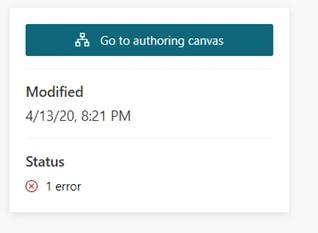
Power Virtual Agents opens the topic in the authoring canvas and displays the topic's trigger phrases. The authoring canvas is where you define the conversation path between a customer and the bot, edit the message text box, and add and change the text font style and hyperlink.
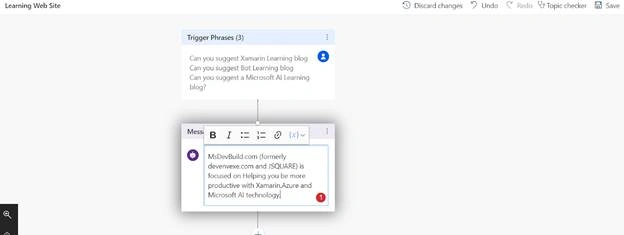
Build and Save the Topic
Once you have done the changes, click on Topic Checker. The topic checker will show you if there are any errors or warnings in the topic. If there's no error, click on the Save option.

Test Bot Application
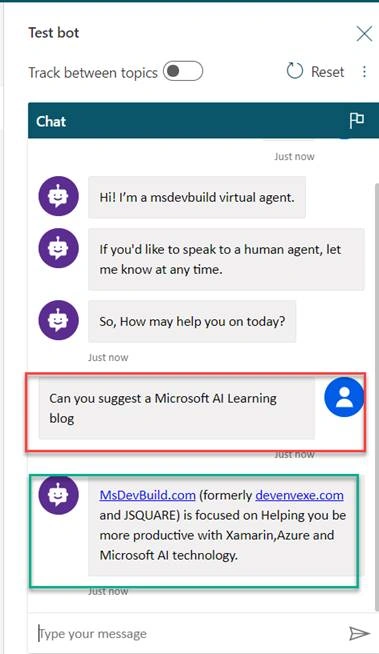
You're now ready to test your bot application using the built-in Power virtual agent bot Emulator. You can provide user input, which we created as a topic, “Can you suggest a Microsoft AI Learning Blog” and the bot will reply to the triggered message.
Summary
You have successfully created topics and running the application in the power virtual agent. I hope you have enjoyed learning about the power virtual agent bot. If you have any questions/feedback/issues, please write them in the comment box.
Join the conversation! Your thoughts help the community grow.