

Introduction
In this article, you will learn how to add the dropdown fields to SharePoint Framework Web part properties pane.
In my previous articles, I have introduced the custom properties, explained check box field properties sample and managing multiple pages on properties pane of SharePoint Framework (SPFx) Web part.
In my SPFx article series, you can learn about SPFx introduction, prerequisites, steps for setting up the environment, developing and testing the Web parts, using the local environments.
In the previous article sample, you will have seen adding the multiple pages to the properties pane of SPFx Web part. You can use the samples from the previous articles to accomplish the task.
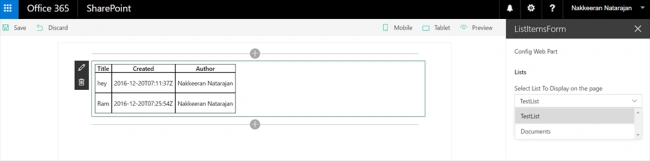
In this article, you will see populating the dropdown options on the SPFx Web part properties pane. First, let us bind the list names to the dropdown property. Subsequently, the list items can be loaded on the Web part, which is based on the list name selected on the dropdown field. As you have noticed in the previous articles, the property pane has pages, each page has a group and group can contain multiple properties.
DropDown property
The dropdown property is defined, using PropertyPaneDropdown method. It contains the following.
- property name- Custom name to the property, which can be used as a variable.
- label- The text to be displayed for the drop down.
- isDisabled- Boolean value to identify whether the property is enabled or disabled.
- options- The dropdown values with the key, text, index and isSelected (boolean to identify whether the option is selected) properties.
Preethi RPosted Apr 4, 2018, 9:45 AM
How to set default value to the dropdown panel ? I have tried with "selectedkey" as well as isSelected options