

Introduction
In this article, you will learn about developing and testing a web part which retrieves list items from a SharePoint list. In my previous article, you have seen about SPFx introduction, prerequisites, and steps for setting up the environment:
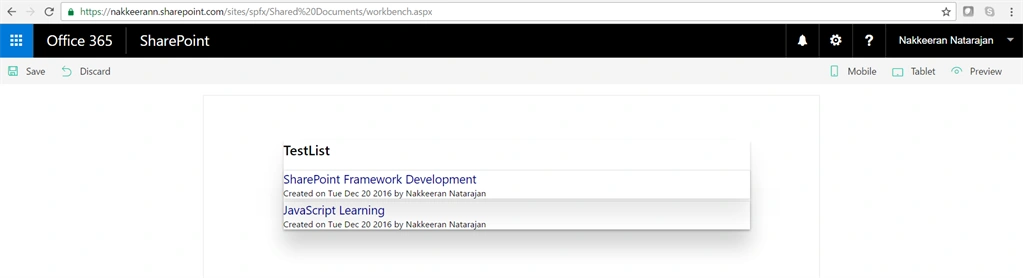
Here, let us see how to render the items of a custom list with the help of SPFx and REST API.
Web part file
The web part file (ListItemsFormWebPart.ts) is already present in the project.
As you can see on web part class file, the beginning section shows the components to be imported. The styles, web part properties, and other containers are stored as modules/interfaces in different files. Such components are imported from the corresponding files to the class file before using it.
Similarly, some of the components required for developing web parts, need to be imported from the library (@microsoft/sp-client-preview).
The interfaces are created. This is very similar to C# programming. The interfaces are contracts that meet the needs of a class. In this example, list item collection and list item interfaces are created.The list item collection will hold the set of list items. The list item will hold the item properties, like Title, Author, etc.
Then, the class file is defined. The class inherits the default BaseClientSideWebPart class.
The class contains the following,
- Members To declare the variables
- Constructor To initialize the data.
- Render method To define the root/full HTML for a web part.
- Custom methods For custom data manipulations. Here, the custom logic is inserted to get the data from SharePoint.
- Web part property method (propertyPaneSettings) - Defines the web part properties. I will explain more about this component in the next articles.
Code
The following two files (web part file and style file) need to be modified.
ListItemsFormWebPart.ts File
- import {
- BaseClientSideWebPart,
- IPropertyPaneSettings,
- IWebPartContext,
- PropertyPaneTextField
- } from '@microsoft/sp-client-preview';
- import styles from './ListItemsForm.module.scss';
- import * as strings from 'listItemsFormStrings';
- import { IListItemsFormWebPartProps } from './IListItemsFormWebPartProps';
- export interface spListItems{
- value: spListItem[]
- }
- export interface spListItem{
- Title: string;
- id: string;
- Created: string;
- Author: {
- Title: string;
- };
- }
- export default class ListItemsFormWebPart extends BaseClientSideWebPart<IListItemsFormWebPartProps> {
- private listName: string = "";
- public constructor(context: IWebPartContext) {
- super(context);
- }
- public render(): void {
- this.domElement.innerHTML = `
- <div class="${styles.listItemsForm}">
- <div class="${styles.container}" id="listContent">
- <div class="ms-Grid-row ms-bgColor-themeDark ms-fontColor-white ${styles.row}">
- </div>
- </div>
- </div>`;
- this.listName = "TestList";
- this.LoadListItems();
- }
- private LoadListItems(): void{
- let url: string = this.context.pageContext.web.absoluteUrl + "/_api/web/lists/getbytitle('"+this.listName+"')/items?$select=Title,Created,Author/Title&$expand=Author";
- this.GetListItems(url).then((response)=>{
- this.RenderListItems(response.value);
- });
- }
- private GetListItems(url: string): Promise<spListItems>{
- return this.context.httpClient.get(url).then((response: Response)=>{
- return response.json();
- });
- }
- private RenderListItems(listItems: spListItem[]): void{
- let itemsHtml: string = "";
- itemsHtml+='<h2>'+this.listName+'</h2>';
- listItems.forEach((listItem: spListItem)=>{
- let itemTimeStr: string = listItem.Created;
- let itemTime: Date = new Date(itemTimeStr);
- itemsHtml += `
- <div class="${styles.listItem}">
- <div class="${styles.listItemTitle}">${listItem.Title}</div>
- <div class="${styles.listItemProps}">Created on ${itemTime.toDateString()} by ${listItem.Author.Title}</div>
- </div>`;
- });
- this.domElement.querySelector("#listContent").innerHTML =itemsHtml;
- }
- protected get propertyPaneSettings(): IPropertyPaneSettings {
- return {
- pages: [
- {
- header: {
- description: strings.PropertyPaneDescription
- },
- groups: [
- {
- groupName: strings.BasicGroupName,
- groupFields: [
- PropertyPaneTextField('description', {
- label: strings.DescriptionFieldLabel
- })
- ]
- }
- ]
- }
- ]
- };
- }
- }
Humayun Kabir MamunPosted Jan 29, 2017, 12:28 AM
Thanks for this nice article...