

In this article, we will learn about what data contract and known type are in WCF. We will also see their usage and how to mention them.
Let's start!
What is Contract in WCF
Contract provides the way to know about WCF service and communicate with it. There are four type of contracts available in WCF,
- Service Contract
- Operation Contract
- Data Contract
- Message Contract
But in this article, we do not see anything about those contracts except the Data contract.
What is Data Contract?
It is used to mention the custom or user defined data type into the WCF service. If you ask question such as, "Can’t we achieve it without mentioning the Data contract?" The answer will be "Yes, you can do it." By default the Data Contract Serializer can do this work.
This time, again one question may arise; that is, why we need to mention it? The Data Contract Serializer class serializes all data including private data. For that purpose we mention the DataContract attribute in it. There are two attributes used in the DataContract,
- DataContract Attribute
- DataMember Attribute
The DataContract attribute is used to mention the custom class as data contract and the DataMember attribute is used to mention the data member as a member of the data contract. We can use this for both the data member and properties of the class.
Let us see the steps to create the WCF service and capture it in a client application with data contract.
Step 1: Create one Service library named StudentServiceLib.
Step 2: For creating the DataContract create one class named Student and include the code like this,
- [DataContract]
- public class Student
- {
- [DataMember]
- public string Name
- {
- get;
- set;
- }
- [DataMember]
- public string Department
- {
- get;
- set;
- }
- [DataMember]
- public int Year;
- }
Note:
Here, I mention the DataMember attribute for both properties and public member of the class. It’s just for now, we can specify the DataMember attribute.
Step 3: WCF Service in the name StudentService and mention the code like this.
- [ServiceContract]
- public interface IStudentService
- {
- [OperationContract]
- Student GetStudent(string name);
- [OperationContract]
- void SaveStudent(Student student);
- }
- public class StudentService: IStudentService
- {
- public Student GetStudent(string name)
- {
- switch (name)
- {
- case "sakthi":
- return new Student
- {
- Name = "sakthi", Department = "MCA", Year = 3
- };
- case "kumar":
- return new Student
- {
- Name = "sakthi", Department = "BCA", Year = 3
- };
- default:
- return new Student
- {
- Name = name, Department = "BE", Year = 3
- };
- }
- }
- public void SaveStudent(Student student)
- {
- }
- }
If you want to know how to create WCF service, please refer my following article, Host The Application With Multiple Endpoints In Self Hosting,
That’s all. Our service is ready to host and implement the following configuration and code to self host the application in a new console application named StudentService.
- <system.serviceModel>
- <services>
- <service name="StudentServiceLib.StudentService" behaviorConfiguration="mexBehaviour">
- <endpoint address="StudentService" binding="basicHttpBinding" contract="StudentServiceLib.IStudentService"></endpoint>
- <host>
- <baseAddresses>
- <add baseAddress="http://localhost:8085" />
- </baseAddresses>
- </host>
- </service>
- </services>
- <behaviors>
- <serviceBehaviors>
- <behavior name="mexBehaviour">
- <serviceMetadata httpGetEnabled="true" />
- </behavior>
- </serviceBehaviors>
- </behaviors>
- </system.serviceModel>
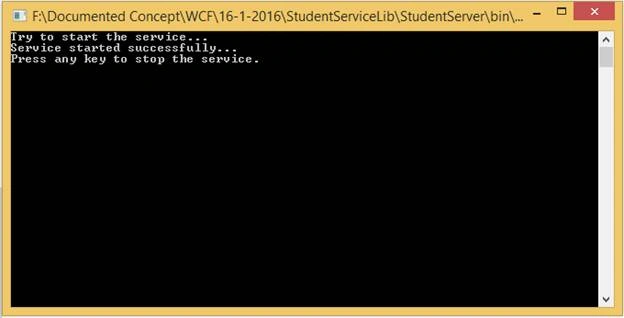
- ServiceHost host = new ServiceHost(typeof(StudentServiceLib.StudentService)); Console.WriteLine("Try to start the service..."); host.Open(); Console.WriteLine("Service started successfully..."); Console.WriteLine("Press any key to stop the service."); Console.ReadKey();
Build the solution and run the StudentServer.exe in the administrator mode. If it run successfully the console window will be like the following:
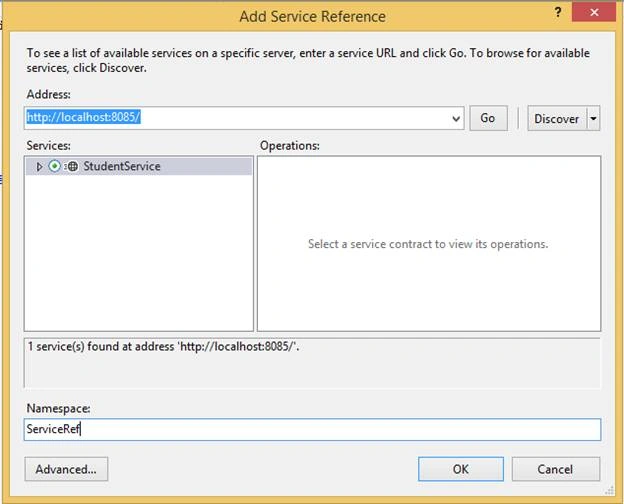
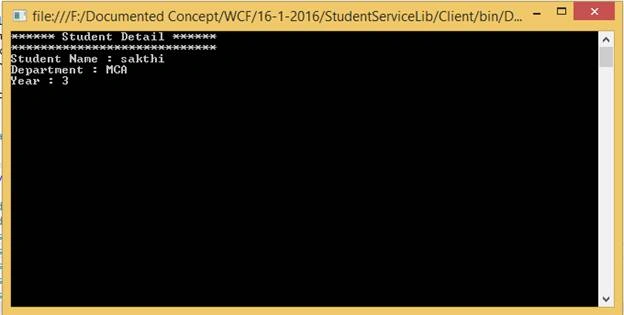
Add the service reference in the client application and implement the code like this to retrieve the student detail.
- StudentServiceClient client = new StudentServiceClient();
- Student student = client.GetStudent("sakthi");
- Console.WriteLine("****** Student Detail ******");
- Console.WriteLine("****************************");
- Console.WriteLine("Student Name : " + student.Name);
- Console.WriteLine("Department : " + student.Department);
- Console.WriteLine("Year : " + student.Year);
- Console.ReadKey();

Sonu ChaudharyPosted Apr 26, 2016, 4:07 AM
nice share
Raja TPosted Jan 20, 2016, 10:53 PM
Nice, Thanks for sharing
Debasis SahaPosted Jan 20, 2016, 12:19 AM
Nice article..
Santhakumar MunuswamyPosted Jan 19, 2016, 1:56 PM
Good Article. Keep it up
Mohammed IbrahimPosted Jan 19, 2016, 8:59 AM
nice
Humayun Kabir MamunPosted Jan 19, 2016, 7:40 AM
Nice...