

We know that jQuery is a very important part of a JavaScript. jQuery is an open-source library for client-side programming or scripting.
Now I will explain here step-by-step how to insert text data into a database.
Step 1
Go to the database side.
- Create a PersonData table in the SQL database as in the following:
- create table PersonData
- (
- Name varchar(20),
- LName varchar(20)
- )
- Create a procedure to insert a data record into a table as in the following:
- create procedure sp_PersonData
- @Name varchar(20),
- @LName varchar(20)
- as
- begin
- set nocount off;
- insert into PersonData (Name,LName)values(@Name,@LName)
- End
Step 2
Go to the Visual Studio project side.
I. Go to the project in the Solution Explorer.
Select the project.
Right-click on it and select Add New Item.
Select the page as in the following figure.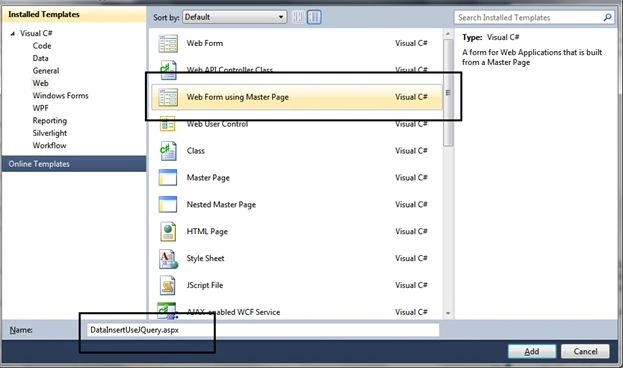
Figure 1: Add Design Page
II. Now go to the page design side.
Add a TextBox control and Button control as in the following: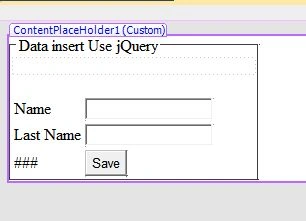
Figure 2: Design Page
III. Finally write scripting on the design page for the TextBox data insert as in the following:
- <%@ Page Title="" Language="C#" MasterPageFile="~/MasterPage.Master" AutoEventWireup="true" CodeBehind="DataInsertUseJQuery.aspx.cs" Inherits="Test_WebApplication.UI.DataInsertUseJQuery" %>
- <asp:Content ID="Content1" ContentPlaceHolderID="head" runat="server">
- </asp:Content>
- <asp:Content ID="Content2" ContentPlaceHolderID="ContentPlaceHolder1" runat="server">
- <script type="text/javascript" src="http://ajax.googleapis.com/ajax/libs/jquery/1.11.1/jquery.min.js"></script>
- <script type="text/javascript">
- function SavePersonRecord() {
- var Name = $.trim($('#<%=txtName.ClientID %>').val());
- var LName = $.trim($('#<%=txtLastName.ClientID %>').val());
- var Messege = "";
- if (Name == '') {
- Messege = "Can not Blank Name";
- }
- if (LName == '') {
- Messege += "Can not Blank Last Name";
- }
- if (Messege.length == 0) {
- $.ajax({
- type: "POST",
- dataType: "json",
- contentType: "application/json; charset=utf-8",
- url: "DataInsertUseJQuery.aspx/InsertPersonRecord",
- data: "{'Name':'" + Name + "', 'LName':'" + LName + "'}",
- success: function (Record) {
- $('#txtName').val();
- $('#txtLastName').val();
- if (Record.d == true) {
- $('#Result').text("Your Record insert");
- }
- else {
- $('#Result').text("Your Record Not Insert");
- }
- },
- Error: function (textMsg) {
- $('#Result').text("Error: " + Error);
- }
- });
- }
- else {
- $('#Result').html('');
- $('#Result').html(Messege);
- }
- $('#Result').fadeIn();
- }
- </script>
- <fieldset style="width: 250px"><legend> Data insert Use jQuery </legend>
- <h3 id="Result"></h3>
- <div>
- <asp:Table runat="server" >
- <asp:TableRow>
- <asp:TableCell>Name </asp:TableCell><asp:TableCell><asp:TextBox ID="txtName" runat="server" ></asp:TextBox></asp:TableCell>
- </asp:TableRow>
- <asp:TableRow>
- <asp:TableCell>Last Name</asp:TableCell><asp:TableCell><asp:TextBox ID="txtLastName" runat="server" ></asp:TextBox></asp:TableCell>
- </asp:TableRow>
- <asp:TableRow>
- <asp:TableCell></asp:TableCell><asp:TableCell><asp:Button ID="btnInsertRecord" runat="server" Text="Save" OnClientClick="SavePersonRecord(); return false"/></asp:TableCell>
- </asp:TableRow>
- </asp:Table>
- </div>
- </fieldset>
- </asp:Content>
Here we will add:
- using System.Configuration;
- using System.Data;
- using System.Data.SqlClient;
- using System.Web.Services;
- <connectionStrings>
- <add name="connstr" connectionString="Data Source=RAKESH-PC;Initial Catalog=SqlServerTech;User ID=sa;Password=password" providerName="System.Data.SqlClient"/>
- <add name="Pratical_testConnectionString" connectionString="Data Source=RAKESH-PC;Initial Catalog=Pratical_test;User ID=sa" providerName="System.Data.SqlClient"/>
- </connectionStrings>
- using System;
- using System.Collections.Generic;
- using System.Linq;
- using System.Web;
- using System.Web.UI;
- using System.Web.UI.WebControls;
- using System.Configuration;
- using System.Data;
- using System.Data.SqlClient;
- using System.Web.Services;
- namespace Test_WebApplication.UI
- {
- public partial class DataInsertUseJQuery : System.Web.UI.Page
- {
- string conString = ConfigurationManager.ConnectionStrings["connstr"].ConnectionString;
- protected void Page_Load(object sender, EventArgs e)
- {
- }
- [WebMethod]
- public static bool InsertPersonRecord(string Name, string LName)
- {
- bool InsertData;
- using (SqlConnection con = new SqlConnection(conString)
- {
- using (SqlCommand cmd = new SqlCommand("sp_PersonData", con))
- {
- cmd.CommandType = CommandType.StoredProcedure;
- cmd.Parameters.AddWithValue("@Name", Name);
- cmd.Parameters.AddWithValue("@LName", LName);
- if (con.State == ConnectionState.Closed)
- {
- con.Open();
- }
- int Result = cmd.ExecuteNonQuery();
- if (Result > 0)
- {
- InsertData = true;
- }
- else
- {
- InsertData = false;
- }
- return InsertData;
- }
- }
- }
- }
- }
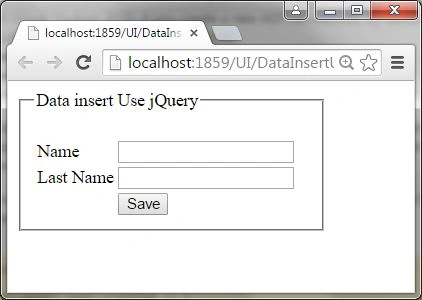
Figure 3: Browser side Design Page
Now fill in the record in the TextBox and click the Save button to save the record to the database.
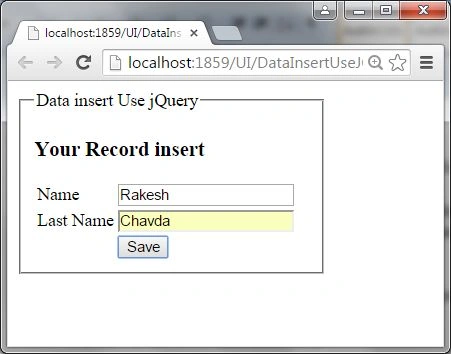
Figure 4: Save Data
Check in your database for the last inserted record as in the following:
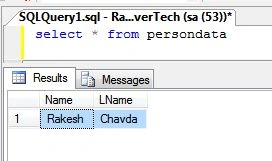
Figure 5: Check Record in Database
Finally now you understand how to insert a record with jQuery ajax.
Karan TrivediPosted Sep 20, 2017, 8:51 AM
Idk i used this code only butnothing is working i dont know where m doing mistake
Santhakumar MunuswamyPosted Jul 5, 2015, 4:40 AM
Good one
Nilesh JadavPosted Jul 4, 2015, 9:41 AM
Great article sir
Gopi ChandPosted Jul 3, 2015, 10:55 PM
Good one...
Pankaj Kumar ChoudharyPosted Jul 3, 2015, 8:47 PM
Nice Explain Sir.................