

Introduction
In this article, we are going to make our data persistence using SQLite in Xamarin.Forms. Firstly, we will setup SQLite db for our project, then make a table in it, and add some data in this table. After this, whenever we open our application, we will see that our data is now persisted and saved in local db of application.
Setup SQLite for your project
See this article to setup SQLite in your project or follow the steps blow:
Three steps are needed to setup SQLite db.
- Install sqlite-net-pcl into your solution from NuGet Package.
- Declare Interface in PCL project.
- Implement this interface in all three projects.
Firstly, install sqlite-net-pcl, then declare and implement interface. Details are given below.
Declaring Interface
- using SQLite;
- namespace XamarinApp1.Persistence
- {
- public interface ISQLiteDb
- {
- SQLiteAsyncConnection GetConnection();
- }
- }
Declare this interface in PCL.
Implement interface
Now, implement this interface in all three projects. By implementing this interface, you can set database path of each application. For Android and iOS code, it remains same but for Windows, it is slightly different.
For Android and iOS.
- using System;
- using SQLite;
- using XamarinApp1.Persistence;
- using System.IO;
- using Xamarin.Forms;
- using XamarinApp1.iOS.Persistence;
- [assembly: Dependency(typeof(SQLiteDb))]
- namespace XamarinApp1.iOS.Persistence
- {
- public class SQLiteDb : ISQLiteDb
- {
- public SQLiteAsyncConnection GetConnection()
- {
- var documentsPath = Environment.GetFolderPath(Environment.SpecialFolder.MyDocuments);
- var path = Path.Combine(documentsPath, "MySQLite.db3");
- return new SQLiteAsyncConnection(path);
- }
- }
- }
For Windows
- using System;
- using System.Collections.Generic;
- using System.Linq;
- using System.Text;
- using System.Threading.Tasks;
- using SQLite;
- using XamarinApp1.Persistence;
- using Windows.Storage;
- using System.IO;
- using Xamarin.Forms;
- [assembly: Dependency(typeof(XamarinApp1.UWP.Persistence.SQLiteDb))]
- namespace XamarinApp1.UWP.Persistence
- {
- public class SQLiteDb : ISQLiteDb
- {
- public SQLiteAsyncConnection GetConnection()
- {
- string documentPath = ApplicationData.Current.LocalFolder.Path;
- string path = Path.Combine(documentPath, "MySQLite.db3");
- return new SQLiteAsyncConnection(path);
- }
- }
- }
Save a data in SQLite (Make your application data persistent)
In this example, we will make a simple textbox. Anything you write and submit through this textbox is saved in your db. First, make a test class in PCL project through which our db table is generated.
Here is our test class code.
- public class test
- {
- [PrimaryKey, AutoIncrement]
- public int id { get; set; }
- [MaxLength(255)]
- public string Title { get; set; }
- [MaxLength(1000)]
- public string Desc { get; set; }
- }
Now, write XAML code for it and make a user interface to save data.
XAML
- <StackLayout>
- <Label Text="Save Your Notes:"></Label>
- <Entry Placeholder="Enter Notes Title" x:Name="Title"></Entry>
- <Entry Placeholder="Enter Notes Description" x:Name="Description"></Entry>
- <Button Text="ADD NOTE" Clicked="OnAdd"></Button>
- <Label Text="Saved Note" VerticalOptions="End"></Label>
- <ListView VerticalOptions="EndAndExpand" x:Name="mylistview">
- <ListView.ItemTemplate>
- <DataTemplate>
- <TextCell Text="{Binding Title}" Detail="{Binding Desc}"></TextCell>
- </DataTemplate>
- </ListView.ItemTemplate>
- </ListView>
- </StackLayout>
Output
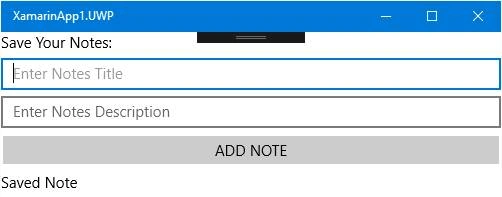
Code
- public partial class SQLiteDbTest : ContentPage
- {
- private SQLiteAsyncConnection _connection;
- private ObservableCollection<test> _test;
- public SQLiteDbTest()
- {
- InitializeComponent();
- _connection = DependencyService.Get<ISQLiteDb>().GetConnection();
- }
- protected async override void OnAppearing()
- {
- await _connection.CreateTableAsync<test>();
- var abc = await _connection.Table<test>().ToListAsync();
- _test = new ObservableCollection<test>(abc);
- mylistview.ItemsSource = _test;
- base.OnAppearing();
- }
- void OnAdd(object sender, System.EventArgs e)
- {
- var test = new test { Title = Title.Text, Desc = Description.Text };
- _connection.InsertAsync(test);
- _test.Add(test);
- }
- }
- }
Now, add some data and see the result.
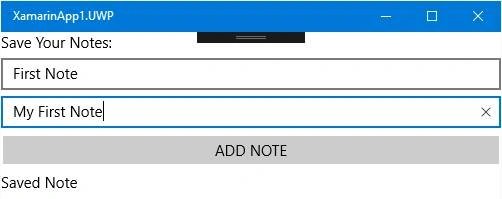
By clicking on Add Note Button,
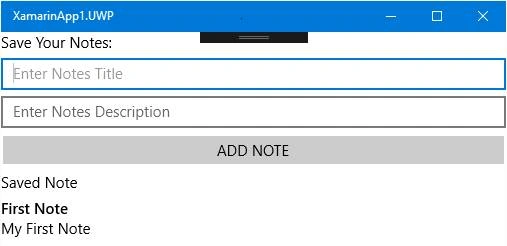
Your first note is saved in db of application. Now, this data is persistent and no matter how many times you close your application or open it, your data remains here.
Alain NataliniPosted Jul 6, 2017, 12:32 AM
Good job. I was going to write about this argument, but you wrote about it first.