

In this article, we will see a simple example of DataBinding in a GridView. For demonstration purposes I have created a database (named EmployeeDB) with a table named Employee.
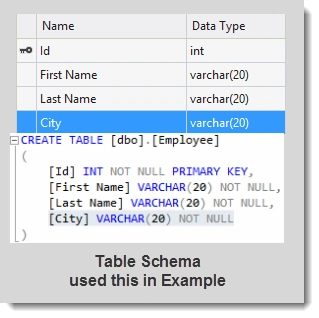
Let's Begin.
1) Drop a GridView Control from the toolbox and set the AutoGenerateColumns property to false.
2) Add a Columns Collection (element) to manage the collection of Column fields.
3) Inside the Columns tag, add a column field (BoundField) that displays the value of a field in a data source.
4) Set the DataField property to the name of the column in the table for binding to the BoundField object and set the HeaderText value for displaying it on the GridView's Header.
5) We can also adjust the appearance of the Header and Row in a GridView using the <HeaderStyle> element and <RowStyle> element.
Default.aspx Code
- <%@ Page Language="C#" AutoEventWireup="true" CodeFile="Default.aspx.cs" Inherits="_Default" %>
- <!DOCTYPE html>
- <html xmlns="http://www.w3.org/1999/xhtml">
- <head runat="server">
- <title></title>
- </head>
- <body>
- <form id="form1" runat="server">
- <div>
- <asp:GridView ID="GridView1" runat="server" AutoGenerateColumns="false" CellPadding="6">
- <Columns>
- <asp:BoundField DataField="Id" HeaderText="Employee ID" />
- <asp:BoundField DataField="First Name" HeaderText="First Name" />
- <asp:BoundField DataField="Last Name" HeaderText="Last Name" />
- <asp:BoundField DataField="City" HeaderText="City" />
- </Columns>
- <HeaderStyle BackColor="#0066cc" Font-Bold="true" ForeColor="White" />
- <RowStyle BackColor="#bfdfff" ForeColor="Black" />
- </asp:GridView>
- </div>
- </form>
- </body>
- </html>
Default.aspx.cs Code
- using System;
- using System.Data;
- using System.Data.SqlClient;
- using System.Configuration;
- public partial class _Default : System.Web.UI.Page
- {
- protected void Page_Load(object sender, EventArgs e)
- {
- if(!IsPostBack)
- {
- ShowData();
- }
- }
- //getting Connection String from Web.config file
- string cs = ConfigurationManager.ConnectionStrings["DBCS"].ConnectionString;
- //Method for DataBinding
- protected void ShowData()
- {
- DataTable dt = new DataTable();
- SqlConnection con = new SqlConnection(cs);
- SqlDataAdapter adapt = new SqlDataAdapter("select * from Employee",con);
- con.Open();
- adapt.Fill(dt);
- con.Close();
- if(dt.Rows.Count>0)
- {
- GridView1.DataSource = dt;
- GridView1.DataBind();
- }
- }
- }
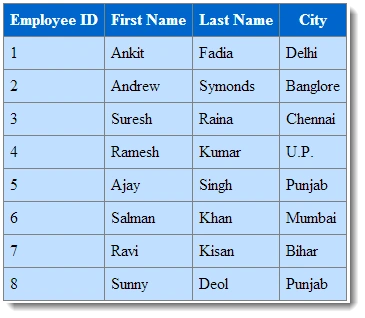
I hope you like it. Thanks.
Vusi KrakriPosted Jan 17, 2018, 7:14 AM
Brilliant post. keep up the good work