

Date Object Method In TypeScript: Part 6
Before reading this article, please go through the following articles:
Introduction
In this article, I am describing the date object's "getUTCFullYear" and "getUTCMonth" method in the TypeScript.
In TypeScript, the getUTCFullYear method returns the year of the specified date or the current date, identical to UTC. The getUTCFullYear method() will be returned as an absolute value.
getUTCFullYear() Method
Syntax
- Date.getUTCFullYear()
Function
- getUTCFullYear() {
- var year = new Date();
- var span = document.createElement("span");
- span.innerText = "getUTCFullYear Method \n Current year, According to UTC-> " + year.getUTCFullYear() + "\n";
- document.body.appendChild(span);
- }
getUTCMonth() Method
In TypeScript, the getUTCMonth method returns the month for the specified date or current the date, identical to UTC. The months are numbered starting with zero. January is 0 and December is 11.
Syntax
- Date.getUTCMonth()
Function
- getUTCMonth() {
- var CurrntMonth: string[] = ["January", "February", "March", "April", "May", "June", "July", "August", "September", "October", "November", "December", ];
- var month = new Date();
- var CrrntUTCMonth = CurrntMonth[month.getUTCMonth()];
- var span = document.createElement("span");
- span.style.color = "Blue";
- span.innerText = "getUTCMonth Method \n Current Month name, According to UTC-> " + CrrntUTCMonth + "\n";
- document.body.appendChild(span);
- }
Complete Program
getUTCFullYear_getUTCMonth.ts
- class getUTCFullYear_getUTCMonth {
- getUTCFullYear() {
- var year = new Date();
- var span = document.createElement("span");
- span.innerText = "getUTCFullYear Method \n Current year, According to UTC-> " + year.getUTCFullYear() + "\n";
- document.body.appendChild(span);
- }
- getUTCMonth() {
- var CurrntMonth: string[] = ["January", "February", "March", "April", "May", "June", "July", "August", "September", "October", "November", "December", ];
- var month = new Date();
- var CrrntUTCMonth = CurrntMonth[month.getUTCMonth()];
- var span = document.createElement("span");
- span.style.color = "Blue";
- span.innerText = "getUTCMonth Method \n Current Month name, According to UTC-> " + CrrntUTCMonth + "\n";
- document.body.appendChild(span);
- }
- }
- window.onload = () => {
- var obj = new getUTCFullYear_getUTCMonth();
- obj.getUTCFullYear();
- obj.getUTCMonth();
- };
getUTCFullYear_getUTCMonth_MethodDemo.htm
- <!DOCTYPE html>
- <html lang="en"
- xmlns="http://www.w3.org/1999/xhtml">
- <head>
- <meta charset="utf-8" />
- <title>TypeScript HTML App</title>
- <link rel="stylesheet" href="app.css" type="text/css" />
- <script src="getUTCFullYear_getUTCMonth.js"></script>
- </head>
- <body>
- <h3>getUTCFullYear and getUTCMonth method in TypeScript</h3>
- <div id="content"></div>
- </body>
- </html>
getUTCFullYear_getUTCMonth.js
- var getUTCFullYear_getUTCMonth = (function() {
- function getUTCFullYear_getUTCMonth() {}
- getUTCFullYear_getUTCMonth.prototype.getUTCFullYear = function() {
- var year = new Date();
- var span = document.createElement("span");
- span.innerText = "getUTCFullYear Method \n Current year, According to UTC-> " + year.getUTCFullYear() + "\n";
- document.body.appendChild(span);
- };
- getUTCFullYear_getUTCMonth.prototype.getUTCMonth = function() {
- var CurrntMonth = ["January", "February", "March", "April", "May", "June", "July", "August", "September", "October", "November", "December", ];
- var month = new Date();
- var CrrntUTCMonth = CurrntMonth[month.getUTCMonth()];
- var span = document.createElement("span");
- span.style.color = "Blue";
- span.innerText = "getUTCMonth Method \n Current Month name, According to UTC-> " + CrrntUTCMonth + "\n";
- document.body.appendChild(span);
- };
- return getUTCFullYear_getUTCMonth;
- })();
- window.onload = function() {
- var obj = new getUTCFullYear_getUTCMonth();
- obj.getUTCFullYear();
- obj.getUTCMonth();
- };
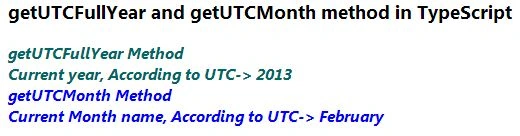
Output
Join the conversation! Your thoughts help the community grow.