

- How to create a DateTime
- Understand DateTime properties
- How to add and subtract date and time using DateTime
- Find days in a month and year
- How to compare two dates, times or DateTime
- How to format dates and times
1. How to create a DateTime in C#
There are several ways to create a DateTime object. A DateTime object can have a Date, Time, Localization, culture, milliseconds, and kind. The value of DateTime is between 12:00:00 midnight, January 1, 0001 to 11:59:59 P.M., December 31, 9999 A.D.
The code in Listing 1 uses various constructors of DateTime structure to create DateTime objects.
// Create a DateTime from date and time
DateTime dob = new DateTime(1974, 7, 10, 7, 10, 24);

// Create a DateTime from a String
string dateString = "7/10/1974 7:10:24 AM";
DateTime dateFromString =
    DateTime.Parse(dateString, System.Globalization.CultureInfo.InvariantCulture);
Console.WriteLine(dateFromString.ToString());

// Empty DateTime
DateTime emptyDateTime = new DateTime();

// Just date
DateTime justDate = new DateTime(2002, 10, 18);

// DateTime from Ticks
DateTime justTime = new DateTime(1000000);

// DateTime with localization
DateTime dateTimeWithKind = new DateTime(1974, 7, 10, 7, 10, 24, DateTimeKind.Local);

// DateTime with date, time and milliseconds
DateTime dateTimeWithMilliseconds = new DateTime(2010, 12, 15, 5, 30, 45, 100);
Listing 1
2. C# DateTime Properties
The Date and the Time properties of DateTime get the date and the time of a DateTime. Some self-explanatory DateTime properties are Hour, Minute, Second, Millisecond, Year, Month, and Day.
Here is a list of some other properties with their brief description.
- DayOfWeek property returns the name of the day in a week.
- DayOfYear property returns the day of a year.
- TimeOfDay property returns the time element in a DateTime.
- Today property returns the DateTime object that has today's values. Time value is 12:00:00.
- Now property returns a DateTime object that has right now date and time values.
- UtcNow property returns a DateTime in Coordinated Universal Time (UTC)
- A tick represents one hundred nanoseconds or one ten-millionth of a second. Ticks property of DateTime returns the number of ticks in a DateTime.
- Kind property returns a value that indicates whether the time represented by this instance is based on local time, Coordinated Universal Time (UTC), or neither. The default value is unspecified.
The code listed in Listing 2 creates a DateTime object and reads its properties.
DateTime dob = new DateTime(1974, 7, 10, 7, 10, 24);
Console.WriteLine("Day:{0}", dob.Day);
Console.WriteLine("Month:{0}", dob.Month);
Console.WriteLine("Year:{0}", dob.Year);
Console.WriteLine("Hour:{0}", dob.Hour);
Console.WriteLine("Minute:{0}", dob.Minute);
Console.WriteLine("Second:{0}", dob.Second);
Console.WriteLine("Millisecond:{0}", dob.Millisecond);
Console.WriteLine("Day of Week:{0}", dob.DayOfWeek);
Console.WriteLine("Day of Year: {0}", dob.DayOfYear);
Console.WriteLine("Time of Day:{0}", dob.TimeOfDay);
Console.WriteLine("Tick:{0}", dob.Ticks);
Console.WriteLine("Kind:{0}", dob.Kind);
Listing 2
The output of Listing 2 looks like Figure 1.
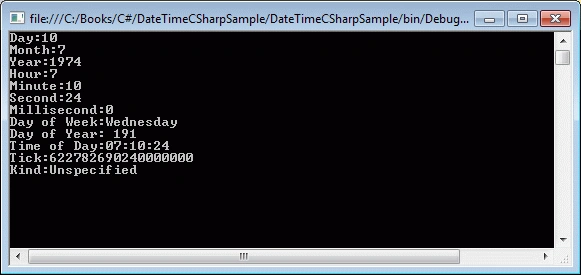
Figure 1
3. Adding and Subtracting DateTime in C#
DateTime structure provides methods to add and subtract date and time to and from a DateTime object. The TimeSpan structure plays a major role in addition and subtraction.
We can use Add and Subtract methods to add and subtract date and time from a DateTime object. First we create a TimeSpan with a date and/or time values and use Add and Subtract methods.
The code listed in Listing 3 adds and subtracts 30 days from today and displays the day on the console.
DateTime aDay = DateTime.Now;
TimeSpan aMonth = new System.TimeSpan(30, 0, 0, 0);
DateTime aDayAfterAMonth = aDay.Add(aMonth);
DateTime aDayBeforeAMonth = aDay.Subtract(aMonth);
Console.WriteLine("{0:dddd}", aDayAfterAMonth);
Console.WriteLine("{0:dddd}", aDayBeforeAMonth);
Listing 3
The DateTime structure has methods to add years, days, hours, minutes, seconds, milliseconds and ticks. The code listed in Listing 4 uses these Addxxx methods to add various components to a DateTime object.
// Add Years and Days
aDay.AddYears(2);
aDay.AddDays(12);
// Add Hours, Minutes, Seconds, Milliseconds, and Ticks
aDay.AddHours(4.25);
aDay.AddMinutes(15);
aDay.AddSeconds(45);
aDay.AddMilliseconds(200);
aDay.AddTicks(5000);
Listing 4
The DateTime structure does not have similar Subtract methods. Only Subtract method is used to subtract the DateTime components. For example, if we need to subtract 12 days from a DateTime, we can create another DateTime object or a TimeSpan object with 12 days and subtract it from the DateTime. Alternatively, we can use a minus operator to subtract a DateTime or TimeSpan from a DateTime.
The code snippet in Listing 5 creates a DateTime object and subtracts another DateTime and a TimeSpan object. Code also shows how to subtract just days or hours or other components from a DateTime.
DateTime dob = new DateTime(2000, 10, 20, 12, 15, 45);
DateTime subDate = new DateTime(2000, 2, 6, 13, 5, 15);

// TimeSpan with 10 days, 2 hrs, 30 mins, 45 seconds, and 100 milliseconds
TimeSpan ts = new TimeSpan(10, 2, 30, 45, 100);

// Subtract a DateTime
TimeSpan diff1 = dob.Subtract(subDate);
Console.WriteLine(diff1.ToString());

// Subtract a TimeSpan
DateTime diff2 = dob.Subtract(ts);
Console.WriteLine(diff2.ToString());

// Subtract 10 Days
DateTime daysSubtracted = new DateTime(dob.Year, dob.Month, dob.Day - 10);
Console.WriteLine(daysSubtracted.ToString());

// Subtract hours, minutes, and seconds
DateTime hms = new DateTime(dob.Year, dob.Month, dob.Day, dob.Hour - 1, dob.Minute - 15, dob.Second - 15);
Console.WriteLine(hms.ToString());
Listing 5
4. Find Days in a Month
The DaysInMonth static method returns the number of days in a month. This method takes a year and a month in numbers from 1 to 12. The code snippet in Listing 6 gets the number of days in Feb month of year 2002. The output is 28 days.
int days = DateTime.DaysInMonth(2002, 2);
Console.WriteLine(days);
Listing 6
Using the same approach, we can find out total number of days in a year. The GetDaysInAYear method in Listing 7 takes a year and returns total number of days in that year.
private int GetDaysInAYear(int year) {
    int days = 0;
    for (int i = 1; i <= 12; i++) {
        days += DateTime.DaysInMonth(year, i);
    }
    return days;
}
Listing 7
5. Compare Two DateTime In C#
The Compare static method is used to compare two DateTime objects. If result is 0, both objects are the same. If the result is less than 0, then the first DateTime is earlier; otherwise the first DateTime is later.
The code snippet in Listing 8 compares two DateTime objects.
DateTime firstDate = new DateTime(2002, 10, 22);
DateTime secondDate = new DateTime(2009, 8, 11);
int result = DateTime.Compare(firstDate, secondDate);

if (result < 0)
    Console.WriteLine("First date is earlier");
else if (result == 0)
    Console.WriteLine("Both dates are same");
else
    Console.WriteLine("First date is later");
Listing 8
The CompareTo method can also be used to compare two dates. This method takes a DateTime or object. The code snippet in Listing 9 compares two DateTime objects using the CompareTo method.
DateTime firstDate = new DateTime(2002, 10, 22);
DateTime secondDate = new DateTime(2009, 8, 11);
int compareResult = firstDate.CompareTo(secondDate);
if (compareResult < 0)
    Console.WriteLine("First date is earlier");
else if (compareResult == 0)
    Console.WriteLine("Both dates are same");
else
    Console.WriteLine("First date is later");
Listing 9
6. Format C# DateTime
I have to admit; the folks at Microsoft have done a great job of providing DateTime formatting solutions. Now you can format a DateTime to any kind of string format you can imagine.
The GetDateTimeFormats method returns all possible DateTime formats for the current culture of a computer. The code snippet in Listing 10 returns an array of strings of all possible standard formats.
DateTime dob = new DateTime(2002, 10, 22);
string[] dateFormats = dob.GetDateTimeFormats();
foreach (string format in dateFormats)
    Console.WriteLine(format)
Listing 10
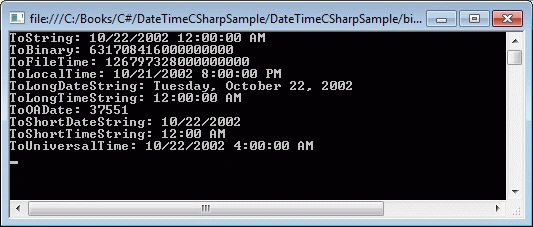
The code snippet in Listing 10 generates output as in Figure 2.
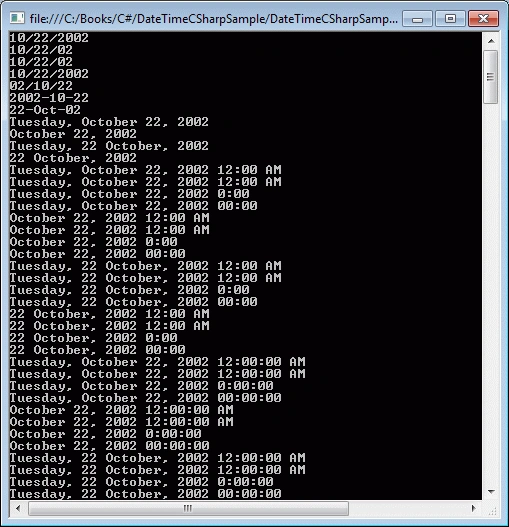
Figure 2
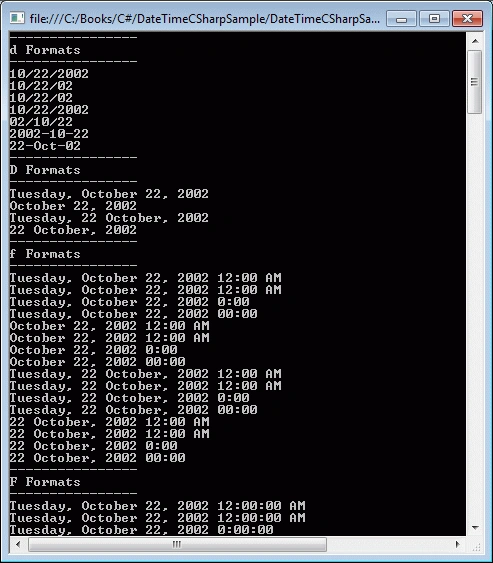
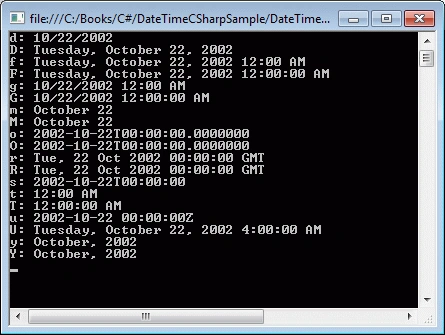
The GetDateTimeFormats method also has an overload that takes a format specifier as a parameter and converts a DateTime to that format. It is very important to understand the DateTime format specifiers to get the desired formats. Table 1 summarizes the formats and their codes.
Ishika TiwariPosted Mar 19, 2024, 5:00 AM
Nice article