

The Coordinated Universal Time (UTC) is the primary time standard commonly used across the world. The data warehouses store all date properties in UTC format. These UTC dates are localized in the date and time based on the user's time zone. The primary advantage of storing dates and times in UTC format is that it makes data transportable. In other words, date and time stored in UTC format can be easily converted to local date and time by adding an offset.
Problem statement
UTC dates are very important for the organization that span timezones. Normally the DBA chooses UTC date to store dates because it can be easily converted to a local date and time by adding an offset. This is very easily done with C# code. Using the following code we can get the local date in C#.
- DateTime d = DateTime.UtcNow;
- var tz = "India Standard Time";
- var currentdate = System.TimeZoneInfo.ConvertTimeBySystemTimeZoneId(d, TimeZoneInfo.Utc.Id, tz);
- Console.WriteLine("UTC Date :" + d);
- Console.WriteLine("Local Date :" + currentdate);
Output
The following describeds how to convert a UTC date to a local date based on the time zone in a SSRS report.
Solution: Microsoft provides a way to use an assembly with a report. By default the "System" namespace is included as the report assembly reference so we can use the preceding C# code in the “Code” section of the report property and create a custom function that returns a local date. The following is the procedure to do that.
Step 1
Click on Report >> Report Properties from the menu.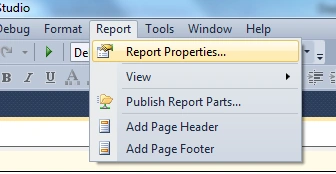
Step 2
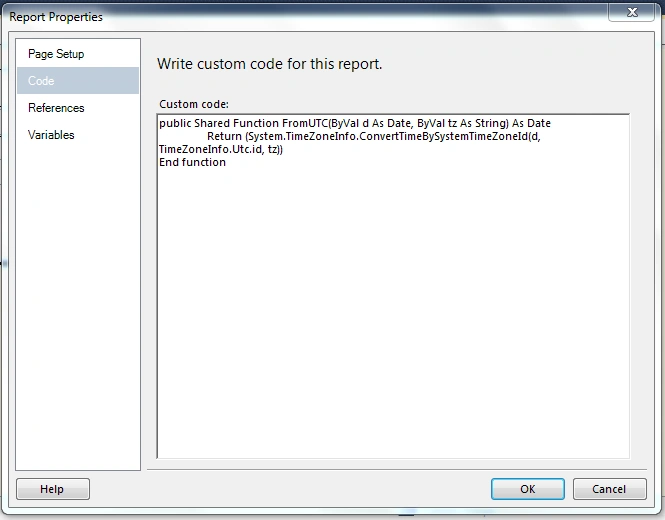
Add the following function in the Code tab.
- public Shared Function FromUTC(ByVal d As Date, ByVal tz As String) As Date
- Return (System.TimeZoneInfo.ConvertTimeBySystemTimeZoneId(d, TimeZoneInfo.Utc.id, tz))
- End function
Step 3
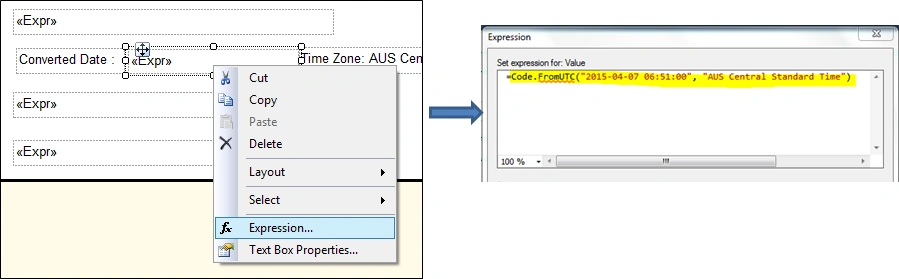
To convert a date from UTC right-click the TextBox and select "Expression". Use the function that is written in the Code tab of the report properties and pass the UTC date value and timezone name to get the localized date value.
- =Code.FromUTC("2015-04-07 06:51:00", "AUS Central Standard Time")
Output
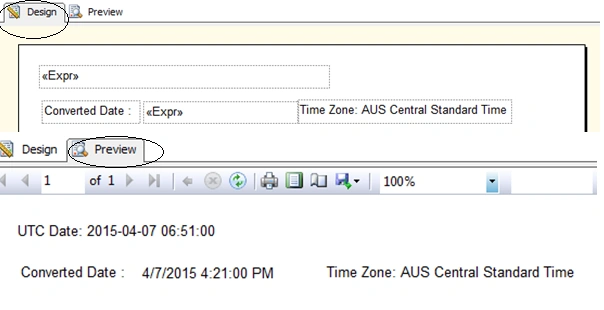
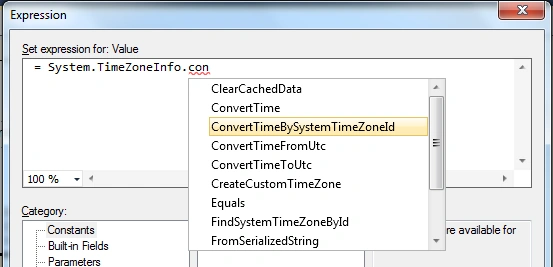
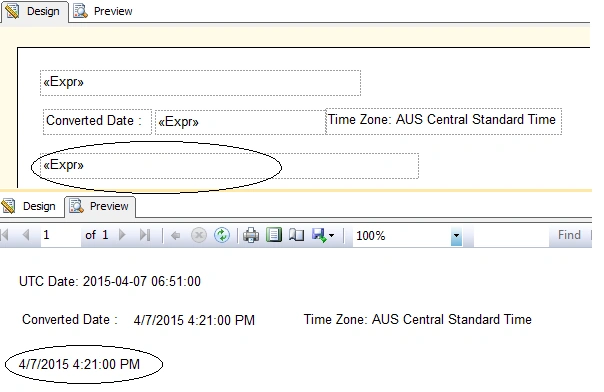
The same thing can be done directly within an expression (without creating any VB code in the Code section), as shown in the following figure. Right-click on the TextBox and select "Expression". Paste in the following code. (This example contains a hard-coded date and timezone name; these can be replaced with a parameter or field).
- =System.TimeZoneInfo.ConvertTimeBySystemTimeZoneId("2015-04-07 06:51:00", TimeZoneInfo.Utc.id, "AUS Central Standard Time")

Output
You may get a list of supported timezones from here,
Summary
Using the method described in the preceding section, we can convert a UTC date to a local date based on the timezone. I hope this helps!
Dizzy HarrisPosted Feb 11, 2022, 8:17 PM
Thanks for the Article. Was helpful. I did overcome the datetime2 format issue by returning the time as a string.Expression: =System.TimeZoneInfo.ConvertTimeBySystemTimeZoneId(FormatDateTime(Globals!ExecutionTime), TimeZoneInfo.Utc.id, "Central Standard Time")
سپهر کرمانیPosted Dec 9, 2017, 4:25 AM
This Function work datetime2 Format. means means you can't use "now()"
cristy RudsPosted Apr 8, 2017, 1:34 AM
Sir Any Help Its not Working or Me. I want to show Now() function As India Standard time Please help
cristy RudsPosted Apr 6, 2017, 2:32 AM
#error it showing in the textbox
cristy RudsPosted Apr 4, 2017, 3:05 PM
Sir Can i do some thing like this"(System.TimeZoneInfo.ConvertTimeBySystemTimeZoneId(Now(), System.TimeZoneInfo.Utc.id, "India Standard Time"))"
cristy RudsPosted Apr 3, 2017, 8:34 AM
Sir my report is running on a server in us or uk and user are viewing report from india, i just need a textbox to display indian current time.please help stuck here from past week
cristy RudsPosted Apr 3, 2017, 8:28 AM
No its not working can u please help me it giving # error
cristy RudsPosted Apr 3, 2017, 7:01 AM
TimeZoneInfo.Utc.Id, "India Standard Time") giving error on ,Id red line in expresion
Karthik Muthu KaruppanPosted Apr 13, 2015, 1:39 PM
Good one
Santhakumar MunuswamyPosted Apr 11, 2015, 2:54 PM
good work
Gowtham RajamanickamPosted Apr 10, 2015, 12:51 PM
good one
Khargesh RajputPosted Apr 10, 2015, 1:30 AM
nice
NitinPosted Apr 10, 2015, 1:10 AM
good one
Former memberPosted Apr 10, 2015, 12:08 AM
nice