
This project is a Savings Goal Calculator designed using Tailwind CSS. It helps users estimate the time required to reach their savings goal based on their current savings, monthly contribution, and desired savings goal amount.
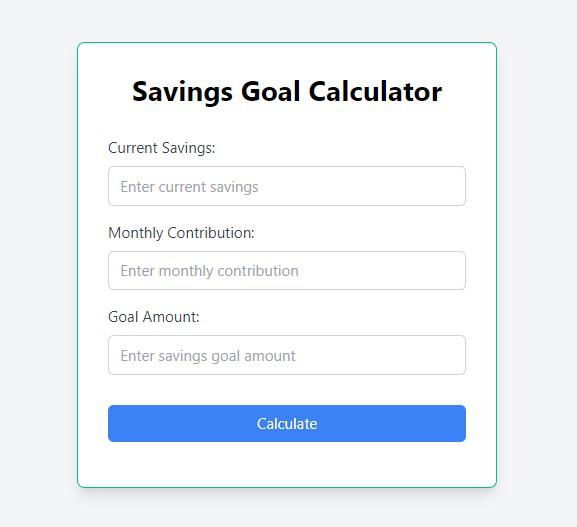
Final Output Preview Image:
Prerequisites / Technologies Used
HTML
CSS (Tailwind CSS)
JavaScript
Approach / Functionalities
Set up your development environment with the HTML, CSS and JavaScript support.
Include the Tailwind CSS library in your project by linking to it in your HTML file.
Design the layout and structure of the Savings Goal Calculator using HTML.
Apply styles to the elements using the Tailwind CSS classes.
Implement the functionality using the JavaScript to calculate the time required to reach the savings goal.
Test the application to ensure it functions correctly.
Example :
HTML
<!DOCTYPE html>
<html lang="en">
<head>
    <meta charset="UTF-8">
    <meta name="viewport" content="width=device-width, initial-scale=1.0">
    <title>The Savings Goal Calculator</title>
    <link href="https://cdn.jsdelivr.net/npm/[email protected]/dist/tailwind.min.css" rel="stylesheet">
</head>
<body class="bg-gray-100 flex justify-center items-center h-screen">
    <div class="max-w-md w-full bg-white p-8 rounded-lg shadow-lg border-2 border-green-500">
        <h1 class="text-3xl font-bold text-center mb-8">Savings Goal Calculator</h1>
        <div class="mb-4">
            <label for="currentSavings" class="block text-gray-700 mb-2">Current Savings:</label>
            <input type="number" id="currentSavings" class="w-full border border-gray-300 rounded-md py-2 px-3 focus:outline-none focus:border-blue-500" placeholder="Enter current savings">
        </div>
        <div class="mb-4">
            <label for="monthlyContribution" class="block text-gray-700 mb-2">Monthly Contribution:</label>
            <input type="number" id="monthlyContribution" class="w-full border border-gray-300 rounded-md py-2 px-3 focus:outline-none focus:border-blue-500" placeholder="Enter monthly contribution">
        </div>
        <div class="mb-4">
            <label for="goalAmount" class="block text-gray-700 mb-2">Goal Amount:</label>
            <input type="number" id="goalAmount" class="w-full border border-gray-300 rounded-md py-2 px-3 focus:outline-none focus:border-blue-500" placeholder="Enter savings goal amount">
        </div>
        <div class="flex justify-center mt-8">
            <button id="calculateButton" class="w-full bg-blue-500 text-white rounded-md py-2 px-4 hover:bg-blue-600 focus:outline-none">Calculate</button>
        </div>
        <div id="result" class="text-lg font-semibold mt-4"></div>
    </div>
    <script>
        document.getElementById('calculateButton').addEventListener('click', function() {
            const currentSavings = parseFloat(document.getElementById('currentSavings').value);
            const monthlyContribution = parseFloat(document.getElementById('monthlyContribution').value);
            const goalAmount = parseFloat(document.getElementById('goalAmount').value);

            if (!currentSavings || !monthlyContribution || !goalAmount) {
                document.getElementById('result').textContent = 'Please fill in all fields.';
                return;
            }
            const monthsToGoal = Math.ceil((goalAmount - currentSavings) / monthlyContribution);
            const yearsToGoal = Math.floor(monthsToGoal / 12);
            const remainingMonths = monthsToGoal % 12;
            let result = `You will reach your savings goal in `;
            if (yearsToGoal > 0) {
                result += `${yearsToGoal} year${yearsToGoal > 1 ? 's' : ''}`;
                if (remainingMonths > 0) {
                    result += ` and ${remainingMonths} month${remainingMonths > 1 ? 's' : ''}`;
                }
            } else {
                result += `${remainingMonths} month${remainingMonths > 1 ? 's' : ''}`;
            }
            document.getElementById('result').textContent = result;
        });
    </script>
</body>
</html>
output:
Join the conversation! Your thoughts help the community grow.