

We have all seen many websites dislaying the number of online users. In this article, we will learn how to display the number of online users in an ASP.NET Web Application / Website.
Procedure
Let's begin.
- Go to File -> New -> Website then select ASP.NET Empty Web Site
- Right-click on the Website Project (in Solution Explorer) then select Add then click on Add New Item
- Select Global Application Class (Global.asax) then click on the Add Button
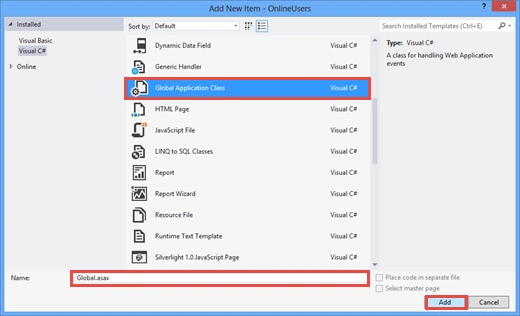
You will see various events in the Global.asax file, for example Application_Start, Application_End and so onThe . Application_Start event is called once when the application starts. The Session_Start event is called every time a new session is started. The Session_End event is called when a user session ends. In the Application_Start event, we will initialize our Application state variable.
- <%@ Application Language="C#" %>
- <script runat="server">
- void Application_Start(object sender, EventArgs e)
- {
- // Code that runs on application startup
- Application["TotalOnlineUsers"] = 0;
- }
- void Application_End(object sender, EventArgs e)
- {
- // Code that runs on application shutdown
- }
- void Application_Error(object sender, EventArgs e)
- {
- // Code that runs when an unhandled error occurs
- }
- void Session_Start(object sender, EventArgs e)
- {
- // Code that runs when a new session is started
- Application.Lock();
- Application["TotalOnlineUsers"] = (int)Application["TotalOnlineUsers"] + 1;
- Application.UnLock();
- }
- void Session_End(object sender, EventArgs e)
- {
- // Code that runs when a session ends.
- // Note: The Session_End event is raised only when the sessionstate mode
- // is set to InProc in the Web.config file. If session mode is set to StateServer
- // or SQLServer, the event is not raised.
- Application.Lock();
- Application["TotalOnlineUsers"] = (int)Application["TotalOnlineUsers"] - 1;
- Application.UnLock();
- }
- </script>
- <system.web>
- <sessionState mode="InProc" cookieless="false" timeout="20"></sessionState>
- </system.web>
Now add a Webform and drop a label control from the Toolbox.
Default.aspx Code:
- <form id="form1" runat="server">
- <div>
- <p>No. of Online Users:<asp:Label ID="Label1" runat="server" Text="Label" ForeColor="#CC0000"></asp:Label></p>
- </div>
- </form>
- protected void Page_Load(object sender, EventArgs e)
- {
- Label1.Text = Application["TotalOnlineUsers"].ToString();
- }
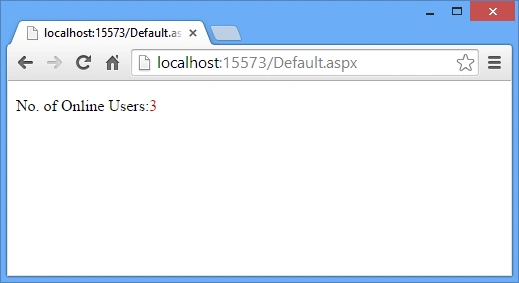
Run the application (Ctrl+ F5). For checking it, copy the URL and paste it into a new instance of a different browser. When a visitor visits your website, a new session is started for him and the Application["TotalOnlineUsers"] variable is increased by 1. When the user session expires then the Application["TotalOnlineUsers"] variable is decreased by 1.
Preview:
We can also use a cookieless session by setting the cookieless property to true.
- <sessionState mode="InProc" cookieless="true" timeout="20"></sessionState>
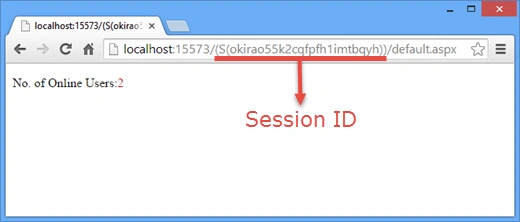
On running the application, you will see a Session ID in URL that is different for all users, for all sessions, for the new instance of the ohter browser.
The session ID is embedded in the URL in this format:
The session ID is embedded in the URL in this format:
http://yourserver/(session ID here)/default.aspx
Preview:
I hope you like it. Thanks.
Pratham DavePosted Sep 21, 2019, 5:09 AM
Yes, once the browser is closed, user count couldn't decrease,
rahul singhPosted May 20, 2017, 4:03 PM
count not decreasing when the user log out or when session Abondan.