In this article, we will learn how to display a username along with his/her photo stored in the database after successful login. Before doing this we will add details of the employee with an image and display it in a GridView. Here the image will be stored in the application folder. We can also edit, update, delete and cancel the details of the employee in the GridView.
Table Creation
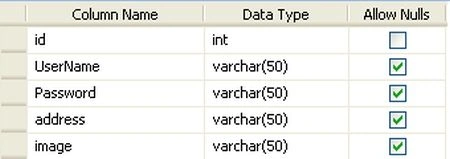
Stored Procedure
- CREATE PROCEDURE insert_employee
- (
- @UserName varchar(50),
- @Password varchar(50),
- @address varchar(50),
- @image varchar(50)
- )
- AS
- Insert into employee values(@UserName,@Password,@address,@image)
-
- CREATE PROCEDURE update_employee
- (
- @id int,
- @UserName varchar(50),
- @address varchar(50)
- )
- AS
- update employee set UserName=@UserName,address=@address where id=@id
- CREATE PROCEDURE delete_employee
- (@id int)
- AS
- Delete from employee where id=@id
Default.aspx.cs
- using System;
- using System.Collections;
- using System.Configuration;
- using System.Data;
- using System.Linq;
- using System.Web;
- using System.Web.Security;
- using System.Web.UI;
- using System.Web.UI.HtmlControls;
- using System.Web.UI.WebControls;
- using System.Web.UI.WebControls.WebParts;
- using System.Xml.Linq;
- using System.Data.SqlClient;
- using System.IO;
- namespace Display_image_username_after_login
- {
- public partial class _Default : System.Web.UI.Page
- {
- string strConnString = ConfigurationManager.ConnectionStrings["ConnectionString"].ConnectionString;
- string s1;
- string path;
- SqlConnection cnn = new SqlConnection();
- SqlCommand com = new SqlCommand();
- SqlDataAdapter sqlda;
- DataTable dt;
- int id;
- string name;
- string address;
- string image;
- protected void Page_Load(object sender, EventArgs e)
- {
- if (!IsPostBack)
- {
- bindgrid();
- }
- }
- protected void btn_insert_Click(object sender, EventArgs e)
- {
- if (FileUpload1.PostedFile.ContentLength > 0)
- {
- s1 = Path.GetFileName(FileUpload1.FileName);
- path = Server.MapPath("images") + "/" + s1;
- FileUpload1.SaveAs(path);
- }
- SqlConnection con = new SqlConnection(strConnString);
- con.Open();
- SqlCommand com = new SqlCommand("insert_employee", con);
- com.CommandType = CommandType.StoredProcedure;
- com.Connection = con;
- com.Parameters.AddWithValue("@UserName", txt_name.Text);
- com.Parameters.AddWithValue("@Password", txt_password.Text);
- com.Parameters.AddWithValue("@address", txt_address.Text);
- com.Parameters.AddWithValue("@image", s1);
- com.ExecuteNonQuery();
- com.Dispose();
- bindgrid();
- con.Close();
- clear();
- }
- private void clear()
- {
- txt_name.Text = "";
- txt_password.Text = "";
- txt_address.Text = "";
- }
- private void bindgrid()
- {
- SqlConnection con = new SqlConnection(strConnString);
- con.Open();
- sqlda = new SqlDataAdapter("SELECT * FROM employee ", con);
- dt = new DataTable();
- sqlda.Fill(dt);
- sqlda.Dispose();
- GridView1.DataSource = dt;
- GridView1.DataBind();
- con.Close();
- }
- protected void GridView1_RowDeleting(object sender, GridViewDeleteEventArgs e)
- {
- SqlConnection con = new SqlConnection(strConnString);
- con.Open();
- try
- {
- id = Convert.ToInt32(((Label)(GridView1.Rows[e.RowIndex].FindControl("label2"))).Text);
- SqlCommand com = new SqlCommand("delete_employee", con);
- com.CommandType = CommandType.StoredProcedure;
- com.Connection = con;
- com.Parameters.Add("@id", SqlDbType.Int).Value = id;
- SqlDataAdapter sqlda = new SqlDataAdapter("select * from employee where id=@id", con);
- sqlda.SelectCommand.Parameters.Add("@id", SqlDbType.Int).Value = id;
- DataSet ds = new DataSet();
- sqlda.Fill(ds);
- try
- {
- image = Convert.ToString(ds.Tables[0].Rows[0]["image"]);
- File.Delete(Server.MapPath("images") + "\\" + image);
- }
- catch (Exception)
- {
- }
- com.ExecuteNonQuery();
- com.Dispose();
- bindgrid();
- }
- catch (Exception)
- {
- }
- }
- protected void GridView1_RowCancelingEdit(object sender, GridViewCancelEditEventArgs e)
- {
- GridView1.EditIndex = -1;
- bindgrid();
- }
- protected void GridView1_RowEditing(object sender, GridViewEditEventArgs e)
- {
- GridView1.EditIndex = e.NewEditIndex;
- bindgrid();
- }
- protected void GridView1_RowUpdating(object sender, GridViewUpdateEventArgs e)
- {
- SqlConnection con = new SqlConnection(strConnString);
- con.Open();
- id = Convert.ToInt32(((Label)(GridView1.Rows[e.RowIndex].FindControl("label4"))).Text);
- name = (((TextBox)(GridView1.Rows[e.RowIndex].FindControl("txt_name"))).Text);
- address = (((TextBox)(GridView1.Rows[e.RowIndex].FindControl("txt_address"))).Text);
- SqlCommand com = new SqlCommand("update_employee", con);
- com.CommandType = CommandType.StoredProcedure;
- com.Connection = con;
- com.Parameters.Add("@id", SqlDbType.Int).Value = id;
- com.Parameters.Add("@UserName", SqlDbType.VarChar, 50).Value = name;
- com.Parameters.Add("@address", SqlDbType.VarChar, 50).Value = address;
- com.ExecuteNonQuery();
- com.Dispose();
- con.Close();
- GridView1.EditIndex = -1;
- bindgrid();
- }
- protected void GridView1_SelectedIndexChanging(object sender, GridViewSelectEventArgs e)
- {
- GridView1.PageIndex = e.NewSelectedIndex;
- bindgrid();
- }
- }
- }
Login.aspx
- <%@ Page Language="C#" AutoEventWireup="true" CodeBehind="Login.aspx.cs" Inherits="Display_image_username_after_login.Login" %>
- <!DOCTYPE html PUBLIC "-//W3C//DTD XHTML 1.0 Transitional//EN" "http://www.w3.org/TR/xhtml1/DTD/xhtml1-transitional.dtd">
- <html xmlns="http://www.w3.org/1999/xhtml" >
- <head runat="server">
- <title>Untitled Page</title>
- </head>
- <body>
- <form id="form1" runat="server">
- <div>
- <asp:Label ID="lb1" runat="server" Font-Bold="True" ForeColor="#FF3300"></asp:Label><br />
- <asp:Label ID="Label1" runat="server" Text="UserName" Font-Bold="True"
- Width="100px" BackColor="#FFFF66" ForeColor="#FF3300"></asp:Label>
- <asp:TextBox ID="TextBox_user_name" runat="server" ForeColor="#993300" Width="100px"></asp:TextBox>
- <asp:RequiredFieldValidator ID="RequiredFieldValidator1" runat="server"
- ControlToValidate="TextBox_user_name" ErrorMessage="Please enter the UserName"></asp:RequiredFieldValidator>
- <br />
- <asp:Label ID="Label2" runat="server" Text="Password" Font-Bold="True"
- Width="100px" BackColor="#FFFF66" ForeColor="#FF3300"></asp:Label>
- <asp:TextBox ID="TextBox_password" runat="server" ForeColor="#CC6600"
- TextMode="Password" Width="100px"></asp:TextBox>
- <asp:RequiredFieldValidator ID="RequiredFieldValidator2" runat="server"
- ControlToValidate="TextBox_password" ErrorMessage="Please enter the Password"></asp:RequiredFieldValidator>
- <br />
- <asp:Button ID="btn_login" runat="server" Text="Login" Font-Bold="True"
- BackColor="#CCFF99" onclick="btn_login_Click" /><br />
- </div>
- </form>
- </body>
- </html>
Login.aspx.cs
- using System;
- using System.Collections;
- using System.Configuration;
- using System.Data;
- using System.Linq;
- using System.Web;
- using System.Web.Security;
- using System.Web.UI;
- using System.Web.UI.HtmlControls;
- using System.Web.UI.WebControls;
- using System.Web.UI.WebControls.WebParts;
- using System.Xml.Linq;
- using System.Data.SqlClient;
- namespace Display_image_username_after_login
- {
- public partial class Login : System.Web.UI.Page
- {
- string strConnString = ConfigurationManager.ConnectionStrings["ConnectionString"].ConnectionString;
- string str;
- SqlCommand com;
- protected void btn_login_Click(object sender, EventArgs e)
- {
- object obj = null;
- SqlConnection con = new SqlConnection(strConnString);
- con.Open();
- str = "select count(*) from employee where UserName=@UserName and Password =@Password";
- com = new SqlCommand(str, con);
- com.CommandType = CommandType.Text;
- Session["UserName"] = TextBox_user_name.Text;
- com.Parameters.AddWithValue("@UserName", Session["UserName"]);
- com.Parameters.AddWithValue("@Password", TextBox_password.Text);
- obj = com.ExecuteScalar();
- if ((int)(obj) != 0)
- {
- Response.Redirect("Welcome.aspx");
- }
- else
- {
- lb1.Text = "Invalid User name and Password";
- clear();
- }
- con.Close();
- }
- private void clear()
- {
- TextBox_user_name.Text = "";
- TextBox_password.Text = "";
- }
- }
- }
Welcome.aspx
- <%@ Page Language="C#" AutoEventWireup="true" CodeBehind="Welcome.aspx.cs" Inherits="Display_image_username_after_login.Welcome" %>
- <!DOCTYPE html PUBLIC "-//W3C//DTD XHTML 1.0 Transitional//EN" "http://www.w3.org/TR/xhtml1/DTD/xhtml1-transitional.dtd">
- <html xmlns="http://www.w3.org/1999/xhtml" >
- <head runat="server">
- <title>Untitled Page</title>
- </head>
- <body>
- <form id="form1" runat="server">
- <div>
- <asp:Label ID="lb1" runat="server" Text="Label"></asp:Label>
- <asp:GridView ID="GridView1" runat="server" AutoGenerateColumns="False"
- BackColor="#CC3300" ForeColor="Black" ShowHeader="False" >
- <Columns>
- <asp:TemplateField>
- <ItemTemplate>
- <img alt ="" src ='images/<%#Eval("image") %>' height="50px" width="50px"/>
- </ItemTemplate>
- </asp:TemplateField>
- </Columns>
- </asp:GridView>
- </div>
- </form>
- </body>
- </html>
Welcome.aspx.cs
- using System;
- using System.Collections;
- using System.Configuration;
- using System.Data;
- using System.Linq;
- using System.Web;
- using System.Web.Security;
- using System.Web.UI;
- using System.Web.UI.HtmlControls;
- using System.Web.UI.WebControls;
- using System.Web.UI.WebControls.WebParts;
- using System.Xml.Linq;
- using System.Data.SqlClient;
- namespace Display_image_username_after_login
- {
- public partial class Welcome : System.Web.UI.Page
- {
- string strConnString = ConfigurationManager.ConnectionStrings["ConnectionString"].ConnectionString;
- string str;
- SqlDataAdapter sqlda;
- DataTable dt;
- protected void Page_Load(object sender, EventArgs e)
- {
- lb1.Text = "<b><font color=Brown>" + "WELLCOME :: " + "</font>" + "<b><font color=red>" + Session["UserName"] + "</font>";
- if (!IsPostBack)
- {
- bindgrid();
- }
- }
- private void bindgrid()
- {
- string UserName = (string)Session["UserName"];
- SqlConnection con = new SqlConnection(strConnString);
- con.Open();
- str = "select image from employee where UserName='" + UserName + "'";
- sqlda = new SqlDataAdapter(str, con);
- dt = new DataTable();
- sqlda.Fill(dt);
- sqlda.Dispose();
- GridView1.DataSource = dt;
- GridView1.DataBind();
- con.Close();
- }
- }
- }
Output
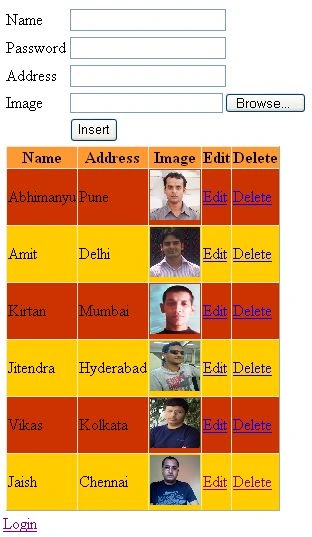
Click login link and provide a correct username and password:
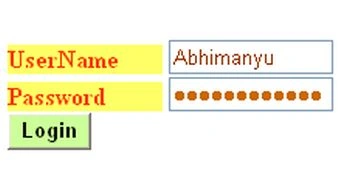
After successful login:



Deepak RatanPosted May 19, 2015, 6:27 AM
The photo is not displaying after login, What to do?
nikhil reddyPosted Dec 19, 2013, 1:23 PM
did u used any mvc code to develop this code
vinay guptaPosted Sep 25, 2013, 12:36 PM
thanks
mazhar khanPosted Sep 24, 2013, 6:52 AM
nice artical... everythig is working properly but... i dont know the .csproj file, meaning n used...
nisar mdPosted Mar 10, 2013, 3:27 AM
I had error on this code.....That is cant found a path......
Sri nidhiPosted Feb 26, 2013, 3:51 AM
if i increase the fields in registration form errors are coming...!!! what should i do...??? i have updated that employee table also.
bhagavan bharoseeditedPosted Feb 2, 2013, 8:21 AMEdited Feb 2, 2013, 8:23 AM
Thanx.... :)