

Introduction
I have been writing a lot about advanced topics like MVC, Entity Framework, Repository Patterns and so on. My priority is to always cover the topic as a whole, so that a reader does not need to search for missing links anywhere else. This article will cover almost every OOP concept that a novice/beginner developer might seek and not only beginners but this article's purpose is to be helpful to experienced professionals who also need to brush-up on their concepts or who need to prepare for interviews.
I will cover the topics in such a manner that they are covered in a simple and straight way taking snippets as examples wherever needed. We'll use C# as our programming language throughout our readings.
We'll play with tricky questions and not go for enough theory. For theory you can refer to the MSDN.

Pre-requisites
Since this is the first part of the series, my readers should have a basic knowledge of C# and should be aware of OOP concepts and terminology.

- Diving Into OOP (Day 1) : Polymorphism and Inheritance(Early Binding/Compile Time Polymorphism).
- Diving into OOP (Day 2) : Polymorphism and Inheritance (Inheritance).
- Diving into OOP (Day 3) : Polymorphism and Inheritance (Dynamic Binding/Run Time Polymorphism).
- Diving into OOP (Day 4) : Polymorphism and Inheritance (Abstract Classes).
- Diving into OOP (Day 5): All about access modifiers in C#(Public/Private/Protected/Internal/Sealed/Constants/Readonly Fields).
- Diving into OOP (Day 6) : Understanding Enum in C# (A Practical Approach).
- Diving into OOP (Day 7): Properties in C# (A Practical Approach).
- Diving into OOP (Day 8): Indexers in C# (A Practical Approach)
- Learning C# (Day 9): Delegates in C# (A Practical Approach)
- Learning C# (Day 10): Events in C# (A Practical Approach)
- What is OOP and what is the advantage of OOP?
OOP stands for "Object-Oriented Programming". Remember, it's OOP, not OOPS; "S" may stand for system, synopsis, structure and so on. OOP is a programming approach (usually called a programming paradigm or a methodology) entirely based on objects, instead of just functions and procedures like in procedural languages. It is like a programming language model organized around objects rather than "actions" and data rather than logic. An "object" in an OOP language refers to a specific type, or "instance", of a class. Each object has a structure exactly similar to other objects in a class, but can have individual properties/values. An object can also invoke methods specific to that object
OOP makes it easier for developers to structure and organize software programs. Individual objects can be modified without affecting other aspects of the program therefore it is also easier to update and change programs written in object-oriented languages. Since the nature of software programs have grown larger over the years, OOP has made developing these large programs more manageable and readable.
- OOP Concepts
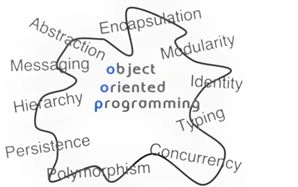
The following are OOP concepts explained in brief, then we'll take the topics in detail.
1) Data Abstraction: Data Abstraction is a concept in which the internal and superfluous details of the implementation of a logic is hidden from an end user (who is using the program). A user can use any of the data and methods from the class without knowing about how this is created or what the complexity behind it is. In terms of a real world example, when we drive a bike and change the gears we don't need to care about how it works internally, like how a lever is pulled or how a chain is set.
2) Inheritance: Inheritance is a very popular concept in OOP .This provides a developer an advantage called reusability of code. Suppose a class is written having functions with specific logic, then we can derive that class into our newly created class and we don't need to write the logic again for derived class functions, we can use them as they are.
3) Data Encapsulation: Wrapping up of a member data and member functions of a class in a single unit is called encapsulation. The visibility of the member functions and data members is set via access modifiers used in the class.
4) Polymorphism: Poly means many and morphism means form. The concept refers to the many possible forms of behaviours of an object .
5) Message Communication: Message Communication means when an object es the call to a method of a class for execution.
OK, we have covered lots of theory, now it's time for action. I hope that will be interesting.
- Polymorphism
In this article we will cover nearly all the scenarios of compile-type polymorphism, the use of the params keyword in detail and case studies or hands-on to multiple possible combinations of the thoughts coming to our mind while coding.
Method Overloading or Early Binding or Compile Time Polymorphism:
1. Let's create a simple console application named InheritanceAndPolymorphism and add a class named Overload.cs and add three methods named DisplayOverload having varying parameters as follows.
Overload.cs
- public class Overload
- {
- public void DisplayOverload(int a){
- System.Console.WriteLine("DisplayOverload " + a);
- }
- public void DisplayOverload(string a){
- System.Console.WriteLine("DisplayOverload " + a);
- }
- public void DisplayOverload(string a, int b){
- System.Console.WriteLine("DisplayOverload " + a + b);
- }
- }
In the main method in the Program.cs file, add the following code:
Program.cs
- class Program
- {
- static void Main(string[] args)
- {
- Overload overload = new Overload();
- overload.DisplayOverload(100);
- overload.DisplayOverload("method overloading");
- overload.DisplayOverload("method overloading", 100);
- Console.ReadKey();
- }
- }
Now when you run the application, the output is:
Output
DisplayOverload 100
DisplayOverload method overloading
DisplayOverload method overloading100
The class Overload contains three methods named DisplayOverload, they only differ in the datatype of the parameters they consist of. In C# we can have methods with the same name, but the datatypes of their parameters differ. This feature of C# is called method overloading. Therefore we need not remember many method names if a method differs in behavior, only providing different parameters to the methods can call a method individually.
Point to remember: C# recognizes the method by its parameters and not only by its name.
A signature signifies the full name of the method. So the name of a method or its signature is the original method name + the number and data types of its individual parameters.
If we run the project using the following code:- public void DisplayOverload() { }
- public int DisplayOverload(){ }
We certainly get a compile time error as:
Error: Type 'InheritanceAndPolymorphism.Overload' already defines a member called 'DisplayOverload' with the same parameter types
Here we had two functions who differ only in the data type of the value that they return, but we got a compile time error, therefore another point to remember is:
Point to remember: The return value/parameter type of a method is never a part of the method signature if the names of the methods are the same. So this is not polymorphism.
If we run the project using the following code:- static void DisplayOverload(int a) { }
- public void DisplayOverload(int a) { }
- public void DisplayOverload(string a){ }
We again get a compile time error as in the following:
Error: Type 'InheritanceAndPolymorphism.Overload' already defines a member called 'DisplayOverload' with the same parameter types
Can you differenciate with the modification done in code above, that we now have two DisplayOverload methods, that accept an int (integer). The only difference is that one method is marked static. Here the signature of the methods will be considered the same as modifiers such as static are also not considered to be a part of the method signature.
Point to remember: Modifiers such as static are not considered to be a part of the method signature.
If we run the program as in the following code, consider that the method signature is different now.- private void DisplayOverload(int a) { }
- private void DisplayOverload(out int a)
- {
- a = 100;
- }
- private void DisplayOverload(ref int a) { }
We again get a compile time error as in the following:
Error: Cannot define overloaded method 'DisplayOverload' because it differs from another method only on ref and out
The signature of a method not only consists of the data type of the parameter but also the type/kind of parameter such as ref or out and so on. Method DisplayOverload takes an int with differing access modifiers, in other words out/ref and so on, the signature on each is different.
Point to remember: The signature of a method consists of its name, number and types of its formal parameters. The return type of a function is not part of the signature. Two methods cannot have the same signature and also non-members cannot have the same name as members.
- Role of the Params Parameter in Polymorphism
A method can be called by any of four types of parameters; they are:
- by value,
- by reference,
- As an output parameter,
- Using parameter arrays.
As explained earlier the parameter modifier is never a part of the method signature. Now let's focus on Parameter Arrays.
A method declaration means creating a separate declaration space in memory. So anything created will be lost at the end of the method.
Running the following code:
- public void DisplayOverload(int a, string a) { }
- public void Display(int a)
- {
- string a;
- }
Results in a compile time error as in the following:
Error1: The parameter name 'a' is a duplicate
Error2: A local variable named 'a' cannot be declared in this scope because it would provide a different meaning to 'a', that is already used in a 'parent or current' scope to denote something else
Point to remember: Parameter names should be unique. And also we cannot have a parameter name and a declared variable name in the same function.
In the case of by value, the value of the variable is ed and in the case of ref and out, the address of the reference is ed.
When we run the following code:
Overload.cs
- public class Overload
- {
- private string name = "Akhil";
- public void Display()
- {
- Display2(ref name, ref name);
- System.Console.WriteLine(name);
- }
- private void Display2(ref string x, ref string y)
- {
- System.Console.WriteLine(name);
- x = "Akhil 1";
- System.Console.WriteLine(name);
- y = "Akhil 2";
- System.Console.WriteLine(name);
- name = "Akhil 3";
- }
- }
Program.cs
- class Program
- {
- static void Main(string[] args)
- {
- Overload overload = new Overload();
- overload.Display();
- Console.ReadKey();
- }
- }
We get out put as,
Output
Akhil
Akhil 1
Akhil 2
Akhil3

We are allowed to the same ref parameter as many times as we want. In the method Display the string name has a value of Akhil. Then by changing the string x to Akhil1, we are actually changing the string name to Akhil1 since the name is ed by reference. Variables x and name refer to the same string in memory. Changing one changes the other. Again changing y also changes the name variable since they refer to the same string anyways. Thus variables x, y and name refer to the same string in memory.
When we run the following code:
Overload.cs -
- public class Overload
- {
- public void Display()
- {
- DisplayOverload(100, "Akhil", "Mittal", "OOP");
- DisplayOverload(200, "Akhil");
- DisplayOverload(300);
- }
- private void DisplayOverload(int a, params string[] parameterArray)
- {
- foreach (string str in parameterArray)
- Console.WriteLine(str + " " + a);
- }
- }
Program.cs
- class Program
- {
- static void Main(string[] args)
- {
- Overload overload = new Overload();
- overload.Display();
- Console.ReadKey();
- }
- }
We get the output:
Output
Akhil 100
Mittal 100
OOP 100
Akhil 200
We will often get into a scenario where we would like to n number of parameters to a method. Since C# is very particular in parameter ing to methods, if we an int where a string is expected, it immediately breaks down. But C# provides a mechanism for ing n number of arguments to a method, we can do it using the params keyword.
Point to remember: This params keyword can only be applied to the last argument of the method. So the n number of parameters can only be at the end.
In the case of the method DisplayOverload, the first argument must be an integer, the rest can be from zero to an infinite number of strings.
If we add a method like:
private void DisplayOverload(int a, params string[] parameterArray, int b) { }
We get a compile time error as in the following:
Error: A parameter array must be the last parameter in a formal parameter list
Thus is is proved that the params keyword will be the last parameter in a method, this is already stated in the latest point to remember.
Overload.cs- public class Overload
- {
- public void Display()
- {
- DisplayOverload(100, 200, 300);
- DisplayOverload(200, 100);
- DisplayOverload(200);
- }
- private void DisplayOverload(int a, params int[] parameterArray)
- {
- foreach (var i in parameterArray)
- Console.WriteLine(i + " " + a);
- }
- }
Program.cs
- class Program
- {
- static void Main(string[] args)
- {
- Overload overload = new Overload();
- overload.Display();
- Console.ReadKey();
- }
- }
When we run the code we get:
200 100
300 100
100 200
Therefore,
Point to Remember: C# is very smart to recognize if the penultimate argument and the params have the same data type.
The first integer is stored in the variable a, the rest are made part of the array parameterArray.- private void DisplayOverload(int a, params string[][] parameterArray) { }
- private void DisplayOverload(int a, params string[,] parameterArray) { }
For the preceding written code, we again get a compile time error and a new point to remember as well.
Error: The parameter array must be a single dimensional array
Point to remember: the error above says it all.
The data type of the params argument must be a single dimensional array. Therefore is allowed but not [,]. We also are not allowed to combine the params keyword with ref or out.
Overload.cs
- public class Overload
- {
- public void Display()
- {
- string[] names = {"Akhil", "Ekta", "Arsh"};
- DisplayOverload(3, names);
- }
- private void DisplayOverload(int a, params string[] parameterArray)
- {
- foreach (var s in parameterArray)
- Console.WriteLine(s + " " + a);
- }
- }
Program.cs
- class Program
- {
- static void Main(string[] args)
- {
- Overload overload = new Overload();
- overload.Display();
- Console.ReadKey();
- }
- }
Output
Akhil 3
Ekta 3
Arsh 3
We are therefore allowed to a string array instead of individual strings as arguments. Here names is a string array that has been initialized using the short form. Internally when we call the function DisplayOverload, C# converts the string array into individual strings.
Overload.cs
- public class Overload
- {
- public void Display()
- {
- string [] names = {"Akhil","Arsh"};
- DisplayOverload(2, names, "Ekta");
- }
- private void DisplayOverload(int a, params string[] parameterArray)
- {
- foreach (var str in parameterArray)
- Console.WriteLine(str + " " + a);
- }
- }
Program.cs
- class Program
- {
- static void Main(string[] args)
- {
- Overload overload = new Overload();
- overload.Display();
- Console.ReadKey();
- }
- }
Output
Error: The best overloaded method match for 'InheritanceAndPolymorphism.Overload.DisplayOverload(int, params string[])' has some invalid arguments
Error:Argument 2: cannot convert from 'string[]' to 'string'
So, we get two errors.
For the preceding code, C# does not permit mix and match. We assumed that the last string “Ekta” would be added to the array of string names or convert the names to individual strings and then the string “Ekta” would be added to it. Quite logical.
Internally before calling the function DisplayOverload, C# accumulates all the individual parameters and converts them into one big array for the params statement.
Overload.cs
- public class Overload
- {
- public void Display()
- {
- int[] numbers = {10, 20, 30};
- DisplayOverload(40, numbers);
- Console.WriteLine(numbers[1]);
- }
- private void DisplayOverload(int a, params int[] parameterArray)
- {
- parameterArray[1] = 1000;
- }
- }
Program.cs
- class Program
- {
- static void Main(string[] args)
- {
- Overload overload = new Overload();
- overload.Display();
- Console.ReadKey();
- }
- }
Output: 1000
We see that the output produced is the proof of concept. The member parameterArray[1] of array has an initial value of 20 and in the method DisplayOverload, we changed it to 1000. So the original value changes, this shows that the array is given to the method DisplayOverload and that provides the proof.
Overload.cs
- public class Overload
- {
- public void Display()
- {
- int number = 102;
- DisplayOverload(200, 1000, number, 200);
- Console.WriteLine(number);
- }
- private void DisplayOverload(int a, params int[] parameterArray)
- {
- parameterArray[1] = 3000;
- }
- }
Program.cs
- class Program
- {
- static void Main(string[] args)
- {
- Overload overload = new Overload();
- overload.Display();
- Console.ReadKey();
- }
- }
Output
102
In the preceding mentioned scenario C# creates an array containing 1000 102 and 200. We now change the second member of array to 3000 that has nothing to do with the variable number. As DisplayOverload has no knowledge of numebr, so how can DisplayOverload change the value of the int number? Therefore it remains the same.
Overload.cs
- public class Overload
- {
- public void Display()
- {
- DisplayOverload(200);
- DisplayOverload(200, 300);
- DisplayOverload(200, 300, 500, 600);
- }
- private void DisplayOverload(int x, int y)
- {
- Console.WriteLine("The two integers " + x + " " + y);
- }
- private void DisplayOverload(params int[] parameterArray)
- {
- Console.WriteLine("parameterArray");
- }
- }
Program.cs
- class Program
- {
- static void Main(string[] args)
- {
- Overload overload = new Overload();
- overload.Display();
- Console.ReadKey();
- }
- }
Output
parameterArray
The two integers 200 300
parameterArray
Now we talk about method overloading. C# is extremely talented though partial. It does not appreciate the params statement and treats it as a stepchild. When we invoke DisplayOverload only with one integer, C# can only call the DisplayOverload that takes a params as a parameter since it matches only one int. An array can contain one member too. The fun is with the DisplayOverload that is called with two ints now. So here we have a dilemma. C# can call the params DisplayOverload or DisplayOverload with the two ints. As said earlier, C# treats the params as a second class member and therefore chooses the DisplayOverload with two ints.When there are more than two ints like in the third method call, C# is void of choice but to grudgingly choose the DisplayOverload with the params. C# opts for the params as a last resort before flagging an error.
Now for an example that is a bit trickier, yet important.
Overload.cs
- public class Overload
- {
- public static void Display(params object[] objectParamArray)
- {
- foreach (object obj in objectParamArray)
- {
- Console.Write(obj.GetType().FullName + " ");
- }
- Console.WriteLine();
- }
- }
Program.cs
- class Program
- {
- static void Main(string[] args)
- {
- object[] objArray = { 100, "Akhil", 200.300 };
- object obj = objArray;
- Overload.Display(objArray);
- Overload.Display((object)objArray);
- Overload.Display(obj);
- Overload.Display((object[])obj);
- Console.ReadKey();
- }
- }
Output
System.Int32 System.String System.Double
System.Object[]
System.Object[]
System.Int32 System.String System.Double
In the first instance we are ing the method Display an array of objects that looks like an object. Since all the classes are derived from a common base class object, we can do that. The method Display gets an array of objects, objectParamArray. In the foreach object the class has a method named GetType that returns an object that looks like Type, that too has a method named FullName that returns the name of the type. Since each of three types are displayed. In the second method call of Display we are casting objArray to an object. Since there is no conversion available for converting an object to an object array, in other words object [], only a one-element object [] is created. It's the same case in the third invocation and the last explicitly casts to an object array.
For proof of concept, see the following.
Overload.cs
- public class Overload
- {
- public static void Display(params object[] objectParamArray)
- {
- Console.WriteLine(objectParamArray.GetType().FullName);
- Console.WriteLine(objectParamArray.Length);
- Console.WriteLine(objectParamArray[0]);
- }
- }
Program.cs
- class Program
- {
- static void Main(string[] args)
- {
- object[] objArray = { 100, "Akhil", 200.300 };
- Overload.Display((object)objArray);
- Console.ReadKey();
- }
- }
Output
System.Object[]
1
System.Object[]
5. Conclusion
In this article of our Diving Into OOP series we learned about compile-time polymorphism, it is also called early binding or method overloading. We catered most of the scenarios specific to polymorphism.We also learned about the use of powerful the params keyword and its use in polymorphism.
To sum up, let's list all the points to remembers once more.
- C# recognizes the method by its parameters and not only by its name.
- The return value/parameter type of a method is never the part of method signature if the names of the methods are the same. So this is not polymorphism.
- Modifiers such as static are not considered as part of the method signature.
- The signature of a method consists of its name, number and types of its formal parameters. The return type of a function is not part of the signature. Two methods cannot have the same signature and also non-members cannot have the same name as members.
- Parameter names should be unique. And also we cannot have a parameter name and a declared variable name in the same function.
- In case of by value, the value of the variable is ed and in the case of ref and out, the address of the reference is ed.
- This params keyword can only be applied to the last argument of the method. So the n number of parameters can only be at the end.
- C# is very smart to recognize if the penultimate argument and the params have the same data type.
- A Parameter Array must be a single dimensional array.
In future articles we'll cover topics in the same fashion.  Happy Coding.
Read more
- C# and ASP.NET Questions (All in one)
- MVC Interview Questions
- C# and ASP.NET Interview Questions and Answers
- Web Services and Windows Services Interview Questions
For more technical articles you can reach out to CodeTeddy
My other series of articles:
Happy coding !
Join the conversation! Your thoughts help the community grow.