

Complete source code: Click Here
Introduction
Flexibility in database selection is critical in modern application development. A Web API should support multiple database options such as SQL Server, PostgreSQL, MySQL, and SQLite without major code changes. In this article, we will build a .NET 9 Web API using Clean Architecture, Domain-Driven Design (DDD), and MediatR, while implementing dynamic database selection using Entity Framework Core (EF Core).
Why Do We Need a Dynamic Database?
1. Flexibility in Deployment
- Different environments (development, staging, production) may require different databases.
- Users or clients may have preferences for a specific database technology.
2. Cost Optimization
- Some databases are more cost-effective depending on usage.
- Cloud providers offer different pricing models for different database engines.
3. Scalability and Performance
- Some databases are better suited for high-scale applications.
- Ability to switch between relational and NoSQL databases based on use cases.
4. Vendor Independence
- Avoid vendor lock-in by supporting multiple databases.
- Easier migration between databases if needed.
5. Multi-Tenant Applications
- Different clients may require different database engines.
- Supports SaaS applications where tenants choose their preferred database.
Key Features
- Clean Architecture for better maintainability
- DDD principles for structured domain logic
- CQRS using MediatR for command-query separation
- Dynamic Database Selection (SQL Server, PostgreSQL, MySQL, SQLite)
- Entity Framework Core for data persistence
Prerequisites
- Visual Studio or VS Code
- .NET 9 SDK
- The database is based on your needs.
About the Project
This project is a .NET 9 Web API designed with Clean Architecture principles and Domain-Driven Design (DDD). It follows the CQRS pattern using MediatR and supports dynamic database selection using Entity Framework Core. The project is structured into multiple layers for maintainability and scalability:
- WebAPI Layer: Handles HTTP requests and routes them to the application layer.
- Application Layer: Contains business logic, DTOs, and CQRS commands/queries.
- Domain Layer: Defines core entities and domain logic.
- Infrastructure Layer: Manages database context, dependency injection, and configurations.
The main objective of this project is to allow users to select a database dynamically via configuration, making the API flexible and adaptable for different deployment scenarios.
Let’s start with the implementation.
Create the Solution and Projects
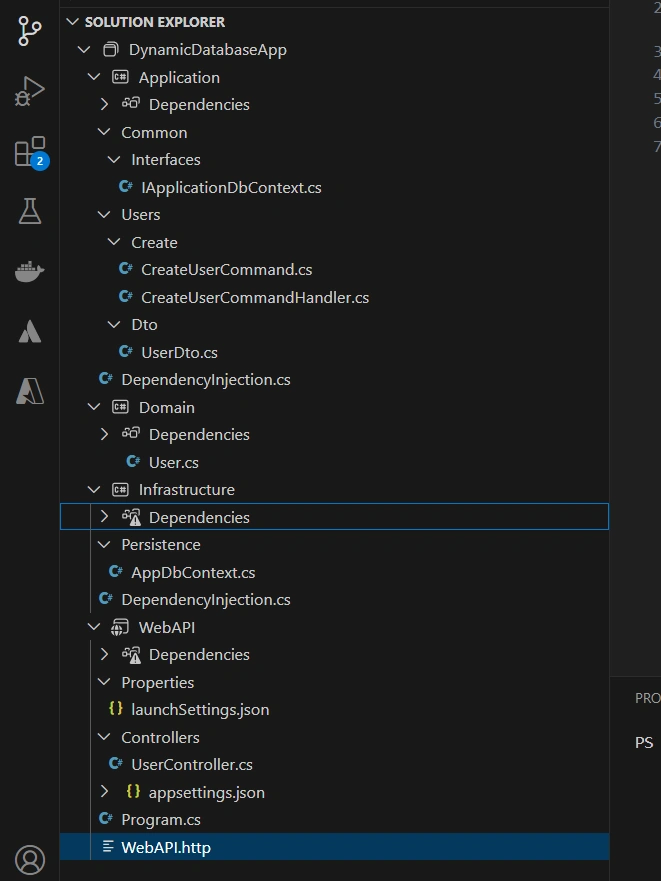
We can create solutions and projects from UI or through command. The project structure should be as shown below:

- DynamicDatabaseApp: Solution
- WebAPI: ASP.NET Web API (.NET 9)
- Application – Class Library: .NET 9
- Doman – Class Library: .NET 9
- Infrastructure – Class Library: .NET 9
mkdir DynamicDatabaseApp && cd DynamicDatabaseApp
dotnet new sln -n DynamicDatabaseAPI

dotnet new webapi -n WebAPI
dotnet new classlib -n Application
dotnet new classlib -n Domain
dotnet new classlib -n Infrastructure

dotnet sln add src/WebAPI src/Application src/Domain src/Infrastructure

dotnet add src/WebAPI reference src/Application src/Infrastructure

dotnet add src/Application reference src/Domain

dotnet add src/Infrastructure reference src/Domain
Add Project references
- WebAPI: Application, Infrastructure
- Application: Domain
- Infrastructure: Application
- Domain: none
Install Required NuGet Packages
Let’s Add the necessary packages for the project.
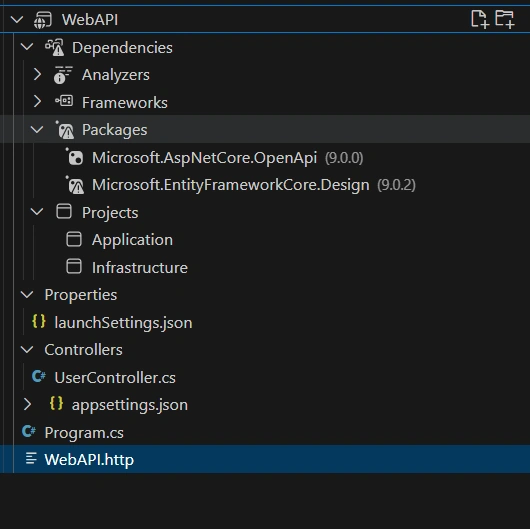
- WebAPI: Microsoft.EntityFrameworkCore.Design
- Application: MediatR, Microsoft.EntityFrameworkCore, Microsoft.Extensions.DependencyInjection
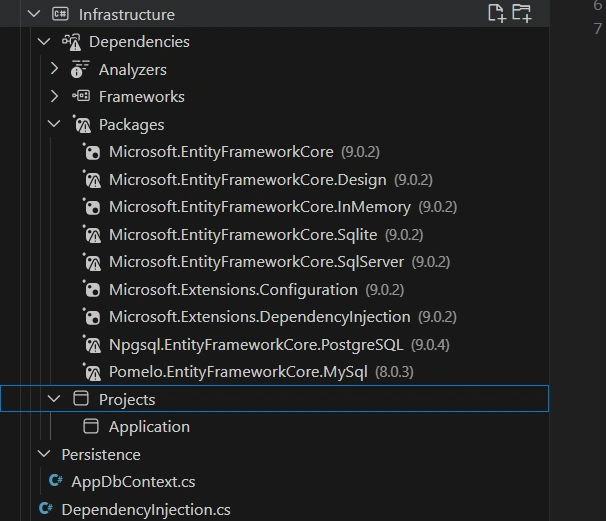
- Infrastructure: Microsoft.EntityFrameworkCore, Microsoft.EntityFrameworkCore.InMemory, Microsoft.EntityFrameworkCore.Sqlite, Microsoft.EntityFrameworkCore.SqlServer, Npgsql.EntityFrameworkCore.PostgreSQL, Pomelo.EntityFrameworkCore.MySql, Microsoft.Extensions.Configuration, Microsoft.Extensions.DependencyInjection
- Domain: none
You can add the packages from UI or command.
dotnet add src/WebAPI package Microsoft.EntityFrameworkCore.Design

dotnet add src/Application package MediatR
dotnet add src/Application package Microsoft.EntityFrameworkCore
dotnet add src/Application package Microsoft.Extensions.DependencyInjection

dotnet add src/Infrastructure package Microsoft.Extensions.DependencyInjection
dotnet add src/Infrastructure package Microsoft.EntityFrameworkCore.Design
dotnet add src/Infrastructure package Microsoft.EntityFrameworkCore
dotnet add src/Infrastructure package Microsoft.EntityFrameworkCore.Sqlite
dotnet add src/Infrastructure package Microsoft.EntityFrameworkCore.SqlServer
dotnet add src/Infrastructure package Npgsql.EntityFrameworkCore.PostgreSQL
dotnet add src/Infrastructure package Pomelo.EntityFrameworkCore.MySql
dotnet add src/Infrastructure package Microsoft.Extensions.Configuration
dotnet add src/Infrastructure package Microsoft.Extensions.DependencyInjection
We created a project structure following Clean Architecture and added the necessary references.
Implementing the Layers
Define the Domain Layer (Domain)
Entity – User.cs
namespace Domain;

public class User
{
    public Guid Id { get; set; }
    public string Name { get; set; } = string.Empty;
    public string Email { get; set; } = string.Empty;

}
Define the Application Layer (Application)
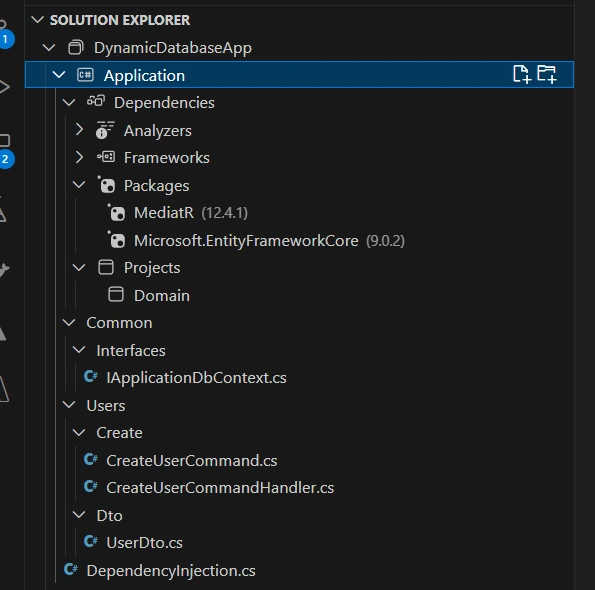
Create IApplicationDbContext.cs class in the Common/Interfaces folder.
using Domain;
using Microsoft.EntityFrameworkCore;

namespace Application.Common.Interfaces;

public interface IApplicationDbContext
{
    DbSet<User> Users { get; }
    Task<int> SaveChangesAsync(CancellationToken cancellationToken = default);

}
Create UserDto.cs under User/Dto folder.
namespace Application.Users.Dto;

public record UserDto
{
    public string Name { get; set; } = string.Empty;
    public string Email { get; set; } = string.Empty;
}
Command – CreateUserCommand.cs in folder User/Create.
using MediatR;

namespace Application.Users.Create;

public class CreateUserCommand : IRequest<Guid>
{
    public string Name { get; set; } = string.Empty;
    public string Email { get; set; } = string.Empty;
}
Command Handler – CreateUserCommandHandler.cs in folder User/Create.
using Application.Common.Interfaces;
using Domain;
using MediatR;

namespace Application.Users.Create;

public class CreateUserCommandHandler(IApplicationDbContext dbContext) : IRequestHandler<CreateUserCommand, Guid>
{
    public async Task<Guid> Handle(CreateUserCommand request, CancellationToken cancellationToken)
    {
        var user = new User
        {
            Id = Guid.NewGuid(),
            Name = request.Name,
            Email = request.Email
        };

        dbContext.Users.Add(user);
        await dbContext.SaveChangesAsync(cancellationToken);

        return user.Id;

    }
}
For Dependency Injection, add DependencyInjection.cs.
using Microsoft.Extensions.DependencyInjection;

namespace Application;

public static class DependencyInjection
{
    public static IServiceCollection AddApplication(this IServiceCollection services)
    {
        services.AddMediatR(config =>
        {
            config.RegisterServicesFromAssembly(typeof(DependencyInjection).Assembly);
        });

        return services;
    }
}
The Application project should be as illustrated below.
Implement the Infrastructure Layer (Infrastructure)
Database Context – AppDbContext.cs (under the Persistence folder).
using Application.Common.Interfaces;
using Domain;
using Microsoft.EntityFrameworkCore;
using Microsoft.EntityFrameworkCore.ChangeTracking;

namespace Infrastructure.Persistence;

public class AppDbContext (DbContextOptions<AppDbContext> options)
    : DbContext(options), IApplicationDbContext
{
    public DbSet<User> Users { get; set; } = null!;

    public override Task<int> SaveChangesAsync(CancellationToken cancellationToken = default)
    {
        ChangeTracker.DetectChanges();
        return base.SaveChangesAsync(cancellationToken);
    }
}
DependencyInjection.cs
using Infrastructure.Persistence;
using Microsoft.Extensions.Configuration;
using Microsoft.Extensions.DependencyInjection;
using Microsoft.EntityFrameworkCore;
using Application.Common.Interfaces;

namespace Infrastructure;

public static class DependencyInjection
{
    public static IServiceCollection AddInfrastructure(this IServiceCollection services, IConfiguration configuration)
    {
        string dbType = configuration["Database:Type"] ?? string.Empty;

        services.AddDbContext<AppDbContext>(options =>
        {
            switch (dbType)
            {
                case "SQLServer":
                    options.UseSqlServer(configuration.GetConnectionString("SqlServerConnection"));
                    break;
                case "PostgreSQL":
                    options.UseNpgsql(configuration.GetConnectionString("PostgresConnection"));
                    break;
                case "MySQL":
                    options.UseMySql(configuration.GetConnectionString("MySqlConnection"), ServerVersion.AutoDetect(configuration.GetConnectionString("MySqlConnection")));
                    break;
                case "SQLite":
                    options.UseSqlite(configuration.GetConnectionString("MySqlLiteConnection"));
                    break;
                case "InMemory":
                    options.UseInMemoryDatabase("InMemoryDbForTesting");
                    break;

                default: throw new Exception("Invalid database type");
            }

        });

        services.AddScoped<IApplicationDbContext>(sp => sp.GetRequiredService<AppDbContext>());

        return services;
    }

}
The DependencyInjection class provides a centralized way to register different database providers (SQL Server, PostgreSQL, MySQL, SQLite, and In-Memory) based on configuration. This approach allows seamless database switching without modifying the core application logic, improving scalability, cost-effectiveness, and deployment flexibility.
Infrastructure Project
Presentation layer (WebAPI)
For the above dynamic database configuration, we will add the configuration values in appsettings.json.
appsettings.json
{
  "Database": {
    "Type": "SqlServer"
  },
  "ConnectionStrings": {
    "SqlServer": "Server=.;Database=MyDb;Trusted_Connection=True;MultipleActiveResultSets=true",
    "PostgreSQL": "Host=localhost;Database=mydb;Username=myuser;Password=mypassword",
    "MySQL": "Server=localhost;Database=mydb;User=root;Password=mypassword;",
    "SQLite": "Data Source=mydatabase.db"
  },
  "Logging": {
    "LogLevel": {
      "Default": "Information",
      "Microsoft.AspNetCore": "Warning"
    }
  },
  "AllowedHosts": "*"
}
Add UserController.cs under the Controllers folder.
using Application.Users.Create;
using MediatR;
using Microsoft.AspNetCore.Mvc;

namespace WebAPI.Controllers
{
    [Route("api/[controller]")]
    [ApiController]
    public class UserController (IMediator mediator) : ControllerBase
    {
        private readonly IMediator _mediator = mediator;

        [HttpPost]
        public async Task<ActionResult<Guid>> CreateUser(CreateUserCommand command)
        {
            var userId = await _mediator.Send(command);

            return Ok(userId);
        }

    }
}
Register services in the program.cs.
builder.Services
    .AddApplication()
    .AddInfrastructure(builder.Configuration);

....

app.MapControllers();
Complete program.cs file.
using Application;
using Infrastructure;

var builder = WebApplication.CreateBuilder(args);

// Add services to the container.
// Learn more about configuring OpenAPI at https://aka.ms/aspnet/openapi
builder.Services.AddOpenApi();

builder.Services
    .AddApplication()
    .AddInfrastructure(builder.Configuration);

builder.Services.AddEndpointsApiExplorer();

var app = builder.Build();

// Configure the HTTP request pipeline.
if (app.Environment.IsDevelopment())
{
    app.MapOpenApi();
}
app.MapControllers();

app.UseHttpsRedirection();

app.Run();
WebAPI Project
That’s all. Now, we did the dynamic database for the application. You can do configuration in the database and do migrations accordingly.
Complete Project Structure
Conclusion
Implementing dynamic database selection in a .NET 8 Web API using Clean Architecture, DDD, MediatR, and Entity Framework Core provides a flexible, scalable, and future-proof solution for modern applications. By leveraging appsettings.json to configure different database providers, developers can easily switch between SQL Server, PostgreSQL, MySQL, SQLite, and In-Memory databases without altering the core application logic.
This approach enhances maintainability, cost-efficiency, and adaptability, making it ideal for multi-tenant applications, microservices, and cloud-based deployments. Whether you’re developing for local testing, production environments, or multi-database support, this architecture ensures seamless database integration.
By adopting this strategy, your application remains robust, vendor-independent, and ready to scale, empowering developers to build high-quality, dynamic APIs with ease.
Join the conversation! Your thoughts help the community grow.