

Introduction
In this article, we are going to discuss how to implement dynamic theme in Flutter using Provider. There are many other ways to apply dynamic theme in Flutter but I have found Provider to be one of the best and most efficient ways.
Summary of the Example
We will implement dynamic theme for controlling dark and light mode of the application which you have in some applications, like reading applications where light mode is for day and dark mode is for the night. You may have also noticed that Google Maps has the same feature for night and day modes which automatically go on and off according to the light.
Output
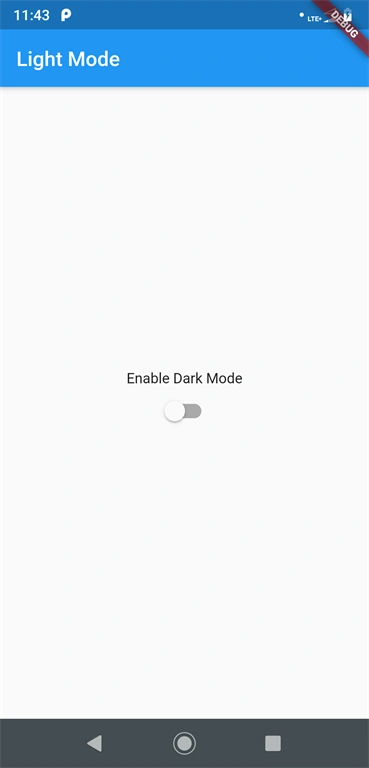
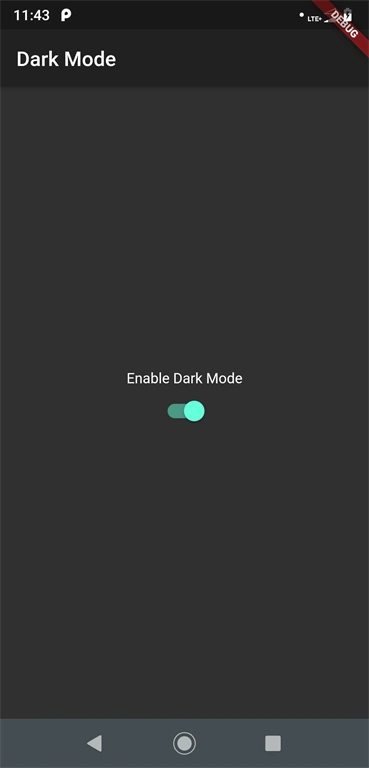
Required Plugin: provider
Steps
Step 1
The first and most basic step is to create a new application in Flutter. If you are a beginner in Flutter, then you can check my blog, Create a first app in Flutter. I have created an app named “flutter_dynamic_theme”.
Step 2
Add the provider plugin in pubspec.yaml file.
- dependencies:
- Flutter:
- sdk: Flutter
- cupertino_icons: ^0.1.2
- provider: ^3.1.0
Step 3
Create a new file for provider theme implementation. I have created a file named theme_provider.dart. Following is the programming implementation.
- // Package for ChangeNotifier class
- import 'package:Flutter/foundation.dart';
- class DynamicTheme with ChangeNotifier {
- // ChangeNotifier : will provide a notifier for any changes in the value to all it's listeners
- bool isDarkMode = false;
- getDarkMode() => this.isDarkMode;
- void changeDarkMode(isDarkMode) {
- this.isDarkMode = isDarkMode;
- notifyListeners(); // Notify all it's listeners about update. If you comment this line then you will see that new added items will not be reflected in the list.
- }
- }
Join the conversation! Your thoughts help the community grow.