

Introduction
Blazor is a framework built by Microsoft for creating interactive client-side web UI with a .NET codebase. We can write both client-side and server-side code in C#.NET itself. There are two hosting models available for Blazor. Blazor Server and Blazor WebAssembly. Blazor Server for production was already available. Recently, Microsoft released the production version of Blazor WebAssembly.
Syncfusion is a company founded in 2001 that offers over 1,600 components and frameworks for mobile, web, and desktop development. Their products are well received by all over the world clients.
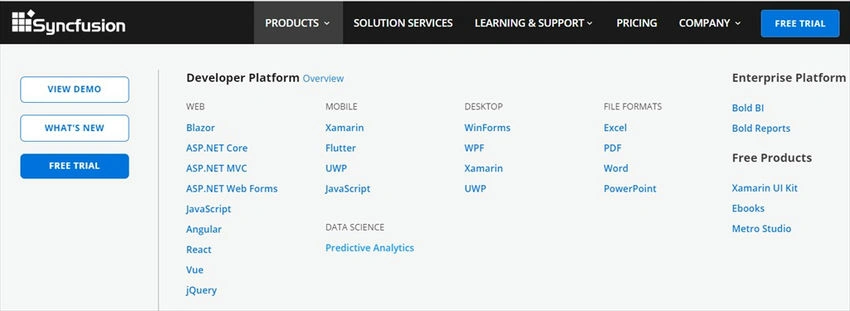
We are using the Syncfusion Blazor chart component library to create our chart. Syncfusion is offering more than 65 native UI controls for Blazor. We will create an application to see the daily published articles count on C# Corner site with respective dates. We are fetching this data from C# Corner RSS feeds. Currently they are providing the latest 100 articles count to RSS feeds.
We can create a Blazor Server application using Visual Studio 2019. You can also use Visual Studio Code to create the Blazor Server app.
Install the latest “Syncfusion. Blazor” library using the NuGet package manager.

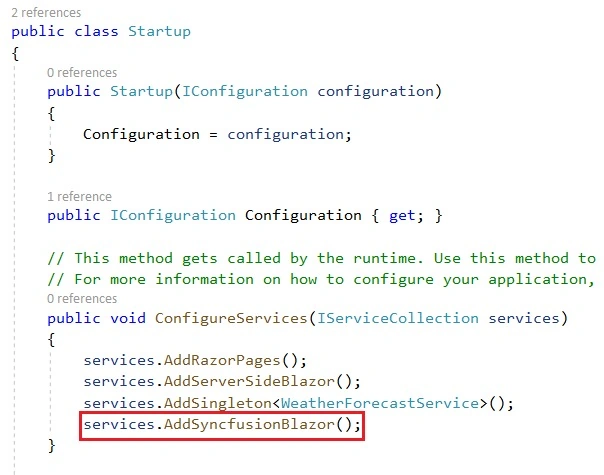
We can register this library inside the “ConfigureServices” method in the “Startup” class.
We need two classes, “RssFeed” and “DateWiseCount” to fetch C# Corner RSS feeds. I am creating these two classes inside a single file.
RssFeeds.cs
namespace BlazorChart.Data
{
    public class RssFeed
    {
        public string PublishedDate { get; set; }
    }
    public class DateWiseCount
    {
        public string PublishedDate { get; set; }
        public double Count { get; set; }
    }
}
We can create a new class, “Articles” create a method, “ArticlesCounts” and write the logic for fetching data from C# Corner RSS feeds.
Articles. cs
using System;
using System.Collections.Generic;
using System.Globalization;
using System.Linq;
using System.Xml.Linq;

namespace BlazorChart.Data
{
    public class Articles
    {
        public List<DateWiseCount> ArticlesCounts()
        {
            CultureInfo culture = new CultureInfo("en-US");
            try
            {
                XDocument doc = XDocument.Load("https://www.c-sharpcorner.com/rss/latestarticles.aspx");
                var feeds = from item in doc.Root.Descendants().First(i => i.Name.LocalName == "channel").Elements().Where(i => i.Name.LocalName == "item")
                            select new RssFeed
                            {
                                PublishedDate = Convert.ToDateTime(item.Elements().First(i => i.Name.LocalName == "pubDate").Value, culture).ToString("dd-MMM-yy")
                            };

                var feedGroups =
                    from p in feeds
                    orderby p.PublishedDate descending
                    group p by p.PublishedDate into g
                    select new { PublishedDate = g.Key, Count = g.Count() };

                List<DateWiseCount> dateWiseCounts = new List<DateWiseCount>();
                foreach (var feed in feedGroups)
                {
                    dateWiseCounts.Add(new DateWiseCount { PublishedDate = feed.PublishedDate, Count = feed.Count });
                }
                return dateWiseCounts;
            }
            catch (Exception)
            {
                return null;
            }
        }
    }
}
Create a new razor component, “Chart” inside the “Pages” folder and write the below code to display the chart in the component.
Chart. razor
@page "/chart"
@using BlazorChart.Data
@using Syncfusion.Blazor.Charts

<SfChart Title="C# Corner Daily Published Articles Analysis (Latest 100 only)">
    <ChartPrimaryXAxis ValueType="Syncfusion.Blazor.Charts.ValueType.Category"
                       Title="Published Date">
    </ChartPrimaryXAxis>
    <ChartPrimaryYAxis Title="Total Aticles on Date">
    </ChartPrimaryYAxis>
    <ChartLegendSettings Visible="true"> </ChartLegendSettings>
    <ChartTooltipSettings Enable="true"></ChartTooltipSettings>
    <ChartSeriesCollection>
        <ChartSeries Type="ChartSeriesType.Spline" DataSource="@dateWiseCounts"
                     XName="PublishedDate" YName="Count" Name="Articles">
            <ChartMarker>
                <ChartDataLabel Visible="true"> </ChartDataLabel>
            </ChartMarker>
        </ChartSeries>
    </ChartSeriesCollection>
</SfChart>

@code {
    List<DateWiseCount> dateWiseCounts = new List<DateWiseCount>();

    protected override void OnInitialized()
    {
        dateWiseCounts = new Articles().ArticlesCounts();
    }
}
“SfChart” is the component name used by Syncfusion for charts.
Mainly, it has 5 properties. “ChartPrimaryXAxis”, “ChartPrimaryYAxis”, “ChartLegendSettings”, “ChartTooltipSettings” and “ChartSeriesCollection”
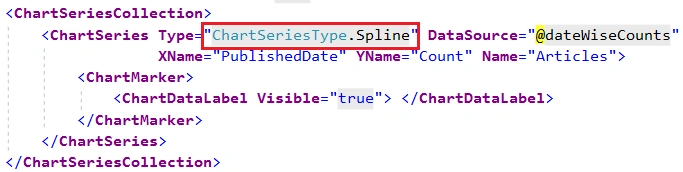
ChartSeriesCollection provides the chart type and other details.
Currently, they are providing 31 types of charts (as of 31st May 2020). We use the Spline chart type in this application.
We can modify the “NavMenu” component to add new navigation to the Chart component.
NavMenu.razor
<p class="top-row pl-4 navbar navbar-dark">
    <a class="navbar-brand" href="">BlazorChart</a>
    <button class="navbar-toggler" @onclick="ToggleNavMenu">
        <span class="navbar-toggler-icon"></span>
    </button>
</p>

<p class="@NavMenuCssClass" @onclick="ToggleNavMenu">
    <ul class="nav flex-column">
        <li class="nav-item px-3">
            <NavLink class="nav-link" href="" Match="NavLinkMatch.All">
                <span class="oi oi-home" aria-hidden="true"></span> Home
            </NavLink>
        </li>
        <li class="nav-item px-3">
            <NavLink class="nav-link" href="counter">
                <span class="oi oi-plus" aria-hidden="true"></span> Counter
            </NavLink>
        </li>
        <li class="nav-item px-3">
            <NavLink class="nav-link" href="fetchdata">
                <span class="oi oi-list-rich" aria-hidden="true"></span> Fetch data
            </NavLink>
        </li>
        <li class="nav-item px-3">
            <NavLink class="nav-link" href="chart">
                <span class="oi oi-list-rich" aria-hidden="true"></span> C# Corner Articles
            </NavLink>
        </li>
    </ul>
</p>

@code {
    private bool collapseNavMenu = true;
    private string NavMenuCssClass => collapseNavMenu ? "collapse" : null;
    private void ToggleNavMenu()
    {
        collapseNavMenu = !collapseNavMenu;
    }
}
We can run the application and click the “C# Corner Articles” menu link.
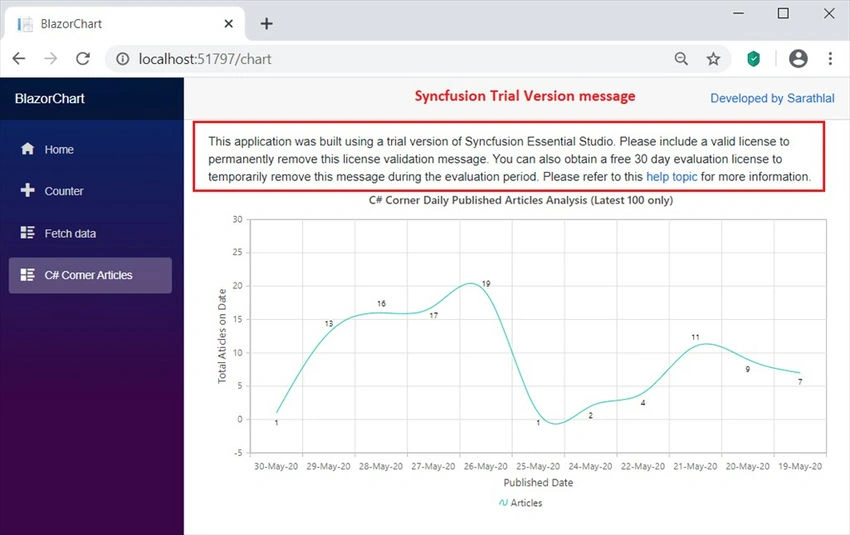
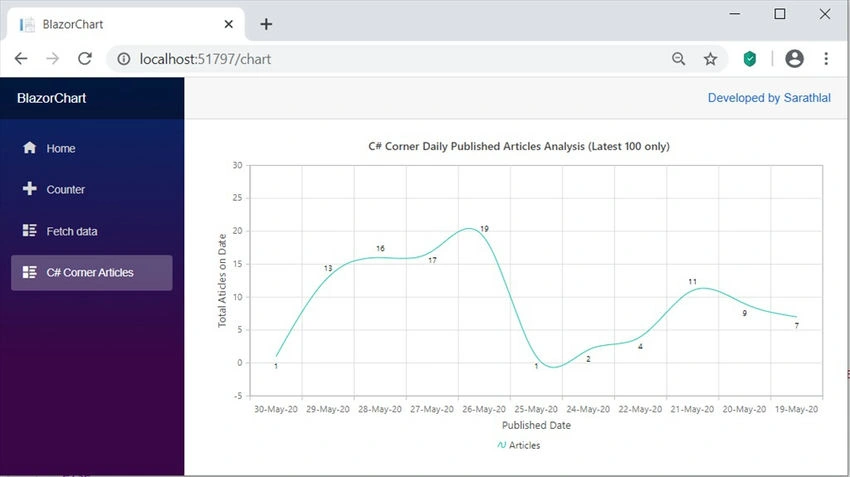
You can see the Spline chart with the published date and total articles count. You may notice that there is a trial version warning message on the top of the chart. We can remove this warning message by giving the proper license number.
You can get a 30-day trial license from the Syncfusion website. You can check their entire Blazor component controls using this evaluation version license.
Please use this site https://www.syncfusion.com/downloads to download trial versions.
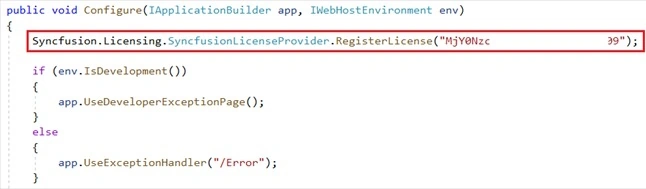
Add this license inside the “Configure” method of the “Startup” class.
We can run the application again and load the chart component. You will not see that warning message again.
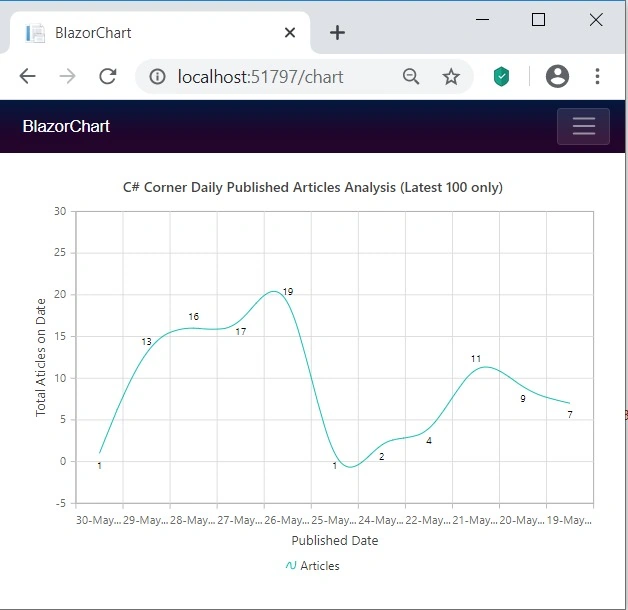
You can see that this chart is very responsive also.
Conclusion
In this post, we have seen how to create a Spline chart using the Syncfusion Blazor component library. We have used C# Corner RSS feeds to fetch daily published article count data and showed it as a chart. In my experience, Syncfusion components are very easy to use and high quality as well. I will use many of the other Blazor components from Syncfusion and show you how to use it very easily and quickly in my upcoming articles. Please feel free to give your valuable feedback as a comment so that I can notice which area needs more concentration for improvement.
Join the conversation! Your thoughts help the community grow.