

In SQL Server, a Table-Valued Parameter (TVP) enables the passing of an entire table as a parameter to a stored procedure or function, making it possible to efficiently handle large amounts of data in a single call. TVPs are frequently utilized for transmitting multiple rows of data from an application to SQL Server.
Advantages of TVPs
- Increased effectiveness: Decreases the requirement for looping and multiple calls when passing numerous rows.
- Streamlined Code: Enhances code clarity by combining multiple inserts/updates into a single batch operation.
- Enhanced Performance: Reduces trips to the server, leading to substantial performance improvements with large datasets.
To achieve this Functionality Follow the Following Steps
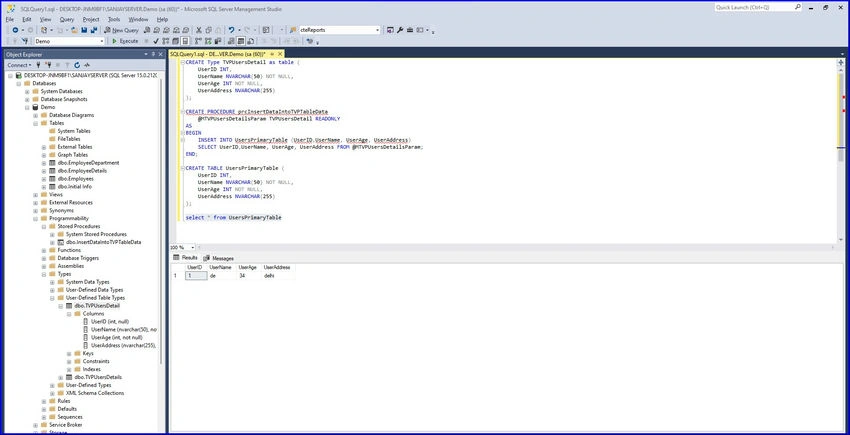
Step 1. In SQL Server, a User-Defined Table Type (UDTT) needs to be created to define the structure (columns and data types) of the table parameter before using a TVP.
CREATE TYPE TVPUsersDetail AS TABLE (
    UserID INT,
    UserName NVARCHAR(50) NOT NULL,
    UserAge INT NOT NULL,
    UserAddress NVARCHAR(255)
);
Step 2. Create a physical table to store information like the one below.
CREATE TABLE UsersPrimaryTable (
    UserID INT,
    UserName NVARCHAR(50) NOT NULL,
    UserAge INT NOT NULL,
    UserAddress NVARCHAR(255)
);
Step 3. After defining the UDTT, create a stored procedure that takes a parameter of this table type.
CREATE PROCEDURE prcInsertDataIntoTVPTableData
    @MTVPUsersDetailsParam TVPUsersDetail READONLY
AS
BEGIN
    INSERT INTO TVPUsersDetail (UserID, UserName, UserAge, UserAddress)
    SELECT UserID, UserName, UserAge, UserAddress
    FROM @MTVPUsersDetailsParam;
END;
Step 4. Develop a sample application similar to the one provided below. I am utilizing WPF, but you may choose your own framework based on your specific needs.
UI View
<Window x:Class="TVPExample.MainWindow"
        xmlns="http://schemas.microsoft.com/winfx/2006/xaml/presentation"
        xmlns:x="http://schemas.microsoft.com/winfx/2006/xaml"
        xmlns:d="http://schemas.microsoft.com/expression/blend/2008"
        xmlns:mc="http://schemas.openxmlformats.org/markup-compatibility/2006"
        xmlns:local="clr-namespace:TVPExample"
        mc:Ignorable="d"
        Title="MainWindow" Height="450" Width="800">

    <StackPanel Margin="10">
        <!-- User ID Field -->
        <StackPanel Orientation="Horizontal" Margin="5">
            <TextBlock Text="User ID:" Width="100" VerticalAlignment="Center"/>
            <TextBox Name="UserIDTextBox" Width="200" Margin="5,0,0,0"/>
        </StackPanel>

        <!-- User Name Field -->
        <StackPanel Orientation="Horizontal" Margin="5">
            <TextBlock Text="User Name:" Width="100" VerticalAlignment="Center"/>
            <TextBox Name="UserNameTextBox" Width="200" Margin="5,0,0,0"/>
        </StackPanel>

        <!-- User Age Field -->
        <StackPanel Orientation="Horizontal" Margin="5">
            <TextBlock Text="User Age:" Width="100" VerticalAlignment="Center"/>
            <TextBox Name="UserAgeTextBox" Width="200" Margin="5,0,0,0"/>
        </StackPanel>

        <!-- User Address Field -->
        <StackPanel Orientation="Horizontal" Margin="5">
            <TextBlock Text="User Address:" Width="100" VerticalAlignment="Center"/>
            <TextBox Name="UserAddressTextBox" Width="200" Margin="5,0,0,0"/>
        </StackPanel>

        <!-- Buttons -->
        <Button Content="Add to List" Click="AddToList_Click" Margin="5"/>
        <Button Content="Submit to Database" Click="SubmitToDatabase_Click" Margin="5"/>

        <!-- DataGrid to Display Entries -->
        <DataGrid Name="UserDataGridView" Margin="5" Height="200"/>
    </StackPanel>
</Window>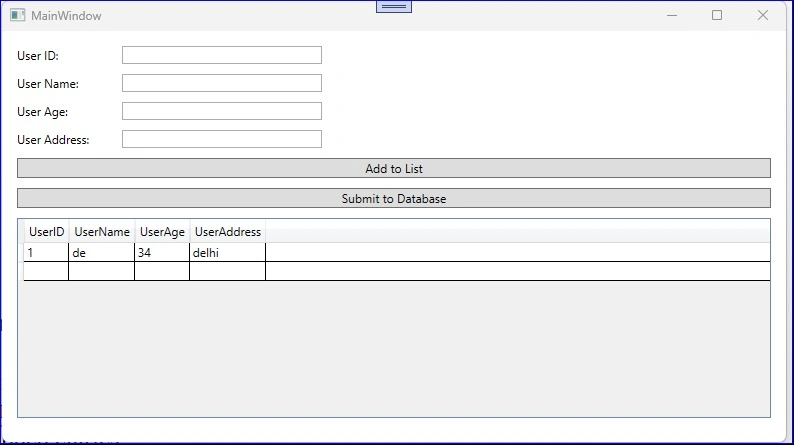
Join the conversation! Your thoughts help the community grow.