A solution parser within the realm of C# generally denotes a software or library capable of parsing and understanding the data within a Visual Studio solution (.sln) file and its corresponding project (.csproj) files. Such parsers empower developers to interact with, modify, and scrutinize the architecture and elements of a solution, encompassing its projects, references, dependencies, and build settings.
Benefits of a Solution Parser in C#
- Automated Analysis and Reporting: Solution parsers enable the automated extraction of information regarding the structure, dependencies, and configurations of a solution. This feature proves to be valuable in generating reports on code quality, dependencies, and build status.
- Dependency Management: Through the parsing of solution and project files, tools can analyze and visualize the dependencies between projects. This capability aids in identifying potential issues like circular dependencies or outdated packages.
- Build Automation: Integrating solution parsers into build automation scripts allows for dynamic modification of solution and project configurations. This proves to be beneficial in continuous integration (CI) pipelines where different build environments may require different settings.
- Refactoring Support: Developers can utilize solution parsers to automate refactoring tasks, such as renaming projects, updating namespaces, or restructuring solution folders.
- Custom Tooling: Solution parsers can be utilized to build custom development tools that cater to specific needs, such as custom linting rules, project templates, or automated code generation.
Popular Parsing Solutions for C#
- Microsoft. Build (MSBuild): MSBuild serves as the build platform for .NET and Visual Studio. It offers a range of APIs that allow developers to load, query, and modify project files. These APIs can be utilized indirectly to parse solution files. The commonly used namespaces for this purpose are Microsoft.Build.Locator and Microsoft.Build.Evaluation.
- EnvDTE (Development Tools Environment): EnvDTE is an automation model that provides developers with a means to interact with the Visual Studio environment. It enables access to solution and project elements, allowing developers to manipulate them from within Visual Studio extensions or automation scripts.
- NuGet Package Manager: The NuGet Package Manager offers tools such as NuGet.Protocol and NuGet.Packaging, which can be employed to manage dependencies specified in project files. When combined with other libraries, these tools can form an integral part of a comprehensive solution parsing and manipulation toolkit.
Implementation
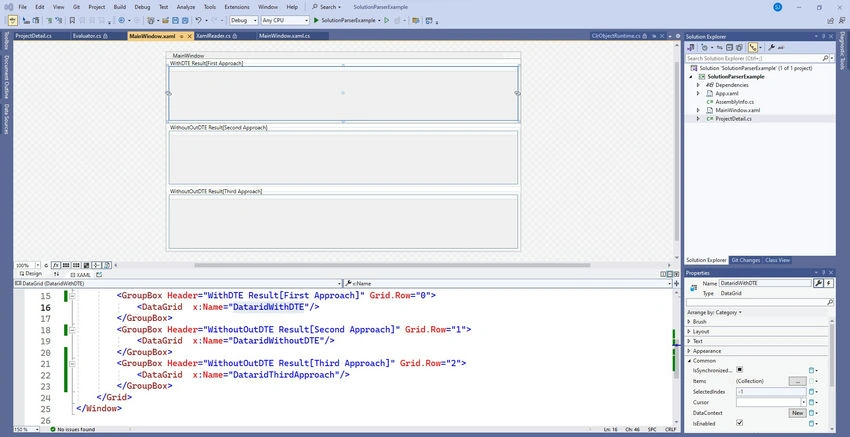
Step 1. Xaml View
<Window x:Class="SolutionParserExample.MainWindow"
        xmlns="http://schemas.microsoft.com/winfx/2006/xaml/presentation"
        xmlns:x="http://schemas.microsoft.com/winfx/2006/xaml"
        xmlns:d="http://schemas.microsoft.com/expression/blend/2008"
        xmlns:mc="http://schemas.openxmlformats.org/markup-compatibility/2006"
        xmlns:local="clr-namespace:SolutionParserExample"
        mc:Ignorable="d"
        Title="MainWindow" Height="450" Width="800">

    <Grid>
        <Grid.RowDefinitions>
            <RowDefinition Height="*"/>
            <RowDefinition Height="*"/>
            <RowDefinition Height="*"/>
        </Grid.RowDefinitions>

        <GroupBox Header="WithDTE Result[First Approach]" Grid.Row="0">
            <DataGrid x:Name="DataridWithDTE"/>
        </GroupBox>

        <GroupBox Header="WithoutOutDTE Result[Second Approach]" Grid.Row="1">
            <DataGrid x:Name="DataridWithoutDTE"/>
        </GroupBox>

        <GroupBox Header="WithoutOutDTE Result[Third Approach]" Grid.Row="2">
            <DataGrid x:Name="DataridThirdApproach"/>
        </GroupBox>
    </Grid>

</Window>
Code behind(CS file)
using EnvDTE80;
using Microsoft.Build.Construction;
using System.Collections.ObjectModel;
using System.IO;
using System.Reflection;
using Window = System.Windows.Window;

namespace SolutionParserExample
{
    /// <summary>
    /// Interaction logic for MainWindow.xaml
    /// </summary>
    public partial class MainWindow : Window
    {
        Type? s_SolutionParserFromSolutionFile;
        PropertyInfo? s_SolutionParserReader;
        MethodInfo? s_SolutionParserSolution;
        PropertyInfo? s_SolutionParserProjects;
        public List<ProjectSolution> ProjectsList { get; set; }
        ProjectInSolution[] arrayOfProjects = null;

        // Change below path with your solution file
        string solutionFilePath = @"C:\Users\sanjay\Desktop\MediaElementSampleProject (3)\MediaElementSampleProject\MediaElementSampleProject.sln";
        private ObservableCollection<ProjectDetail> _ProjectsListWithoutDTE;

        public ObservableCollection<ProjectDetail> ProjectsListWithoutDTE
        {
            get { return _ProjectsListWithoutDTE; }
            set { _ProjectsListWithoutDTE = value; }
        }

        private ObservableCollection<ProjectDetail> _ProjectsListWithDTE;

        public ObservableCollection<ProjectDetail> ProjectsListWithDTE
        {
            get { return _ProjectsListWithDTE; }
            set { _ProjectsListWithDTE = value; }
        }

        private ObservableCollection<ProjectDetail> _ProjectsListThirdApproachExample;

        public ObservableCollection<ProjectDetail> ProjectsListThirdApproachExample
        {
            get { return _ProjectsListThirdApproachExample; }
            set { _ProjectsListThirdApproachExample = value; }
        }

        public MainWindow()
        {
            InitializeComponent();
            GetProjectDetailsWithDTE(); // First Approach
            GetProjectDetailsWithoutDTE(); // Second Approach
            GetProjectInformationByThirdApproach(); // Third Approach
            DataridWithoutDTE.ItemsSource = ProjectsListWithoutDTE;
            DataridWithDTE.ItemsSource = ProjectsListWithDTE;
            DataridThirdApproach.ItemsSource = ProjectsListThirdApproachExample;
        }

        private void GetProjectInformationByThirdApproach()
        {
            // Load the solution file
            SolutionFile solutionFile = SolutionFile.Parse(solutionFilePath);
            ProjectsListThirdApproachExample = new ObservableCollection<ProjectDetail>();

            // Iterate through each project in the solution
            foreach (var project in solutionFile.ProjectsInOrder)
            {
                string projectName = project.ProjectName;
                string projectRelativePath = project.RelativePath;
                string projectFullPath = System.IO.Path.Combine(System.IO.Path.GetDirectoryName(solutionFilePath), projectRelativePath);
                string projectGuid = project.ProjectGuid;
                string projectType = project.ProjectType.ToString();

                ProjectsListThirdApproachExample.Add(new ProjectDetail
                {
                    ProjectName = projectName,
                    ProjectGuid = projectGuid,
                    ProjectType = projectType,
                    RelativePath = projectRelativePath,
                });
            }
        }

        private string GetRelativePath(string basePath, string fullPath)
        {
            Uri baseUri = new Uri(basePath + Path.DirectorySeparatorChar);
            Uri fullUri = new Uri(fullPath);
            Uri relativeUri = baseUri.MakeRelativeUri(fullUri);
            string relativePath = Uri.UnescapeDataString(relativeUri.ToString());

            return relativePath.Replace('/', Path.DirectorySeparatorChar);
        }

        private void GetProjectDetailsWithDTE()
        {
            string solutionDirectory = Path.GetDirectoryName(solutionFilePath);
            var dte = GetDTE();
            dte.Solution.Open(solutionFilePath);
            ProjectsListWithDTE = new ObservableCollection<ProjectDetail>();

            foreach (EnvDTE.Project project in dte.Solution.Projects)
            {
                ProjectsListWithDTE.Add(new ProjectDetail
                {
                    ProjectName = project.Name,
                    RelativePath = GetRelativePath(solutionDirectory, project.FullName),
                });
            }
            dte.Solution.Close(false);
        }

        private DTE2 GetDTE()
        {
            Type dteType = Type.GetTypeFromProgID("VisualStudio.DTE.17.0", true);
            object obj = Activator.CreateInstance(dteType, true);
            return (DTE2)obj;
        }

        private void GetProjectDetailsWithoutDTE()
        {
            s_SolutionParserFromSolutionFile = Type.GetType("Microsoft.Build.Construction.SolutionFile, Microsoft.Build, Version=15.1.0.0, Culture=neutral, PublicKeyToken=b03f5f7f11d50a3a", false, true);

            if (s_SolutionParserFromSolutionFile != null)
            {
                s_SolutionParserReader = s_SolutionParserFromSolutionFile.GetProperty("SolutionReader", BindingFlags.NonPublic | BindingFlags.Instance);
                s_SolutionParserProjects = s_SolutionParserFromSolutionFile.GetProperty("ProjectsInOrder", BindingFlags.Public | BindingFlags.Instance);
                s_SolutionParserSolution = s_SolutionParserFromSolutionFile.GetMethod("ParseSolution", BindingFlags.NonPublic | BindingFlags.Instance);
            }

            if (s_SolutionParserFromSolutionFile != null)
            {
                var solutionResultParser = s_SolutionParserFromSolutionFile.GetConstructors(BindingFlags.Instance | BindingFlags.NonPublic).First().Invoke(null);

                using (var streamReader = new StreamReader(solutionFilePath))
                {
                    s_SolutionParserReader.SetValue(solutionResultParser, streamReader, null);
                    s_SolutionParserSolution.Invoke(solutionResultParser, null);
                }

                var projects = new List<ProjectSolution>();
                var projectsobj = s_SolutionParserProjects.GetValue(solutionResultParser, null) as IReadOnlyList<ProjectInSolution>;

                if (projectsobj != null)
                {
                    arrayOfProjects = projectsobj.ToArray();
                }

                for (int i = 0; i < arrayOfProjects.Length; i++)
                {
                    projects.Add(new ProjectSolution(arrayOfProjects.GetValue(i)));
                }

                this.ProjectsList = projects;
                ProjectsListWithoutDTE = new ObservableCollection<ProjectDetail>();

                foreach (var item in ProjectsList)
                {
                    ProjectsListWithoutDTE.Add(new ProjectDetail
                    {
                        ProjectName = item.ProjectName,
                        ProjectGuid = item.ProjectGuid,
                        ProjectType = item.ProjectType,
                        RelativePath = item.RelativePath,
                    });
                }
            }
        }
    }

    public class ProjectSolution
    {
        static readonly PropertyInfo? s_ProjectName;
        static readonly PropertyInfo? s_RelativePath;
        static readonly PropertyInfo? s_ProjectGuid;
        static readonly PropertyInfo? s_ProjectType;

        static ProjectSolution()
        {
            Type? ProjectInSolution = Type.GetType("Microsoft.Build.Construction.ProjectInSolution, Microsoft.Build, Version=15.1.0.0, Culture=neutral, PublicKeyToken=b03f5f7f11d50a3a", false, true);

            if (ProjectInSolution != null)
            {
                s_ProjectName = ProjectInSolution.GetProperty("ProjectName", BindingFlags.Public | BindingFlags.Instance);
                s_RelativePath = ProjectInSolution.GetProperty("RelativePath", BindingFlags.Public | BindingFlags.Instance);
                s_ProjectGuid = ProjectInSolution.GetProperty("ProjectGuid", BindingFlags.Public | BindingFlags.Instance);
                s_ProjectType = ProjectInSolution.GetProperty("ProjectType", BindingFlags.Public | BindingFlags.Instance);
            }
        }

        public string ProjectName { get; private set; }
        public string RelativePath { get; private set; }
        public string ProjectGuid { get; private set; }
        public string ProjectType { get; private set; }

        public ProjectSolution(object solutionProject)
        {
            this.ProjectName = (s_ProjectName == null ? "" : s_ProjectName.GetValue(solutionProject, null) as string);
            this.RelativePath = (s_RelativePath == null ? "" : s_RelativePath.GetValue(solutionProject, null) as string);
            this.ProjectGuid = (s_ProjectGuid == null ? "" : s_ProjectGuid.GetValue(solutionProject, null) as string);
            this.ProjectType = (s_ProjectType == null ? "" : s_ProjectType.GetValue(solutionProject, null).ToString());
        }
    }
}
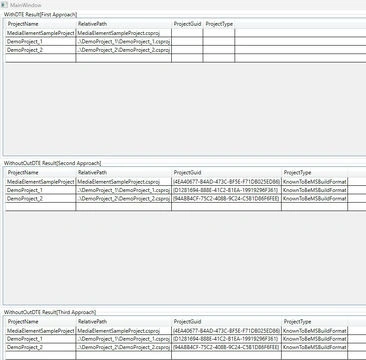
Step 2. Result View
Conclusion
In the realm of software development and maintenance, a C# solution parser offers immense advantages. It empowers developers to automate different aspects, such as accessing the structure and configuration of solutions and projects programmatically. This, in turn, facilitates enhanced automation, improved dependency management, and streamlined build and deployment processes. Widely utilized tools like MSBuild and EnvDTE provide robust APIs for seamless interaction with solution and project files.
Repository path: https://github.com/OmatrixTech/SolutionParserExample


Join the conversation! Your thoughts help the community grow.